How to easily fix the Weather app after jailbreaking with evasi0n

By , Feb 6, 2013

evasi0n cydia fix UIKit Tools

Some of you who used evasi0n to jailbreak their iPhone earlier this week might have encountered an issue where the Weather app would just crash at launch. The evad3rs were quick to identify the issue, and yesterday, they released a “manual” solution to fix the problem.

This fix, which we detailed and explained, required a bit of code manipulation, and was not really the easiest way to go at it. Fortunately, the evad3rs have now released and update that can be downloaded right from Cydia…

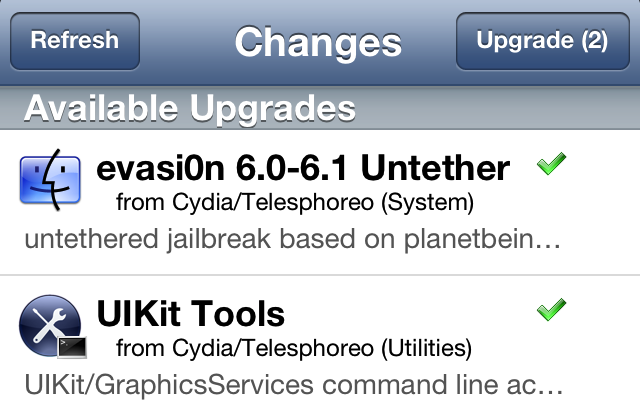
In order to fix the Weather issue (as well as the long reboot issue that was also reported by a few jailbreakers), go to Cydia, and hit the “Changes” tab. From there you should see the an upgrade available for UIKit Tools and for the evasi0n 6.0-6.1 Untether packages.

Upgrade both packages, and reboot your device. Not only your device should now reboot faster (assuming you had the long reboot issue), but your Weather app should also be fixed.

Don’t forget to reboot!

Once you’re done, please come back here and let us know how this worked for you by leaving a comment below.

  • Share:
  • Follow:
  • http://twitter.com/SayamPorwal sayam porwal

    hey i have jailbrekaed my itouch 5gg on ios 6.1 complete restore …..wen it was all done i opened cydia was trying to download winterboad n it came install …wen it was installing it was not going in a speed and after 30 seconds it cums like posix:operation timed out!!!itz cuming many times n i am not able to install any tweak please reply on dis issue

  • http://www.facebook.com/profile.php?id=100005201160297 Abdo Ahmed

    not working ipt4 ios 6.1

  • http://www.facebook.com/andychaplins Andy Milne

    Has any 1 got problems with Siri on the 4s after jailbreak

  • http://www.facebook.com/tekchandjeswani Tek Chand Jeswani

    still the same problem iphone 5 (6.1)

  • Jman

    MAKE SHURE app synce is un-installed first or the fix will not fix the weather app

  • Jman

    If you have installed app sync just just un-install it and install mobile terminal and do this:
    Type “Login root”
    Password “Alpine”

    #!/bin/bash
    chmod -x /usr/libexec/mobile_installation_proxy
    killall -9 mobile_installation_proxy
    rm /var/mobile/Library/Caches/com.apple.mobile.installation.plist /var/mobile/Library/Caches/com.apple.LaunchServices-045.csstore
    launchctl stop com.apple.mobile.installd
    launchctl start com.apple.mobile.installd

    while [ ! -f /var/mobile/Library/Caches/com.apple.mobile.installation.plist ];
    do
    sleep 1
    done
    while [ ! -f /var/mobile/Library/Caches/com.apple.LaunchServices-045.csstore ];
    do
    sleep 1
    done

    sleep 10

    chmod +x /usr/libexec/mobile_installation_proxy
    sync
    reboot;

    • Jman

      If that does not fix the weather app then a full restore is needed sadly

  • http://www.facebook.com/christian.song.3 Christian Song

    Unrelated to this, but related to Weather App Icon: I had my iPhone 4 restored and the Weather App Icon still remain as if WeatherIcon tweak is installed, Is there any way to restore the Icon completely?

  • jdini76

    I’ve been having the same issue where the weather app worked fine after evasi0n 1.0 but then broke after cydia updates. After trying all recommended fixes here, which didn’t work, I finally was able to fix it with the manual fix posted a couple days ago.

  • Icecoolg

    Removed appsync and my weather app started working! And by the way I had appsync so I could install iDOS which is no longer on the appstore, I diddnt use it to steal apps.

  • http://www.facebook.com/joyshayla.lockett Joyshayla Lockett

    I uninstalled appsync and my weather app works perfectly now…take that bitch appsync off

  • Tim

    Hey guys, I used the manual fix befor the cydia fix came out and it worked just fine using the terminal, however after the cydia update to the ulkit, my weather app went back to crashing, I’ve rebooted a few times to no avail, I’ve also tried re-entering the code that originally fixed the issue, but no luck. I’d appreciate any suggestions that u guys might have. (iPhone 5 on iOS 6.1)

  • milan

    not fixed same

  • Nick

    Weather app still does not work after with iPhone 5

  • dan

    I don’t think it will work on the 4s because I’m seeing all these comments saying that they are having problems with the 4s 6.0.1 and 6.1…

  • Omar

    still the same… the app would just crash at launch as before… upgrading the cydia change nothing

  • http://www.facebook.com/neilormsby Neil Ormsby

    The update still hasn’t shown up on cydia? I have tried to find an alternative source. Any thoughts?

  • http://twitter.com/StitchedBalls eLQuique

    Still not fixed 4S 6.1 now the original weather app doesn’t want to function it crashes just shuts down.

  • John b

    Upgraded app sync to 6.0 worked a treat thank you

  • Rolf

    Here is the answer delete Appsync reboot then it should work, do not forget to reboot then you can add VShare again and it still should be woking, deleting Appsync in Cydia will also delete programs like VShare.

  • http://twitter.com/AAPLintheTree23 Art

    My weather app on my iPhone 4S was working fine after the initial jailbreak. Now, after I installed this update, it crashes at launch.

  • http://www.facebook.com/Mdmoataz Moataz Denguir

    it worked on my iphone 4s(6.1) but not on the 3gs(6.1)

  • http://www.facebook.com/maux.prada Maurice Marines

    I don’t have the UIkiTools where can you find it?

  • Ozayr

    Hi guys my weather app does not work after jailbrake, so I googled if a fix was avail and got to this forum, but my problem is I cannot for the life of me find the package mentioned above (UIKit tool) I went to changes and hit refresh and searched from top to bottom but nothing can any one help please
    THNX

  • http://www.facebook.com/daryljoseph04 Joseph Daryl Andrade

    Worked for me

  • Hytek77

    Hello can we have an update here! Weather app still not working! iPhone 5 6.1

  • http://www.facebook.com/evan.pepper Evan Pepper

    I have an iPhone 4S and I have it on iOS 6.1, and using code to fix the app crashing didn’t work, so I deleted appsync, which also deleted appcake, but it fixed the weather app crashing! I had appsync for iOS 5+ which might have been the problem, as opposed to having appsync for iOS 6.0+ or whatever.

  • Kyle

    Had to restore ma iPhone 5 after evasi0n so did so and then retail broke for now cydia not to work not as good as redsnow I must say is any one else cydia
    down

  • http://www.facebook.com/dillon.m.wynne Dillon M Wynne

    My sound went put today like if someone calls me I can hear them unless I turn speaker on and if I play a song on my phone it makes a single pop sound then nothing plays alarms won’t work my phone won’t ring when anyone calls and apps play certain sounds like for ex on “doodle jump” when I’m jumping on the planks you hear the normal sound but if you hit a spring it’s a weird sound and when you unlock my phone it’s normal but Siri just makes a pop sound please help!!!

  • ZVI Kaufman

    still not fixed on my iphone 4 version 6.1.2

  • Bobby Orr

    Fags

  • Dave Akins

    After uninstalling appsync, weather should work after reboot. I then reinstalled app sync, rebooted, weather still works!

    • suckdeep

      It took me a long time to find out how to fix this thing haha

      works me for too

  • disqus_ZdgMgwfhqq

    It works for my iPhone 4 great…Thanks!!!!

  • Rajan

    Yeah.. This imformation and after update still not wroking

  • MONSTERCUPCAKE

    Install “iOS 6 Weather App Fix” from Cydia. They’re hosted in both the Xsellize and Sinfuliphonerepo Sources. I know that these repos are known for assisting with pirated packages, but they host some pretty helpful fixes as well. After installing this and rebooting, the Weather app works perfectly. I have an iPhone 5 on 6.1, if that’s important. No other fix worked; the evasi0n update for 6.1.2 actually broke the stock Weather app! I tried everything before trying the “iOS 6 Weather App Fix” short of Terminal commands (which I was too lazy to attempt)

  • Ash

    I uninstalled app sync. Respring and restarted and it works again. Iphone 5 IOS 6.0.1 hope this helps.

  • gal

    i have followed the instructions how to fix that threw terminal my iphone 5 reboot automatically and the weather app still crashes???

  • george lopez

    not working with ipod touch 5th generation

  • Engymodz

    It’s not stealing.. It’s like taking a Ferrari for a test drive before purchasing it.. Clear?

  • http://www.facebook.com/andres.vazquez.35380 Andres Vazquez

    Worked great thanks iPhone 4S

  • Ximena Castro

    Can’t find either one inside changes.

  • http://www.facebook.com/Stankyweasel Patsy Henson

    It worked! Thank you very much.

  • Eddie

    I did what was told and removed AppSync and rebooted it but the weather still crashes on my itouch 5

  • http://www.facebook.com/ricky.goodchild.5 Ricky Goodchild

    Can’t find them on Cydia

  • law

    still not fix on my iphone 5 6.1.2

  • Imitiate

    iPhone 4s , iOS 6.1.2 , Cydia 1.1.8 . I have a problem with the weather app . But , I can’t seem to find these updates in Cydia though . Any help ? D:

  • Alex Z

    didn’t work..ipod touch 4g (ios 6.1.2) uninstalled appsync, reinstalled UIKit tools version 1.1,7, rebooted, weather app still crashes

  • Michelle

    Reinstalled evasion update, rebooted. Removed app sync, rebooted. Weather app works for me now. i5

  • Zunzero

    Hey I have a problem but I fix it with the iOS 6 wether app fix thanks for the comment babak :) and will work for iPod touch 4th generation iOS 6.1.2

  • Genie

    iOS 6 weather app fix- worked for me on Iphone 5 6.1.2