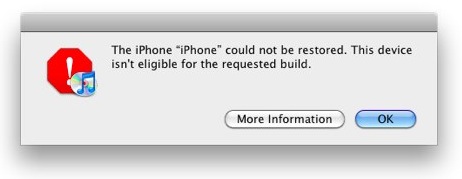
How to Fix “Device Not Eligible for Upgrade, Restore, Requested Build” Error

By , Dec 28, 2011

When trying to update your iPhone, iPad, or iPod touch to a newer firmware to take advantage of an untethered jailbreak, you might have encountered various problems, such as error message 1013, 1600, 1601, 1602, 1603, 1604, etc. These errors might tell you that your device is not eligible for upgrade, or that it’s not eligible for restore, or even that it isn’t eligible for the requested build.

There are fairly common errors, and thankfully there is an easy fix. All it takes in a few seconds of your time.

There are actually two ways to fix these types of error messages. The easy way, and the long way. We’re going to have a quick look at both.

The easy way: TinyUmbrella
  • Download TinyUmbrella
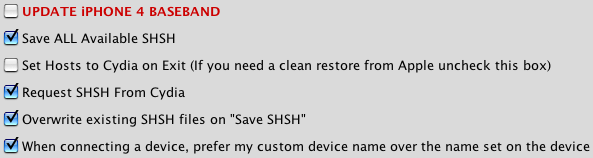
  • Launch TinyUmbrella and go to the “Advanced” tab
  • Uncheck the box that says “Set Hosts to Cydia on Exit (If you need a clean restore from Apple uncheck this box)”
  • Close TinyUmbrella

The hard way: editing files manually

On Mac:

  • Make sure you are logged in as administrator
  • Open Finder
  • Hold down COMMAND + SHIFT keys and press ‘G’
  • Enter “/private/etc/” in the field and press “Go”
  • Find “hosts” file in the directory
  • Drag the file to your desktop
  • Open it in text editor
  • Remove the line that has gs.apple.com entirely or put a # at the beginning of it to comment it out
  • Save the file
  • Drag it back to the /private/etc/ folder
  • Enter your username and password to authenticate

On Windows:

  • Locate the hosts file in one of the following directories:
  • Windows 95/98/Me c:\windows\hosts
  • Windows NT/2000/XP Pro c:\winnt\system32\drivers\etc\hosts
  • Windows XP, Vista, 7 c:\windows\system32\drivers\etc\hosts
  • Right click on it and choose “Open With…” then click on “Notepad”
  • Remove the line that has gs.apple.com completely and save the file

Once this is done, proceed to restore or update your iPhone, iPod touch, or iPad. You shouldn’t have any problems going forward.

You should now be good to go ahead and restore or update your iOS firmware. Let us know if you have any questions in the comments.

  • Share:
  • Follow:
  • http://twitter.com/oneBurge Burge

    Easy way of cause is way so much easier..if i was you ..yes you ..I’ll do that..

  • Daniel Risler

    I could have used that when I first tried to update to iOS 5… OS X Daily blog posted this fix, so I managed to upgrade. Good article though. ;)

  • Nick Runnals

    I still got the error… i think I fubar’d my phone trying to setup spire. I’m downloading recovery file through iTunes now..

  • http://pulse.yahoo.com/_Z5IW4ZYEDL64L56FMAC6N6XSTM Niro

    when i try and drag the “hosts” file back, after i authenticate and replace, it says it cant do so becuase the file is in use. I closed my text editor and anything to do with the file..what am i doing wrong? why wont it replace the file?

  • Nick Runnals

    I also tried the hard way and “gs.apple.com” wasn’t in the file?

  • http://www.facebook.com/nontrademarkorangeslushdrink Non-Trademark Orange Slush Dri

    I’ve been getting this error since my 2g. I’ve tried both suggested solutions several times, along with every other conceivable “fix” you can find on Google. Nothing has worked. This past time, Tiny Umbrella didn’t even detect my phone, so I couldn’t boot it out of recovery mode. I had to drive 35 miles to the nearest Apple store with an available appointment to get it fixed. It’s pretty infuriating not to be able to simply upgrade my own firmware, and Apple couldn’t care less.

    • Anonymous

      If the apple store was able to fix it…. you should have been able to fix it yourself…..

  • César Carvalho Maciel

    What i’ve fighted yesterday for discover this, till 4 am, but i did it!! btw, thanks!!

  • http://www.facebook.com/heist.kade Heist Kade

    Hi i have jailbroken iphone 4 running iOS4.3.3 baseband 4.10.01. May i know the safest way to upgrade my iphone to 5.0.1? if i just update from itunes, is there any chances my iphone will locked?

    • http://www.facebook.com/people/James-Bailey/100001793622814 James Bailey

      You need to use a custom ipsw to preserve your baseband or u will not be able to unlock it look in jeefs videos and you will find one about preserve your baseband

    • http://www.facebook.com/people/James-Bailey/100001793622814 James Bailey

      You need to use a custom ipsw to preserve your baseband or u will not be able to unlock it look in jeefs videos and you will find one about preserve your baseband

  • http://twitter.com/TheA1One Anas Barak

    thank you so much , I’ve been having this error for along time and i didn’t know what to do
    until now , thanks

  • http://twitter.com/sevgjan Sevgjan

    does TU have to be running to take effect, or it’s not necessary?

  • http://www.facebook.com/people/Patrick-Ochoa/100000953095775 Patrick Ochoa

    SIRI PROXY TUTORIAL!!!!

  • http://adamscode.sourceforge.net Adam D

    “Windows NT/2000/XP Pro” should say “Windows NT/2000″
    Also, on Vista/7, need to right click notepad and choose run as admin first.

    Ad@m

  • http://pulse.yahoo.com/_5HE4JKKH7ERO2CY5ASJUTOIRXY David

    I’ve done both methods still can’t do anything. Now WHAT!

  • http://pulse.yahoo.com/_5HE4JKKH7ERO2CY5ASJUTOIRXY David

    Done both methods still can’t do anything. Now WHAT!

  • http://www.facebook.com/profile.php?id=1552119091 Brandy Devisco

    i did everything either hard way and easy way. but i always get “The Iphone could not be restored. An Unknown error occured (10). help please

    • http://profile.yahoo.com/3KBYPAO2I2DHBXLLZERN2KE2VA Rajik Brown

      same prob, did youget it fixed??..

  • richie pooh

    I try all of that and still get error 28 on my iPhone 3GS, the phone won’t reboot

  • http://twitter.com/magical_dazza Darren Wright

    I found the hard way easy. Tiny Umbrella backed up my SHSH Blobs fine but as for restoring i shut it down completely rebooted my PC got iPhone in DFU mod the line in hosts file deleted worked 1st time. Thanks for the post really helpful.

  • http://twitter.com/Avinash147 avinash

    Did not work for me..

  • http://pulse.yahoo.com/_TU5UPUDH6TEQ3AMPG63S2GIDJE MT

    my ipad 2 4.3.3 jailbroken today suddenly went brick as of new year. now Im trying to restore to 4.3.3 again to jailbreakme it. so far the restoring fails. I use tinyumbrella. and none went thru.. it given me the 1013 error. :( plz help!!!!!!!!

  • Anonymous

    I tried all the recommended remedies and was still having no luck. Then I realized that I needed to update iTunes. That did the trick. Who woulda thunk?

  • http://twitter.com/iHowiz Daniel Hernandez

    I’m looking for a fix for the 16xx error. I’ve tried this any other solutions and none work. Please let me know!

  • Graham Calder

    I did this and it still wont let me? My device is 5.0.1 (9a405) but in tiny umbrella the SHSH blobs where backed up for 5.1 (9b176)?

    any suggestions? i just want to be able to unlock the device and have a untethered jailbrake!

  • Stacey Harding

    Thank you so much! I had been struggling with this for weeks. I did the “hard” way which I found to be very easy. Much appreciated!

    • http://profile.yahoo.com/6J4BJWKVJKMMURZHTFMHKQ26CY Kada

      i’s using 4.3.5, can anyone help me?

  • http://www.facebook.com/alexandros.andrikopoulos.1 Alexandros Andrikopoulos

    I ‘ve tried the hard way and now I’m getting an other error with code 3194.what can i do?plz help!!

  • http://www.facebook.com/oladejosd Oladejo David Olusola

    Please help….I have an iPhone 3G which refused coming up after it fell.The only time it comes up is when i plug it into AC power, it will show the apple logo for 7secs and go off again. I tried connecting it to itunes and the only time itunes recognize it is when i put it in DMU mode. I downloaded the iOS 4.2.1 and tried to restore the iPhone. each time i try, i get Error 1600/1601. Suggestive information will be appreciated. Thanks

    • isha

      same here im getting the same error

  • http://www.facebook.com/james.ieuan.kinch James Kinch

    I am currently in love with you….THANK YOU, you solved my problem perfectly :D

  • http://www.facebook.com/paing.soe.39 Flg Tylanth

    im sure to login with admin account but i can’t drag it back

  • danwan

    failed in easy way. done in hard! thanks!

  • Lester

    im trying to downgrade from ios 6.0 to ios 5.1.1, but everytime it tells me the recovery error shown at the top. Will tiny umbrella be able to fix this issue or does apple not allow this downgrade?

  • http://bu3ouf91.tumblr.com/ Abdulrahman Albadwawi

    Thanks mate.

  • http://www.facebook.com/eren.uyanik.5 Eren Uyanik

    No luck, did everything but does not work for me, I want to upgrade from 5.01 to 5.1.
    Thanks

  • Teofilo Israel Vizcaíno Rodríg

    Me neither

  • Lisper

    Thanks it worked for me! (iPhone 4 iOS 5.1.1 -> iOS 6.0.1)

  • greg mitchell

    i have a 4s iphone and im trying to downgrade to 6.0 or lower but followed both steps to fix problem and it still wont let me downgrade…help

  • tanvir92

    Thanks,that did wok for me :D

  • http://www.facebook.com/kenny.chui1 Kenny Chui

    thanx a lot:))))))

  • @ni

    extremely helpful… thanks

  • http://www.facebook.com/auger.etienne Étienne Auger

    Thanks man, it helped a LOT! i wasn’t able to do it on tinyumbrella at first, so i used the hard way, and it worked!

  • ben darius

    the hard way works! I had to delete the original ‘hosts’ file from the folder and replace it with the modified version- i think you forgot to say to delete it.

  • Krego

    Can’t uncheck the box “Set Hosts to Cydia on Exit (If you need a clean restore from Apple uncheck this box)” in TinyUmbrella because it’s grey ? Hard version doesn’t work … still not eligible. (ipad 4 6.0)

    • Vahe Sasunts

      same here both methods didnt work and tiny umbrella uncheck box is greyed out. Mine is an iphone 5 ios 6.1 trying to restore and update to 6.1.2

  • Hadi

    Thanks a lot. I have been stuck with this problem for three days. My phone was turning off on its own. Then apparently I forced it into recovery using a lot of home button + power button key strokes. Now it’s worked.

    PS: I used “The hard way on Windows.”

  • my name

    thank you bro realllyyy thanxxxxxx you are like superman

  • cnf07f

    The hard way worked for me to allow me to restore it .. now trying to figure out the last time I had backed up my iphone. Why is this such a pain! Apple should fix this !!!

  • http://www.facebook.com/ahalliman Alexandra Idon’taddpplidontkno

    thanks so much the hard way worked and it wasnt hard at all probly easier than having to go download something.

  • lucas

    worked for me too. tks

  • disqus_zBz3pdKVWa

    It worked for me! Did the edit manually. Many many thanks for the hint it made my day!

  • http://twitter.com/JaMonkey Meghan Cooper

    Thank you. My phone was stuck in the restore loop and this fixed it. It just randomly went into recovery mode as I was importing my photos. Sucks I lost a lot but at least it’s working again.