macOS

macOS 10.12.4 beta 3 seeded to developers

Aside from watchOS 3.2 beta 3, tvOS 10.2 beta 3 and iOS 10.3 beta 3 with a new name and shame list for legacy apps,  Apple today seeded a third beta of what would become the fourth major update to Sierra since its launch last fall. macOS Sierra 10.12.4 beta 3 (build 16E163f) with Night Shift Mode and other perks is now available to registered developers.

You can deploy the latest beta over the air on your Mac through the Mac App Store's Updates tab. Today's release is only for developers but a version aimed at public beta testers should drop in the next 24 hours.

New Mac malware from Russia targets your saved passwords and iPhone backups

It used to be that Mac computers were immune from the vast majority of viruses and malware plaguing Windows and other platforms. But as Apple's products have been growing in popularity, hackers and malware developers have been increasingly targeting macOS.

Following recent reports of Mac malware that uses a very old Windows trick which relies on Microsoft Word macros, a new strain of malware from Russian hackers has been found to steal your saved passwords and iPhone backups, security firm BitDefender said.

New malware uses auto-running macros in Word documents to infect your Mac

Taking advantage of a primitive Windows technique relying on automatically-running macros embedded in Microsoft Word documents, a new type of Mac malware attack has been discovered recently. As first noted in a research compiled by Objective-See, the technique used may be crude but once an unsuspecting user opens an infected Word document and chooses to run the macros, the malware installs itself silently on the target Mac and immediately attempts to download a hazardous payload.

macOS Sierra 10.12.4 now available to public beta testers

macOS Sierra 10.12.4 beta 2 with Night Shift Mode and other improvements is now available to public beta testers, two days after the software was seeded to Apple's registered developers.

Public beta testers can deploy the latest beta of Sierra over the air via the Software Update mechanism provided they have installed an appropriate configuration profile through Apple's Beta Software Program website.

References to next-generation MacBook Pros with Kaby Lake chips found in Sierra code

A developer-only preview of what would become the macOS Sierra 10.12.4 software update references a total of eight next-generation MacBook Pro models with the latest Kaby Lake processors from Intel. First discovered by the Apple-centric blog named Pike’s Universum, the code strings in question point to unused IDs for three motherboard identifiers. Aside from other improvements, the Kaby Lake platform enables lower power consumption while possibly bringing support for 32GB RAM.

macOS 10.12.4 properly displays icons for Windows executable files in Finder

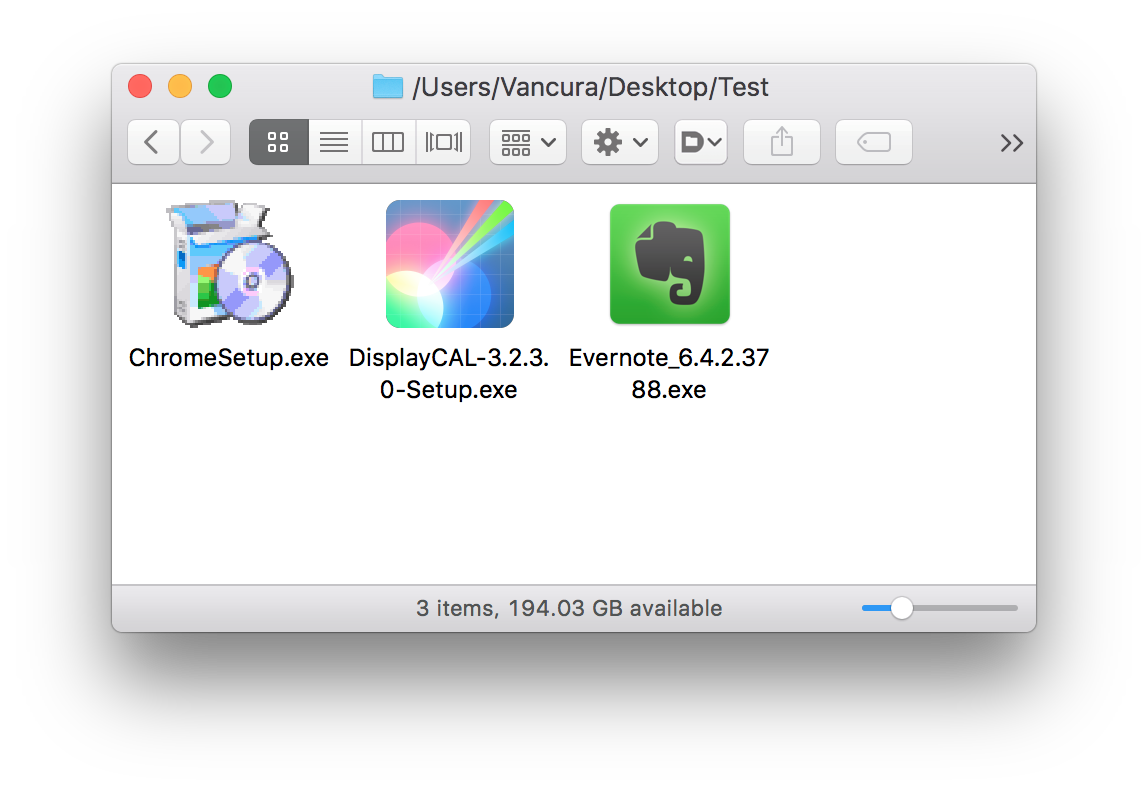
Yesterday's beta release of what would become the fourth major software update to macOS Sierra doesn't just bring iOS's Night Shift mode to your Mac. Aside from that feature and things like an updated PDF API, expanded Dictation support or the ability for Siri to look up cricket scores and rosters, macOS Sierra 10.12.4 includes better handling of Windows executable files in the Finder.

As discovered by Microsoft's Mac product designer Vaclav Vancura, rather than use a generic icon to represent Windows executables like before, macOS Sierra 10.12.4 now actually parses .EXE files for native Windows resources such as icons.

Apple releases iOS 10.3 and macOS Sierra 4 for public beta testing

Following yesterday's release of developer-only previews of the upcoming iOS 10.3 and macOS Sierra 10.12.4 software updates, Apple today made the new betas available to public beta testers who are enrolled in Apple Beta Software Program.

iOS 10.3 public beta can be installed via the Software Update mechanism on iOS devices with an appropriate configuration profile installed. macOS Sierra 10.12.4 public beta can be downloaded on your Mac through Mac App Store's Updates tab.

How to use Travel Time in Calendar on iPhone and Mac

Travel Time is a nifty addition to Apple’s Calendar app, capable of precisely estimating the duration of your upcoming trip based on parameters such as milage and traffic. Used properly, it can notably ease some of your daily scheduling woes, but paradoxically, a large contingent of regular Calendar users still routinely overlook the feature.

Formerly introduced as frequent locations and traffic conditions widgets, the service has only slowly gained traction amongst users. Travel Time today however has come of age and is now neatly integrated into one of the most popular productivity applications both on iOS and macOS. So if you didn’t get the memo on the virtues of Travel Time in Calendar, here’s what you need to know.