iPhone Photography

iPhone photography: how to use Intentional Camera Movement to your advantage

I hope you have had a great couple of weeks making some HDR magic with your iPhone. Today we are going to explore a more abstract and fun approach to iPhone photography. If you remember a couple of lessons back we were using a slow shutter speed to create light trails. You probably remember having to hold your iPhone still and leave your camera shutter open for a long time. It was kind of complicated and gear intensive.

This time around, we are going to leave our shutter open for a long time but careless about holding our iPhone still. This is a technique that we in the industry call "Intentional Camera Movement" or ICM. The goal is to intentionally use blur to create something unique and beautiful!

The Glif for iPhone 5 is here

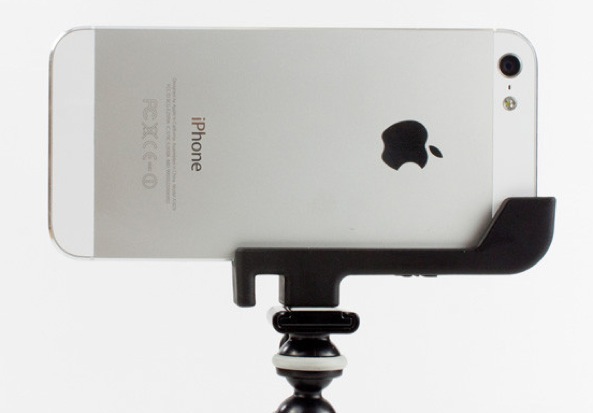
Sooner than later, avid iPhone photographers yearn for a tripod mount to help frame their shots perfectly. That's why we were so excited about the Glif, an all-in-one tripod mount that launched two years ago. And now, from the minds of the original creators Dan Provost and Thomas Gerhardt - the duo behind Studio Neat - comes the Glif for your iPhone 5.

First batch of this awesome accessory is on its way to the warehouse and will begin shipping early next week. If you're serious about iPhoneography, this could be your must-have holiday item. If you're interested in the Glif, I've included more info and a making-of video right after the break...

Facebook rolls out Photo Syncing

The social networking giant Facebook has begun rolling out a new feature aimed at automatically uploading each photo a user takes on his or her device. This capability exists in some other third-party iOS apps, like the Dropbox app and the Google+ client. Facebook has figured out how to implement the feature without breaking Apple's rules, by using standard API calls for background uploads and not relying on location APIs or its deep integration with iOS 6...

Camera+ receives a massive update

Tap tap tap's Camera+, my favorite go-to iPhone photography app which in September finally got a dedicated iPad version, today received a massive update, bringing a number of new features. Version 3.6, for starters, brings accurate framing on the iPhone 5 for capturing snaps exactly as you see them - no more viewfinder cropping. Advanced users will love the new Live Exposure feature which displays ISO and shutter speed change in real-time.

You also get flash of sorts when using the front-facing camera. It's a trick akin to PhotoBooth on the Mac as the screen goes white for a moment to light up your face in darkness before the shutter-release. Another welcome addition: the horizon level feature for those who have trouble taking a straight photo. As you'd expect, the updated app also brings the obligatory bug fixes, minor improvements and a dozen tweaks that lead to a much better overall experience. Go past the fold for the full release notes...

How to use Pro HDR to create stunning high dynamic range iPhoneography

Welcome back to iDownloadBlog.com's lessons in iPhone Photography. I hope you enjoyed making light trails the last couple weeks. They're some pretty creative folks out there looking like they had a good time with it. In today's lesson, we are going to revisit high dynamic range (HDR) photography. Actually, we are going to improve upon it using a great little app called Pro HDR.

Before we get going, and to celebrate the release of the iPad mini, I decided to give away a few copies of my book "Big World Little Lens - The Complete Guide to iPhone Photography." It is specifically designed for the iPad and iPad mini. If you haven't picked up a copy of the book yet, you can here. The cool thing about iPad books is that you will get free updates whenever I publish a new version. Speaking of the a new version, I'm in the middle of a major update that will be hitting the shelves at the beginning of the year. If you get the books now, you will automatically get the free update then.

Instagram launches Facebook-like web profiles

I always hated that my Instagram account lacked a public profile easily viewable in a desktop web browser. That began changing with Facebook's acquisition of the popular image sharing service as Instagram slowly but surely started putting basic pieces of the web profile puzzle in place, letting people at least like and comment on photos without having to depend on mobile apps. Today, the company has finally rolled out full-blown web profiles and boy do they look a lot like Facebook's profile design...

Photographing light trails with your iPhone and Slow Shutter Cam

Welcome back to our lessons in iPhone Photography. I hope you enjoyed injecting a little motion into your iPhoneography over the last couple of weeks. This week, I want to continue on the theme of motion and pushing the limits of your iPhone. As a photographer, especially an iPhone photographer, your creativity often comes to an end when the sun goes down. Even with the iPhone 5's improved low light capabilities, making images at night isn't where your iPhone excels. In today's lesson, I hope to change that.

At night, there's nothing more fun than photographing light trails. Here's a quick example of light trails that I shot this week. The idea is simple: stabilize your iPhone and photograph cars as they drive by. If you'd like to know about using a tripod and cable release with your iPhone, check out chapter 6 of my book, 'Big World Little Lens - The Complete Guide to iPhone Photography' in the iTunes Bookstore...

Get your iPhone photography moving with this simple technique

Welcome back to iDownloadBlog's lessons in iPhone Photography. Before we get into today's lesson, iDB reader Latinpride011 left a comment last week asking for a quick video about Hueless. I can't oblige everyone, but I try my best. So here you go. I hope it helps!

Now that we've got that taken care of, let's get your iPhone photography moving! In this lesson I want to introduce you to a cool little technique we call 'panning'. The goal of this technique it to keep your moving subject in focus and turn the background into a blur of motion. The way you achieve this look is to have your subject move past you as you 'pan' your iPhone in pace with your subject as you take your photo. Here's an example of this technique in action...

Camera Awesome hits iPad, Camera+ gains iPhone 5 low-light boost mode

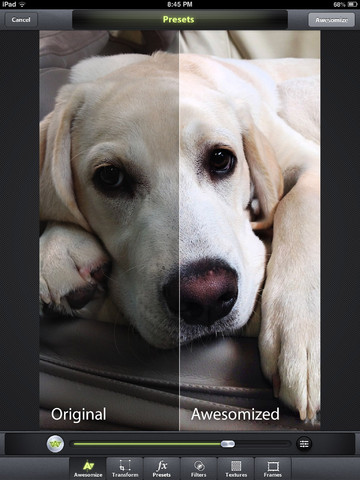
Taptaptap's Camera+ and SmugMug's Camera Awesome are like the two most important photography and image editing apps in my arsenal. Both have been refreshed this morning, but don't let a minor version update fool you as each app enables major enhancements that add help add flair to iPhone photography.

Following in the footsteps of Taptaptap, SmugMug's Camera Awesome has been updated with native iPad support. At the same time, Taptaptap (which recently released CAmera+ for iPad and gave the iPhone version iCloud sync and other new features) has updated Camera+ for iPhone with the cool low-light boost mode Apple debuted on the iPhone 5...

A course on black and white iPhone photography

Welcome back to iDonwloadBlog's lessons in iPhoneography. You can can catch up on previous lessons here. If you need a quick start, feel free to check out my free iPhone Photography tutorial.

Today I want to talk about Black & White Photography. I'm not talking about taking photos and performing black and white conversions. Nope, I'm talking about 100% pure uncut black & white iPhone Photography. The app we are going to be using is a totally cool app called Hueless. Why is it so cool, you ask? Well, because it was the first true black & white camera app for the iPhone. It's a true camera application. There's no editing images from your camera roll. When you fire up Hueless, you have to set your exposure, contrast, focus, and filtering at the time you take the photo. Today we will only be looking at exposure, contrast, and filters...

Camera+ for iPad is here: layers, brushes, straightening, Flickr and Facebook importing

The software isn't just blown up to the iPad's 9.7-inch canvas, it also comes with new features specific to the iPad version only. Combined with freshly updated Camera+ for iPhone, you can now seamlessly sync your Lightbox between your iPhones and iPads via iCloud. iPad-specific features include new advanced filters, the straightening feature (finally!), brush on effects, layered effects (mix “So Emo” with “Tailfins”) and the ability to import your images from Flickr and Facebook...

Instagram updated for the iPhone 5 and iOS 6

Instagram has finally been updated for iOS 6, and more importantly, the app has been updated to take advantage of the 4 inches of screen real estate the iPhone 5 has to offer.

Besides the few bug fixes that you might not even notice, the big changes come to the photo uploader and filters. iPhone 5 users will appreciate that the filters don't overlap on the photo anymore, leaving you plenty of space to see what your photo will actually look like...