Battery

iOS 4.2 Improves iPhone and Carrier Efficiency with “Network Controlled Fast Dormancy”

With the recent release of iOS 4.2, Apple has joined efforts with Nokia to make smartphone carrier signaling more efficient. The Nokia Siemens Networks recently did a test to show that iOS 4.2 supports a relatively new and unadopted technology called "Network Controlled Fast Dormancy." That may sound like a mouthful, but what it actually means isn't that hard to understand.

Nokia already implemented this technology earlier this year, but Apple has been the first smartphone platform to support NCFD since Nokia. Based on Nokia and Apple's combined market share, Apple's adoption of this technology now puts NCFD-supported devices into the hands of more than half of the people buying new smartphones around the world...

Customize Your iPhone’s Battery Alerts with PowerAlerter

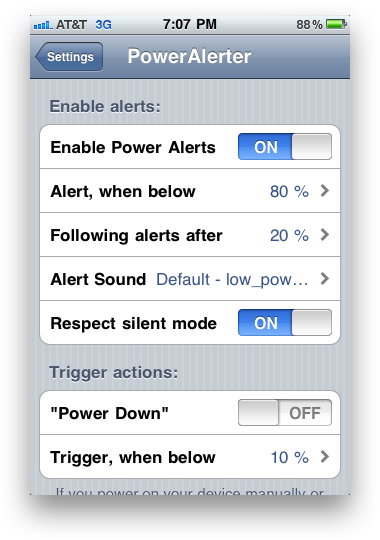
Sometimes, getting a battery alert at 20% on your iPhone isn't enough.  For those of us that want more control over our battery alerts, there's PowerAlerter.

PowerAlerter is a Cydia tweak that gives you full control over visual, audio and haptic notifications for your iPhone's battery. With PowerAlerter, you'll never have to worry about forgetting to plug your iPhone into the charger again...

Conserve Your iPhone Battery with ScreenDimmer

ScreenDimmer

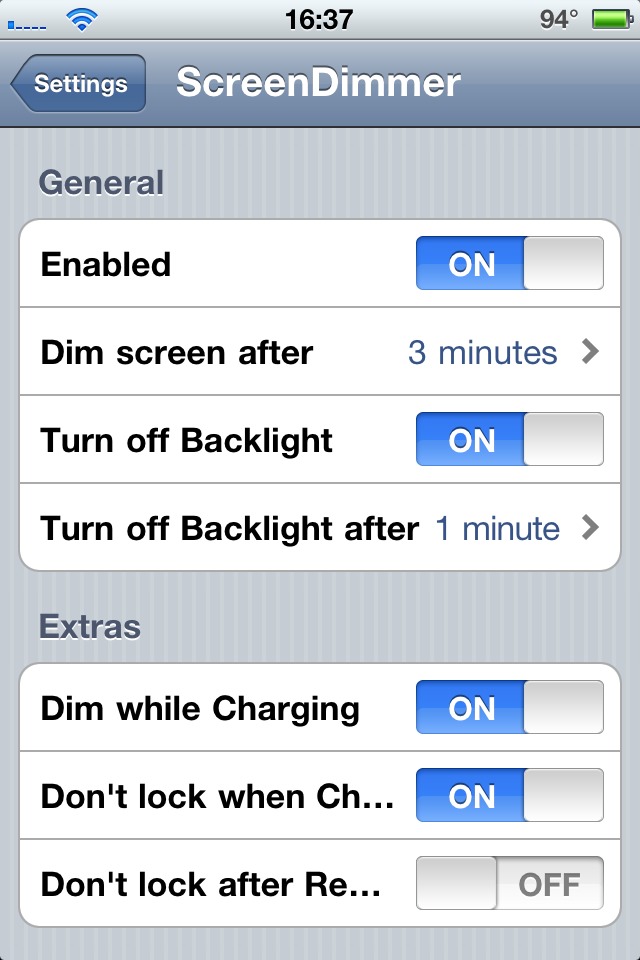
Apple promised better battery life with the iPhone 4 but let's face it, it still falls short. But then again, depending on how you use it, a full charge can last anywhere from just a few hours to a couple of days (I'm being very generous). I'll admit I'm a heavy iPhone user. It's useful and I like it and being a heavy iPhone user obviously taxes the battery. I run very few things in the background to conserve battery life but I want more conservation.

Extend Your iPhone Battery Life With Auto3G

Auto3G is a new jailbreak application that aims at extending your iPhone battery life by automatically turning off the 3G radio when you lock your iPhone, and automatically turning it back on when you slide to unlock.

This simple app allows you to always have the speed of 3G when you need it, without draining your battery when you're not using it. Auto3G will add a new icon to your springboard from which you can choose the 3G timeout settings.

iPhone 3GS A Month Later. Still A Lot Missing

It seems it was yesterday that I unboxed my iPhone 3GS for the first time. Of course it was love at first sight. It is fast and elegant, but now that I've been using it for a month, I notice there is still a lot missing to make it the perfect phone.

Copy/Paste is Clunky

Woohoo, the iPhone finally has copy/paste. It only took Apple 2 years to implement this basic feature... The reality is that they did a terrible job. I think copy/paste on the iPhone is clunky and intrusive. Now everytime you touch your iPhone screen, you have this annoying popup asking you if you want to select/copy/paste. Apple products usually are about amazing user experience and copy/paste for the iPhone is a big fail.

16 Tips To Maximize Your iPhone Battery Life

As I wrote a few days ago, my iPhone's battery life is terrible. I did everything I could think of to maximize it but it's still not enough to get me through a full day without charging it.

The only good thing that comes out of that is it helped me put up together a list of 16 things you can do to increase your iPhone battery life.

Apply all or some of these tips and your battery life should get better. Note that this article is inspired by Apple's website.

Keep your iPhone off the heat. It works best from 32° to 95° F Update your iPhone with the latest firmware (unless you're a jailbreaker) Turn off wifi if you're not using it (Settings > Wi-Fi and set Wi-Fi to Off) Turn off 3G if you don't need it (Settings > General > Network and set Enable 3G to Off) Turn off song EQualizer (Settings > iPod > EQ and tap Off) Turn off Bluetooth (Settings > General > Bluetooth and set Bluetooth to Off) Turn off Push Notifications (Settings > Notifications and set Notifications to Off) Turn off Location Services (Settings > General > and Location Services to Off) Turn off Push Email (Settings > Mail, Contacts, Calendars > Fetch New Data and set Push to Off) Fetch new data manually (Settings > Mail, Contacts, Calendars > Fetch New Data and tap Manually) Don't check too many email accounts (Settings > Mail, Contacts, Calendars, choose an email account, and set Account to Off) Auto-adjust Brightness (Settings > Brightness and set Auto-Brightness to On) Don't play too much games Go through a full charge cycle each month (charge the battery to 100% and completely run it down) Set Auto-Lock for the screen to 1 minute (Settings > General > Auto-Lock > 1 minute) Turn off Vibrate (Settings > Sounds and set Vibrate to off)

I understand it's quite impossible to follow all these tips at once but depending on the situation, you can make these simple adjustments to your iPhone and it will undoubtedly increase its battery life.

If you have more tips on how to improve the iPhone battery life, feel free to share in the comments or in the forum.
On iPhone 3GS Poor Battery Life And Apple’s Poor Customer Support

When Apple introduced the iPhone 3GS last month, they announced that the battery life would be improved. Given the poor battery life of my iPhone 3G, I took that as a great news and was very excited about being able to get more from my iPhone.

Like many other iPhone 3GS owners, I am very disappointed in the actual battery life. It is nothing like Apple had claimed but since the phone was brand new, I figured that I'd need to give it a few full charges and run downs to optimize the battery. I was wrong as it didn't change anything. I also tried all the tricks as turning off push notifications, location services, etc...

So I decided I'd give a call to Apple to see what they suggested. It started pretty bad as I had to wait a solid 15 minutes to get someone on the phone. Oh well, they must be busy, I thought. Finally someone picks up the phone and mumbles what I believe is a name and some type of welcoming message for me. Eww, bad first impression!

How to Activate Battery Percentage On iPhone 3.0

One of the new features of the 3.0 firmware is numerical battery. This feature, which has been available for jailbroken iPhones for a long time, lets you see the percentage of the battery left. It's a really neat feature as I think it's more accurate that the little battery logo to figure out how much battery you have left.

It took me a while to find out how to activate the battery percentage as this feature is kinda burried in the settings.

To turn numerical battery on, simply go to Settings > General > Usage.

Feel free to contact me should you have tips & tricks about the new iPhone 3.0 firmware.

Extend The Battery Life Of Your iPhone Up To 12 Times

Feeling bummed by the short battery life of your iPhone? Well, PhD student Atif Shamim of Calton University in Canada might have the solution for you... almost... Shamim has created an amazing new invention to prolong battery life in iPhones and Blackberries by getting rid of all the wires used to connect the electronic circuits with the antenna.

The invention involves a packaging technique to connect the antenna with the circuits via a wireless connection between a micro-antenna embedded within the circuits on the chip.

“This has not been tried before — that the circuits are connected to the antenna wirelessly. They’ve been connected through wires and a bunch of other components. That’s where the power gets lost,” Mr. Shamim said.

A paper about the device has won an award at the European Wireless Technology Conference, and Shamin has filed for a patent in both the US and Canada.

There is no indication about when we might see this new technology on our favorite device, but I am pretty sure Apple is looking into it as we speak. With the recent battery issues I've been having, I am really looking forward this technology being implemented on the iPhone and other devices. My bet however is that it will take a while.