Apple

Hands-on with watchOS 4: pausing workouts in the background, Toy Story faces & more

Yesterday was a big day as Apple seeded a bunch of new betas to its developers. Earlier this morning, we posted a nicely done hands-on video walkthrough of the new features and changes in iOS 11 beta 2, but what about the latest watchOS 4 beta?

Your wish is our contributor Andrew O'Hara's command!

Andrew put together a quick video demonstration of everything new in the latest beta of watchOS 4. Keep in mind that watchOS 4 beta 2 is not as feature-packed as a second beta of iOS 11, but there's still plenty to get excited about.

Watch Andrew's video highlighting all the new stuff and important changes in beta 2.

https://www.youtube.com/watch?v=jD7D-F0mXXU

Subscribe to iDownloadBlog on YouTube

Aside from the gorgeously animated characters on the new Toy Story watch face, this beta lets you press the Side button and the Digital Crown simultaneously in order to quickly pause an active workout session, even if the Workout app is running in the background.

This is a very compelling feature for those who use their watch for swimming. Prior to watchOS 4, pausing a workout while swimming first required you to turn the Digital Crown to expel the water from the speaker. Then you had to swipe on the Workout app's screen to reveal the session controls, among them the Pause button.

The problem is, a wet Apple Watch display tends to behave erratically so getting to that screen while in water was difficult. With the new shortcut, this particular pain point goes away.

Haptics now play for frontmost apps in watchOS 4 beta 2, but some languages are unavailable for Dictation, including the newly released Shanghainese dictation.

New features and changes

Here are the new features and important changes in watchOS 4 beta 2.

Nicely animated Toy Story watch face Breathe notifications now respect your custom settings Location-based automation triggers now work if triggered from the alert on Apple Watch Pressing the Side Button and Digital Crown pauses an active workout session even if the Workout app is not in the foreground SiriKit requests no longer fail with a “Sorry I can’t do that” error. watchOS apps from TestFlight or the App Store now work with SiriKit Siri may not play music that has been synced to Apple Watch Music tracks now play from and sync to Apple Watch (Apple Watch must be on its charger for Music tracks to sync and Love/Dislike options are currently missing for locally synced music on your watch)

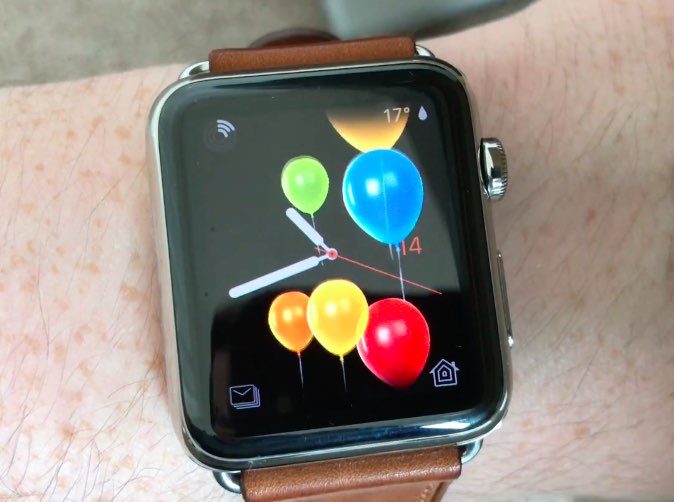
Aside from Woody, Jessie and Buzz Lightyear, the new Toy Story watch face in the second beta provides other animated characters, like Ham, Rex and Bullseye.

A separate video from Andrew shows off almost all the character animations available in the new Toy Story watch face, including additional customizations.

https://www.youtube.com/watch?v=NuEuxD9AJ7I

That's all, folks!

As we conclude our tour of watchOS 4 beta 2, we'd like to ask you to share any new feature discoveries of your own with fellow readers by posting them in the comment section.

You can also shoot us your findings via tips@iDownloadBlog.com.

What’s your favorite new feature in watchOS 4 beta 2, and why?

Apple seeds fourth beta of iOS 10.3.3 and tvOS 10.2.2 to developers

Apple on Thursday released a fourth beta of iOS 10.3 for iPhone, iPad and iPod touch, as well as tvOS 10.2 for Apple TV. iOS 10.3.3 beta 4 (build number 14G5053a) and tvOS 10.2.2 beta 4 (build number 14W5751b) are now available to Apple's registered developers and members of the Apple Developer Program through Dev Center.

To deploy them over the air, use the Software Update mechanism in the Settings app. Your iPhone, iPad, iPod touch or Apple TV must have an Apple beta configuration profile installed.

Both iOS 10.3.3 and tvOS 10.2.2 are bug-fix releases with no new user-facing features. They're probably the last point updates as Apple is currently beta-testing the next major versions of its platforms: iOS 11, watchOS 4, macOS High Sierra and tvOS 11.

GPU designer Imagination puts itself up for sale just two months following Apple dispute

Fabless semiconductor maker Imagination Technologies has announced it's putting itself up for sale, either in chunks or as a larger whole, just two months after Apple said it didn't want to license its mobile GPU blueprints for iOS devices anymore.

The iPhone maker accounts for about half of Imagination's sales.

The UK-based company's share price immediately fell off a cliff as a result. Imagination lost 70 percent of its value following a dispute with Apple.

Reuters reported Thursday that Imagination's board of directors has “received interest from a number of parties”.

The company said in a statement:

Imagination Technologies announces that over the last few weeks it has received interest from a number of parties for a potential acquisition of the whole group.

The board of Imagination has therefore decided to initiate a formal sale process for the group and is engaged in preliminary discussions with potential bidders.

Analysts think potential bidders could include Intel, Qualcomm, Mediatek, CEVA and various Chinese firms. It's unclear it Apple itself could be interested.

Founded in 1985 and listed in 1994, Imagination had a market capitalization of 425 million pounds, or approximately $538 million, following today's news. By comparison, the company was valued at more than 2 billion pounds in April 2012, or more than $2.5 billion.

Two months ago, Imagination started seeking buyers for its Ensigma business and the MIPS division, which it bought for $100 million in 2013. The British GPU designer said it was offloading those businesses in order to focus on its new PowerVR Furian graphics architecture.

According to UBS, Imagination's non-Apple business was worth 81 million pounds in April 2017, or about $100 million. Apple, which owns an eight percent stake in Imagination, said in April it's been working on “a separate, independent graphics design in order to control its products.”

The Cupertino firm should stop using Imagination's GPU designs within 15 to 24 months.

Apple was rumored to acquire Imagination last year, but the talks fell apart. Apple has since poached Imagination's COO John Metcalfe along with a bunch of Imagination engineers.

Without any Apple royalty contributions, Imagination could become a loss-making company.

Hands-on with iOS 11 beta 2: DND While Driving and other new features, changes & fixes

Apple (somewhat surprisingly) dropped the second beta of iOS 11 to developers on Wednesday with a myriad of changes and bug fixes. While there doesn't seem to be a huge number of user-facing enhancements, there are still quite a few notable changes and new features in this beta.

A large number of prominent bugs have been fixed that have been plaguing users, like crashing when deleting a voicemail, manual screen brightness not staying set, 3D Touch on phone numbers and addresses not working.

Unfortunately, with all of those bug fixes are several new bugs and known issues.

For instance, an SOS alert may still be sent even though the user cancelled it. This is a good reminder this is an early developer beta that should only be run on secondary devices.

As for the new features, we have the initial implementation of the much touted Do Not Disturb While Driving mode that will lock your phone as well as send a custom auto-reply (customizable in Settings → Do Not Disturb) should someone text you.

Control Center can now be disabled inside of applications, like on prior iOS editions. And far from last, the Files app now has started to show external locations like Google Drive and Box.

New features and changes

This is what you probably wanted to know about iOS 11 beta 2.

CarPlay now has lane guidance in Maps Smaller speed in Maps To edit/add filters in Photos you now tap the edit button in the top right corner instead of the sliders icon Now Playing widget has been tweaked New phone placeholder icon when no album artwork present in Now Playing widget Audio source switcher is now available on Lock screen New orange color for the new Echo effect in Messages Do Not Disturb While Driving is enabled with extra options in Settings Control Center can be turned on or off while in apps New search options within Apple Music You can now select multiple items in Photos Bluetooth widget now works the same as Wi-Fi: instead of turning off, it will just disconnect from whatever is connected to it Notification Center pull down has a gradual blur New Share sheet extension: Save to Files app Safari has new experimental features in Settings Dictation is now available in Hindi New options in Settings to make notification banners permanent or permanent Built-in screen recorder boosts video capture resolution to 1080p

Take a look at our hands-on video to see all of these new features and more in action.

https://www.youtube.com/watch?v=TZ5pwZMPRxI

Subscribe to iDownloadBlog on YouTube

And here's a quick overview of the most important fixes.

Bug fixes 3D Touch data detectors are now working for phone numbers, addresses, etc. Screen brightness stays at set level YouTube search bar has returned More stable Bluetooth connections (Dexcom) Android Migration now works as intended Crashing when deleting voicemails is fixed Lock screen no longer rotates Long exposure photos are now higher quality than in first beta Wrapping it all up

As we conclude our tour of all the changes, fixes, improvements and new features in iOS 11 beta 2, feel free to tell us about your own discoveries and observations in comments or via tips@iDownloadBlog.com.

What's your favorite change in iOS 11 beta 2 thus far, and why?

Hands-on with beautifully animated Toy Story faces in watchOS 4

Aside from bringing more intelligence and fitness features to Apple Watch, the new watchOS 4 software includes a bunch of beautifully animated Toy Story faces. Not unlike the existing Mickey and Minnie Mouse watch faces, the Toy Story ones bring to life popular Pixar characters including Woody, Jessie, Buzz Lightyear, Ham, Rex and Bullseye.

Our own Andrew O'Hara did a quick video showing off almost all the character animations available in the new Toy Story watch faces in watchOS 4, including additional customizations.

Give the video a quick watch, then meet us in comments.

https://www.youtube.com/watch?v=NuEuxD9AJ7I

watchOS 4 packs in other new watch faces.

Kaleidoscope, for instance, turns static images into mesmerizing patterns and the new Siri watch face uses artificial intelligence and machine learning to display the information users need most throughout the day.

ROUNDUP: 60+ new features in watchOS 4

Plus, you have new complications for your watch faces, including Now Playing and Apple News.

These new watch faces, complications and other features all require watchOS 4, a free upgrade for all Apple Watch users later this year.

Are you excited for the new Toy Story-themdd faces for your Apple Watch? Share in the comments section below!

New video tutorials from Apple explain how to customize and share Moments

Apple yesterday published a pair of new videos through its official YouTube channel, covering the Moments feature in Photos which uses machine learning to automatically create themed albums and animated slideshows from your best images and videos.

Running sixteen seconds long each, the two new clips show how to customize and share Memories in the stock Photos app on iPhone. Using iOS's multipurpose Share sheet, users can publish their currently playing Memory Movie to Facebook, Twitter and other services.

And with the ability to choose from many built-in templates and songs, everyone can customize every Memory to their liking, all from within the stock Photos app.

How to customize Memories on iPhone 7

“Customize your Memories movies by choosing from tons of preselected moods and music, right from the Photos app,” reads the video's description.

https://www.youtube.com/watch?v=_Dzv3LCvlJY

How to share Memories on iPhone 7

“Share your favorite Memories movies with friends, family or all of Facebook, right from the Photos app.”

https://www.youtube.com/watch?v=X-VxQYw8hLk

To watch other tutorials in the series, visit apple.com/iphone/photography-how-to.

macOS High Sierra beta 2 rolling out

Apple today rolled out a second beta of macOS High Sierra to its registered developers and members of the Apple Developer Program. macOS High Sierra beta 2 is now available via the Updates tab on Mac App Store on your Mac that has an appropriate configuration profile installed, which can be obtained through Dev Center.

macOS High Sierra 10.3 beta 2 doesn't offer new features, but instead focuses on performance improvements and bug fixes.

The general public should soon have the chance to test-drive macOS High Sierra via the Apple Beta Software Program. macOS High Sierra debuted as a developer-only preview at Apple's Worldwide Developers Conference on June 5. The software update will exit beta and release publicly this fall.

Should you spot new user-facing features and other changes in macOS High Sierra beta 2, ping us on Twitter or shoot us an email via tips@iDownloadBlog.com. Feel free to attach any screenshots, if necessary. We'll be making sure to update the post with any relevant new information, as it becomes available.

Second beta of iOS 11 seeded to developers

Apple today seeded a second beta of iOS 11 to its registered developers and members of the Apple Developer Program. To download and install the update, use the Software Update mechanism on your iPhone, iPad or iPod touch, which must be running the previous beta and have an appropriate configuration profile installed (you can download it through Dev Center).

This second beta doesn't seem to come with new features, but rather looks like it is focusing on the usual bug fixes and performance improvements.

The first developer-only beta of iOS 11 brought out a bunch of new features and platform technologies, including a major revamp for App Store, advanced multitasking features on iPad, drag and drop, a new Files app, AirPlay 2 with multi-room audio, new Siri capabilities and more.

https://www.youtube.com/watch?v=-hoPcMPvL88

Subscribe to iDownloadBlog on YouTube

iOS 11 also packs in many visual refinements across the system designed to make Apple's mobile operating system look prettier than ever. Some of the visual tweaks include bolder headlines across stock apps, a redesigned app drawer in Messages and much, much more.

If you spot new user-facing features, changes or important refinements in iOS 11 beta 2, be sure to ping us on Twitter or shoot us an email via tips@iDownloadBlog.com (attach any screenshots, if necessary) and we'll update the article with any relevant new information.

Watch rare interview with former iOS chief Scott Forstall and original iPhone team members

The Computer History Museum last night hosted Pulitzer Prize journalist John Markoff (formerly of the New York Times) who interviewed former iOS chief Scott Forstall and the original iPhone engineering team members Hugo Fiennes, Nitin Ganatra and Scott Herz.

“We knew we were doing something right with the user interface design,” Forstall told Markoff, citing an example of a two-year old girl and a 99-year old woman who could use iPhone and iPad without any user manual.

“The team was amazing and we knew we were doing something right,” he added.

“The first text I ever sent was on my iPhone, because texting on other devices was horrid,” he revealed. Commenting on Apple's late co-founder Steve Jobs, Forstall called him “the most intense person I’ve ever known.”

Jobs was “super driven, demanding and forced people to do their best,” Scott said.

“When he was sick, I’d go to his house every day. On some days, he couldn’t open his eyes,” he said of Steve's passing. “We got Siri right before he passed and he loved it because he was too weak to type. I was surprised, it just seemed like he’d always be there.”

Asked to comment on the then controversial skeuomorphic design, which imitates real-world materials like leather in software, Forstall responded by saying the following:

I never heard the term skeuomorphism, even years after we built iPhone.

I mean, that’s a horrible word. It sounds unnatural, it just sounds terrible. When I look at good design—when I look for good design—I look for something which is easy to use.

Approachable and friendly that you can use without a manual.

If you look at the designs we did at Apple, we talked about photo-illustrative, metaphorical designs. And those were infused into the design sense of Apple by Steve Jobs since the original Mac if not earlier. The original Mac had a desktop and folders that looked very much like the desktop on which that Mac sat.

And so we used these design philosophies. It doesn’t mean that we loved every single part of it. It doesn’t mean I loved every single part of it. There’s definitely things that I was less a fan of than others. But we built these designs that worked. And how do we know they worked? You just had to watch people use it.

Here's the full video of the interview (the Forstall part begins at 1:07).

https://www.youtube.com/watch?v=zjR2vegUBAo

The original video is available on Facebook.

Asked if there ever was a time he shook his head at something about iPhone (assuming he's still using one), Forstall said this:

That happens all the time. If you’re a designer, if you care about design, you can’t go through any part of your life without shaking your head and thinking that could have been done better. And I thought that for our design, even the first version. The second version you’re always making it better.

On Apple secrecy:

The thing about Apple is we all get it, we all live in that culture. They were very respectful. You develop a talent for describing what you’re working on without giving too many details.

Fiennes added that the first time he saw pinch-zooming was at the original iPhone keynote. Ganatra said he heard Forstall on many occasions talking about scrolling deceleration, adding he was “being very detailed about scrolling and how the UI responds to touch.”

“There’s a lot of math that goes into making it work so well,” said Ganatra.

And to illustrate Apple's legendary attention to detail, Fiennes said Jobs asked him to move the processor in an iPhone a couple of millimeters in order to make the printed circuit board (which ordinary users never get to see) symmetrical.

Forstall suggested Apple kicked off work on a tablet project, dubbed Project Purple, because Steve hated an unnamed Microsoft employee (Scott says it wasn't Bill Gates).

“It began because Steve hated this guy at Microsoft. That is the actual origin. Every time Steve had any social interaction with that guy, he would come back pissed off,” said Forstall.

“Steve came in on a Monday, there was a set of expletives and then he said, 'Let's show them how it's really done'.”

Steve later put the tablet project on hold to work on iPhone, asking Scott if they could take a rubber-band scrolling demo they were doing with the tablet and shrink it down to a phone.

The rest, as they say, is history.

I also like this anecdote on how Jobs scammed Apple for free lunch:

He and I would go to the cafeteria at Apple all the time, and he would insist on paying. I was like, you're paying me enough that I can afford the $8 lunch, but he'd always, if he got his food before he'd wait at the line for me to get up there and he'd pay.

And he made it so you could pay with your Apple badge.

So you'd come up there and you'd badge in, and it would be directly withdrawn from your paycheck. Somehow, I was like, 'Why are you, really, go sit down, I feel like an ass when you're sitting up there waiting for me and I can't get any long-cooking food.'

Steve said 'No, no, no, this is great. I only get paid $1 per year. I don't know who's paying every time I badge!' He was a multi-billionaire scamming Apple!"

The lunch story is at mark 1:56 in the video.

Although Forstall isn't currently building anything himself, he's “doing a lot” in terms of advising startups and Broadway (he has always loved theater and even used to act).

“It was always a passion” he said. “When I left Apple, I was introduced to a woman and we hit it off and she said ‘we should produce something on Broadway.’” Doing a Broadway show, he says, is like managing a startup.

“You start with the creative types, you invent something, then you put a bunch of money and effort and time behind it and you give it to the public.”

At the end of the interview, Forstall thanked everyone in the audience who had participated in creating iPhone, iPad and iOS. “It's not one person or even four people,” he said. “It was hundreds and thousands of people who made it happen.”

It is no secret that Forstall was a divisive figure within Apple due to its exacting standards, demanding demeanor and abrasive management style.

He was fired in a major management shakeup in October 2012, in part due to his alleged refusal to sign an apology letter over the Apple Maps debacle, prompting CEO Tim Cook to issue a public apology to Apple customers.

Videos: cool stuff made with ARKit

Eager to learn why Apple's new ARKit framework is such a big deal? Look no further than a new website which offers a hand-picked curation of some of the coolest stuff developers have made thus far with ARKit, via The Loop.

For the uninitiated, augmented reality experiences superimpose computer-generated imagery on top of live video feed of the real world. According to Apple, ARKit uses a technique known as Visual Inertial Odometry to accurately track the world around an iPhone or iPad by fusing camera sensor data with motion data.

“These two inputs allow the device to sense how it moves within a room with a high degree of accuracy, and without any additional calibration,” the company says.

The following videos offer a look at the capabilities of the ARKit framework.

https://www.youtube.com/watch?v=nMd0dIAEJuc


https://www.youtube.com/watch?v=1hvfpxaxGwc


https://www.youtube.com/watch?v=6OV2mBbNtVk


https://www.youtube.com/watch?v=2xrVFDRJ8HQ


https://www.youtube.com/watch?v=R4OeFjZCi9o


https://www.youtube.com/watch?v=OHJRExynkuI


https://www.youtube.com/watch?v=VdaWHv6hmJk


https://www.youtube.com/watch?v=njQSiO2uj0s


https://www.youtube.com/watch?v=Rq2NChZ3c4E


https://www.youtube.com/watch?v=4HY868Jskrc

The ARKit framework uses computer vision to determine the layout of your surroundings and automatically find horizontal planes like tables and floors. It can track and place objects on smaller feature points and apply the right type of light to a virtual object in order to match the current lighting conditions in your room.

Ikea is working on an AR app in partnership with Apple that will let users try out furniture in augmented reality before buying it. Apple's WWDC 2017 keynote demos included an upcoming ARKit-driven game, called Wingnut AR, by director Peter Jackson's AR company.

If you like these demos, be sure to follow @madewithARKit on Twitter.

Swift creator Chris Lattner leaves Tesla after only six months on the job

Closeup of Tesla model 3 headlights

Former Apple executive Chris Lattner is leaving Tesla. He barely lasted six months on the job. “Chris just wasn't the right fit for Tesla, and we've decided to make a change,” the electric car company said Tuesday, according to The Wall Street Journal.

He exited the same day Tesla hired leading artificial intelligence expert Andrej Karpathy as its new director of AI and Autopilot. Lattner's LinkedIn profile had not been updated at post time to reflect his exit from Elon Musk's company.

He did tweet though that he was interested in any available roles for a seasoned engineering leader. “Turns out that Tesla isn't a good fit for me after all,” reads his impromptu tweet. “I'm interested to hear about interesting roles for a seasoned engineering leader”.

The Wall Street Journal notes that Tesla saw a number of high-profile departures over the past few months amid pressure from CEO Elon Musk on engineers to develop and perfect autonomous car systems by the end of 2017, a tall order.

Credited as the creator of Swift, Apple's new modern pogromming language, Lattner left Apple this January to take a position as Vice President of Autopilot Software at Tesla. During his Apple tenure, he also held the title of Senior Director of the Developer Tools team.

Photo creidit: Sean O’Kane for The Verge

Investors force Uber CEO to step down

Travis Kalanick, 40, who is the co-founder and chief executive of Uber, has resigned from his post yesterday at the request of five major Silicon Valley investors, following his indefinite leave of absence. He will stay on the company's board of directors and continue to hold a majority of Uber's voting-eligible stock shares.

An Uber spokesperson declined to comment.

Mike Isaac, reporting for The New York Times, said that Kalanick is stepping down from his CEO role after “a shareholder revolt” made it untenable for him to stay on at the company.

“I love Uber more than anything in the world and at this difficult moment in my personal life I have accepted the investors request to step aside so that Uber can go back to building rather than be distracted with another fight,” Kalanick said in a statement.

Yesterday, five of Uber’s major investors demanded that Kalanick resign immediately, including the venture capital firm Benchmark, one of the ride-hailing firm’s biggest shareholders which has one of its partners, Bill Gurley, on Uber’s board.

Here's a Bloomberg video showing Kalanick getting into an argument with an Uber driver.

https://www.youtube.com/watch?time_continue=25&v=gTEDYCkNqns

The five major investors demanded that Kalanick step down in a letter delivered to him while he was in Chicago. Titled “Moving Uber Forward,” it highlights the need for a change in leadership.

The board of directors said in a statement that Kalanick had “always put Uber first”.

His resignation as CEO will give Uber “room to fully embrace this new chapter in its history.”

Here's an excerpt from the article:

Taking a startup chief executive to task so publicly is relatively unusual in Silicon Valley, where investors often praise entrepreneurs and their aggressiveness, especially if their companies are growing fast. It is only when those startups are in a precarious position or are declining that shareholders move to protect their investment.

Having laid off nearly two-dozen employees after an investigation into Uber’s corporate culture, the company is now searching for new executives, including a chief operating officer.

Uber recently appointed Bozoma Saint John as its Chief Brand Officer.

Until June 2017, she was a marketing executive at Apple Music after joining the Cupertino giant in its acquisition of Beats Music for $3 billion in May of 2014.