Apps

Things 3 is out with overhauled interface and multiple new features

German developer Cultured Code on Thursday released Things 3, a major new iteration of its powerful personal task manager for iPhone, Apple Watch, iPad and Mac. Things 3 brings out a beautiful timeless new design with delightful interactions and animations. Aside from the new look and feel, the refreshed app is packed to the gills with a host of new features.

Released as three separate apps (they've kept the current pricing), Things 3 is Cultured Code's first paid update for existing users since versions 1.0.

Here's what developers had to say about the app's gorgeous new UI:

The all-new Things comes with an all-new design. It's not just how it looks—but also how it works, and how it feels. The interactions are delightful. The animations are smooth. The content is more structured. The concepts are clearer.

Open a to-do and you'll immediately get a sense of how the new apps feel.

Nicely animated transitions expand the selected to-do into an empty white piece of paper. You can add additional details to your to-do, neatly tucked away in the corner until you need them.

“There are no distractions here, it’s just you and your thoughts,” said developers.

The choice is yours: you can create either a simple to-do that looks like text on a piece of paper or opt for a richer to-do which may include additional details such as tags, checklists (a new feature for to-dos in Things 3), a start date, a deadline and so forth.

Speaking of to-dos, Things 3 introduces an all-new Magic Plus Button.

Found in the corner of the screen, you can tap it to quickly add a new to-do or actually drag the button to a particular list in order to generate a to-do in a specific location. Plus, managing to-dos is now way easier than before with expanded support for gestures, like dragging and dropping, swiping, tapping to expand and more.

Seasoned Things users will be delighted to know that developers have implemented one of the most-requested features: time-based reminders. For those to-dos you absolutely cannot miss, adding a reminder will give you peace of mind.

While scheduling a to-do in Jump Start, click Add Reminder and set the time. There are three ways to set the time: manually, using the app's natural language parser (just type “Wed 8pm” or some such, and you're all set) or you can speak to Siri (“Remind me to call Seb at 5am.”)

Watch the promotional video for Things 3.

https://www.youtube.com/watch?v=2R6o5t0VK_A

Things 3 now supports headings to break up complex projects into sections.

And with the app's Magic Plus Button, you can create and place headings in new projects like a pro. The app's cleaner design extends to your Today and Upcoming sections which now combine calendar events and to-dos into one unified view with a timeline at the top, giving an outline of your schedule.

A new This Evening section is your at-a-glance overview of any to-dos that you won’t get to until later in the day, like things you can only do when you get home. The This Evening section is a handy way to keep these to-dos separate from the rest, in their own discrete list.

And to help you find a needle in the haystack, Things 3 now includes a Quick Find feature.

Just pull down on any list to reveal search, which can now find content across the entire app. Quick Find also includes handy shortcuts to your to-dos, lists, tags and more.

Type Travel, another new feature in Things 3, lets you navigation to any project, area or to-do in the app. On iPad, you can now swipe away the sidebar and focus on just the current list you’re working on, both in portrait and landscape orientations.

On your Mac, Things now has a Slim Mode which cuts out distractions so you can focus on the task at hand. To enter this mode, collapse the sidebar with a two-finger swipe. Slim Mode is especially great when you’re working in macOS's Split View multitasking mode.

You can even open multiple windows in Slim Mode and drag and drop items between them.

https://culturedcode.cachefly.net/things/videos/2017-05-03-allnewthings-when/video.mp4

Developers have completely rewritten core layers of the apps, which are now shared between macOS and iOS for increased reliability. The Apple Watch app has been updated as well (it now shows checklists and headings), there's a new structure for Areas in the iOS app and you can now import data from Wunderlist or OmniFocus into Things 3.

And with TouchBar support, owners of the new MacBook Pro can take advantage of convenient access to the app's most-used commands.

Things is fully integrated with all the latest iOS technologies: Apple Watch, Calendars, Siri, Reminders, Today Widget, Quick Actions, Action Extension, Handoff and Notifications.

The apps all stay updated via Things Cloud, which is the push sync service that Cultured Code custom-built for the app. Unfortunately, iCloud syncing is not supported in Things.

For the complete overview of what's new in the app, visit the official Things website.

Things 3 for iPhone and Apple Watch is $9.99 on App Store.

Things 3 for iPad is $19.99 on App Store.

Things 3 for Mac is $49.99 on Mac App Store.

To celebrate the launch of Things 3, all apps are 20 percent off until next Thursday, May 25.

A 14-day trial of Things for Mac is available via the Cultured Code website.

Futurama: Worlds of Tomorrow coming to iOS, will contain some entirely new episodes

Game developers FoxNext Games and Jam City (via its game studio TinyCo) announced today that Futurama: Worlds of Tomorrow for iPhone and iPad will arrive sometime in early summer.

The new game will blend simulation, combat, galactic exploration and choose-your-own-adventure mechanics together to bring the escapades of the Planet Express crew to life. In his February interview with USA Today, Matt Goering said that the game will contain some entirely new episodes of the show.

“Oh, you guys wanna do a game? That’s fine,” he said. “But we’re gonna sneak some more Futurama episodes in there on whatever device people are gonna be using.”

The game features two main settings: New New York, which focuses on simulation and character progression gameplay, and Space Adventures, in which players explore and battle their way through planets, nebulas and other weird stuff across the Futurama universe.

Futurama: Worlds of Tomorrow is being developed in partnership with Futurama and The Simpsons creator Matt Groening and his Curiosity Company, along with executive producer David X. Cohen and original Futurama writers.

“Jam City is working with the writers, animators, and cast to produce even more original animation that will have fans waving their tentacles in the air,” according to developers.

The official teaser trailer embedded below is the first new animation from the Futurama universe since the show's original TV run ended in 2013.

“I'm proud to say that Futurama lives! In mobile-video-game teaser trailer form, anyway,” said the series' creator Matt Groening. “If you squint, it's kind of like a little episode!”

https://www.youtube.com/watch?v=k2Izx4MQCwQ

“Working on this new Futurama animation has been a thrilling adventure,” said David X. Cohen.

“I finally understand how Neil Armstrong must have felt when he first landed on the lunar surface, watched some funny cartoons on the control screen, and did whatever else was on his schedule that day,” he added, jokingly.

In the New New York setting, your main focus will be on rescuing characters, collecting special items and materials, expanding your characters' capabilities by leveling them up and crafting ability-defining character outfits and tackling story-driven quests.

According to developers, events that occur in New New York will often move the game's overarching narrative forward, by allowing players to assemble a crew of their favorite Futurama characters and take to the stars for Space Adventures.

“While traversing the depths of space, players will fight alien enemies in retro arcade-style combat, rendered in beautiful 16-bit graphics, and explore strange lands in which their choices determine their fate,” they said.

Futurama: Worlds of Tomorrow will arrive sometime in early summer to iPhone, iPad, Android and Amazon devices. More information on the game will be released in the near future and we'll be making sure to keep you in the loop.

You can pre-register at youwillplayfuturama.com to receive a special in-game gift when you start playing. More original Futurama animation is coming too, so stay tuned.

Gmail for iOS now uses machine learning to provide smart replies

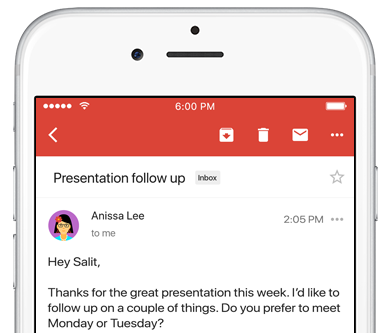
Google on Wednesday launched an updated version of the mobile Gmail app for iOS and Android, bringing out a handy new Smart Reply feature based on the company's machine learning technology. Like with canned responses in Apple's own Messages app, Gmail analyzes the contents of your emails to provide up to three canned responses based on what it thinks the sender is asking in their original message.

Smart Replies may include simple “Yes” and “No” responses. If the sender is asking whether to meet on Wednesday or Friday, Gmail may provide a bit more complex replies such as “Let's do Wednesday”, “Friday works for me” or “Either day works for me”.

Once you’ve selected one, you can send it immediately or edit your response starting with the Smart Reply text. By utilizing machine learning, the Smart Reply feature produces better responses the more you use it. “If you're more of a 'thanks!' than a 'thanks.' person, we'll suggest the response that's, well, more you,” says Google.

To learn about the smarts behind Smart Reply, check out the Google Research Blog.

Smart Reply will roll out globally in English first, with Spanish following in the coming weeks. Additional languages for Smart Replies will be added soon, Google has promised.

According to the search monster, the machine learning-assisted Smart Reply feature already drives twelve percent of replies in its Inbox email app.

Aside from Smart Replies in the Gmail app, today's keynote address at Google's annual I/O conference for developers saw the release of the official Google Assistant app for iOS.

Gmail for iOS is available at no charge from App Store.

Hey Siri, make some room for Google Assistant on my iPhone

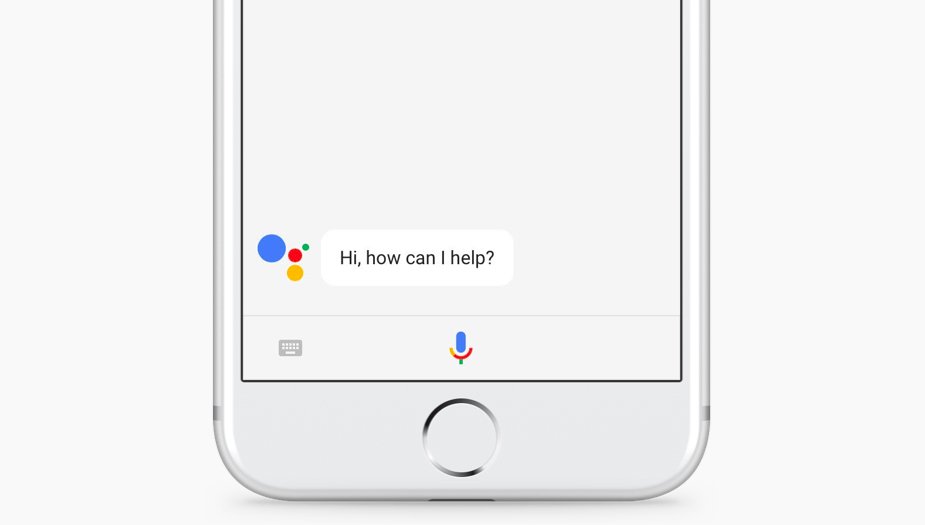
The rumors were true: the search giant Google today released a standalone Assistant app for iPhone to take on Siri. Available at no charge on App Store, it features a blend of the chat style functionality found in in the Google Allo version of Assistant and the voice-controlled version found on Android.

It even lets you call friends on Google Home or out on the town with your iPhone.

“Whether you need a reminder to pick up milk, help finding your travel photos or need to make a dinner reservation, your Assistant is ready to help,” says the company.

To get started with Assistant, press the microphone icon or start typing.

https://www.youtube.com/watch?v=VZ9MBYfu_0A

“And for when you want to see what you’ve previously asked, we’ll also soon add history within your conversation,” notes Google. And with an upcoming firmware update for Google Home, customers will be able to put responses to queries from Home's Assistant on a supported display, including your iPhone and even your TV (with Chromecast).

Apple users can use Assistant's chatbot-like capabilities as well as all of its interactive features without having to purchase Google's Pixel smartphone or another Android smartphone.

Here are a few things Assistant can help you with:

Make quick phone calls (“Call Mom”) Send text messages (“Text my bestie”) Send emails (“Email my boss the latest TPS report”) Set reminders (“Remind me to buy a birthday gift for Sarah”) Set calendar events (“Set a calendar event for dinner with Charlie tomorrow from 7-9”) Play music (“Play Jazz music on YouTube”) Navigate to places (“Get me directions home”) Ask it anything (“Will I need an umbrella today?”)

Google has promised to enhance Assistant with new features, including:

New chatbot abilities Integration with Google Lens technology

Google Lens will give Assistant for iPhone and Android some pretty cool camera capabilities with a little help from advanced artificial intelligence features. You'll be able to, for example, easily identify an object by pointing your phone's camera at it.

The company even demonstrated how Lens technology will permit Assistant users to snap up a photograph of a business's sign to quickly pull up useful information such as reviews, menu items, friend check-ins and other relevant data.

And in yet another example, Google demoed how Assistant could help Android users connect to a Wi-Fi network simply by taking a picture of a sticker on a router.

“If you see a marquee for your favorite band, you can hold up your Assistant, tap the Lens icon and get information on the band, tickets and more,“ said the firm.

Plus, starting today developers can build conversational apps for the Google Assistant on phones. In other words, soon you’ll be able to not only get help and answers from Google, but also from third party services.

The AI-powered helper will be rolling out to eligible Android phones in Brazilian Portuguese, French, German and Japanese, Google said. By the end of the year, Assistant will include additional language support for Italian, Korean and Spanish.

The company has more than 70 smart home partners supporting Assistant across Google Home, Android phones and iPhone, including August locks, TP-Link, Honeywell, Logitech and LG.

Assistant is already available on more than 100 million devices, said Google.

Grab Google Assistant for iOS for free via App Store.

The app requires an iPhone, iPad or iPod touch with iOS 9.1 or later.

AI powered, end-to-end encrypted calls now available in Telegram Desktop

Secure instant messaging service Telegram today launched voice calls in its desktop app for Mac, Windows and Linux nearly two months after implementing the voice-calling feature in Telegram Messenger for iPhone and iPad.

To make sure Telegram calls are the best in terms of quality, speed and security, the app uses artificial intelligence to update its neural network after each call about things such as network speed, ping times, packet loss percentage and other factors that influence the quality of your VoIP calls.

Based on gathered data, the app optimizes dozens of parameters to improve the quality of future calls on the given device and network. By default, Telegram calls are lightweight.

https://twitter.com/telegram/status/864543129847955457

If there's a change in your connection during the call, the app will make necessary adjustments.

For instance, Telegram may boost your sound quality on stable Wi-Fi connection or use less data if your Wi-Fi or cellular coverage is spotty at best.

Whenever possible, your calls will go over a peer-to-peer connection using the best audio codecs to save traffic while providing “crystal-clear quality.” When a peer-to-peer connection cannot be established, the app will use the closest server to you.

Telegram has its own distributed infrastructure all over the world to ensure the fastest possible delivery of your texts and seamless voice calling experience. As mentioned, VoIP calls on Telegram use end-to-end encryption, just like the app's Secret Chats feature, to prevent eavesdropping.

For voice calls, however, they've improved the key exchange mechanism. “To make sure your call is 100 percent secure, you and your recipient just need to compare four emoji”, said the team.

Bottom line: the quality of Telegram calls will further improve as you and others use them, thanks to the built-in machine learning. And with group calling, video calling and screen sharing apparently on the team's to-do list, Telegram is bound to become a capable Skype alternative.

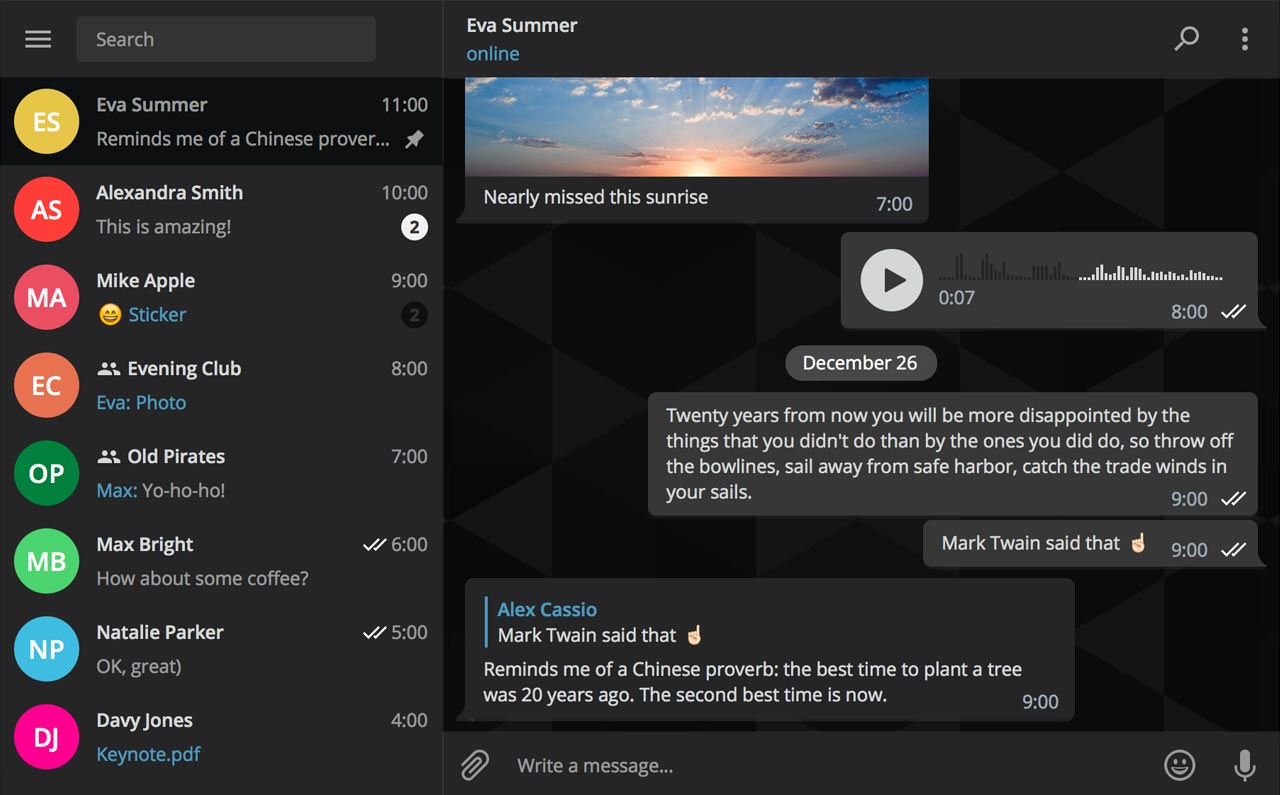
As soon as VoIP calls are enabled for your country, a phone icon will appear on every profile page in Telegram Desktop.

Telegram for iOS is available free via App Store.

Telegram Desktop can be downloaded from Mac App Store or through the official website.

Viber for iPhone gains chat pinning and adjustable notification sounds

Rakuten-owned messaging app Viber is launching a pair of interesting enhancements in its mobile app for iPhone and iPad. The first improvement comes in the form of handy new options for adjusting Viber's default notification sound on a per-chat basis. The other enhancement lets you easily pin your favorite conversations to the top of the chat screen.

Aside from these improvements, Viber 6.8.8 for iPhone and iPad, a free download from App Store, includes unspecified bug fixes and performance improvements.

Chat pinning

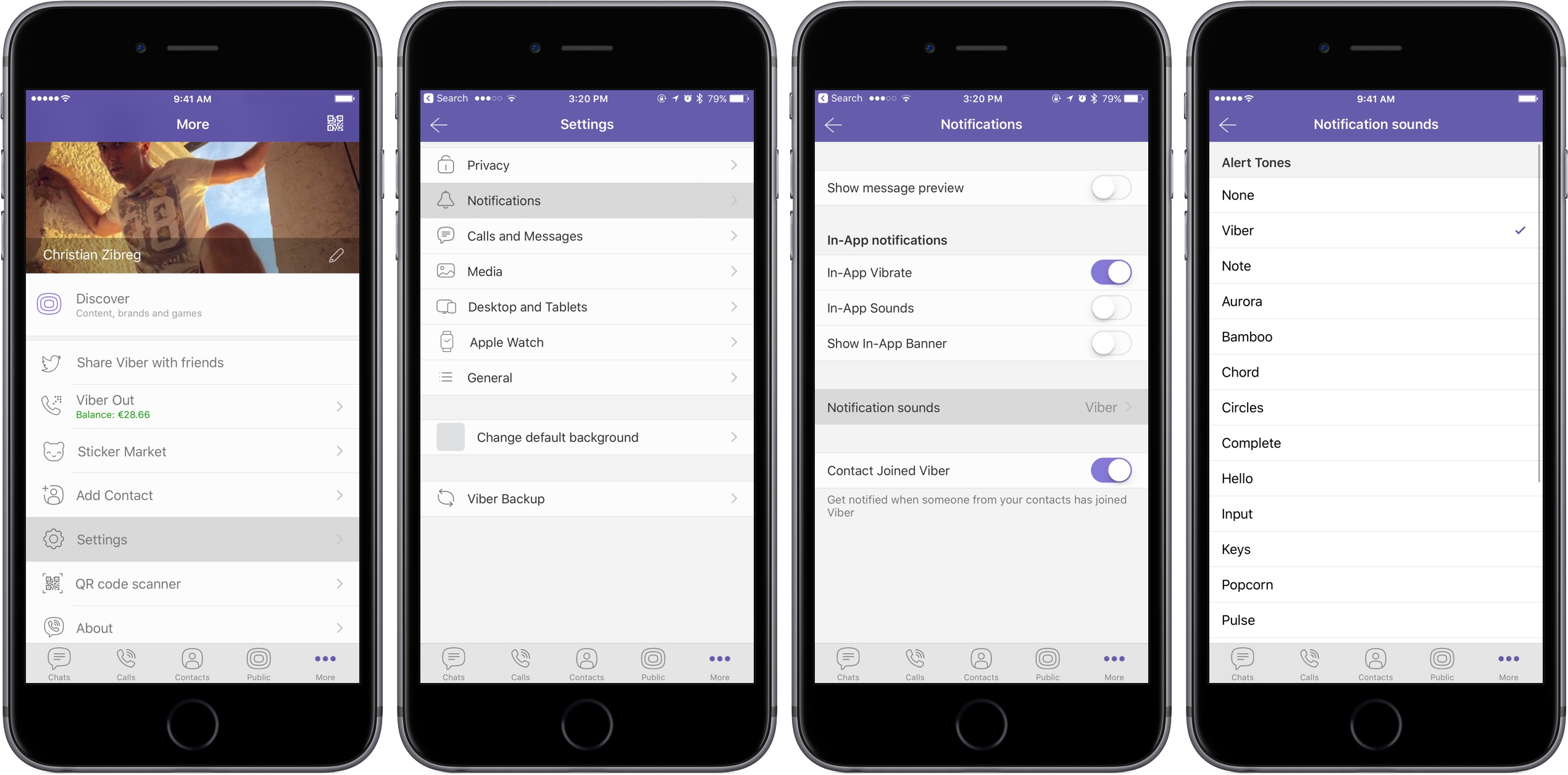
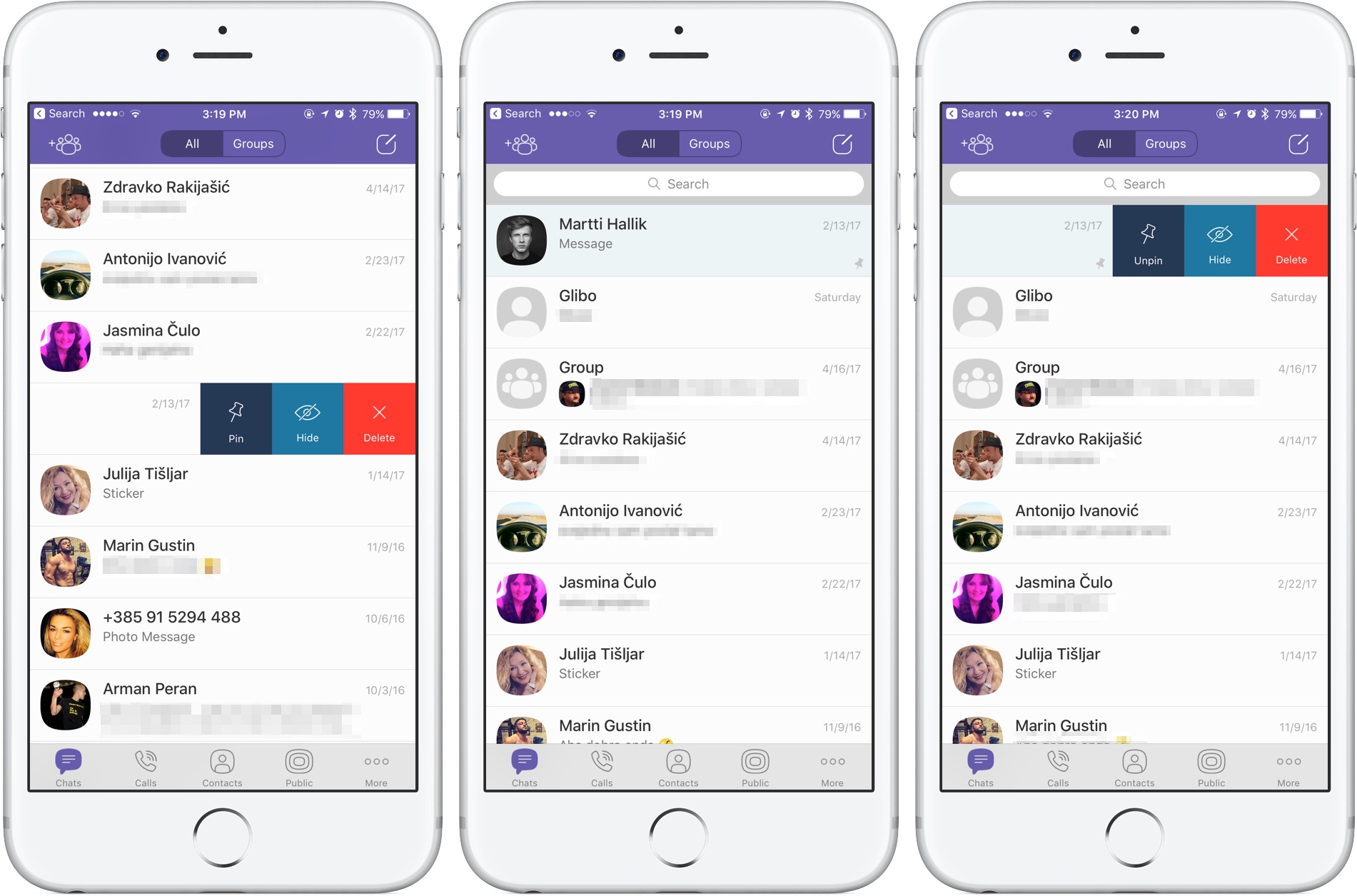
With this feature, you can pin your favorite conversations to the top of the chat list where they're easier to spot. To pin a chat, swipe the conversations in the chat list, then select Pin to pin it to the top of the screen or Unpin if it's already pinned and you'd like to unpin it, as shown on the screenshots top of post.

Rival WhatsApp from Facebook is said to be working on chat pinning, too.

Custom notification sounds

Viber now allows you to override its default notification sound and replace it with the sounds listed in Settings → Sounds. You can choose a new default sound for all Viber notifications or select a different notification sound on a per-chat basis to make it easier to audibly distinguish between notifications for new messages from, say, your Mom and a co-worker.

Download Viber 6.8.8 for iOS via App Store.

Apple to soon require app-specific passwords to access your iCloud data

According to an Apple Support email sent out today, all native third-party apps for iPhone, iPad, Mac and other platforms will be required to use app-specific passwords to access user data stored in iCloud, not Apple ID credentials.

App-specific passwords went into effect in October 2014.

Back then, enabling two-step verification for Apple ID would turn on app-specific passwords for web-based apps and services. Starting on June 15, app-specific passwords will become a mandatory requirement for any native app that wishes to access user data in iCloud.

You can generate app passwords in the Password & Security section of the Apple ID website.

A password created for one app, like Outlook, doesn't work in another app like Spark.

Come June 15, you'll be automatically signed out of all apps that use your Apple ID credentials. As an example, if you set up Fantastical for Mac with your Apple ID to access your iCloud calendars, you'll need to generate an app-specific password to continue accessing your iCloud calendars from within the app on and after June 15.

In simpler terms, you'll be required to enable two-factor authentication for your Apple ID and generate individual passwords for each app after the cutoff date.

The change is platform-agnostic: if you use Windows 10's Mail app to receive your iCloud data like contacts and calendars, you'll need to create an app-specific password for it. This is for the sake of everyone's security because signing into third-party apps with your primary Apple ID password may expose you to various attacks and hacking attempts.

To be clear, this only affects apps which access iCloud in a non-native way, which includes email clients like Outlook, Thunderbird and others. If an app has been updated to use iCloud Drive, it won't need an app-specific password to access user data in iCloud.

Bottom line: Apple still lets you grant apps access to your iCloud data, but soon you'll be able to do so in such a way that keeps your primary Apple ID password safe and secure.

Apple's first-party apps are not affected by this change.

Instagram rolls out selfie filters, rewind option for videos, hashtag sticker & eraser brush

Instagram today announced several new capabilities for its mobile app, including selfie filters via the front-facing camera in what appears to be yet another effort to copy the last big Snapchat feature. Aside from face filters, Instagram 10.21 also includes a rewind playback option for videos, a new hashtag sticker an an eraser brush tool.

Face filters

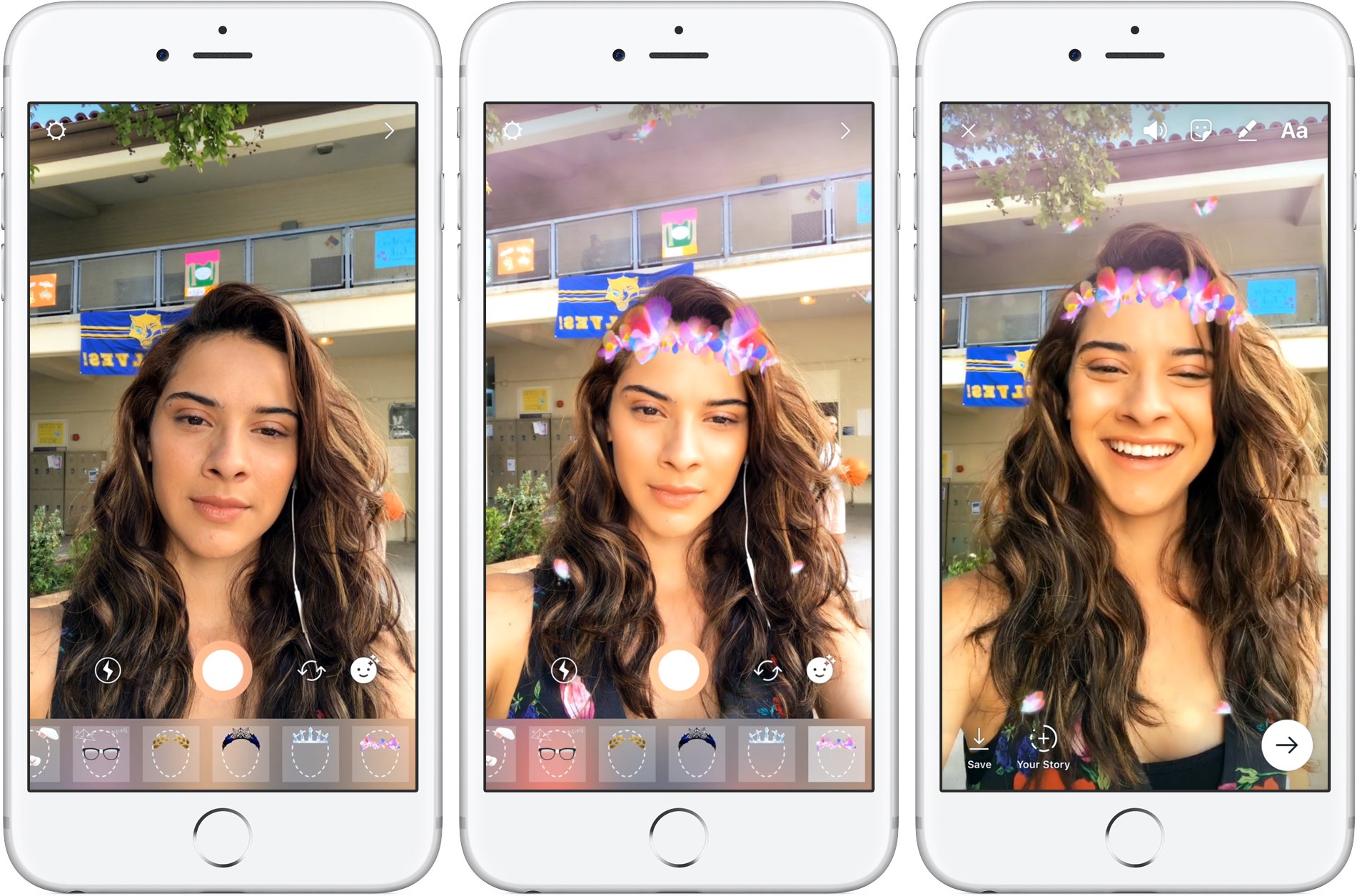
With all-new face filters in the Instagram camera, you can turn an ordinary selfie into something fun and entertaining. A total of eight different face filters are included at launch, with more to be added at a later stage via future updates. To get started with this feature, tap the new face icon in the bottom-right corner of the Instagram camera.

Simply tap a filter to try it on.

The filters include effects ranging from math equations swirling around your head to furry koala ears that move and twitch. “Whether you're sitting on the couch at home or out and about, face filters help you express yourself and have playful conversations with friends,” noted the Facebook-owned company.

https://vimeo.com/217551217

Some of the filters work with a friend.

Moreover, all the face filters included in this edition of Instagram work with Boomerang, meaning you can now add an unexpected twist to the videos you share.

Rewind option for videos

Instagram also provides a new Rewind playback option for videos.

A new camera format next to “Boomerang” and “Hands-Free”, “Rewind” lets you share a rewind of your video. This mode captures your video normally, then makes it play in reverse.

Hashtag stickers

A new hashtag sticker joins Instagram's existing stickers and geofilters. To get started with it, tap the sticker icon in the top-right corner, then choose and customize the new hashtag sticker before adding it to your own Story.

Like with mentions, you can add hashtags using regular text as well.

Hashtag stickers are interactive: folks watching your Story can tap the hashtag sticker or text to visit the hashtag page and explore related posts.

Eraser tool

With the new eraser brush, you can remove parts of drawings or color.

Instagram advises selecting the fill tool after you’ve taken a photo or video to fill the entire screen with color. Then, using the new Eraser tool, you can easily and quite creatively reveal parts of your photo or video underneath.

These new features are available as part of Instagram 10.21 for iOS.

To learn more about these updates, check out Instagram's Help Center.

Instagram is available at no charge from App Store.

Nintendo’s next big franchise coming to iPhone will be The Legend of Zelda

Nintendo's next big franchise coming to iPhone and other smartphones will be The Legend of Zelda, a high-fantasy action-adventure RPG video game series created by the legendary Japanese game designers Shigeru Miyamoto and Takashi Tezuka.

The iOS port of The Legend of Zelda should hit App Store either in in the latter half of 2017 or in 2018, following the release of Animal Crossing for iOS, according to sources speaking with The Wall Street Journal.

The mobile game will be developed by DeNA, the studio behind Super Mario Run and Fire Emblem Heroes.

As mentioned, Animal Crossing for iPhone will be coming out some time in the second half of 2017, followed by the official Legend of Zelda game for smartphones. Separately, the report mentions that the Pokemon Company is working on a new digital card game app, too.

If you've never played The Legend of Zelda, you should give it a try as it's one of Nintendo's most successful franchises, selling over 75 million copies as of 2016.

The game's chief protagonist is named Link.

https://www.youtube.com/watch?v=rweamiexWHU

Subscribe to iDownloadBlog on YouTube

The series' installments typically task the player with rescuing Princess Zelda and the kingdom of Hyrule from Ganon, who is the game's key antagonist. The games' plots commonly involve a relic known as the Triforce, which is basically a set of three omnipotent golden triangles.

Following its 1986 debut, The Legend of Zelda has expanded to include 19 entries on all of Nintendo's major game consoles, as well as a number of spin-offs. The series even gave birth to an American animated TV series and individual manga adaptations in Japan.

Following a multi-year hiatus from mobile, Nintendo eventually committed to bringing some of its most-prized intellectual property to smartphones, starting with the Miitomo app and on to Super Mario Run for iPhone and the iOS version of Fire Emblem Heroes.

Image: Breath of the Wild, the latest title in the Zelda series, is currently available for Nintendo's Switch and Wii U consoles.

Big Keys, Subtotal, Dazzle Browser, and other apps to check out this weekend

This week's edition of our Apps of the Week roundup includes a third-party keyboard with extra large keys, a new app for saving money, and a mobile-friendly web browser. And as always, we have two great new games for you to check out this weekend.

Big Keys

Big Keys is exactly what it sounds like: a third-party iOS keyboard with extra large keys. I'm sure this isn't a brand new concept and the third-party keyboard implementation in iOS is pretty rough, but with Mother's Day this weekend, I figured this was worth a mention. Anyone who has trouble typing on (or seeing) the tiny keys on the iOS keyboard will love this. Now it only works in landscape mode, but you get large keys and large emojis. Plus it has a numeric keypad, supports gestures, and it's customizable. Big Keys is available for $2.99.

Subtotal

Get up to 10% cash back when eating out with the app Subtotal. It's simple: at the end of your meal, select your restaurant. Follow the on-screen instructions to enter and pay your bill (supports Apple Pay). Present the on-screen barcode to your waiter—it works just like a gift card. You get your cash back in a few days. Now it's a new thing, so only a handful of restaurants are supported so far (Applebee's, Chili's, Red Robin, etc.), but this seems like an app worth checking out for folks who want to save money with little effort. Subtotal is available for free.

Dazzle Browser

The third-party iOS web browser space is a tough one to get into. Apple's Safari, of course, has a huge head start with prominent placement and performance enhancements. Google's Chrome has solidified itself as the official runner-up. Then there are a bunch of smaller browsers fighting for a distant third. Dazzle throws its hat into the ring with a simple, mobile-first interface. It was built for one-handed usage with a unified search bar located towards the bottom of the app, and the ability to quickly swipe between pages. Dazzle Browser is available for free.

Sky Gamblers Races

Your favorite fighter plane franchise is back with the ultimate air racing game. Featuring more than 90 highly detailed WWII planes, Sky Gamblers Races tasks players with building their reputation on the air racing circuit. Unique visuals, sound effects, and gyroscope controls make for an immersive gaming experience. There are over 100 races in different environments and 5 game modes: normal, slow down, elimination, timed races and death races. You of course can customize your plane and even race opponents in real time. Sky Gamblers Races is available for $2.99.

Crash Club

If you're looking for something a little different this weekend, Crash City is the anti-racing game. Drive anywhere you want in this big coastal city, break everything and take down other drivers for points to rule the leaderboard! Massively multiplayer action with over 30 players live and real time in every game. Everything can be crashed, with weapons and abilities available in the middle of the action. There are over 25 unique cars that can be customized in both looks and performance. Crash City is available for free (with some IAPs).

More apps to check out Drop everything (except your bags) – this app is all you need for grocery shopping Apple’s free app of the week: Little Kitten Meet Breaker, a young podcast app with a social twist Infuse media player gains supercharged subtitles, 10-bit video playback & more PDF Expert 6 for iOS is out with revamped look, enhanced search, new editing tools & more Apple’s Workflow app gains new Apple Music actions, brings back Chrome and Pocket integrations