Alex Heath

MarkdownMail – Composing HTML Emails on the iPhone

MarkdownMail is an iPhone app from Second Gear Software for creating HTML emails. The app is based on John Gruber's Markdown markup syntax. MarkdownMail converts your Markdown formatted message into a HTML message for emailing. If you're not familiar with how HTML works, don't worry. After five minutes of learning the Markdown syntax, you're ready to start writing yourself.

It's dead simple...

Apple Patents MagSafe Power Connector for iOS Devices

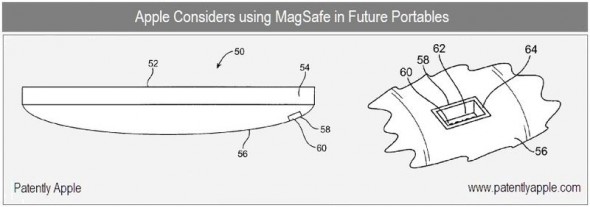
The U.S. Patent and Trademark Office published an interesting continuation patent application from Apple yesterday. Apple's patent says, "the connector 62 may be a power connector such as the MagSafe power connector manufactured by Apple Inc. of Cupertino, Calif. The MagSafe power connector utilizes a magnetic attraction to help retain a corresponding connector thereto."

Plenty of speculation could be made about what MagSafe charging means for iOS devices...

Instagram: A Beautiful Photography App And Social Network

Instagram is a new camera app for the iPhone with a focus on social networking. The app offers some wonderful, lomo-like filters to make your photos not look so crappy. There are dozens of photography apps that do this well, so what makes Instagram special?

Sharing your photos through social networking is a huge part of Instagram. The app’s developer, Kevin Systrom, descibes Instagram as not merely a camera app, but  “a community focused on helping you collect, organize, and share the images of your life from your mobile phone.” Instagram packages this community very elegantly. The look and feel is clean and fast, and there aren’t any gimmicks...

Google Goggles Arrive on the iPhone

The Google Mobile app for iPhone was just updated to support Google Goggles, a feature that has been available on Android for awhile. So what is Google Goggles? And why is it a big deal?

Google Goggles is the next step toward merging the physical world with the online world. While it’s definitely a baby step, Googles is still groundbreaking in the search and mobile space. Goggles allows you to take a picture of essentially anything in real life: buildings, books, wine bottles, or just plain text, and get results from Google about that object...

Glif – the iPhone Accessory You’ve Been Waiting For

Glif is an upcoming iPhone 4 tripod and mount from the mind’s of Dan Provost and Thomas Gerhardt. Glif’s website describes the product as, “a simple iPhone 4 accessory with two primary functions: mounting your iPhone to a standard tripod, and acting as a kickstand to prop your phone up at an angle.”

The device is a small, L-shaped piece of injection-mold plastic with an embedded tripod mount. Glif locks around the long-sided part of your iPhone and snaps into any standard tripod... 

Google Books on Your iPhone

I’ve always wanted an easy way to have a digital library of what I’ve read, what I’m reading, and what I want to read. A Kindle or iBooks library is helpful in having reference on what to read and what has already been read.

However, I haven’t found a good way to handle the recording of physical books I’ve read or books that I’ve read online in another format. I’ve been searching for an easy, cloud-based digital “shelf” for my reading life.

How silly of me to not look farther than Google for my answer. I am reliant on Google in my daily life for email, documents, RSS feeds, and of course, search. I’ve used Google Books only a couple of times to find something like an excerpt from a public domain book. It was not until today that I saw the “My Library” feature of Google Books. Lo and behold it was exactly what I was looking for...
Swearch – A Swanky Startpage for Your iPhone

Swearch.me is a web app created by Steve Streza, a web and mobile developer. The app uses HTML5, CSS, and Javascript to deliver an elegant search engine experience in mobile Safari. Everything is retina display-optimized and lighting fast.

The current engines offered are Google, Twitter, Wikipedia and Flickr. When you visit Swearch.me on your iPhone, you see the Google engine first. Simply swipe your finger from right to left to switch between Twitter, Wikipedia and Flickr’s engines...