How to Downgrade iPhone iOS 4.2.1

By , Dec 2, 2010

Let’s say you recently updated your iPhone to iOS 4.2.1 and for various possible reasons, you are already regretting this move. It is possible to downgrade your iPhone 4.2.1 to a previous iOS, but for this, you need to have your SHSH blobs on file for the iOS you want to downgrade to.

To be completely clear, if you don’t have your SHSH blobs on file for the iOS you want to downgrade to, you will not be able to downgrade. There is no way around that. This being said, here is how to downgrade iPhone iOS 4.2.1 to  4.1, 4.0.2, 4.0.1, or 4.0…

During the downgrade process, your iPhone contacts Apple’s servers to sign the firmware and make sure it can be downgraded. When a new firmware comes out, Apple signs the previous one for a few more days then stops, so technically, you can’t downgrade any longer.

The trick is to make your iPhone believe it is talking to Apple’s servers, while in fact it is talking to Saurik’s servers where your SHSH blobs are saved. That’s exactly what we’re going to do.

Downgrade iPhone 4.2.1 to 4.x

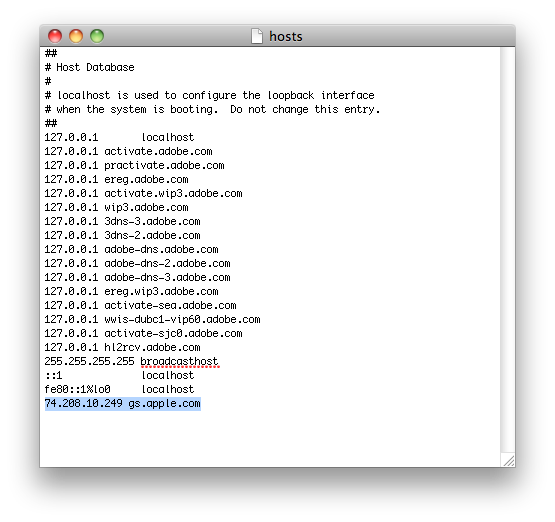
Step 1 for Windows: Make sure you are logged in with administrator privileges. Navigate to C:/Windows/System32/drivers/etc and open the filed name “hosts” with NotePad. Add the following at the very bottom of the file: 74.208.10.249    gs.apple.com

Save the file in the same directory.

Step 1 for Mac: In Finder, go to Go > Go To Folder, and enter /etc. Search for the “hosts” file and right click on it to open with TextEdit. Add the following at the very bottom of the file: 74.208.10.249    gs.apple.com

Click Save As to save the edited file on your desktop. Name the file “hosts”, and make sure to uncheck the box that says “if no extension is provided, use .txt”. Now drag and drop this edited file to /etc.
Step 2: Download the firmware you want to downgrade to from our downloads section.

Step 3: Put your iPhone in DFU mode. Launch iTunes and plug your iPhone in. Press and hold the home and and sleep button together for 10 seconds. After exactly 10 seconds, release the sleep button while still holding the home button. Keep holding the home button until iTunes tells you it has found an iPhone in recovery mode.

Step 4: Now hold the Option key (Mac only) or Shift key (Windows only) while clicking the Restore button in iTunes. A dialog box will pop up and you’ll be able to choose the firmware you want to downgrade to, downloaded in step 2.

Step 5: Your iPhone might throw some errors (ie. error 1004 or 1015). That’s ok. It’s normal so don’t freak out and just click “ok”.

Step 6: Your iPhone should now be stuck in recovery mode, showing the “connect to iTunes” logo. To get out of this, simply download and install TinyUmbrella, launch it, then click on”Exit Recovery”.
That’s it. You should now have successfully downgraded your iPhone.

  • Share:
  • Follow:
  • Japol

    i was not able to back up my SHSH Blobs, oh, how i wish i could go back to 4.1 because 4.2.1 is just like 4.0.2.

    • karan

      same thing here bro!my shsh dont not get saved so when i restore with 4.1 gives error n stuck on apple logo:(

  • Suavedude

    Well laid out bruv. Thanks for all these efforts. I succesfully upgraded my OS3.1.3 to iOS 4.2.1 2days ago. But while messing about with Cydia, my phone got stuck in safe mode ONLY. Spent hrs looking for solution till I tried exactly what you wrote here. It worked. Now I’m back to 3.1.3 BB 6.15.00. And my phone still works. Will attempt upgrade again soon.  call us crazy and risktakers.

  • AJ

    I was unable to do this on iPhone 4. I was able to down grade the os but update made to the modems firmware made 3G unusable.

    • Suavedude

      Is Cydia installed in your 3G?

      • http://www.hotmail.com Bob

        Dó this work in 2011?

  • Burge

    Done this a few days ago …I just do not want a tethered jailbreak..So I’ll stick with 4.1 for now

    • Z

      +1 I’m waiting on pwnage tool to be updated

  • itunesfail

    On Oct 11, 2010 you stated cydia usually saves your shsh blobs but you recommended backing. Well I should have listened but being a novice jailbreaker I didn’t. I did notice after I re-jailbroke that some of my settings where saved such as when i reinstalled sbsettings all my previous settings where back on my device before the upgrade to 4.2.1. I didn’t have to assign activator gestures they where just like I had them before. How can I find out if shsh blobs where saved? Thanks for the help.

    • Burge

      Dud you press the make my life easier . When you first jailbroke ? If so that are saved on cydia sever .. Or did you save them with umbrella ? If so they are save on cydia and your PC/MAC.. (if you didnt change the settings ) if there in cydia use umbrella to get them on your PC/MAC . Umbrella can fetch them for you..

      • Corey

        Oh My Gosh…where in the hell did you learn to speak.

  • Cryptic

    I have an unlocked iOS 4.2.1 and BB 6.15.00.. will this downgrade lock my phone again? in which case i will never downgrade.. pls help.. ?????

    • Suavedude

      I don’t see why it should(technically speaking). UltraSnow 1.2 unlocks BB 6.15.00 period regardless of your firmware. As long ad you have access to Cydia and able install UltraSnow 1.2

    • Burge

      Only the iOS can be downgraded not the baseband ..you can still unlock after a downgrade

  • David

    I upgraded to 4.2 through redsn0w. I went into Cydia and downloaded the updates they wanted me to download. After that I downloaded ultrasn0w 1.2 and my cell service is showing no service.I hae tried to downgrade to 4.1 or 4.0 and the recovery mod won’t kick over in tinyumbrella. Did I do something wrong?

    • Suavedude

      Did you tick the “make iPad BaseBand” thing during JK? More important still, what BB are on now? Finally, what level did you get to b4 you launched Tiny?

    • Wahid Makrani

      dude you hav to check ” upgrade ipad baseband” check if ur stil on the older BASEBAND.. for u to be able to c ur cell service u hav to update ur baseband to 6.15.00

  • David

    I did not tick the “make iPad Baseband” thing since I don’t know what JK is. The phone is on 05.15.04-5.9_M3S2 baseband. I got to iTunes coming up with the error message 1015 and I “kicked my device out of recovery” but it keeps showing the “connect to iTunes” icon.

  • Rich

    @David

    You needed to click the iPad baseband to unlock. If you’ll read iPhone dev team’s blog, you’ll see they clearly explain the reason why and the risks. Also, I believe JK was just a typo for JB, which is jailbreak.

  • David

    @Rich Thank you! My phone is now working

    • http://www.twitter/madebyemattel Misty

      Ok your iphone was stuck in the recovery mode loop? and now it is working what did you do???? Mine will not ever come out of recovery no matter what I do, redsn0w, itunes, tinyumbrella, ireb, nothing!!!!!!

      please help me I miss my phone. :/

      • Chris

        If you on 4.2.1 and your phone got stuck in recovery mode , None of them are able to kick you out of recovery mode. The only solution is go back to 4.1
        Step 1
        run tinyUmbrella and choose your saved 4.1 SHSH Blobs and click “Start tss Server”
        Step 2
        Now open iTunes and press on “Restore” button while holding the Shift key , now point it to your 4.1 Stock firmware
        Step 3
        itunes will give you error 1015 and u should see your phone got stuck in recovery loop again ,but this time you are able to use the TinyUmbrella to kick you out of Recovery mode.
        Step 4
        Thats it ,ur phone should now boot normal , and youre on 4.1
        Hope it helps !

  • bongo

    good guide, but way to advertise cracked photoshop installation :/

  • Alex

    Nice!
    I had fw 4.2.1 with jb and unlock. I just downgraded to 4.1. Redsn0w and ultrasn0w worked. now i got a untethered iphone 3gs instead of a tethered! Me like!! =D

    • http://www.twitter/madebyemattel Misty

      How did you downgrade? Did you have shshs on file?

  • Katharine

    I have an iPhone 4 with iOS 4.2.1 and Firmware 03.10.01 that I’m desperately trying to unlock. Have successfully jailbroken with redsn0w but ultrasn0w won’t unlock due to the software being to current, so now I’m trying to downgrade. Will the above work on my system?
    Cheers

    • John

      Your current BB is still unlockable and Downgrading will not change your BB. Dev Team is working for an unlock for the iPhone 4.

  • pheonix

    I have a 3GS that I JBd with redsn0w. All went fine.
    After installing ultrasn0w it has gotten stuck in a recovery loop.

    Tried to restore using this guide and I get error 1602.
    I’m just trying to get out of this damn loop!
    Help please!

  • John

    I thought you can only restore with a cooked ipsw once you changed your BB to 6.15. Did you use an official ipsw to restore back to 4.1? I’m thinking of downgrading from 4.2.1 to 4.1 and use limera1n to JB and ultrasn0w 1.2 to unlock. My push is not working on 4.2.1 and my battery is draining too fast, not to mention it runs hot. I have an older model 3GS.

    • Chris

      Step 1
      run tinyUmbrella and choose your saved 4.1 SHSH Blobs and click “Start tss Server”
      Step 2
      Now open iTunes and press on “Restore” button while holding the Shift key , now point it to your 4.1 Stock firmware
      Step 3
      itunes will give you error 1015 and u should see your phone got stuck in recovery loop. Use TinyUmbrella to kick you out of Recovery mode.
      Step 4
      Thats it ,now youre on 4.1
      Cheers ! i tried this methos many times and it always works even u have BB 6.15

  • Heinrich

    Once you go to the 6.x iPad Baseband (which is exactly what this new carrier unlock does for you in Cydia) then ***you can never, ever go back***. You can downgrade your OS but the Baseband stays the same ie your iPhone is now forevermore not capable of being updated via iTunes to any new OS that Apple releases. EVER. You will from that point onwards, be stuck cooking custom firmware. And, when you sell your nice shiny iPhone to the next unsuspecting guy, he will also be forced to jailbreak the phone in order to upgrade it. So, your iPhone will have very limited resale value, because only jailbreakers can buy it.This seems like a super bad idea to me. I have found (thank you God) a kind friend with an exact 3GS like mine with an older OS and baseband, and traded so I can still unlock using older methods, because there is no way in hell I am going to put an iPad OS on my phone.

  • Heinrich

    JOHN:

    As I read it, FuzzyBand will downgrade your Baseband ONLY on older 3GSes and 3G. So you may be in luck. Mine was newer Baseband. Look up FuzzyBand.

  • ben

    hey guys, so I have an itouch 3g (ios 3.2 or something, jailbroken). BUT 2 days ago, I made the mistake of updating to the latest ios 4.2 …

    I’d now like to downgrade to ios 4.0 – will the steps above work?? or am i screwed because i never backed up my SHSH blod in the first place? confused on that point.

  • PJ

    I have stock 4.1 shsh saved on my computer but i upgraded my baseband to the ipad baseband through redsn0w and am now on 4.2.1. I keep getting “could not be restored because firmware is not compatible.” Am I stuck with 4.2.1 or is there a way to downgrade to 4.1?

    • Chris

      Read my comment above , i am sure u can downgrade to 4.1 since you have saved your 4.1 shsh regardless of BB 6.15

  • Samrat

    THANXXXXX A TON.. Downgraded iPhone 4 from 4.2.1 to 4.1….Worked for me.

  • rod

    if u r in 4.2 06.15.00 use the new pwnage tool 4.1.3 (no problem) to downgrade 4.1 ..but the baseband CAN’T downgrade…

  • JAS

    will this downgrade the baseband too ?? cuz right now i have a iphone 4 with BB 2.10.04 so if i downgrade my phone to 4.0.2 will the baseband turn to 1.59.00

  • http://www.weflyhere.com cashman

    i have 4.2.1 jB can u give me step by step to dwngrad and make unlocked?

  • lucas

    i am having a problem with my iphone 3gs. it is the new bootrom running 4.2.1. BB 05.15.04 now hearing what you all are saying about the dangers of going to the BB of 06.15, i was wondering if i downgrade my 3GS to 4.1 will that change the BB so that i can unlock my phone safely? If so can you please link me the site that has a step by step process on how to downgrade the 3gs. I do not think i have any saved SHSH files. SO am i just F***ed and i will have to go with the 06.15 BB? Any help would be awesome i havent had a phone for a week i NEED it back ! Thanks!

  • BabylonX

    If you read some posts above you wouldn’t ask that question.

    Answer: BB’s can never be downgraded. Never. NEVER. So if you want to unlock do not update it in the first place. And don’t use the iPads one because if you do you are stuck with it probably forever.

  • Alex

    so in the other words if you were never 4.1 you could never go to that firmware again -_-

  • Dan

    Hey can anyone help me jailbreak and downgrade my iPhone 3G I jailbroke it a few times but couldnt get service and it got stuck in recovery mode but I got it out but that forced me to go back to the 4.2.1 firmware it has the 05.15 baseband any help will be greatly appreciated :)

  • alex

    Hey PLease reply i do not have the file name ‘ hosts’ on my laptop HELP!

  • alex

    SORRY I FOUND IT! ON MY LAPTOP THERE 2 HOSTS ONE ::: ‘HOSTS UMBRELLA AND 2 : ‘HOSTS’ WITCH ONE?

  • alex

    OMG THANKS MATE ALOT THIS WORKED PERFECTLY FINE!!!! MANN YOUUURRR MYYY HERRROOOO!!!!! I UPGRADED TO 4.2.1 BUT YOU COULDNT JAILBREAK IT, BUT I WANTED TO DOWNGRADE TO 4.0 TO JAILBREAK IT! BUT WITH THIS TUTORIAL IT HELPED ALOTT THANKSS MATEEE YOUUURRR THEEE MANNN!!!!!!

  • tenha

    I downloaded the 3.0 and 4.0 versions, but there is no ipsw file. should I create it? how it should be created? which one is faster 3.0 or 4.0? thanks.

  • Fahim

    I have a iphone 4, v4.2.1 bought last week need to unlock for the different sim, is it possible now, or if i downgrade to any version can i use different sim, or do i have to jailbrake and unlock it again….after downgrading and which version u suggest most

  • iH8beingCONFUSED

    How do people find this so simple? I got confused in step 1… im just gonna have to wait till they have a jailbreak this you simply click “Jailbreak” and it does it. Hopefully it wont be long… thats how i did my other one, but i aciidentely screwed up and updated to 4.2.1. Does anyone know when it will be simple again??

  • Hockey

    Does this work 4 iPod touch??? I want to downgrade from 1.2.4 to 4.1 any help is greatly apreciated

  • hemorrhage666

    anyone familiar with bypassing these errors?

    seem to halt the update process

    1/6/11 4:41:05 AM usbmuxd[3006] _MobileDeviceConnect_locked (thread 0×100681000): This is not the droid you’re looking for (is actually com.apple.mobile.restored). Move along, move along.
    1/6/11 4:41:05 AM usbmuxd[3006] _MobileDevicePairWorker (thread 0×100681000): Pair worker could not connect to lockdownd: 0xe8000028
    1/6/11 4:41:05 AM iTunes[3088] _MobileDeviceConnect_locked (thread 0xa0720540): This is not the droid you’re looking for (is actually com.apple.mobile.restored). Move along, move along.
    1/6/11 4:41:05 AM iTunes[3088] _MobileDeviceConnect_locked (thread 0xa0720540): This is not the droid you’re looking for (is actually com.apple.mobile.restored). Move along, move along.
    1/6/11 4:41:05 AM JavaApplicationStub[3033] _MobileDeviceConnect_locked (thread 0x1347b6000): This is not the droid you’re looking for (is actually com.apple.mobile.restored). Move along, move along.
    1/6/11 4:41:05 AM [0x0-0x5f05f].TinyUmbrella[3033] OSXDeviceLibrary[SEVERE|Thread-4|4:41:05]: Unable to connect to device [-231794332]
    1/6/11 4:41:36 AM com.apple.usbmuxd[3006] MuxTCPInputSCE received RST for 0×2-c35d0a1f1233e23e113332783a394be0d096254a@0xfd500000:12345->0x100329a00-iTunes/com.apple.iTunes:3840: handleConnectResult: failure – 61
    1/6/11 4:41:36 AM com.apple.usbmuxd[3006] MuxTCPInputSCE received RST for 0×2-c35d0a1f1233e23e113332783a394be0d096254a@0xfd500000:12345->0x102d00030-iTunes/com.apple.iTunes:4096: handleConnectResult: failure – 61

  • James

    Hello, I have an iPhone 4 that is NOT jailbroken. I have it currently on IOS4.2.1 and the only tIme it was jailbroken was on iOS 4.1. That only last like a week though. But my question is, I hate 4.2.1 cause my phones battery is shit now so I want 4.1 back. Is there anyway I can downgrade despite me NOT having a jailbroken device? Is there anyway I can get SHSH blobs from the Internet or something? Thanks for any possible help ahead of time.

  • James Amato.

    Hello, I have an iPhone 4 that is NOT jailbroken. I have it currently on IOS4.2.1 and the only tIme it was jailbroken was on iOS 4.1. That only last like a week though. But my question is, I hate 4.2.1 cause my phones battery is bad now so I want 4.1 back. Is there anyway I can downgrade despite me NOT having a jailbroken device? Is there anyway I can get SHSH blobs from the Internet or something? Thanks for any possible help ahead of time.

  • James Amato.

    Hello, I have an iPhone 4 that is NOT jailbroken. I have it currently on IOS4.2.1 and the only tIme it was jailbroken was on iOS 4.1. That only last like a week though. But my question is, I hate 4.2.1 cause my phones battery is bad now so I want 4.1 back.

  • James Amato.

    Oh god I am sorry, I didn’t know I submitted multiply posts of the same thing. I’m so sorry, it said on my phone it didn’t and there was an error.
    /: my bad, don’t think I’m trying to spam.

  • Gina

    I’m trying to downgrade from 4.2 to 4.1, I downloaded the 4.1 firmware to my desktop but it comes zipped.. When I unzip the file it splits up and I don’t have the little white box.. ITunes does not recognize it as the .ipsw file.. I’ve even tried just using the zip file, that doesnt work either..What should I do? How do I get the little white box on my desk top? I have the 4.2 box but I need the 4.1 box to downgrade?! Please help! Thanks..

    • Precioustulip

      Im wondering if you ever get an answer for this. I.m having the same problem and don.t know what to do :(

  • prof66

    I am trying to downgrade 4.2.1 to 4.0.1, but the process halts in step 5 with `unknown error 3194` given bu itunes. any idea how to avoid the problem?

  • jeremy

    everytime i try to downgrade my iphone 3g from 4.2.1 it doesnt work! help!!!!

  • Rocketman

    Hi, I have a jailbraked iphone 4 with 4.2.1 and firmware 03.10.01. Can this downgrade work to unlock the phone? I am guessing what the answer’ll be, but just want to make sure
    P.S.: Don’t not have no backup of any shsh.

    Thanks

  • Cristian

    Need help I saved my shsh blobs when I was on 4.2.1 then I want to downgrade to 4.1 or 4.0.2 is that possible

  • MICHEL NG

    HI I HAVE IPHONE 3GS 16G WITH VERSION 4.0( 8A293 ) AND M- FIRWARE 05.14.02 SHOW ME HOW I CAN JBREAK & UNLOCK …THANKS …

  • Happy Kid

    I love u, man.

  • Ragnum

    Hello,

    I tried to downgrade my IPhone 4 from 4.2.1 to 4.0.1 by saving shsh blobs with tiny umbrella and after that the phone got stuck in recovery loop. Then I tried to restore it to 4.1 and also restored and updated (without tiny umbrella) to latest version again (4.2.1) via itunes but none of them has worked and the phone is still in recovery mode (itunes symbol). Neither tiny umbrella nor recboot or ireb can’t help getting it out of recovery mode.

    Afterwards I read somewhere that apple has designed IPhone 4 – 4.2.1 so that it gets into recovery mode if baseband is tried to be changed which makes tiny umbrella become useless. I tried to restore the phone several times by changing the log file, clearing the “iphone software updates” folder but it is still stuck.

    Any ideas or help?

  • Tim

    For anyone trying to downgrade, your phone had to have whatever ios you are trying to downgrade to previously installed on it. You also would have had to save your SHSH blobs with the older ios using tiny umbrella while Apple was signing it. Which means if you have never saved your SHSH blobs you can NOT downgrade. Saving your SHSH blobs now will only let you downgrade back to whatever ios you are currently running. Also you can not save old SHSH blobs after Apple has released an update ie. you can not save SHSH for 4.1 since Apple has release 4.2.1. If you have saved your SHSH’s previously it should work because I literally just downgraded a 3GS from 4.2.1 down to 4.1 and it worked like a champ. Thanks Sebastien.

  • Deep

    FINALLY SOMETHING THAT WORKS,THANK YOUUUUUU!!!!

  • ShanePersonPeople

    If you do this, and you backup before you do it, you lose all your settings, you just get back the actual media because it will say “Software too old”. So you will have to set up a new iphone thingy, i thought it was well worth it, but some may disagree. For me yes it will take a while to get all my settings set up, but yes i’ll find new settings on the way.