Jailbreak Apps

Action Menu – My Favorite Jailbreak App Updated for iOS 4

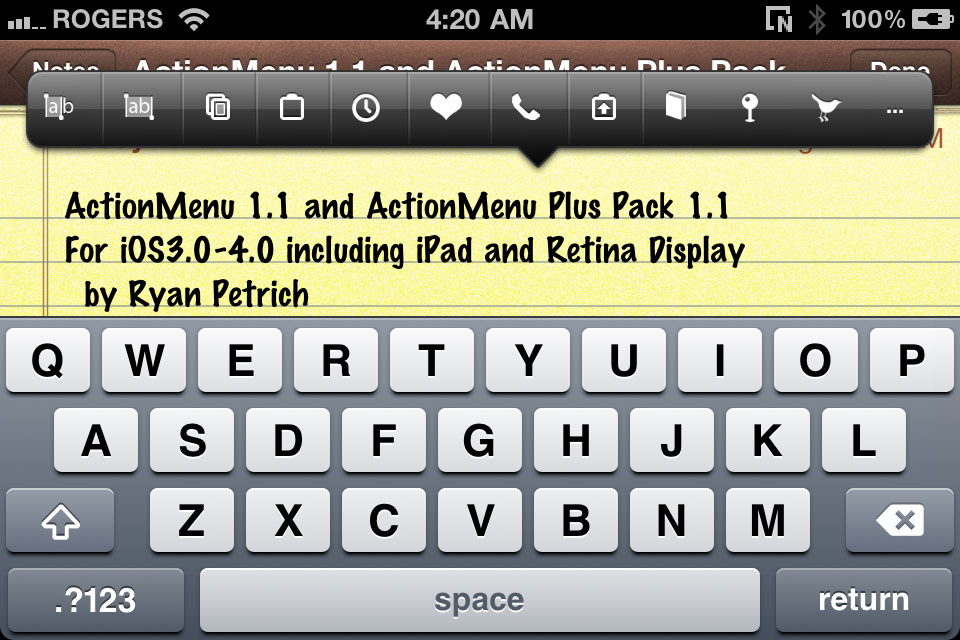
It's like Christmas for me right now. One of my favorite jailbreak apps, Action Menu, has been updated to bring support for iOS 4, the iPhone 4 and the iPad. I've always confessed my love for Action Menu, which saves me tons of time in my everyday usage of the iPhone.

For those of you who don't know about Action Menu, let me give you a quick glimpse at what it does. Action Menu takes a stab at enhancing the copy/paste function of your iPhone by adding a bunch of add-ons to it. The lite version is free but for $2.99, you can get the full-featured app, which I think is well worth the money.
How to Send SMS from Your iPad

Want to send SMS from your iPad? There is an app for that, assuming you have a jailbroken iPad 3G. SwirlyMessage is a new jailbreak application by the developer of SwirlyMMS that allows you to send and receive real SMS and MMS on your iPad 3G.

In order to use SwirlyMessage, you need a jailbroken iPad 3G, and make sure that your carrier data plan allows for sending sending SMS and/or MMS. I don't have an iPad 3G so I wasn't able to try this application but from what I understand, SwirlyMessage simply provides an interface to send SMS through your carrier. If that's the case, extra cost for each SMS sent/received might apply.

You can download SwirlyMessage from Cydia for $12. Please let us know what you think of this application should you decide to give it a try.

Replace Your iPhone “Slide to Unlock” by the Volume Button

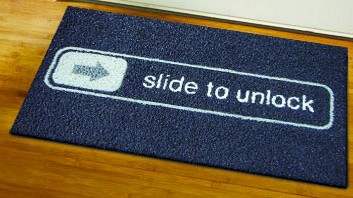
Are you tired of using the "Slide to Unlock" thingy on your iPhone to get access to its homescreen? Then VUnlock might the jailbreak app you've been waiting for. VUnlock allows you to use the volume button of your iPhone to unlock the screen.

Using the volume key to access your phone might be a faster way than turning on the screen and swiping your finger across. The downside is you might accidentally unlock your iPhone more often now it's just one push of a button away.

FolderCloser Jailbreak App Automatically Closes Your iPhone Folders

If like me you get annoyed by folders staying opened after you launch and close an application from within this folder, then FolderCloser should be the right mod for you. Available for free in Cydia, FolderCloser will automatically close the opened folder at app launch. There are no settings or icon for this app. Just install it and your folders should now close by themselves.

Five Icon Switcher Tweak for iPhone

Five Icon Switcher is a new mod by Chpwn that, just like the name suggests, brings an additional icon to your iPhone multitasking switcher. Not groundbreaking but simple and very convenient. That's the kind of mods I like!

Safari Download Manager Updated for iOS 4

Safari Download Manager, the extension that adds a powerful download manager to the iPhone's web browser, has been updated to work on iOS 4, bringing support for the iPhone 4 and the iPad.

Although a bit pricey, Safari Download Manager is a great application that really unleashes to power of the iPhone, allowing you to download and save on your device virtually any file out there.

You can download Safari Download Manager from Cydia for $5.

Remove Background Toggle for SBSettings

Remove Background is a new mod available in Cydia that adds a toggle to SBSettings allowing you to remove all apps from the task switcher, and kill apps processes at the same time. It's pretty handy because your app switcher can get messy really quickly if you recently opened several applications

I've been looking for a similar app for a while and although Remove Background works as advertised, I find it to be too "extreme" for me. I rarely (if ever) want to kill all apps at once. Instead, I'd like to be able to select in the settings what apps I never want to run in the background or appear in the task switcher. If you're a developer, feel free to use my idea...

What about you? Have you used Remove Background? What do you think about it?

This is How Much Data Your iPhone Uses When Using FaceTime on 3G

There are a few jailbreak apps on Cydia that let you use FaceTime on 3G: 3G Unrestrictor, My3G, and FaceBreak. If like me you're on an unlimited data plan, data usage is not a problem. If however you are on a capped data plan, using FaceTime over 3G could take you overboard.

A few days ago, I made a FaceTime call over 3G for 10 minutes to figure out how much data FaceTime uses on 3G. As you can see on the image above, I sent about 15 MB of data and I received about 12 MB. I think I sent more than I received because I was moving around a lot.

Total data usage for a 10-minute FaceTime call on 3G: 26.5 MB. That's about 2.65 MB per minute.

Obviously your mileage may vary but these numbers shouldn't be too far from what a FaceTime call over 3G will cost you.

FaceBreak Allows FaceTime Over 3G

FaceBreak is a new jailbreak application that allows you to do FaceTime on 3G. It is very similar to 3G Unrestrictor and My3G, except it only works with FaceTime.

It is available for $1.49 from the Cydia Store. It is cheaper than 3G Unrestrictor and My3G, but again, it doesn't do as much. If you only need FaceTime to work on 3G, then FaceBreak is your best bet. If however you need a mod to allow other apps to run on 3G, then you'd be better off going with My3G.

Have you tried FaceBreak? How do you like it?

NoCyFresh Prevents Cydia From Refreshing at Launch

NoCyFresh is a new jailbreak app available in the http://repo.modyouri.com/ repo that provides a way to enable and disable Cydia's refresh of packages at launch. You can still manually refresh by going to the Changes section and hitting "refresh".

I haven't personally tried it but I'd love to hear your thoughts if you have. It seems that NoCyFresh can be a real time saver. Comments?

UPDATE: iDB reader Burge tells us this is a dangerous package. After a bit of research, turns out he is correct. Don't install NoCyFresh (or do it at your own risks)

Face Time Mod Improves Quality of FaceTime Video Calls

Face Time Mod is a new jailbreak app that changes the FPS (Frames Per Second) during your FaceTime calls to optimize the video quality depending on your Internet connection. This allows for better quality video if your wifi connection can handle it. In the same way, it will lower the quality of the video if you're running FaceTime on Edge using My3G for example.

By default, the original FPS is a minimum of 15 and a maximum of 15 as well. Face Time Mod brings the minimum down to 6 FPS and the max to 30 FPS.

There is one big downside to this app though: both iPhones must have Face Time Mod installed for it to work.

Face Time Mod is available for free in Cydia under the http://repo.modyouri.com repo.

What do you think of it?

Add Contacts to Your iPhone Springboard with CallMe

CallMe is a jailbreak app that adds contacts directly to your iPhone springboard allowing you to call/text them in just one tap. After installing the application, you can launch it and choose the contacts you want to add to the home screen. If the contact has several numbers tied to him, you can choose which one you want to use, and whether you want to use it for call or SMS.

Contacts added to the home screen can be put into folders. Pretty convenient!

CallMe is available in Cydia for free. You will have to add the following repo: http://ispaziorepository.com.

If you try CallMe, please let us know what you think of it.