iPhone

Stay up-to-date on the latest iPhone news and learn new tips and tricks with our comprehensive tutorials. From software updates to new features, we’ve got you covered.

Apple working to bring comprehensive clinical data to iPhone

Aiming to turn your iPhone into the “one-stop shop for all your medical info,” a secretive team within Apple's growing Health unit has been in talks with developers, hospitals and other industry groups about bringing comprehensive clinical data to the device.

CNBC has learned from a half-dozen people familiar with the team that a future revision to the stock Health app could let users store their detailed lab results and stuff like allergy lists to their iPhone for optional sharing with hospitals, doctors, health developers and more.

“Imagine turning to your iPhone for all your health and medical information—every doctor's visit, lab test result, prescription and other health information, all available in a snapshot on your phone and shared with your doctor on command,” reads the article.

In its quest to turn the handset into the central bank for all health-related information, Apple is allegedly exploring potential acquisitions and attending health IT industry meetings.

It even hired some of the top developers involved with FHIR, an increasingly popular protocol for exchanging electronic health records, like former Epic Systems executive Sean Moore and Ricky Bloomfield, a physician from Duke University with a background in medical informatics.

According to CNBC:

Apple in recent months has been involved with discussions with health IT industry groups that are looking for ways to make this goal a reality, two of the people said.

These include "The Argonaut Project," a private sector initiative that is promoting the adoption of open standards for health information and "The Carin Alliance," an organization looking to give patients a central role in controlling their medical data.

Since iOS 10, the Health app has supported the Health Level 7 Continuity of Care Document (HL7 CCD) standard, which allows users to bring their own health records to the Health app. Users can share their records in an appropriate format with doctors.

Th Cupertino giant's new initiative, however, seems to be a lot broader in scope because, unlike the ability to store a limited snapshot of HL7 CCD records on the device, it would make sharing full medical data with hospitals and medical professionals a reality.

If successful, the company could easily solve one of the medical community's biggest problems—easy sharing of medical data and patient information between doctors, especially among different hospitals or clinics.

A March report said Apple has been working on a sensor for Apple Watch to non-invasively track blood glucose, a prototype of which Tim Cook is reportedly wearing on his body. Recently, the iPhone maker hired Stanford University's digital health efforts chief, Sumbul Desai.

Twitter revamped with dynamically updated Reply/Like/Retweet counts, Safari Reader support & more

Twitter today announced a major overhaul, making the app feel lighter, faster and easier to use with faster navigation via a new side menu, bolder headlines, revamped icons and more.

The new side navigation menu lets you quickly access your profile, accounts, settings and privacy. As a bonus, you can now add filters and stickers on your profile image, if you'd like.

Tweets now update dynamically with Reply, Retweet and Like counts so that you can easily see conversations as they’re happening, in real-time. The app now features support for opening links to articles and websites in Safari’s in-app viewer.

This lets you log in to websites using your saved Safari passwords and enjoy articles in the browser's Reader mode, all within the Twitter app.

New switches in Twitter's settings interface let you turn on increased color contrast, decided whether or not you'd like links to open in Safari's Reader View and more.

Accessibility settings are now in a more prominent location.

So fresh. So clean. So live.

Check out our new look.https://t.co/ClWbwi8CEH pic.twitter.com/nR27POQkEi

— Twitter (@Twitter) June 15, 2017

Here's an overview of the new features and design:

Profile, additional accounts, settings and privacy—all in one place. A new side navigation menu and fewer tabs at the bottom of our app=less clutter and easier browsing. You told us you loved this change on Android last year and we’re excited to now bring it to iOS. Links to articles and websites now open in Safari’s viewer in the Twitter app so you can easily access accounts on websites you’re already signed into (iOS only). We’ve refined our typography to make it more consistent and added bolder headlines to make it easier to focus on what’s happening. Also, rounded profile photos make it clearer to see what’s being said and who’s saying it. More intuitive icons make it easier to engage with Tweets—especially if you’re coming to Twitter for the first time. For example, people thought the Reply icon, an arrow, meant delete or go back to a previous page. We switched to a speech bubble, a symbol most know and love. We also made the icons lighter for more seamless interaction Tweets now update instantly with Reply, Retweet and Like counts so you can see conversations as they’re happening, live (not available on twitter.com and Twitter Lite).

The aforementioned changes are rolling out across twitter.com, Twitter for iOS, Twitter for Android, TweetDeck, and Twitter Lite over the coming days and weeks.

Twitter for iOS is a free download from App Store.

Facebook for iOS now lets everyone use animated GIFs in comments

Facebook today announced that users of its mainland mobile app can now use animated GIFs in comments. This sought-after feature has been enabled for all people on Facebook globally.

“We know people love communicating with GIFs on Messenger and we’re also making it easier to use GIFs on Facebook,” said the social network. When making a comment in Facebook for iPhone, iPad or iPod touch, tap the new GIF button to spice up your message with animations.

Additionally, Facebook rolled out some new and exclusive GIFs they’ve created featuring some of the Internet’s biggest stars, including DNCE, Logan Paul, Amanda Cerny, DREEZY, Patrick Starr, Violet Benson, Wuz Good, Brandi Marie and Landon Moss.

To use them, search #GIFparty when sharing a GIF on Facebook or Messenger or visit GIPHY.com/Facebook.

Since rolling out support for animated GIFs on Messenger back in 2015, users have sent nearly thirteen billion GIFs in the last year alone via the messaging app, or nearly 25,000 GIFs every minute. GIF sends on Messenger have tripled in the past year and New Year’s Day 2017 was the most popular day ever for GIF sends on Messenger, with more than 400 million GIF sends.

Facebook for iOS is available at no charge in App Store.

Eleven: an upcoming collection of iOS 11-like jailbreak tweaks

If you’re jailbroken on iOS 10 and yearn to make your device look like it's running iOS 11, then you’re in luck because prominent developers are taking on a full-scale project to bring several iOS 11 features to the jailbreak community before the operating system update is released this Fall.

The project is being undertaken by iOS developers LaughingQuoll and Antique_Dev, and will be called Eleven. It will be a collection of multiple different jailbreak tweaks that each focus on specialized features of iOS.

How to disable ‘Behind the Lyrics’ pop-ups in Spotify

Spotify is perhaps one of the largest names in the music-streaming industry, and while Apple Music is indeed catching up, a large number of iPhone users are still using the third-party alternative.

Despite its popularity, many Spotify users aren’t fond of the persistent Behind the Lyrics feature that interrupts your view of the album artwork whenever music is playing.

Wistron confirms at least one new iPhone will be waterproof and have wireless charging

At least one of Apple's new iPhone models coming this year will be waterproof and have wireless charging capabilities, Apple partner Wistron has officially confirmed.

According to Japanese outlet Nikkei Asian Review, waterproofing will alter the assembly process for the upcoming iPhones a little bit.

Yuanta Investment Consulting and Fubon Securities analysts claim Wistron is splitting orders for the upcoming 5.5-inch devices “with flat displays” with Foxconn, meaning Wistron is probably referring to an LCD-based iPhone 7 Plus model as having wireless charging features.

KGI Securities analyst Ming-Chi Kuo predicted a few months ago that all three iPhone models coming this year would comet outfitted with wireless charging modules.

Wistron is an Apple partner that is currently making a small number of the iPhone SE and iPhone 6 handsets in India so it's a bit surprising that they would jeopardize their Apple business by confirming a feature the Cupertino firm has yet to discuss publicly.

Here's what a company official said:

Assembly process for the previous generations of iPhones have not changed much, though new features like waterproof and wireless charging now require some different testing and waterproof function will alter the assembly process a bit.

The iPhone 7 series is splash, water and dust-resistant, rated IP67 under the IEC standard 60529. According to Apple, “splash, water, and dust resistance are not permanent conditions and resistance might decrease as a result of normal wear.”

Wistron is probably talking about increased water and dust-resistance under the IP68 rating, like Samsung's Galaxy S8. The Korea Herald said in January that iPhone 8 would feature IP68-rated dust and waterproofing.

As for the rumored wireless charging features, Reuters recently reported that Apple has been testing at least five different wireless charging technologies.

In February, Apple joined the Wireless Power Consortium, prompting some watchers to interpret the move as an unmistakable sign that iPhone 8 would use the ubiquitous interface standard Qi (pronounced chee) that's being widely used for wireless charging across a number of consumer electronics devices.

Apple supplier Largan to ship 3D lenses soon, likely for iPhone 8

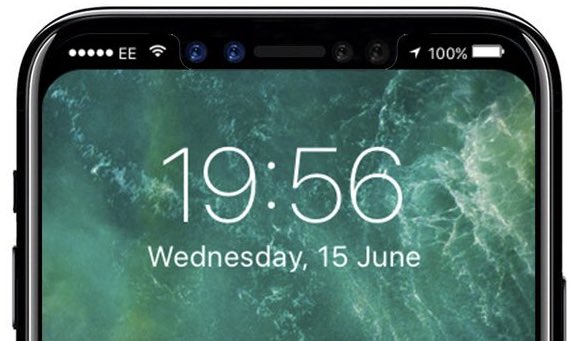
Taiwanese vendor Largan Precision, which supplies lenses for the dual-camera iPhone 7 Plus, recently confirmed it would start shipping facial recognition 3D sensors in the second half of this year, in time for iPhone 8.

The company is currently in the process of expanding production capacities. They'll be hiring a cool 4,500 workers for its new production facility, or nearly double its current workforce. Apple's OLED-based iPhone 8 is said to use 3D sensors to capture a user's face and iris, even in low-light conditions.

KGI Securities analyst Ming-Chi Kuo predicted that a next-generation FaceTime camera on iPhone 8 would augment standard RGB sensors with infrared transmitting/receiving modules and include a bespoke 1.4-megapixel sensor capable of detecting changes in light signals.

The next-generation camera would apparently use lasers invisible to the human eye for advanced features such as 3D selfies, accurate depth mapping, 3D modeling and more.

iPhone 8's image sensors should be built by Sony, like before.

Largan CEO Adam Lin said in a press conference this week after the company's annual general meeting, as reported by Nikkei, that they will have lenses for a 3D-sensing module “used in a smartphone ready to ship in the second half this year”.

No phone vendor has officially announced a device with 3D lenses, leaving only iPhone 8 as the most likely phone with 3D lenses that'll be ready to ship in the second half of 2017.

Jeff Pu, an analyst at Yuanta Investment Consulting, estimates that Largan will supply 90 percent of rear-camera lenses for 2017 iPhones, around half of the 3D-sensing lenses and up to one-third of the front camera lenses. Foxconn-controlled Genius Electronics Optical and Japan's Kantatsu are said to compete for the rest of the iPhone 8 orders.

Image: iPhone 7 Plus dual-camera system with Largan-made lenses.

Despite rear fingerprint sensor, Consumer Reports ranks Galaxy S8 higher than iPhone 7

Influential US magazine Consumer Reports today published their latest smartphone rankings. After weeks of “rigorous testing”, the organization has ranked Samsung's new Galaxy S8 Plus, which released in late April, higher than Apple's iPhone 7 and iPhone 7 Plus devices, which have been on the market for eight months now.

The testing procedure took into account popular user features such as design, battery life, cameras, display quality and more. The top spot was previously occupied by the earlier-generation Galaxy S7 and Galaxy S7 Edge.

As for Apple's smartphone, Consumer Reports ranked iPhone 7 Plus fifth.

Here are the top five smartphones, according to Consumer Reports:

Samsung Galaxy S8 Plus Samsung Galaxy S8 Samsung Galaxy S7 Edge LG G6 Apple iPhone 7 Plus

Despite the latest Galaxies not having a dual-camera setup, Consumer Reports doesn't think consumers will miss the depth of field photography and optical zoom features found on iPhone 7 Plus.

“A few top-end cameras, including the iPhone 7 Plus and the LG G6, have dual rear-facing cameras, to enhance either zoom or wide-angle photography,” notes the report.

“The Samsung phones haven’t gone that route yet—and we don’t think they suffer for it.”

The latest Galaxy phones have “some of the best smartphone battery life we've seen,” they added.

Consumer Reports testers found the latest Galaxies' curved AMOLED display with the drastically reduced bezels at the top and the bottom both pretty to look at and functional, with a bigger screen area in the same-size device.

That doesn't necessarily make the flagship Samsung phone comfortable to hold in one's hand.

“Even on the smaller model, it will be hard for most users to reach the upper regions of the screen with their thumb,” said lead phone tester Richard Fisco.

Consumer Reports' biggest gripe with the new Galaxy S8 family? An “awkwardly” positioned fingerprint sensor on the back.

Here's what they had to say about it:

The fingerprint scanner on the back is awkwardly placed. You can use the scanner for unlocking the phone, and that works well. But it's right next to the rear camera, and we found ourselves repeatedly poking around to locate it—and smudging the camera lens in the process.

Consumer Reports is, of course, the same publication that lost some of its credibility by first not recommending iPhone 4 due to Antennagate only to change its mind a few weeks later. The fact they're now pitting the latest devices from Samsung and LG against Apple's 2016 smartphone—which will be superseded by iPhone 8 in a three month's time—isn't helping either.

iWork apps gain editing improvements, 500 shapes & more in latest update

Apple's iWork productivity suite was updated today on Mac App Store and App Store with several new editing features and other improvements available across iPhone, iPad, iPod touch and Mac devices.

For starters, Pages, Numbers and Keynote for Mac, along with their iOS counterparts, now come with a brand new library of over 500 professionally drawn shapes that you can readily use in your documents, spreadsheets and presentations.

Across all the iWork apps, users can now reply to comments and join threaded conversations, making collaborative editing even easier than before, while new auto-correction and text replacement options save time while typing.

In Numbers, the new Insert Stock Quote feature and the Stock and Currency functions let you get data from the previous market day’s close. Keynote now lets you scroll like a pro on your Mac's trackpad with new pan and zoom options and your presenter notes can be edited while displaying slides in Light Table view.

Here's the full list of new features, fixes and enhancements in Pages 6.2, Numbers 4.2 and Keynote 7.2 for Mac, iPhone and iPad listed in release notes accompanying these downloads:

What's new in Pages 6.2 for Mac Enhance your documents using a library of over 500 professionally drawn shapes Reply to comments and join threaded conversations Add linked text boxes so text easily flows from one place to another New auto-correction and text replacement options save time while typing Export documents as fixed layout ePub books Change margins, headers, footers and paper size while collaborating Improved support for Hebrew and Arabic languages

Learn more about the new Pages for Mac features on Apple's website.

What's new in Numbers 4.2 for Mac Enhance your spreadsheets using a library of over 500 professionally drawn shapes Reply to comments and join threaded conversations Support for print preview in collaborative spreadsheets New auto-correction and text replacement options save time while typing The Insert Stock Quote feature and the Stock and Currency functions now return data from the previous market day’s close

Learn more about the new Numbers for Mac features on Apple's website.

What's new in Keynote 7.2 for Mac Enhance your presentations using a library of over 500 professionally drawn shapes Reply to comments and join threaded conversations New auto-correction and text replacement options save time while typing Scroll anywhere with new pan and zoom options Edit presenter notes while displaying slides in Light Table view Improved support for Hebrew and Arabic languages The Stock and Currency functions now return data from the previous market day’s close

Learn more about the new Keynote for Mac features on Apple's website.

What's new in Pages 3.2 for iOS Enhance your documents using a library of over 500 professionally drawn shapes Reply to comments and join threaded conversations Add linked text boxes so text easily flows from one place to another New auto-correction and text replacement options save time while typing New page thumbnail view allows you to easily navigate your document Export documents as fixed layout ePub books Change margins, headers, footers and paper size while collaborating

Learn more about the new Pages for iOS features on Apple's website.

What's new in Numbers 3.2 for iOS Enhance your spreadsheets using a library of over 500 professionally drawn shapes Reply to comments and join threaded conversations Support for print preview in collaborative spreadsheets New auto-correction and text replacement options save time while typing The Insert Stock Quote feature and the Stock and Currency functions now return data from the previous market day’s close

Learn more about the new Numbers for iOS features on Apple's website.

What's new in Keynote 3.2 for iOS Enhance your presentations using a library of over 500 professionally drawn shapes Easily rearrange your slides with the new Light Table view Edit presenter notes while viewing slides Reply to comments and join threaded conversations New auto-correction and text replacement options save time while typing Improved support for Hebrew and Arabic languages

Learn more about the new Keynote for iOS features on Apple's website.

These apps used to be paid downloads, but Apple recently made them free for all users.

Grab Pages, Numbers and Keynote for free from Mac App Store.

Pages, Numbers and Keynote for iPhone and iPad are available free on App Store.

Choose your default web browser in iOS with BrowserChanger10

Everyone has a favorite web browser they prefer to use on their computer, but when it comes to the iPhone or iPad, Apple forces all URL links to open in Safari by default.

You can change this with a new free jailbreak tweak called BrowserChanger10 by iOS developer HiDaN, which lets you choose a new default web browser for opening URL links.

This tweak makes Spotify album artwork display in full screen mode

When listening to your songs in the Spotify Music app, the album artwork is typically scaled down slightly so that there’s a bit of empty space in between it and the edge of the display.

A new free jailbreak tweak dubbed SpotifyFullScreenArtworkUI by iOS developer theo78825 scales up the album artwork a little bit more so it fills the whole top half of the screen.

Make unlocking non-Touch ID devices quicker with Accelerated Unlock

Devices that don’t support Touch ID or just aren’t utilizing the feature typically resort to passcodes as the next best form of security. On the other hand, there tends to be a rather annoying delay after pressing the Home button before the passcode interface finally appears.

A new free jailbreak tweak dubbed Accelerated Unlock by iOS developer Youssef Mikhail does away with this unwanted delay and makes unlocking your device seem faster.