How to Downgrade iPhone 4.0.2 to 4.0.1

Sebastien, Aug 16, 2010

This step by step guide will show you how to downgrade your iPhone iOS 4.0.2 to iOS 4.0.1. These steps are pretty simple but there is one major requirement: you must have your SHSH files saved on Saurik’s server. There is absolutely no way around it. If you don’t have your SHSH, you won’t be able to downgrade your iPhone.

In this tutorial, we will see how to downgrade the iPhone from 4.0.2 to 4.0.1 but the steps are the same if you want to downgrade to iOS 4 or even 3.1.3.

There are several methods used to downgrade the iPhone. We will learn the method that uses TinyUmbrella. No file editing will be necessary.

How to Downgrade from iOS 4.0.2 to 4.0.1

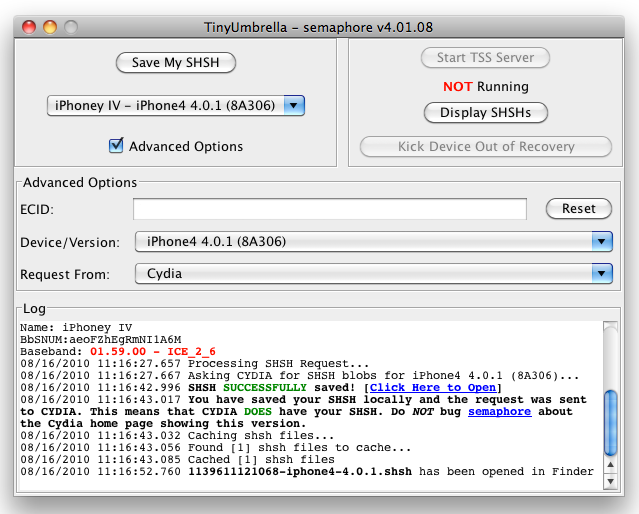
Step 1: Let’s download your SHSH blobs from Saurik’s server to your computer. To do so, download TinyUmbrella and plug your iPhone in. Select the “Advanced Options” box. Also select the firmware version to which you wish to downgrade. Finally, select “Cydia” under “Request From”. Then hit “Save My SHSH”. This will grab your SHSH files from Saurik’s servers and save them on your computer.
Step 2: Download the firmware to which you wish to downgrade to from our iPhone downloads section. Save it to your desktop.

Step 3: Put your iPhone in DFU Mode. To do so, launch iTunes and plug your iPhone in. Press and hold the Home and Power button together for 10 seconds. After 10 seconds, release the Power button while still holding the Home button until iTunes pops up and says it has found an iPhone in recovery Mode.

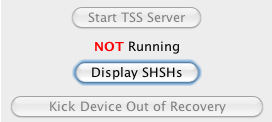
Step 4: Run TinyUmbrellaand click the “Display SHSHs” button to make sure your SHSH blobs were downloaded to your computer. Once done, click “Start TSS Server”.
Step 5: Now we’re going to restore to the firmware you want. To do so, launch iTunes and plug your iPhone in. Hold to SHIFT key (Windows only) or ALT/Option key (Mac only) while clicking on Restore. Make sure you hold the key while clicking Restore. A window will open. Simply select the firmware you downloaded in step 2.

Step 6: Your iPhone will start the restore process. You will most likely get several errors (error 1011, 1013, and 1015) but that’s ok, don’t worry about those.

Step 7: Finally, we need to get your iPhone out of recovery mode. To do so, simply click “Kick Device Out of Recovery” in TinyUmbrella.

Done!

You should now be back on a previous iOS, giving you the ability to jailbreak and unlock.

 
  • Armandioni

    May be that is the issue too!! I got mine to work when the “connect to iTunes” logo appeared on the screen, I thought that was the DFU mode! Sorry, it is my first time jailbreaking…

    • boser

      Armandioni Did you get my email? gmail is giving problems it seems.

  • Daniel Andersen

    dammit! I got my hopes up again !!! haha.. No workies yet :(

  • TOMMY

    hey guys when i try to restore it tell me that itunes can not be restore right now PLEASE HELP !!!!!!!

    • Daniel Andersen

      little more details on how you try to restore please :)

  • TOMMY

    Armandioni, I FOLLOW YOUR STEP AND STILL DON’T WORK PLEASE HELP !!!!!!!

  • TOMMY

    I follow Armandioni step and restore like Armandioni say

  • Jonh

    PLEASE HELP !!!!!! Armandioni, Follow your step and still couldn’t downdgrade…… 74.208.10.249 gs.apple.com, is that the # you put in your notepad ????????

  • http://aynen kaleb

    error 3002 i need help

  • cocoe

    Hello, I have error 3002, I use latest version of umbrella (v4.02.05), I don’t need to specify model to add to backup nor server, it automatically activated Cydia server but always same error.

    Any other ideas?

    Thanks

  • http://n/a Goodone

    Ohhh…man…THANK YOU VERY MUCH!!! I was trying to downgrade unsuccessfully, but after this post everything went smooth!!! Thank you! Appreciate for such useful info!!!

    • Mark

      What type of computer are you using?

      • http://n/a Goodone

        Mac OS X v.10.6.4

  • Mark

    Has anyone been successful downgrading iphone 4 4.0.2 to 4.0.1 using Mac OSX Snowleopard running iTunes 9.2.1. I really need some help.

    • boser

      No one so far that I have heard of.
      I think Goodone is pulling our legs. Prove you did it for us.

      • http://n/a Goodone

        How can I prove? I jailbreaken my iphone 4 on 4.0.1 saved shsh with cydia, than I decided to clear my cell phone and it went into recovery mode loop, so in order to recover it I used itunes and upgraded it to 4.0.2, but jailbreakme.com did not wanted to jailbreak it again. I used this program to recover my SHSH blobs from cydia, than went in each step from this guide and it worked out. I suppose that u guys just dont have shsh blobs and apple dont sign anymore 4.0.1 in this case wait until next release that will break 4.0.2 Good luck all!

      • http://n/a Goodone

        maybe you should try to find any guide how to create your own SHSH blobs for 4.0.1
        Not sure of existing, but might help a lot.

      • http://n/a Goodone

        I can post a video of downgrading using mac if it would be helpful

  • http://www.createdbydavid.net David

    I’m on iPhone 4, 4.0.2 with no SHSH saved. Following the steps provided by Shinnyneptune haven’t worked. I tried to go a little further and edit the other keys in the BuildManifest & Restore files that were different…..and it ALMOST worked. It passed through Apple’s verification, but the restoration process craps out almost right after, and I get an Error 21, leaving me back at square one.

    I’m going to try to edit the files little by little and see if that does anything. If anyone knows what exactly the “Digest”, “PartialDigest”, and “UniqueBuildID” keys are in the BuildManifest.plist file that might help. But for now it’s all just a shot in the dark.

    • http://n/a Goodone

      As far as I know there is no way to downgrade without SHSH saved. Try to find something that will create one for you.

      • http://www.createdbydavid.net David

        Figured I’d give it a shot since Zagga claimed he was able to do it. But of course no avail until he resurfaces with his process, I suppose. Back to boring stock OS for now. Hopefully they release 4.1 during that conference on Wednesday.

  • http://yahoo.com NIshchay

    thanx a ton dude…. i was able to downgrade it with ease…. thanx a lot……

    • http://n/a Goodone

      another one happy user of iphone 4

  • boser

    Well been trying both on mac and pc to downgrade ip4 that came new with 4.0.2. I got it 24 hrs after shsh stopped being signed so I was not able to use cydia and save shsh.
    I have followed the various instructions in this forum but to no avail.
    Even tried using xcode.
    No matter what I do I get the error that this device cannot be downgraded.
    Yet it seems that some of you have been successful with both ip4 and 3gs.
    Has someone been successful in getting their converted ipsw to be recognized??
    If so can you upload it for someone to try on their pc or mac?
    I had hoped that Armandioni was going to send me his ipsw copy but no luck so far.

  • Intimacygel

    Yeah… this guide is “accidently” retarded. The people who managed to get this to work had their shsh blobs saved with 4.0.1 whether they knew it or not, giving us a LOT of false info. Maybe 3gs.. maybe, but not iphone 4, YOU HAVE TO HAVE SHSH BLOBS SAVED PRIOR. I work as a software engineer and ALL steps listed here.. even in a controlled environment do not work(VM). Using the steps above you get 3194. Those of you having the TU server running (not in steps, but I see why you tried) get 3002 because they don’t validate your 4.0.1 shsh.

    I too tried modifying more shit.. I tried modifying the 4.0.2 buildmanifest and restore to include the old .dmg’s instead of the new ones and like a previous poster said.. you almost get there. Apple approves the restore, you phone backlight comes on.. then turns white.. then goes into recovery mode from DFU (yes these are different) and then reboots.. into nothing. You have to kick it out with TU. Moral of the story this does not work as of yet. The only hope we have is someone figuring out what else to change in build manifest and restore.

    • boser

      Well, finally someone else who would really like to have thismethod work but understands that it should not. Nice to get a longer post, rather than someone claiming that it worked and – You dah Man!! Sending everyone scampering back to their computer lair to try again – Maybe if I unplug it while holding my lucky mousepad that will ground it and cause Apple to approve…

      Intimacygel – If you get something going we are here to help.

  • Armandioni

    No man, the one who is accidentally retarded is you, I can’t believe how you proudly say you are an ENGINEER and you are not able to figure this out. It is technology, there is ALWAYS a work around, there is always something else that you can do. I have no need whatsoever to lie to everyone here, I know I did not have the SHSH saved anywhere (for sure) and I know this method works. The only issue is that the iPhone and the PC have to meet certain specifications, which we do not really know. It has perfect logic that iTunes and Apple can be tricked into thinking that 4.0.1 is 4.0.2.

    Boser, I tried to upload the ipsw late yesterday but it failed. I will try once again later today, I hope that helps.

    • http://www.createdbydavid.net David

      Well since you said before that you did this on a 3GS, I think it’s definitely a possibility of the No-SHSH process working for you. However, for iPhone 4, it does not. The process is set up differently in some way that more edits would need to be done. I’ve narrowed it down to the “PartialDigest” keys in the Buildmanifest.plist being the only other important ones, but that still kicks back “Error 21″ after it passes Apple verification.

      Your ipsw could be of major use to every other 3GS user out there, but iPhone 4 people are still out of luck.

  • boser

    I have both pc and mac so if we match – Armandioni and I – and I use his ipsw then we will see…

    Armandioni – Let me know any problems you have or was the problem at your end of the upload??

  • Daniel Andersen

    Is it just me that are constantly only having the 3194-problem ? I don’t even know if my IPSW works for this, tho i think it will, cause i’ve done it exactly as told, but if i cant get through the 3194, which seems to be a connection problem more than a IPSW problem…

    • boser

      As I understand it the 3194 Error is that the ipsw that you are trying to put on your device does not meet apple’s standards. As in, you are trying to downgrade with an ipsw lower than 4.0.2 and the apple verification process checks the files in the ipsw to see what it really is. So you cannot just rename the file and have apple think that it is the 4.0.1 ipsw disguised as 4.0.2.

      Am I correct in my understanding?

  • Intimacygel

    If you were able to get this to approve without a 3194, then your ipsw, hosts, or anything else you did is different than what is stated above. ALSO AS I STATED above (please read posts before you troll), you have iphone 3gs, which MAY work, but has different code to use in the universal .dmg files.. meaning that your ISPW will most likly the exact same shit we have, and yeild the exact same results (fail for iphone 4… which boser and I have). We will just get the 3194.. or the “almost work” as i described above with an error 21. This is a difference of hardware and corresponding software work around. I’m glad this work around works for your 3gs, but it most certainitly does not work for iphone 4. We will have to wait to see if someone figures out what to change in the buildmanifest and restore.. or just wait for another jailbreak.. which I hear will be a little bit as the dev team is taking a break because they say that they’re just giving apple more and more security updates and wish to wait them out.

    Boser, if is ISPW works…GREAT! go ahead and send me a copy, but make sure to see what’s different than ours so we can tell others

  • Intimacygel

    Also… I’m not here to say that it can’t be done. Obviously that’t not what I want. Trust me I know that there is always a workaround, so don’t get so offensive when your “solution does not yield results for people with different hardware” its okay it’s gonna happen. Just don’t say that we’re doing something wrong when following your instructions which is most definitely not the case. We ARE doing something wrong but it most like is something else that we have to figure out. I’ll keep researching and update the iphone 4′s owners here

  • boser

    I believe that it can be done and that is part of the fun and interest. After all, there are lots of people still trying to get an ip4 and here we are trying to jailbreak it but being unsuccessful.
    I am really liking the retina display and the threaded emails. Have yet to try facetime though.

    Anyways, back to this forum. Will see how it goes with ipsw and then inform all.
    However, I have to wait for the ipsw to upload yet before anything else.
    So hold on.

  • Daniel Andersen

    ok…. So when do you guys think the 4.1 will come, so the dev-team will bother to jailbreak it?

    • http://www.createdbydavid.net David

      My guess is the conference is having on September 1st (Wednesday). At least that’s what I’m hoping.

  • Intimacygel

    Yeah I hope they create something.. becuase I hear that they’re taking a break form jailbreaking every release because apple just benefits with increasing their security while they’re constantly working.

  • boser

    Hey check out the forum over at XSellize.
    Exactly what we have been working on and confirmed working but only for 3GS!

  • boser
  • Mark

    Has anyone been successful downgrading iPhone 4 4.0.2 to 4.0.1 using Mac OSX.

  • binh

    I have an issue after downgrade 4.0.2 to 4.0.1 in iphone 3gs, the iphone requested to activate with the original sim card, can somebody help me out, I followed steps of Sebastien.

  • marsha

    I wonder if this would really work:
    How To Jailbreak 4.0.2 on iPohne 4 iPhone 3GS MC

    http://www.youtube.com/watch?v=3Is6QN4N5TQ

  • Unknown

    Should TinyUmbrella detect my iphone 4 after I put it into DFU mode?
    Because it doesn’t… and then i get Error 3002…
    I think I need some help :)

  • Phil

    OMG thank you so much for the guide – after spending 8 hours straight trying every method possible this is the one that worked for me.

    Here’s was my situation:
    iPhone 3GS 4.0.2
    SHSH blobs saved for 4.0

    I downloaded the IPSW for 4.0

    I initially followed the guide to the letter, wouldn’t work, then I tried Aaron’s suggestion of using Cydia’s servers instead of TU, that didn’t work.

    I kept getting error 3002, and a few others I can’t even remember.

    Anyway so what I did is I removed all traces of gs.apple.com in my host file, downloaded my SHSH blob (make sure under advanced options that you download the blob for the firmware you’re trying to downgrade back to – i’d missed that step), start TSS servers, put the iPhone in DFU mode, shift+restore, selected my 4.0 firmware and within 5 minutes my iPhone was back on 4.0 – no 1015 errors of any kind, no need to kick out of recovery.

    Thank you again soooooo much for this guide!!

  • marsha

    This worked like a charm for me! Thank you thank you!!!

  • Lekin

    The methods above DO NOT work for OOB brand new iPhone 4 with 4.0.2 FW. Unfortunately, the wait for Dev Team continues. People who had success downgrading are either on 3G, 3GS or IPhone 4 with FW 4.0.0 or 4.0.1 initially, those can always downgrade/upgrade and vice versa because the SHSH are save elsewhere. If any one out there recorded success on downgrading a brand new iPhone 4 with 4.0.2 FW, please let us know. Peace.

    • Danno

      i agree completely – 4.0.2 OOB had no opportunity to save blobs/shsh with cydia. Although i do have shsh saved from my old 3gs, it’s my new iphone 4 i’m trying to downgrade and the shsh is DEVICE-SPECIFIC…

  • 1337

    Finally i Downgraded to 4.0.0

    Worked fine for me After some PAIN IN THE ASS….fallow the steps like mentioned on top….Important ” LET TSS SERVER RUN” while Restoring,so iTunes can establish a connection to Umbrella..

    IMPORTANT:If you should lose connection with Umbrella (for some reasons)and cant reconnect…>>Run Normal Restore from iTunes and abort,when you see the “APPLE” with the Loading SCREEN…then you should see the iTunes LOGO with the USB on the screen.Then simply reconnect to umbrella and you will Have Connection .WITHOUT Installing the 4.0.2 and start all over again.If iPhone is with black screen in restore mode,there will be no other way to reconnect with umbrella exept like i said.

    THX so FAR

  • 1337

    PS>i Have the 3GS with 8GB came out at the same time like iphone 4

  • Lekin

    I still think any 3G, 3GS and iPhone 4 on 4.0.0 and 4.0.1 can downgrade/upgrade; but OOB iPhone 4 on 4.0.2 will simply not downgrade yet and will not jailbreak/unlock. Any news somewhere about this? @1337 congratulations! 3GS (including new ones) have a differing botroom and can always downgrade.

    • Danno

      Correct – OOB iphone 4 with 4.0.2 never had a chance to save blob/shsh so cannot jailbreak…yet…if ever…

  • Alex

    It worked fine. Downgrade a 3GS from 4.0.2 to 4.0.1. No even errors 1011, 1013, and 1015. Thx!

  • 1337

    @ Lekin
    my 3GS was with 4.0.2 and i downgraded it to 4.0

  • YS

    awesome guide!! I’ve sucessfully downgraded my 3GS from 4.0.2 to 4.0.1. Thanks~

  • lekin

    TinyUmbrella seems to be saying: CYDIA DOES NOT HAVE YOUR SHSH FOR iPhone4 4.0.1 (8A306) THERE IS NO WAY FOR YOU TO GET THEM. SORRY. YOU ARE JUST TOO LATE. That is what all of us with OOB iPhone 4 on 4.0.2 are getting at the first stage of saving the SHSH when we choose the desired downgrade. I am yet to hear success from iPhone 4 (4.0.2).

    • London123

      It is possible to downgrade a new iPhone 4 from 4.02 to 4.01 using this method. It takes a couple of efforts and you have to have tiny umbrella running to continually kick it out of recovery mode.

  • London123

    I tried it over three nights, using the altered 4.01 file to look like a 4.02 file. It would start and then give a error and then be stuck with emergency calls only, immediately after that I used shift restore and directed it again to the changed 4.01 file. It seemed to appear to complete but just then near the end it gave an error. When I kicked it out of recovery with tiny it was working with 4.01. I had no saves shah or anything. So don’t give up, it does work.

    • IntimacyGel

      The cake is a lie.

  • RyanHawk

    Hey, I have been stuck at the point where I cannot “kick device out of recovery” the button is grey and will not let me hit it…Is there a certain amount of time I should let the TSS Server run? I would really appreciate any help, by the way it is a iPhone 3G…

    • RyanHawk

      Error 3014 keeps popping up no matter what I attempt…Help!

  • Mark

    I gave up a week ago. I’d stop spinning your wheels and wait for the next jailbreak.

  • Fatobot

    OMFinG thank you so much!!!! you saved my life thanx a trillion!!!

    • london123

      you need to have tiny umbrella turned on, but press any buttons, so that when the iphone is stuck in recovery mode then you can kick it out.

  • lekin

    iTunes recognized the modified 4.0.2 firmware as 4.0.1 on iPhone 4 OOB with new botroom, this is for sure is not working on my iPhone 4 without an earlier saved SHSH for downgrade to 4.0.1 or 4.0.0. Folks in similar position will have to wait for 4.1 jailbreak/unlock to upgrade reserving baseband and then jailbreak/carrier unlock. My views. Any opposing view out there?

  • boser

    While I wait for 4.1 jb and ul for my OOTB iPhone 4 with 4.0.2 ( I got it barely 24 hrs after Apple stopped signing SHSH’s.) I have been trying other methods and we all thought that we were onto something with the Codeblue downgrade to 4.0.1 idea. Some people who have 3gs had it work but no one with ip4 had success, me included. The main reason that I want jb and ul is that I love Intelliscreen and MyWi and need the jb and ul to support the developers as I purchased these apps when they came out. I am not new to the jb and ul as I have a 2g since buying it new in the states 2 1/2 years ago and having to jb and ul it once I got home from the states in order to use it at all.

    Anyways, I am writing this but have to head off to work shortly and do not have time to try my idea until later tonight but thought that I would throw it out there for the community to discuss.

    The reason that I cannot jb and ul my ip4 is that I did not have a chance to save shsh.
    Now 4.1 is out and I have saved my shsh.
    Now Tiny Umbrella has a way to save shsh for 4.1 and NOT upgrade baseband either – It seems to me that this is maybe approximating what a 3gs would be at for ios, in that the baseband is not upgraded in the install of the new 4.1 ipsw. See: http://thefirmwareumbrella.blogspot.com/
    So what if we combine TU method and the Codeblue method? See: http://www.iphonedownloadblog.com/2010/08/16/how-to-downgrade-iphone-4-0-2-to-4-0-1/#comments
    OR just google either Tiny Umbrella or Downgrade 4.0.2

    Suggested Steps
    Save SHSH for 4.0.2 using TU
    Upgrade to 4.1 ios but not baseband with TU.
    Save 4.1 shsh
    Simply rename a stock 4.0.1 ipsw as 4.0.2 OR do a complete disguise of 4.0.1 as 4.0.2 (As per Codeblue idea)
    Now we are at 4.1 and should be able to downgrade to 4.0.2 using saved shsh and having the restore point to cydia rather than apple.
    Cydia would give the OK for the ipsw to be installed and you have 4.0.1 installed now.
    Now jb and ul by using jailbreakme.com and Cydia

    What does the community think?
    Anyone have time today to have a go at it?
    What are the chances it could brick ip4? Hi or low chance?

    If you do not have time to reply fully, just give me a score from 1 to 5 (5 being that you think this will work for sure.) and we will poll the community.

    This is a fix for now as we all wait for 4.1 and SHATter.

  • Aguna

    i can’t press on the START TSS SERVER. is it that i missed some steps?

  • samland

    How to downgrade my Iphone 4 4.0.2 to 4.0.1 if i dont have SHSH for 4.0.1 and for 4.0.2 and can only make SHSH for 4.1?

    • Devin

      You don’t. Period. There’s no way around it.

  • London123

    The method does work for a brand new iPhone 4 with 4.02 on it. You just need to keep trying. I was about to give up when it did not work for me at first but eventually it did.

  • boser

    Hello London123 – Excuse my disbelief but you are the first on many boards to report success for a brand new iPhone 4 with 4.02 on it.
    What did you do differently the time that it worked?
    Where did you get the ipsw?
    Did you use TU?
    etc…

    • London123

      I followed all the instructions as listed, I removed iTunes and reinstalled version 9.0. When I was trying to do it everyone told me that it could not be done. I even took it to the shops that unlock phones here West London and even they said they could not do it. This was the only place where I found and a german one that said it was possible to do it. I followed the exact instructions as listed above. Download 4.01 and then make the changes to the files as listed, overwrite 4.02 with it. You do need to check the host file and manually change that as well. Then when you do the restore it works until iTunes throws an error message, first few times I also got 3220 or something. But by running tiny I was able to kick it out of recovery. I then tried a restore using shift and then manually selecting the 4.01 and that seemed to work the longest before it also gave an error and went it to recovery. Then only emergency calls would work and it was in a foreign language, I think Spanish or something . But when I kicked it out and then switched it on and off it came on. When I then checked the version on the phone it said 4.01. At no time did it state that the process had been completed, but the phone has been working fine and I have been able to install all my jailbroken apps and everything on it. I will try and upload all the files I used on to a torrent this weekend if it helps anyone.

      • Michael

        Does tiny tells you when the downgrade has completed? itunes throws me an error code 3xxx & I can’t select the option ‘Kick device out of recovery”. So my iphone was dead & itunes restored it to ios 4.1 and firmware 4.2 :( :( :(

  • RICKY

    WHEN i TRY DOWNGRADEING THE iPHONE IT SAYS ERROR 3002 ANYONE KNOW WHAT I NEED TO DO?

  • Lee

    i tried zillion times…. 3194 error which is FW signing respond by apple…. apple stopped approving this firmware so cant downgrade anymore…. unless someone else approve it