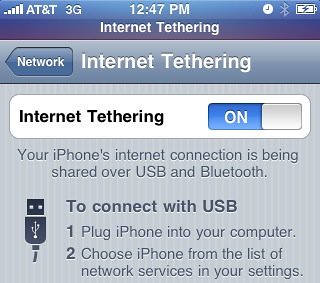
 With the release of BlackSn0w, it is now possible to tether your iPhone running OS 3.1.2.
For those of you who don’t know what tethering is, it basically allows you to use your iPhone as a modem in order to share the internet connection with a computer. For example, this post was written on my laptop while tethering my iPhone in Los Angeles airport.
UPDATE: This post is outdated. For the latest information about tethering your iPhone, please visit this page.
Step 1: Unlock your iPhone using BlackSn0w. See my BlackSn0w tutorial.
Step 2: From your iPhone, navigate to help.benm.at, hit tethering, choose your country and carrier, hit download, then hit Install.
Step 3: Reboot your iPhone.
Step 4: Go to Settings > General > Network > Internet Tethering and turn it on.
You’re done!
You should now be able to tether your iPhone, either via bluetooth or USB.
Pretty simple, isn’t it?
first!
but does it work, anybody?
p.s. does this cost $?
i said da same thing
Will this work for iPod 1st gen. ?
just for at&t??
Hi saad
As blackra1n is a tethered jailbreak, what happens when you reboot the iPhone?
My understanding is that you have to re-run blackra1n to get it to boot up (this may only apply to the latest bootroms that are now shipping).
How does that affect this file installation and is it AT&T only?
I’ve tried it and it worked great – I “undid” it because I was scared from all of the “AT&T is going to find out and you are going to get charged big bucks for doing this” — but then I’ve read “no, as long as you don’t go over 5GB, you’ll be safe” — What is your opinion on this? Is it safe (as in, safe on my pocket book)? By the way – it worked amazing, especially from my Mac – plugged in the usb cable and right when i turned on tethering on the phone my Mac was “online”. As far as via bluetooth, that also worked, I just had to tell my Mac to connect to the iphone w/ BT and then choose “connect to network” ( i think that is what it says ) and it was online with my phone in my pocket. good deal. (cept’n for the “you might lose your house, car and all that you love to pay your bill if AT&T finds out” — please put me at ease on this…)
Oh, i forgot to mention, i’m using a 3GS purchased on june 19 when they were released, i have not had to do the “tethered jailbreak” my JB stays put as it should – even post reboot.
Cool thing!
I’m french and I’m to Bouygues Telecom. iCoffee.fr is closed and I can’t setting my tethering profil.
Can you help me?
This works but it is breaking my wifi connection network cannot be found after installing the new tether hack, anybody know how to get wifi to work again
never mind one more reboot and wifi is working great again. Geohot rocks!!!!!
this one is better its wat i use on my 3g
navigate on your iphone to: http://help.benm.at/help.php
install the one for you
its always good to reboot your iphone after everything to install then go to network settings for config 🙂
twitter @c4pt0n
Nice website, I add my tethering setting with success! 😉
help.benm.at
My iPhone is already JB. Is there a way to enable tethering without re-JB it?
Thanks! 🙂
just go to that site on ur iphone and it will work, if it’s jailbroken already thats fine! this will work..
that only work for at&t, i ty it.
that one from the description is ATT only
the link i provided is for most of them, check it out 🙂
Is not only for att. Im from Brazil and work fine with my TIM carrier
Has anyone ha any problems since using the blackra1n jailbreak because I have and so has my friend. If there are any fixes for it let me know.
Does it work with iPhone 2G? How do I enable tethering in iPhone 2G?
Hey all.
I followed the instructions. Downloaded and installed BlackSn0w… Got the new mobileconfig… tried both benm and peacefulinsanity – rebooted, and turned on tethering which was newly available.
When I plug it in, nothing happens. Bluetooth doesn’t pick it up either. Any thoughts on why it may not be working
Hi – i’ve a legally unlocked (Italy) 3GS with 3.1.2 – none of these ipcc files (from Ben through here etc) seems to unlock Tethering on my phone. Does anyone know what’s going on. Seems to me no point jailbreaking because my phone already works with Vodafone UK, ATT & T-Mobile in the US and Vodafone Australia – mostly my travel schedule…desperate to get rid of the Huawei dongle – thanks for any help
Yes, but does visual voicemail still work?
Does this break the Visual Voicemail from at&t? Someone I know w/ a jailbroken iPhone just got about 6 months worth of missing voicemails in one download.
I had no problem with the jailbreak. However, it will not actually tether!! How do I configure it to work via usb???
HELP!
It *does* work. But don’t be stupid people, don’t hit YouTube or porn sites while tethering as AT&T will pick up the spike in your traffic. In fact, AT&T may be vigilant towards unauthorized tethering. Bottom line is, if you get a bill from AT&T for $1000 for tethering, you have nobody to blame but yourself. =)
Be a smart tether user.
@-M: When you enable tether, it asks you whether you want to enable USB or bluetooth.
http://www.mydigitallife.info/2009/06/28/activate-and-enable-iphone-as-internet-tethering-wireless-modem-without-hack-or-jailbreak/
you should click USB and it should install a driver (well did for me on 3.0) i haven’t tried tethering on the lastest firmware, because i have no use for it…
Oh, and I still have Visual Voicemail.
i do not get that question. i just get the screen that’s pictured above. however, when i connect via usb, there’s no place where i can actually select the phone..it says to choose iPhone from the list of network services…it’s not in the list though.
and wifi will not work now.
🙁
I use PdaNet on my jailbroken 3.1.2 iPhone 3GS. Works like a charm.
I like iphonemodem. Since it uses WIFI, many pc’s can share at once and I can answer the phone whilst we’re all tethered without wires attached. It’s great!
works like a charm
Tried it here in Taiwan via TW Mobile. Not a change to get it to work.
Have you got ant suggestions?
If your having problems on the windows side. make sure you have the latest version of Iturnes installed. it includes the driver that lets the Iphone work as a modem
I’m a Mac user…
I’ve tried some more and still no luck :/
Oh , I apologize Shade, for not including my OS. I’m on a Mac machine OS -x 10.6.
My phone is JB. and unlocked with BlackRa1n RC3.
Sebastian,
I have iTunes 9.0.2.25. I have a new 3GS iPhone with 5.11.07 firmware and 3.2.1.
I did steps 1 – 4 above and all went well and appeard to work except when I go to Network, there is no Internet Tethering tab. Phone is JB because when I could not find Internet Tethering tab, I went to Cydia, downloaded the June Fabrics app and it works fine (but it is unbearably slow). Any help would be appreciated.
Did you reboot your phone???? This is important.
If this doesn’t work, try installing a profile from http://help.benm.at. That should do it.
I can’t get my VVM to work after tethering. Any help? Thanks.
Did not work for me the second time I JB my iPhone. The first time it worked flawlessly. Don’t know why it didn’t work the second time.
Okay guys….HELP DESPERATELY NEEDED! I have the new 3.1.2 version w/ 5.11.07 firmware. I jailbroke/unlocked phone using blackrain….but when I turn off phone or reboot (however you wanna call it) I have to plug into comp and use blackrain again (“make it rain”) then it works. so I have to make sure my phone never dies, runs out of battery or turn it off or I am without a phone till i get to a computer. How can i correct this?! I am not using AT&T….Im on a tmobile network.
does your iphone need to be unlock or will it work if it is jailbroken?
if your talking to me….Yes it does need to be unlocked in order for me to be able to use it w/ Tmobile. Its currently unlocked and jailbroken right now, but IF i turn off phone…I have to use blackrain to use the phone again. .. otherwise, when i turn it back on, it will have the picture of the USB and ITUNES on the main screen and I cant do anything with phone. I just want to know of a way to be able to turn my phone off and be able to turn back on like normal! Gosh.. so frustrating ='(
It seems to work GREAT via BT and USB. My question is; IF someone wanted to remove it, how can this be done???
BTW, I’m using a new 3GS, OS=3.1.2, ModemFirmware=05.11.07.
i’ve retried installing blackra1n again and again and turning tethering on….DOES NOT WORK!
when i did this with that other jailbreak a few months ago it worked without any hassles…wish that would still work :/
using Mac, latest iTunes + 3.1.2 on ATT…
WASTE OF TIME and false hope 🙁
Hi -M@
Did you do a complete CLEAN install of 3.1.2 and follw that up with a Blackra1n RC# JB, then, install the tether? This is what needs to be done, I read this on just about every site when using RC3.
I know this tether works and works well because I used it. Let me know how you make out…
Ive Jbroken my phone, downloaded this app, and rebooted more than once but there’s no “Internet Tethering” option in the Network menu. It shows up under my profile but I’ve gotta be missing something.
Perhaps you guys can help me, I JB’d yesterday, specifically for setting up tethering. I used mr. Geohots Blackra1n. All seemed to go well, but could not run blacksnow, probably because my wifi was not working at the time.
I have a contract with Att so, did not feel the need to unlock, so I never attempted backsn0w again.
I got the wifi working.
My problem is that I can tether only for about 40 seconds, then my browser acts like I lost the connection.
Also, I cannot get my MS outlook to send mail when tethering (i used BenM until the recent 3.1.2 firmware blew it out the water). Is there some kind of proxy i need to get the mail to work right with tethering?
Any insight into either problem would be appreciated.
hi,i have an iphone 3gs with 3.1.2 official firmware, and i don’t want jailbreak it. is there any solution for me to tether without jailbreaking?
@KORN — Yes, there is a solution, subscribe to AT&T tether service. It’s available now and only $55/month extra (on top of the cost of internet service and cell service). This is what the AT&T store salesman told me. Are you ready to JB yet?
att wont charge you for anything you have unlimited data but if you go over 5gb they will cap your connection and your speed will decrease. it is a apn setting not a app.
I have a 3gs, unlo9cked and JB. I’ve downe loaded and installed the config as described and I don’t have a tethering option in my network menu. Any advice or knowledge out there?
I am able to tether. Works flawlessly. My visual voice mail no longer works. I’ve tried resetting, etc, but I have had no luck. The only thing that worked was deleting tethering. Help please. iPhone 3gs 3.1.2. Thanks.
@Mb — You said that you “deleted tethering”. Pls advise how you deleted the tethering?
you go to manage in cydia and uninstall it. Then you select settings>general>profile>and then remove us at&t. This removes tethering
@MB — Appreciate your prompt reply. I don’t see anything obvious relating to the tethering in Cydia. However, I did go to settings>general>profile and noticed the red “remove” button. That’s great, thks.
What sould I be seeing in the Cydia relating to the tethering? I don’t recall adding it via Cydia. I simply downloaded from this site directly to iPhone, as instructed, and it was installed…
ok…tried again…
restored the phone…installed blackra1n..installed tethering…
NOTHING!! it just will not work on my 3gs w/ att.
it will not work via usb or bluetooth…just will not appear in my list of network services. i’ve tried this about 5 times now and it’s safe to say that it just will not work with my phone.
i’ve tried both of the profiles available and neither work.
total waste of time…
Ok, I got all the tethering installed help.benm. Turned on tethering, connected to computer, and it works! However it only works for like 2 minutes and then there’s no connection to the internet. Unplugged and found out my iphone can’t even connect to emails or browse safari anymore. Calls work fine, anyone have an idea what happened? I used speedtest to find out how fast the connection was while tethering was successful, that’s when it cut off…..is that related?
Tried and simply did not work. Its too bad because I upgraded to 3.1 because I thought i could hang on the tethering which I had before.
Oh well, live and learn
@jaime — I know this may sound like a stupid question, BUT, did you unlock your phone AFTER you did the jailbreak??
Many people don’t know that AFTER the JB you have to unlock to get the tether to work. Yesterday I had to do a restore and I did not do the unlock after the JB (I thought I had already done it after I did the JB). When I went to install this tether profile, it installed, but would not display in the NETWORK settings. That reminded me to do the UNLOCK. I removed the tether profile and unlocked with sn0w. After I did the unlock, I reinstalled the tether profile and BAMM, there was the tether setting in NETWORK settings.
I made it to work and work great, but the biggest issue is I am loosing 3G and/or slow speed data signal entirely. The only temporary solution to enable the data signal back is resetting the data network on my iPhone.
I’ve done the steps and it works. However, it messes with my connection in general. I constantly lost reception for both data and calls. I always have to respring or reset my network configuration to get it started. The only way I’ve got a steady connection is what was mentioned above… PDANet. Using both the official tethering and PDANet I can say that PDANet is slower.
Will this unlock for internet tethering work on any laptop with ITunes or just the one I installed it with?
By the way the unlock for internet tethering works great, so far, no problems, straight up instructions, just follow it step by step. Please answer previous question, thanks.
I’m using my iphone right now to connect with my MacBook Pro at the Dallas Fort Worth Airport. Works great!
Has absolutely nothing to do with itunes or any specific computer. This process just turns your iphone into a modem which you can use with any computer.
Kevin–not sure I agree with that. the laptop you attach the phone to will need drivers for the iphone’s “modem”. I ASSUMED they came in as part of the itunes install (and hence tethering would only work on a machine w/ itunes installed). Anyone have thoughts on where those drivers came from???
@Narwhal — I can say with experience that I have used this tether with 2 IBM notebook pc’s and 1 iMac. I only use iTunes on the iMac. The pc’s don’t have iTunes. So, I’m inclined to agree with Kevin. The drivers come from the computer BT and phone connection.
I’m with Spuds.
So I have a 3g 3.1 with Att, if I unlock to get my tethering to work would it be any different than my jailbreak???
@Prisper — YES, jailbreak is different than unlock. The “jailbreak” basically unlocks the phone’s OS, thus allowing you to add 3rd party software, etc. The “unlock” unlocks the “modem firmware” allowing you to use your iPhone with any GSM carrier, and allows you to use the tethering feature as well. Read this, maybe it will help you a little: http://www.iphonedownloadblog.com/2009/07/10/difference-jailbreaking-unlocking/
I have a 3GS running under 3.0 firmaware and it is jailbroken and unlocked using cydia, when going to the web site you mention on the iphone i installed what was there but i so that it said AT&T i live in costa rica and now i have the Tether option but every time i try to connecte it comes up a popup saing
“Set Up Intertel Tethering”
“To enable tethering on this account contact carier”
thank you
Interestingly enough, the MyWi app on the iPhone did let my laptop browse the web and do email, but it would not allow my laptop to make a VPN connection to my company’s network – which was the only reason I needed the app.
Then I tried PDAnet and it worked just fine for both laptop Internet connectivity and also for VPN connectivity.
I was using the USB connection between my Windows XP laptop and my iPhone 3GS v3.1.2.
I am having the same problem as Sutton. Everything went smoothly until the end, any solutions?
I unlocked my iPhone (3.1.2) using BlackSn0w, and then I used the peacefulinsanity mobile config file provided and it all worked in the end, as instructed. However, I was never able, even after resetting the network settings, to have either/or my WiFi or VVM.
I also tried the help.benm.at site and that config file gives me the same problem. After several attempts to enable and disable either config. file and also resetting the network configs, I gave up. I understand that the BlackSn0w was not responsible for the WiFi or VVM problems since they are working right now. Also, I used the same mobile config file from help.benm.at when my phone had the 3.0 firmware and I stopped receiving VVM’s for a while.
My question is… Are there any other mobile config files out there that don’t affect WiFi or VVM?
I’ve been using the set up as described above for a few weeks now and it’s been working great. I have found that I have to remove and reinstall the config, once in a while after I tether because my VVM gets lost. Worth it to me to be able to connect when I need to.
K
after i unlock a phone and put the tethering on a phone and rebot it, it always kicks it into Itunes activation mode what is happening? I had to do it on my phone and nothing happened but i did it on my buddys phone’s and its does it everytime just when i go to rebot it. What I’m wanting to know is do you HAVE to rebot your phone?
Several people mentoned if you have a full plan
AT&T will not charge you for teathering is this correct? It was my understanding AT&T was NOT allowing any teathering.
Any thoughts
Here’s AT&T’s latest “OFFICIAL” stance on high data usage:
http://finance.yahoo.com/news/ATT-Tighter-control-of-cell-apf-2415335930.html?x=0
Im using a 3gs running 3.1.2, i jail broke my phone using blackrain, and followed the steps to be able to tether my phone, rebooted, went to setting/general/network and there is nothing about tethering. What did i do wrong?
@ Nick — Did you do the unlock (sn0w) after you JB’ed? You must unlock to enable the tethering.
Hey why doesn’t it work for my 3g?
Works great!!
Except that i have a problem with wifi
how do i fix this?
I’ve been rebooting several times,
I am also worried that AT&T is going to charge me extra for tethering though…
Hi, Thanx for the great program but my wifi is not working…i saw some other ppl had the same problem with this…but i didnt see any answers…can you or anyone else help me out please…or how do I redo this process and go back to 10 mins ago lol with a jail broken phone and no tethering…
thank you
Follow the instructions on this link to fix your WiFi, GPS and VVM =)
http://www.redmondpie.com/fix-blacksn0w-wifi-youtube-gps-problem-on-iphone-3.1.2-firmware-9140085/
Anyone cares to help me out here? i even removed the profile and still nothing
Arash, this is your solution, you’re gonna be surprised of how simple.
Settings-general-reset-reset network settings
make sure u reinstall profile so tethering os availabe!
Thank you guys…I saw a video on youtube on how to reset the wifi and I thought I should give it try…when I did that and it tried to reboot…it never came back up and was frozen for a good 10 mins so all I could do was to restore…I jailbroke it again and the wifi is working…it was this download for tethering that messed it up…but anyways thank you so much for your time!
I have a non-jailbroken 8 GB 3G running 3.0.2 using a Ben.M mobileconfig on AT&T. Downloaded CS4 Master Edition(almost 7 GB) from my MacBook while tethering and didn’t have any slower speeds or a higher bill. I didn’t hesitate to jailbreak my iPod touch, but jailbreaking my iPhone is something I won’t do. If it is a tethered jailbreak you could be left without a phone for hours if it freezes up and reboots while away from home(as my ipod does about once a month.
No good. I followed the instructions and my phone enters recovery mode after the reboot. Any updates?
it worked awesome thank you!
i just installed this ipcc file with a jailbroken 3g iphone (non black rain). i can’t get the internet tether tab in my settings…what am i missing??
i also forgot to mention…i have ultrasnOw installed and 3.1.2 jail break installed. i’ve tried to install the patch and i’m still not getting the tether option to show up in my network screen!!
what am i doing wrong?!?!?!?!?!?!?
sorry about all the posts but since i can’t edit a post i wanted to mention another thing.
my firmware is 04.26.08 if this helps at all?
Is it really necessary to unlock the iphone with sn0w although my iphone was unlocked OoTB? Is there a way to enable tethering with jailbreak only?
I have the same issue. Mine is a factory unlocked jailbroken iPhone. How can I enable tethering?
Finally got mine to work. YOU ABSOLUTLEY HAVE TO HAVE BLACKSNOW INSTALLED. After I installed blacksn0w tethering works perfectly now
okay. guys help.
the option is there now.
but only kinda.
wheni goto settings>general>network.
it has a button saying “set up internet tethering”
then says “to enable tethering on this account, contact AT&T”
what did i do wrong? i’ve never seen or heard of it doing this before?
help.
I some how managed to get all of this to work, installed mywi, but the connection is SLOW as heck….. not in a 3g area, but I use my spring phone to do the same and can get about 1mb per sec.
Any ideas what the issue could be anyone ?
Vista is the OS
THANKS!
i can’t get to peacefulinsanity? any help! cant get it to come up no matter what i’ve tried.
Will tethering give me any extra charges on my bill? It is jailbroken …. please help i want to do this but dont want extra charges
When the new ATT Profile gets installed, visual voicemail will not work.
This method worked for me also. Make sure before trying the browser part of it to have blacksnow already installed. I’m posting this from my laptop tethered to my iphone now! It does work.
Testing
I installed tether in my I phone but it put the file under profile instead of network still won’t tether???????
I have a new 3GS with 3.1.2.
I am using ATT in the US, so I didn’t need to unlock.
I just bought my phone new 2 days ago.
I used Blackra1n to jailbreak and I used.
Even if you do not need to unlock the phone to use it, you need to unlock it
to use the tether.
I tried many times to tether without unlocking and the tether option did not show up.
Even though I didn’t need to unlock it, I unlocked it to see if it would opne the tether option,
and it did. You must unlock the phone to tether.
I used Blacksn0w to unlock and the http://help.benm.at/help.php to install the tether profile.
Hi there,
I have been tethering my iPhone 3G since 8/2009 with PDAnet and Cydia running 3.0.1. I really want to update my phone but I’m so worried about losing my Internet connection. This process seems to be more simplified than the previous one I used. Do I need to keep PDAnet installed on my computer? Or is this a different program all together? Would you please forward me specific instructions to get my phone from where it is to the update and new tethering program?
Respectfully,
shelle
ps Thank You Soooo much in advance! Your help is GREATLY APPRECIATED!!!!! 🙂
Need help. My wifi is not working after I followed the directions. Any ideas?
how can i connect it to a Mac?
Hey this is cool
Sound good I will of to try it
I did as the instructions but thetering does not show up in the networking
I can’t get it to work. I can get to the point where I can turn the internet tethering on or off on the iphone but it still won’t tether. when i look at network connections on my computer, it shows network cable unplugged for my Apple mobile device. Any ideas???
What us the dangers of having this with AT&T?
I do all the steps but I still can’t connect to the Internet and I don’t know why my phone is a 3gs 3.1.2 please help me
Everytime I try to go on the website it says error establishing data base connection.
AFTER INSTALL TETHERING MI WIFI NO WORK, WHAT CAN I DO
MY WIFI NO WORK AFTER INSTALL TETHERING, WHAT NEED I DO
Step 4 isn’t possible: “Step 4: Go to Settings > General > Network > Internet Tethering and turn it on.”
I don’t get the “internet Tethering” entry under Network. The only thing I get related to the installation of this program is under Profile: US AT&T Tethering. Under Advanced Settings I get “wap.cingular.”
RODO
21 hrs, 6 mins ago
AFTER INSTALL TETHERING MI WIFI NO WORK, WHAT CAN I DO – reset network settings and reboot.
Ntrepidly
9 hrs, 18 mins ago
Step 4 isn’t possible: “Step 4: Go to Settings > General > Network > Internet Tethering and turn it on.”
I don’t get the “internet Tethering” entry under Network. The only thing I get related to the installation of this program is under Profile: US AT&T Tethering. Under Advanced Settings I get “wap.cingular.”
then it didn’t work. Unistall and try again. Try reset network instead.
I got it up and going after posting that note. Thanks.
Well, I use ultrasn0w to jailbreak and use Cydia to download blacksnow to unlock. I use about 8 or 9 gb traffic each month and don’t get any extra charge but use it as your own risky and don’t blame me if you are the unlucky one that get charge$$$$$$$$$.
Followed directions as described above and my phone after plugging into USB port on laptop cleared tethering option on my network. Not very happy with product. Is there a way around this?
What is the application that will make my phone as hotspot wifi source that I can pick signal by wireless? And is there a free version of the my3G application?
Is there anyway to do this with iPod touch instead of iPhone ??? Please help
Hey I downloaded it and it worked but when I went 2 turn tether on it said it will charge me will it charge me or not cuz idk lol
I tried it on my 3gs 3.1.2, after installing the ipcc file mentioned in step 2 I reboot my iPhone(step 3), now when I goto step 4(setting-general-network), I don’t see Internet tethering as an option there( I only see 3gs enable, VPN, & wifi as options).
Please help !
I guess I should’ve read the earlier comments to my issue b4 posting, I need to unlock first, 0fcouse !
Hey I installed it and it works great but does this charge u cuz it said charges may apply when I put tether on cab u plz write back
This program is very good
thanks
Good work guys. Keep it on.
i have a 3g with 3.1.2 and the benm and peacefulinsanity patches did not work. my phone never recognized the new profile in order to enable tethering. i read that the new blacksnow can cause problems with some phone functions like voicemail and gps. i recommend trying the ‘rock your phone’ app with ‘mywi’. you can get a trial for 9 days to see how the connection works and then it’s only $10 to buy. i have att and they should enable tethering (the idiots) but this has worked great on my phone.
Thank u for this info. I talked to apple att and they offered nothing.
Why I installed Internet tether, but I can not see it in setting -> general -> Internet ?
Its pretty good. Nice to experience it
Internet tethering doesn’t come out on my network
Was forced to update to 3.1.3….and canno get this to work
Anybody knows why in my doesn’t appears the tether button off/on I install the snow and makes everything to make it, my carrier is telcel from mexico
Will the Internet tethering work for my jailbroken iPod touch 3 gen?
I happen to live in Africa right now, Nigeria precisely! How do I get this tethering working back here? My iPhone is jailbroken, and I am on a service provider called MTN. The Internet connection on my iPhone works just fine! But I want to “tether”. Read somewhere tethering works in South Africa. Can anyone offer any help or solution? Cheers!
Ok! Got it working. Thanks to this link http://help.benm.at/mi.generator.php it really came in handy. Next thing I need to figure is if my service provider is charging me for tethering. It wouldn’t hurt to tether for free.
Крутая прога!!!
Good stuff guys … this app worked for me with no problems. Just tested it with bluetooth and I didn’t get any problems. Had to restart, that’s all.
My visual voicemail has not worked for more than 3 months.
This has fixed the issue, cleared up hours of frustration, and I finally have visual voicemail working again on my iphone.
All I can say is thank you.
This didn’t work for me killed my wifi and still couldn’t turn on tethering. I want me wifi back!
I installed and rebooted my phone. I turned on tether. Plugged it into computer but the Internet is not working. I went to settings in computer and it is not under Internet options. What am I doing wrong??
It doesn’t work with my iPhone, after the prcedure a pop up ask me to contact my Internet provider.
Please tell me what can I do to solve this problem
Do these instructions work with 3.1.3? I didn’t download that, assuming that it wouldn’t. I currently have 3.1 on my iphone, having downloaded that a few months ago (not realizing it would break my previous tethering hack). I desperately want it back!!
So, will this work with what I have on my phone already? I’m not too tech savvy…
thanks!
blackra1n is better then blacksnow
Damnn bro you the best!!thanks
Super……super……super !!!!!!
Muy bueno
I have tethering working but the Mac will not connect to the internet. When tethered in USB i get “Ethernet Adaptor (en6) has a self-assigned IP address and may not be able to connect.” When i have the flashing blue tethering via bluetooth I still cannot connect. I am jailbroken and unlocked and am running OS10.5.8. Iphone running 3.1.2
I have been able to successfully use PDA Net but it bricked my iphone….
The tether isn’t working for me it’s not in my network tab any1 know sumthing I can do?
Hi, the link opened a tetherimg for at & t , will this work for othr GSM netwoks?
Not working for my 3g iPhone need help please!!
Tethering stopped in 3.1.2 but on my computers only with self assigned no go message. iPhone showed it was still working. Updated to 3.1.3 and re-jailbroke but no tether option in settings network. It took two days to eliminate tethering page on phone but it finally went away. 2nd profile stayed.
Como le hago para ponerlo en Telcel????
Sweet
Just installed it…
Surprise surprise, the option for tethering vanished!
At first i just got a message saying I should contact my carrier to enable it. But now the whole switch is gone… Am I just too dumb to read or did something go wrong?!?
Perfect, so easy. Install the App., install the appropriate config for the recent carrier and here you go.
I have the iphone 3GS I Installed the tethering and confirm and rebooted five time and the tethering is not showing up in my setting. Any suggestions/
I installed it but there’s no on off switch like in the picture can anyone tell me why?
It is wonderful and amaging!
Compu
This app does not work. After I install the new profile and turn my phone off and back on, I do not have the setting to turn on tethering under the network settings. Disappointing. I had high hopes. iPhone os 3.1.2
N/a
Worked great for months with AT&T, but I just moved to UK, now have O2. Anyone know how to make that work? Do I have to reinstall?
i.mjay111107@yahoo.com
Hey I did the jailbreak it worked I downloaded the Internet tethering and then I went 2 the link and it said it will change settings on this iPhone do u want 2 install I click install and it says it’s installed I click done and I reboot my phone and Internet tethering isn’t in my network settings plz help thanx
Hi!
I have t-mobile, is possible Do the same for this carrier?
Thas work how?
Need to use this when I’m outi out of power
I install app and reboot and there is nothing in settings to change. Please help.
Don’t work! I think iPhone updates kill it.
Me gusta el fútbol
Is good
Viva al fútbol y otras cosas
Good, the soft is useful
I think this tether no longer works. Anyone else having this problem? Solutions?
Did exactly as instructions said, but in setting and network I don’t have a Internet tethering off/on….. HELP!!!!!
This didn’t work for my unlocked iPhone 3G using the tmobile service. Can anyone please tell me how to remove the app so I can reset my setting.
~^^
Chris, I think AT&T did something remotely as out of the blue alot of people are reporting that the tethering switch is gone as is mine. two days ago I lost the cable connection and I plugged the phone in, it gave me the message that it would be through USB as my bluetooth was off and BAM, it disappeared. I didn’t even have iTunes in the computer I used so it wasn’t that.
Reinstalled and rebooted two different settings and nothing!
I’m running Cydia – Blackra1n – 3.1.2
I was told that iTunes has To be installed so that pc would have drivers to recognize tethering from iPhone. You don’t have to sync it, just make sure iTunes is installed.
The latest version of iTunes could have blocked this perhaps … very much a WAG at this point.
Umm, nope! Tried that and nothing.
The computer that took away the Tethering didn’t have iTunes which means there was no way of updating it. Can AT&T make remote adjusments?
Great, it has worked for Brasil carrier, even with diff. setup!
No comment
when I tried useing the app it disappeared from my settings.so I tried rebooting and my phone came back on all of apps that I had purchased thru iTunes has disappeared.my app storage shows that they are there by how many gigs my phone has left.does anyone know how to fix this.
I followed all the directions and I have the tethering package on my phone under settings but it’s just there. It’s not under network and there’s no on/off button to make it work……can someone plz help me?
Personal
Unfortunatly… I am getting a message saying “in order to enable tethering please contact your carrier”.
I am on t-mobile… Any ideas!
I’m also just trying to get the free wifi transported to my laptop.
Thanks guys
I want Tethering
Hi
I’m having trouble with this tethering stuff on 3gs 3.1.2.. for 02 in the UK. I went to the tethering option through settings it’s not showing so can’t turn it on..
Any suggestions?
I have the 3gs os 3.1.2 bb 05.11.07 unlocked it before with blackra1n chose cydia but I didn’t do the carrier unlock since I wasn’t planning on going with another carrier.but I just barely learned of 3g tethering and I want to do that with my 3gs.will restoring to default then re-jailbreaking bring up the carrier unlock again?tried using blackra1n again but carrier unlock doesn’t show up at all,is there another of carrier unlocking?thanks!!
Will tethering work with the new Spirit jailbreak, or does the new profile require unlocking? It’s great on my wife’s 3g running 3.1.2, but my GS is on 3.1.3 and Spirit is all I have for now. Thanks in advance.
I want to do this but I’m worried that AT&T will charge me. How do I find out whether or not I’ve used more than 5GB of data usage per month?
So I use to use this all the time and stopped for about two months. Now it won’t connect to tethering anymore. No good!
I used to have tethering enabled also. Phone crashed, was on 3.1.2. Had SSH File saved with saurik. Got phone restored and had to regain JB but could never get tethering g back. So I tried MyWi and it works great! No crash when tethering via Usb and a call comes in. Recommend you get ROCK ID so you can try it out for week. Also, let you turn iPhone into wireless hub with encryption. Pretty cool but it cost money to have it.
Cant get it to wrk on 3gs 3.1.3 carrier o2 uk. Click on uk > o2 vertigo > download with web selected on and notting happens :S any ideas why??
I can’t activate the link,I go to county and carrier AT&T and I can’t click download….it wants to copy or highlight
Mike same happens to me :s
Mns
ALSABBAGH
Bahrain
How do I uninstall from iPhone 3g
Chris will it work if I jailbroke my iPhone with Spirit using OS 3.1.3? Appriciate it
Quiero conectarme a Internet soy de Barcelona
Sugiero que usas MyWi. Me a funcionado perfectamente.
i live in canada and use Bell as my carrier is there anything compatable with them or a download available?
Qqqqq
I couldn’t find Internet tethering tab in the general-network menu. Please let me know how can i do?
Doesn’t work total waste of time. When I click the USA then AT&T I see the download button click it and nothing. The download button isn’t working.
Nemoku
How I’m able to use it in my iPhone
What a good idea
Bonjour tous le monde
Yo.
If you can’t open the link, it’s probably because you opened the link in an app other than Safari. Copy (tap and hold) the link in this here window instead of following it. Go to Safari and paste it into the address bar and you’re giddy-golden.
That said, I got the profile installed but still can’t seem to tether. Testing a few more settings before announcing that as a real problem, though.
Once I get to the provider page and hit download nothing happens
Kent, please skip down a little. I’ve written you a lovely letter.
Everyone else:
Firmware 3.1.3 produces an SOL error when using this hack. You may as well delete the profile and try for MyWi, iPhoneModem, or PdaNet. MyWi expires unless you pay, so I’m testing out PdaNet and iPhoneModem. Not impressed with the latter; I’ll inform if PdaNet runs out.
Dear Kent,
Can you verify that you opened the link in Safari proper? As in, you opened the Safari app, wherever you’re keeping it, and pasted the link http://help.benm.at/ (or typed it, whatever) into the address bar?
If you are certain that you did this, please post your model (2G, 3G, 3GS), firmware (3.0.1, 3.1.2, 3.1.3), and whether your iPhone has been jailbreaked and/or unlocked.
If you don’t know how to find your firmware version, then the problem is a minor error (error identification code: 10T).
If you don’t know how to use Safari, open links, or copy and paste, this is a more serious problem based on the same error (identification code: 10T).
In either case, please consult your iPhone manual. It does not provide the technical error code, but it should help you resolve these issues. If you continue to have difficulties in this area, just let a tech-savvy friend know that you’re coming up with an error (id=10T), and they should figure out what’s wrong pretty quickly.
If you’re on firmware 3.1.3, this is an SOL error. Go to the top to see what that means.
If you choose to ignore my advice and notes in favor of making someone else solve your problem, this is a PEB.cak fault. We can’t help you here, but let any tech know that it’s definitely a PEB.cak problem and they’ll know where to look.
Yours,
Chris T
Thank you
good
I am running 3.1.3 How do I delete these programs? I am going to try pdanet. I have a 3G jailbreak.
I have Att and teyvrot download and it didn’t depress. So I didn’t download.
I try to add tethering. The download button is there however the download doesn’t light up or depress for me to get to the next step to press install.
qqq
Kent,
This specific method of tethering installs a “Profile” onto your phone. Delete it by going to your Network settings, selecting the Profile section, and deleting the unsigned profile you find there.
It’s not really a “program,” per se.
Tia,
I encourage you to read what has already been written in the comments above yours. Should you choose not to do so, I have a letter for you, too.
My darling Tia,
Though I know you must be frightfully fragile and world-weary, since your delicate constitution proved too frail even to allow you to read but half a page of comments above yours, please do be so kind as to oblige me and, instead of tapping, which I’m sure must be hazardous and irritating for your precious fingertips, just hold your finger down–gently, mind, or you could sprain your dermal papillae–on the following text for a small handful of moments until something pops up:
http://help.benm.at/
Take a few moments to relax, now, if the sudden appearance of the popup was too much for your nerves. Have a glass of wine to calm down–be careful not to let your servants uncork the bottle too quickly, or your heart could give out from the shock.
When you’re ready, please tap–only for a moment, mind, but you must still be firm enough that it notices you, so try not to act as transparent as you do when men are about–on the button which, if your tired and strained eyes can follow the pattern, is decorated with the text, “Copy.” You may wish to close your eyes as you do this, for the button lights up in a most shocking, peculiar, and disturbing manner, and I fear you would be dazed for hours yet, with an upset stomach lasting days.
Our wild adventure has not yet reached its end, I fear, but I shall see you through to the last, even if it means that you may eventually need to flag down a modicum of effort and put it to the task. For now, however, we shall dare continue, though our lungs burn with the effort of allowing our servants to carry us about and fan us with palm leaves.
Now, Tia, now is the moment of truth! First, you will *leave* this comfortable, inviting place, home of your siblings, parents, grandparents, aunts, and uncles (though none of these groups, in your case, are exclusive, rendering the final total count of six a little less than impressive). You will leave and return to your home screen, the wild and reckless land of floating icons which, if pushed too far, wiggle in nauseating and alarming fashion, and where is our prize: the Safari. Gather your strength, and once you have rested a little longer, you will be prepared to signal your servants to open the door for you.
From here, it is best to move with all haste, lest the realization of the horrors we have endured catch up to us. With the Safari open, open a new page or scroll to the top of the page you are on–though this is something of an exciting ride, it may still be preferable to trying to navigate the indecipherable labyrinth of the linear, side-scrolling, labeled tabs presented as fully viewable pages that can also be closed with a simple, clearly-lit button. Now, click on the page address. Everything will go dark, but don’t worry, this is unrelated to the fact that you may be fainting; rather, this is a signal that you can now tap again in the newly-protruding address bar to reveal the final stop on our journey, the fabled blackened “Paste” which, unlike your chief dietary supplement, does not stick but is meant to be touched. Select it and, if you have the strength to do so, tap the “Go” button at the bottom right.
This will lead you to a new world; if you survive the trip, the way on will be clear, and your task should be made easier.
Godspeed, Tia. We never knew you would have to endure such trials; please be careful not to break any of your flimsy, bird-like bones on the way.
Oh, and do visit in the spring, if you can find enough servants to carry and fan you the whole way.
Blessings, my darling,
-Chris T
I hit download and nothing happened
Does it only work for 3.1.2? Mines 3.1.3 is there one for that OS?
Does it only work for 3.1.2? Mines 3.1.3 is there
one for that OS?
Good ideer
Sound good
Good!!
I can’t do USB tether only Bluetooth why is that. I connect my iPhone fw 3.0 and my Pc only accepts it as a camera
I select a country then a carrier but it won’t let me download I have a iPhone with 3.12
I have a iPhone with 3.1.2 software I select a country then at& t carrier but when I try to download it does nothing. Any help would be appreciated.
I have a iPhone with 3.1.2 software I select a country then at& t carrier but when I try to download it does nothing.
Ok, so I am able to get to the screen to start tethering set up, I select USA then AT&T and I tap download and nothing, it doesn’t do anything! Please help me!
I had the same problem.
On your iPhone open up Safari and type in help.benm.at then try downloading again.. it worked for me that way.
No me puedo conectar
Chris,
thank you for taking the time to help us get our tethering working. I apologize for all the iliterate and lazy jerks who have posted and continue to post examples of those aforementioned traits.
To the people who are too lazy to read a couple of posts, I am glad that you can’t even get the download link to work. You deserve your pathetic life of misery and begging for somebody to hold your hand.
-Joe
It is good software
It is a good software
Well…I’m having issues desptie overcoming many of the ID=10T errors along the way, but still have no tethering.
Have installed the carrier from ATT for my 3.1.2 BlackRa1n Jailbroken phone and when I go to settings>general I can see my new Profile as downloaded from Benm for my ATT carrier, but when I go to Settings>General>network, the tethering option is not there. I’ve tried it a couple of times now and get the same result.
Any help is appreciate.
If you’re not Joe, please stop reading. If you’re Cody, I’ve got one for you, too, but it’s after this one.
~
Jose ilustrado,
Why, thank you! It may be that your courtesy has interrupted the dissertation I was preparing for the further enlightenment and betterment of nos amis illettrés, but I do believe that your acknowledgement has kindled in me some strange new hope for the world. It’s as if I am at last untethered, burdened no longer by the suggestion that the world is *entirely* made up of dense, lazy morons.
(You might give me too much credit, though, as–by volume–I spent several times as much text mocking the objects of my posts as I did actually clarifying steps.)
I do think you have a point, as well; the steps are clear. If the download button doesn’t work, it’s because you’re in the app you got from C~; if you got an app from C~, you, shall we say, “opened up” your iPhone; if you opened up your iPhone and lack the patience or attention to read some simple instructions, you deserve what’s coming to you.
In light of that, I’ll issue one last, brief piece of advice to all, and then be done with it. Oh, and as for you, Joe, I am curious as to whether or not this method of tethering worked for you after you successfully downloaded the configuration file. If we stray too far from the subject, we risk giving people a reason not to read
-Chris T
(P.S: Are you familiar with the work of David Thorne? If you’ve a peculiar sense of humor and a stranger sense of taste, I recommend him. Twenty-seven b slash six. This is, admittedly, unrelated.)
(If any of these messages are posted more than once, I do apologize–I am having some browser issues. Nothing to do with the iPhone, so don’t worry about that.)
People Who Are Not Cody B,
Read for your own gratification (if you’re into that, you sick freaks), I guess, but I’ve got a little piece of advice just for you after this letter to my friend. You may want to hop on down and take a look.
Cody B,
Truly, I commend you! Not only overcoming the id=10T errors that are so common, but acknowledging that you encountered them and being willing to remove the possibility of a PEB.cak fault! Okay, let’s chat.
What model of device is it: Touch, iPhone, 3G, or 3GS? Here’s a guide if you don’t know how to tell (from most recent to oldest):
—If it has the Compass app and can record video (natively, I mean, without cracked apps), it’s 3GS.
—If it has the 3G option when you go to Network, says 3G on it, and has a white or black backing, it’s a 3G. No Compass or video recording.
—If it has a silver backing with a black strip and is flat instead of round when set down, it’s an original iPhone. No Compass, video recording, or 3G connection.
—If you need help to determine whether or not you have an iPhone or an iPad Touch, you’ve hit another 10T error id. I’ll go ahead and let you sort that one out yourself.
Backup before you jack with anything. That’s a bottom-line rule.
Uninstall the profile from benm.at (select the profile and click Delete) then try the one at this site: http://m.peacefulinsanity.com/Tether.mobileconfig No guarantees with that, but it’s worth a shot.
If that doesn’t work either, there are a couple options. One’s significantly riskier, so I’ll put the safer stuff first.
*Option 1: Try PdaNet. It’s quite popular with 3.1.2 users, and I even think it might be free. I use it, and I like it.
*Option 2: Try iPhoneModem. I didn’t like it much at all, bluntly, but it may still work for you.
*The Risky Option: You could unlock it. Now, unlocking is a bit more permanent than jailbreaking. I don’t really trust it, and have no need to do so myself, but this will probably get tethering working again–if it doesn’t break everything.
Here’s a step-by-step unlocking and tethering guide ONLY FOR 3G OR 3GS, ripped straight from http://www.mobilecrunch.com/2009/11/03/tutorial-how-to-tether-on-an-iphone-3g-or-3gs-running-os-3-1-2/:
—Backup. Oh, and always label your backups clearly so you know what you need to use if you have to restore to a specific phase of your iPhone’s existence.
—Uninstall whatever profiles you have on your machine already.
—Backup.
—Jailbreak with blackra1n. You say you’ve already done this.
—Backup.
—Open the blackra1n app on the iPhone.
—Tap the label reading “sn0w,” then hit the Install button in the upper right. Should take about thirty seconds.
—Backup.
—Now open Safari to http://m.peacefulinsanity.com/Tether.mobileconfig and install that one. Even if you already tried it.
—Backup.
—Exit everything you had open in Safari, leave to the Home screen, and hold the sleep and home button until the iPhone resets. This reboot will take a little while, so grab an ice cold root beer and some licorice.
—When your beloved iPhone comes back to you, open up Settings > General > Network, and Internet Tethering should be there. If it isn’t, or if you can’t open up that option to switch tethering on and off, well, crap. This was *almost* my last resort option. Let me know if it fails (or bricks) and we’ll work through this together. I claim no responsibility, of course. I didn’t even write this guide.
Keep in touch, kid.
-Chris T
****************************************************************
EVERYONE WHO IS HAVING PROBLEMS WITH THIS!
A Handy Guide
****************************************************************
You see what I did there? That was to get your attention. So listen up.
First, a note: if you’re a supreme 1337 hacker d00d who totally pwns us n00bs and think this is obviously TL;DR material, please see the following link for any further queries and never ask anyone here for help again: http://tiny.cc/10byw
-If you’re running firmware 3.1.3 and your iPhone is not unlocked (this applies to all USA folks and many others, unless you’ve unlocked your iPhone manually), this absolutely, positively WILL NOT enable tethering. Your n-princess is in another fortran, so to speak. Your tethering options are apps like MyWi (costs money), iPhoneModem (extremely mediocre), or PdaNet (might cost money, not sure yet).
-If you click the download button and it doesn’t download, the solution to this problem has already been explained multiple times in the comments on this item. Read them.
-If you’re on 3.1.2 and this doesn’t work, try using one of these files instead of the benm.at one: http://m.peacefulinsanity.com/Tether.mobileconfig http://www.iphone-notes.de/mobileconfig/ or (AT&T only) http://gumballtech.com/files/Tether.mobileconfig
(Before installing a new profile, always go to your network settings and delete the old one.)
-If you’re running an OS older than 3.0, this absolutely, positively WILL NOT enable tethering. There are other hacks for that.
-If you’re on an iPod Touch, you are completely off-base. This is about using your iPhone’s data connection to browse the internet on your computer. iPod Touch only has wireless.
-If, after verifying the above, you’ve tried all the “safe” stuff, read most of the salient comments on this post, and are still having trouble, post your issue with your model (Touch, iPhone, 3G, 3GS), whether and how it was jailbroken, whether and how it was unlocked, your firmware version (e.g. 3.1.2), and your baseband (e.g. 05.11.07). If you need help finding these, that’s a minor RTFM glitch, but it’s fixable–this link should clear things up in short order: http://tiny.cc/u88a3
Finally, if you don’t have time for any of this, refuse to do any of your own work or research, won’t listen to anyone who’s trying to help you, and just want a one-click quick-fix that will magically solve all of your problems without any effort on your end, please go here: http://www.amishrakefight.org/gfy/
…And don’t come back until you’re out of puberty, mmkay?
Oh, and as a final note, I won’t be posting any more helpful comments if your problem is addressed above. If you ask about something I just explained, I’ll just tell you to read this. And if you’re a git, I’ll just lie to you because you’re worthless. I’ve given all the help you’ll need. Come back when you’re no longer experiencing an RTFM glitch or a PEB.cak fault and *then* someone may help you with your 10T error id.
Thanks, dolls. It’s been a blast.
-Chris T
****************************************************************
EVERYONE WHO IS HAVING PROBLEMS WITH THIS:
Read The Above. If You’d Rather Not Do Any Reading, Do It Yourself.
****************************************************************
I have done everything and I can’t find the tethering option on my phone please help 🙁 I have an iPhone 3g
Leysi,
Please see the following: http://tiny.cc/wik4h
Specifically this bit:
“Post your issue with…whether and how it was jailbroken, whether and how it was unlocked, your firmware version (e.g. 3.1.2), and your baseband (e.g. 05.11.07).”
Kudos on remembering to post your model, though.
-Chris T
I tried everything and nothing seems to work (not even throwing my phone at a wall) I jail broke with blackra1n I don’t think it’s unlocked I’m using 3.1.2 and 5.11.07 and it’s an iPhone 3gs thanks for any help you can offer
Chris T,
You the man.
I tried Options 1 and 2 to no avail and didn’t want to go down the unlocking route, so I just went and DL’d PDAnet. Worked 1st try….didn’t even know it was out there. I had searched like crazy before coming to this thread for a tethering program and it never made my search page…oh well…it’s all good now.
Btw, my phone is an iPhone 3GS, with 3.1.2 through AT&T. All of the links that had me go DL a new carrier setting to tether didn’t work out for me, and neither did the MyWi one on Cydia. PDAnet was the only one to get the job done.
Thanks for your help,
Cody B.
I don’t know what the fuck I did but it works now thanks for the tips Chris ur awesome
Mikey,
Can I call you Mikey? Anyway, grats to you! This is a family hacker board, though, so be careful what you say or the yuppies will bury you.
Good post! Out of curiosity, did you run blacksn0w or something like that to unlock? I ask only out of concern for you, mind–unlocking is riskier than making parole, and you should know what to be cautious of if you did.
Win for you, anyway.
-Chris T
I get to the download button and then nothing happens…… Please help!
Mikey,
Can I call you Mikey? Anyway, grats to you! This is a family hacker board, though, so be careful what you say or the yuppies will bury you. …Maybe not.
Good post! Out of curiosity, did you run blacksn0w or something like that to unlock? I ask only out of concern for you, mind–unlocking is riskier than making parole, and you should know what to be cautious of if you did.
Win for you, anyway.
-Chris T
_-_
-_-
Cody B,
No, you da man!
Do you use Mac or Windows? (And nobody here start bashing one over the other. This is a community of learners, remember, kids?) I ask because I’ve only run PdaNet on a Mac and I’m wondering how (and if, and how well) it works on Windows.
Some PDANet notes and tips:
-Seems like I’ve finally figured out what the issue is with it being paid or free. The free version will start blocking everything except port 80 after the fourteen-day trial expires. I can mostly verify this; that is, I know absolutely that almost all ports are blocked. I’m still testing to be sure that *all* ports are blocked. Now, this does mean that you could rig something kind of interesting to get through any way with a remote VPN server, but I don’t have a reason to do this yet, so I’m not going to worry about it. Let me know if that’d be real important to you, though, and I’ll consider looking into it when I have time. 😉
-The app runs in the background automatically, which is awesome. It is worth noting that the app-makers recommend you leave it in the foreground before letting your iPhone sleep if you’re going to be tethering for a long time. That’s supposed to keep the iPhone from killing its network connections (which it will normally do after a few minutes asleep, to save power). I don’t know if their suggestion works, since I haven’t tried leaving the app up and don’t much feel like doing it; I avoid the problem entirely with Insomnia.
— Insomnia keeps the iPhone from killing its network connections when it sleeps. That way you can keep a download, ping, or tethering app (like this one) running indefinitely (unless your battery runs out) without ever having to touch it. I use it, I love it.
— Don’t overuse Insomnia; those network connections use a lot of power, especially long-term. If you’re not actually running anything that needs to stay up, leave Insomnia off.
-A lot of people have complained about it being buggy. A lot of those same people are trying to run torrent clients from their computers through the connection. Just… no. This is great for browsing, even online games, but you can’t pull that many connections through the iPhone without it glitching out. I’ve run up to twenty simultaneous internet connections through the iPhone, pulling data in multiple programs at pretty impressive rates, but don’t push your limits if you don’t have to.
-Watch your data transfer amounts and rates with your wireless carrier. They don’t like this, and several (like AT&T) will charge extra if you get too much data through your iPhone.
-If you plan on using this frequently, try installing the SBSettings Toggle for it. Works beautifully, in my experience, though if you switch modes frequently (from USB to WiFi, for instance), it won’t be worth it, since it just turns the PdaNet router on and off.
— If you don’t have SBSettings, I recommend it. You can get it through Cydia. Remember only to display toggles you actually use, though, to maximize usefulness and minimized processor load.
— If you don’t have Cydia, well, get it. It’s The Other App Store. We all love it. Where have you been?
Okay, then. Have fun with your new toy, but don’t forget your chores.
-Chris T
(Double post? Dang, and I was on a roll. Another time, another place, things could have been different, Mikey–but you and me, we were never meant to be.)
Jay ray,
Please see the following: http://tiny.cc/wik4h
Learn how to make flapjacks, too. They’re great.
-Chris T
Je suis un graphiste informatique
How i put in 3.1.3
Ok… I’m at my wit’s end over this. I have satellite internet and I am tired of being saddled with slow speeds for online gaming and the fair access policy (look that term up and cringe). We exceded our FAP last night so I decided to just give in to this jailbreaking/unlocking/tethering propaganda. I JBed my phone with Blackra1n (surprise!), unlocked it with blacksn0w (yep, I was paying attention), and went to the benm.at site and got that tethering crap. I am using a 3GS that was purchased maybe 5-6 months ago. I have unlimited data plan etc.
Now for the problem. A) Tethering doesn’t work for more than 10 seconds, and if I watch my phone “loading wheel” I can see it actually starting and stopping sporadically which is probably the cause of such unpredictable behaviour. B) My phone runs as slow as molasses and I even took the time to clean out 4gig of music files just to be sure everything would be fine. C) since the JB is tethered, I have to sit here and reset, unplug, replug, make it ra1n, rinse repeat rinse rinse repeat rinse repeat for however many times the program feels like making me do while it sits and laughs at my frustration. There’s no guarantee that any method explained on any of these things will work for ANYTHING. Because I have tried damn near everything mentioned.
On the bright side, I was able to connect for nearly 40-50 minutes earlier and played a little bit of World Of Warcraft. The latency was actually under 400ms for the most part which made me a VERY happy camper and made my hopes VERY high until it came crashing down and pretty much made my iphone a paperweight.
IF you have any sort of input on this, please tell me what to do. Because at this point I think it would just be better to restore my phone and not worry about ramifications from AT&T.
Oh, I have 3.1.2 btw, because the update was too large to download on my internet connection.
Oh and my actual internet is running 100x slower since downloading blackra1n.
Le Guillou,
Félicits, mon ami. Pourquoi est-il question? Si vous avez un problème, dites-nous.
Adios,
-Chris T
Juan,
Please see the following: http://tiny.cc/wik4h
Somewhere,
-Chris T
Patrick,
Don’t give up! I’m on the case! But today’s one of my seven busy days, so hold out a little bit until I have some time, okay? Like, say, tomorrow. Then we’ll work through this!
For starters, good post, but verify:
-Your baseband.
-Any other mods you made to the iPhone other than the Craig Charles, unlock, and tether profile download.
-Whether or not you’ve tried the alternative profiles http://m.peacefulinsanity.com/Tether.mobileconfig http://www.iphone-notes.de/mobileconfig/ or http://gumballtech.com/files/Tether.mobileconfig
-Whether you’ve tried PdaNet. Now, I’m not saying we shouldn’t try to get this working, seeing as you’ve got 3.1.2 and it totally should, but connectivity is one of the things we’ll check when we get wrist-deep in this.
Now, uh, if I’m getting a little intense here, there IS the “easy way”–that is, undoing everything and going back to scratch. But that also won’t be plain as unseasoned rice, since the unlock, as I noted, is a little deeper than an executive pardon.
You can do this, Patrick! Be strong!
Don’t eat the yellow snow!
-Chris T
Hey again Chris,
I have a Windows PC running XP. Pda Net installed easy and runs flawlessly at the moment. Been too short of a time to notice if I have any real quams with it, but seems to be rockin’ and rollin’ as we speak.
Anywho, thanks for all the tips and I’ll keep them in mind when tethering. BTW, the Pda Net trial still lets it work when the 14 days runs out, it just blocks you from going to secure websites…so….yea, I’ll be trying your port 80 thing when that time comes 🙂
Thanks again,
Cody B.
Wow downloaded PDAnet. Were people complaining this was slow? I was just downloading at 2meg a second. I have no problem paying money for this even remotely! Just gotta see how it works at my house before completely settling on it.
(Psst! Cody B,
Let me know, eh? It *says* secure websites, but it really means “everything except port 80.” So far. I’m not done testing still. It’s kind of inconvenient to run a test like that. Anyway, that means you can’t send e-mail unless you do it through the browser, you can’t use FTP or RDP or VNC or VLC or most anything else, and, iiif I’m right, you can’t do any “proper” online gaming–that is, only flash games. No WoW or fancy jazz like that. If you find anything proving me wrong, let me know, eh? Otherwise, get hold of me when you need that little VPN trick and I’ll see if it’s even possible.
Bang.
-Chris T)
Patrick,
Zipadee! Glad you’ve finally got some sunshine heading your way.
Before you get too excited, make sure it works where and when you need it. I wouldn’t buy it before the trial expires, either, ’cause you want to know, and that’s the whole point of a trial.
Oh, also, you might be able to live with just the expired trial version. (But take a peek at my private note to Cody B and you may rapidly decide that it just ain’t good enough, especially since you like the World.) It’s also conceivable that such a system could be hacked as I’ve proposed, that is to say, “so it works anyway.” But I’d have to get back to you on that.
Another little thing? You said your actual internet was slow as sin coated in molasses and dragged across rubber cement (or something like that). If there are other problems than this tethering thing, give a shout-out and we’ll see what we can do.
Finally, grats proper! Sounds like it’s working for you. Given the other stuff you’ve tried, I’d be cautious–in particular, delete the tethering profiles you downloaded. Other than that, optimism abounds and it’s a wonderful life.
Keep us posted
Satisfactual,
-Chris T
No mas
Well my normal connection is Hughesnet Satellite… so there’s no hope for me there. My phone works very well, would like a little less latency but I only get 3-4 bars at my house. Perhaps I will try to find a cell booster for iphone, got any suggestions?
Cespisc,
¿No más de qué? Debe usar más palabras. Queremos ayudarle, pero tienes que decimos cómo. ¿Comprende?
Au revoir,
-Chris T
Patrick.
Legend has it that there are Certain Mysterious Procedures that, while suspicious and potentially dangerous (also, they void the warranty), can provide impressive boosts.
Since I’m hacked to heck and back anyway and I’ve got a pretty convenient near-dead zone close by for testing, I’ll try a couple things and let you know how they go.
I’ll gladly pay you Tuesday for a hamburger today,
-Chris T
Could this work on iPod touch 3g 32gig 3.1.3?
Need to connect by tethering
After finding my country (uk) and carrier (02 contract) click download and nothing hapens no option to install, it just stays on download screen
Taylor,
“Tran thanh huan,”
Malky,
Please see the following: http://tiny.cc/wik4h
(URLs are like midgets, not manuals. Make them short and friendly–not long and hard to read.)
-Chris T
(Patrick,
Let me know if there’s a rush, but I haven’t forgot or anything. I’m in interruptus laboris, so when my opus operis, your opusculus will be adficio, declensions be damnosus!
*…nods*
-Chris T)
I unlock my phone and dowlaod the profile still no workin
Unkut,
Please see the following: http://tiny.cc/wik4h
Especially the bits about posting your details if you need help.
Grazie,
-Chris T
I already am able to use Internet tethering with my iPhone thru my carrier Telus in Canada. I pay for the use now, if I download and tether thru this app will my carrier know the difference, and will it cost me just the same?
Really good thing
Can u give an xbox the wifi fo live
Jlesperance,
Short answer: costs the same. Don’t bother with the app.
Long answer:
-1) The method posted here involving help.benm.at is not an app. It just enables tethering on certain iPhones that don’t already have it enabled. You do already have it enabled, so this is worthless to you. PdaNet is just some extra features–there’s no advantage as far as data usage goes.
-2) Tethering one way and tethering another way are basically the same thing, and as far as the carrier can tell, they’re no different than surfing the web from your iPhone–it’s all just data to them. They can’t charge “tethering data” separately from “regular data” because they can’t tell them apart. Some have an extra fee just to allow tethering, but…
-3) TELUS doesn’t have a separate tethering fee for iPhone plans, so you only have to worry about your data plan. If you tether a lot, your data usage can skyrocket; check up on your usage regularly (you can use their website) to make sure you’re not going over. Overage fees can get surprisingly nasty if you tether heavily and don’t keep track.
Mmkay?
Mmkay.
-Chris T
Nuggs,
What?
Also, please see the following: http://tiny.cc/wik4h
Also, you may need to use the following: http://tinyurl.com/3qe7
Also, what?
(Sure, I could guess what you mean. But I’ll only go as far to help you as you’re willing to go to help yourself. It’s standard procedure.)
-Chris T
when I installed the app I lost my tethering option on my iPhone how do get it back I tried reboot my phone and it still never came back how do I fix this problem
No me puedo conectar a Internet utilizando iPhone
Hi, I have had tethering working on 02 uk pay and go for a few weeks… It stopped last night for some unknown reason? The phone still has the tethering option and I can turn it on as usual and it continues to glow blue at the top of the screen. However my mac says that the iPhone USB has a self assigned ip address and may not be able to connect to the Internet?
Any suggestions as to why this Is and any ideas how to fix?
Many thanks – iPhone 3g 3.0.1
Kevin,
My condolences! Please see the following: http://tiny.cc/wik4h
Specifically the part about posting your specifications.
Also, if you were already tethering fine, why did you install the profile?
Double negativing our way away from greatness,
-Chris T
Ricardo,
¿Qué quiere decir que no se puede conectar *con* su *iPhone*, o que no se puede conectar *a través del* iPhone con su *computadora*?
Estamos hablando de “tethering”–atar–que se conecta su computador al iPhone a conectarse a Internet utilizando la conexión de datos de tu iPhone. Es sobre todo útil si usted no tiene WiFi disponibles para su computador.
Ser más claro, por favor. Si usted puede entender Inglés, trata de leer por aqui: http://tiny.cc/wik4h
Si no, trato de explicar su problema con más detalle, gracias.
Lebewohl!
-Chris T
Dave Angel,
Huh. First person I’ve heard of using Pay & Go with an iPhone, but good for you, I guess.
First thing to do: check your account at http://www.o2.co.uk/
Second thing to do: verify that your iPhone is connecting to your computer properly with that USB cord. Just pull up iTunes and try to sync ’em when they’re connected; if the sync works fine, you should be good. If you want to be double-double sure, you may want to try reading something from your iPhone onto your computer. On a Mac, you can just use Image Capture to download photos; I’m not sure what a Windows equivalent would be just now. We can come back to this if the other stuff fails.
If your account is fine and your cord is fine, turn your iPhone on for a bit and wander around the webs. I don’t know how detailed the usage reports from O2 are, so you may need to download some big files–try watching episodes of Elevator on YouTube, that’ll suck up your time pretty quick–the point here is to see if you’re able to use your data connection normally and if they can see and measure it. If your usage goes up (any fractional amount visible and measurable is enough here; don’t go wasting away gigs upon gigs of surfing time just for a test), that shows that the problem isn’t your data connection, per se.
If your account is fine, your cord is fine, and your iPhone’s data connection is registering okay, reboot your computer *and* your iPhone (doesn’t matter if you do it at the same time or while they’re connected or what, I just want you to restart them both), then, assuming they’re working fine, try to hook ’em back up and do some tethering. Disable any other network connections on your computer when you try this, and after they’re connected, “Repair” (if on Windows XP or prior), “Diagnose” (if on Windows Vista or 7), or “Assist me…” and “Diagnostics” (if on Mac OS X) your iPhone connection.
If, after all that, nothing’s worked and you can’t tether, even though your iPhone says you can, come on back and we’ll talk more.
Real quick, though, if you had tethering already enabled, what are you doing *here,* at a post about how to *enable* tethering?
Pay & Go – Public Urinals Made Easy!
-Chris T
Hi,
The hungarian vodafone APN settings are not correct. It would be “internet.vodafone.net”. With the one used in the app it doesn’t work. A fix would be nice. Thanks,
Mi mama
Can I use teethering without blacksnow and in Ghana?
Holaaaaa
Didn’t work at all tried this 3 times and it didn’t work help
I am using a mac mini 2.4gh -iphone3G with 3.1 and 4.26.08 can I still use this teathering or do I need to do something else? Please help as I NEED TEATHERING — yes I’m jailbroke with pwnage tool and unlocked with ultrasnow but unfortunally I am with AT&T but I still should beable to dothis????
Nice
David,
I’m workin’ on it, but it’s proven kinda tough for me to get ahold of that version of the profile without actually installing it. Any chance you can get at the raw file of yours and upload it somewhere? (Feel free to strip any personal information, but I can’t edit the tethering profile without the profile.)
Get me that tethering profile, or a direct link to it, and, if the problem is what you describe it to be, a fix will be child’s play.
Playing like a child,
-Chris T
Tonny,
I have no idea what carrier you’re using and what kind of signal you may get, which are kinda the important things when it comes to tethering in Ghana.
As for blacksn0w, well, yes and no. You don’t have to use blacksn0w specifically, but if you’re not unlocked, odds are wonderful that it won’t work at all.
Ghana keep on keepin’ on,
-Chris T
For some reason, when I go to settings and network, tethering isn’t there. Also I can’t install the sources needed to use it. Please help!
Jon,
Please see the following: http://tiny.cc/wik4h
Ta,
-Chris T
Devon,
Please see the following: http://tiny.cc/wik4h
And what do you mean, install the sources? This has nothing to do with package management.
Madness? This! Is!
-Chris T
Sal,
Sorry for going out of order. Something came up. You know how it is.
It might be more efficient for you to sell your existing equipment to an antique store and buy a real iPhone. Kidding aside, kind of, I don’t know.
There’s no real confirmation that this will work pre-3.1.2 without a baseband upgrade. That’s pretty sinfully old.
However, since it’s older, that just means the security on the device is less effective, so the odds are actually in your favor.
I don’t know if this will hurt anything if you DO install it, but I would suggest that you back everything up, then give it a shot.
Worst-case scenario, there’s always PdaNet. Or carrier pigeons.
Firm proponent of old-fashioned internet via bird,
-Chris T
Hello hai
Do u knw If they made one yet for 4.0 JB?
Techno boy
Can At&T find out about this and charge me for it? As they charge like $20 extra fot tethering now
Très bonne application !
For some
reason, this has stopped working, ive been using it for the last 6 months and now its not working at all. Ive tried rebooting, re installing, deleting the profile, everything and for some reason it quit working on me. Any help would be awesome. Please email me at andrewmiller360@gmail.com
For the people who haved used tethering, do they charge u extra for it?
4.0.1? It doesn’t let me download there carrier bit. I press download and nothing happens. :S Help please.
Download not starting-iPad
Does anybody get it to work under a jailbreaked 4.0.1 (iPhone 4) or is it imposible with that OS?
Same question here,does it work on iphone 4? Thx
Andrew and all, here’s a story with a good ending:
I’ve been jailbroken (from BlackRa1n RC3) and unlocked (BlackSnow included in BlackRa1n) using 3.1.2 on an iPhone 3G for over a year now.
No, it doesn’t cost anything as long as you keep the data usage reasonable. I only tether for email and some minor web surfing when traveling or when the WiFi network at work dies for a day.
I fired up tethering about a week ago and my iPhone died. Dead, dead. I had to restore from iTunes (to 3.1.2, nothing newer) and then again jailbreak and unlock with BlackRa1n. I reinstalled the carrier settings file from benm.at and no tethering. It wasn’t even in the Settings/General/Network screen.
I read Chris T’s posting (or rant rather) from June 9, 2010 1:13pm above. He’s a little rough on us n00bs, but all of the information is there. Go read it. Seriously.
It turns out I had settings files piling up. Under Settings/ General/ Profile I had 3 profiles. I deleted all 3 and rebooted. If you don’t have a profile menu under general (it should be toward the bottom, mine is above ‘reset’), then you don’t have any profiles and you are good.
I retried the file from benm.at and rebooted: no luck. Delete it and reboot.
I tried the one from m.peacefulinsanity.com. Reboot. No luck. Delete it and reboot.
I couldn’t get gumballtech to even install.
I tried the one from iphone-notes.de and reboot. It works!
I don’t know what is wrong with the other carrier settings file for my configuration, but I’m tethered now, back to where I was before my crash and I’m happy.
Here’s the summary:
Read Chris T’s post.
iPhone 3G using 3.1.2
Unlock and Jailbreak using BlackRa1n RC3
Delete all carrier settings files. Reboot.
Try the carrier settings files in Chris T’s post. Don’t have more than one. Reboot after any installations or deletions of carrier settings files.
Happy tethering…
kc,
You’re a darling. I’d almost forgotten about this thread, but the tubes flow warm once again.
Great post. If you’d like to satisfy my curiosity, how did the restore go? I had to fix an issue a little like yours recently, and the app settings got dragged into an alley and shot at some point along the line. I also wonder if you had any jailbroken apps other than BlackSn0w; recovery systems like third-party apps even less than the regular ones. I am forced to assume that they’re still in the process of being tortured to death, since they never showed up on the aforementioned iPhone.
I use a little utility called AptBackup from Cydia to ease the reinstall process (conventional file backups ought to be sufficient for the application’s settings and such), and while recovery drills have brought the machines back up and on fine, this is the main reason I haven’t upgraded to OS4 yet. I’ve got a rather large handful of applications I’d have to worry about reinstalling and reconfiguring, and until the number of apps that refuse to work on iOS 3 is greater than the number of apps I’d have to reconfigure, I’m not sure it’d be worth the hassle.
My little query isn’t directly related to the thread, but I think we exhausted the supply of relevant information a long time ago.
Showing approval and pleasure (but not too much pleasure) at your post,
-Chris T
Patrick from June 15, seriously? Okay then,
Nothing I’ve tried has had a significant impact on my signal. Good luck to you if you read this.
Prescribing low-dosage sociopathy for guilt-free tardiness,
-Chris T
Anyone,
kc referenced my post. Here is a handy link: http://tiny.cc/wik4h
If you decide to comment asking for help, make sure you’ve read the notes there on how to ask for help. Specifically, I’m mentioning this so you’ll know to post your technical details. I will neither confirm nor deny allegations of magic powers, but one way or another, nobody can fix your problem if you just say, “It isn’t working!” You have to say something more like, “It isn’t working! iPhone 3.1.2, JB with blackra1in, no unlock, baseband 05.11.07.”
Insert the standard refrain about not asking stupid questions. For good measure, let’s add a “Don’t do drugs,” too. Drugs are bad. Except ones I decide are good.
Proudly proclaiming unshakable standards (and they wouldn’t be standards if there weren’t two of them),
-Chris T