Jailbreak Your iPhone With BlackRa1n Tutorial

Sebastien, Oct 11, 2009

This step-by-step guide/tutorial will show you how to jailbreak your iPhone using BlackRa1n, the latest jailbreak tool by GeoHot. This BlackRa1n tutorial is for Windows and Mac. Note that this tutorial was written for a PC but the steps are identical for Mac.

Before we get started, I highly suggest you read this post I wrote earlier today. There are a few requirements and restrictions about BlackRa1n and it is very important you read and understand them all.

BlackRa1n will not unlock your iPhone. Also you should not update to 3.1.2 if you want to be able to unlock. If that’s your case, you will have to wait for the Dev Team to update PwnageTool.

This tutorial was written for an iPhone 3GS but the process is exactly the same for all iPhones and all iPod Touch.

UPDATE: This method is completely outdated. Check out our Jailbreak Section for the latest jailbreaking methods.

BlackRa1n RC2 is out! Check out this tutorial for a step by step guide on how to jailbreak your iPhone or iPod Touch with BlackRa1n RC2.

How to Jailbreak Your iPhone Using BlackRain:

Step 1: Update iTunes to the latest version available and reboot your computer.

Step 2: Download BlackRa1n from our iPhone downloads page and install it, then reboot your PC (note that rebooting is not necessary but I always do this as a precaution).

Step 3: Plug your iPhone to your computer and launch BlackRa1n. Click on “make it ra1n”.

make it ra1n

Step 4: Your iPhone will now enter recovery mode. The regular recovery mode image on your iPhone will be replaced by a picture of GeoHot.

entering recovery

Step 5: BlackRa1n will run on your iPhone and then it will reboot.

done

A pop up will show up asking you to donate. If you successfully jailbreak your iPhone, I suggest you send $5 or $10 to GeoHot.

Step 6: Once your iPhone reboots, you will notice a new icon on your springboard. This is BlackRa1n. Now make sure you have internet connection and launch BlackRa1n on your iPhone.
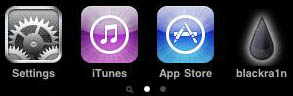
blackra1n installed

Step 7: Choose what installer applications you want to install on your iPhone and then tap “Install”. I suggest only installing Cydia but you may install them all if you want to.
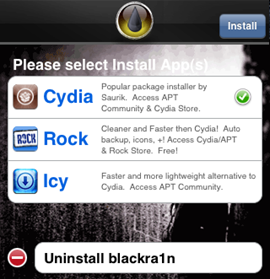
blackra1n app

BlackRa1n will download and install the selected applications.

Step 8: Once done installing, your iPhone will respring and you should see your installer app on your springboard.
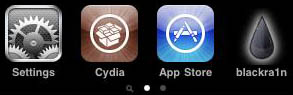
blackra1n cydia installed

Step 9: Once your installer app (Cydia in our case) is installed. You can safely uninstall BlackRa1n by launching the app and selecting “uninstall balckra1n”.
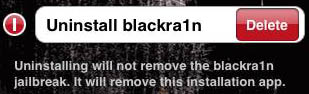
uninstall blackra1n

Step 10: Reboot your iPhone. You’re done!

If you have any question, please leave a comment below…

 
  • bossmonster

    so i used blackra1n and it worked. So did the unlock, or jailbreak, or are htey the same thing. Plzhealp, im dumb

  • Ryan

    How do u downgrade ur software?

  • james

    download the 3.1.2 firmware from the internet. then press shift and restore in itunes and use the 3.1.2 you just downloaded and it will restore/downgrade it to 3.1.2

  • Honeymilk

    Can I use blackrain on my iPhone even if it doesn’t need to be jailbroken….just wanna make sure I don’t mess up my phn.

  • http://NotSure Clarence M. Gilliam

    I paid for this before and now I tried to use it again; and it will not work it says files are missing
    .
    My naddress is

    Clarence M. Gilliam
    120 Union Circle
    Lillington, N.C 27546

    Can you re email the program that works again

    Thanks
    Clarence

    • Bobby Joe Collins

      Haha Ur so stupid

  • elena

    i followed all the instructions and got as far as itl reboot then after abot 15mins my iphone 3g just goes off and wont turn on for awhile then when it goes bac on its still in connect to itunes and saying the sims not compatible i need the origional sim only problem is i bought it over ebay unlocked and a sim didn come with it any ideas what i can do ive had it since march and cant work it please help feel like just throwing it out the window ive tried everything

  • fahim

    it is possible to jailbreak iphone 3gs on 3.1.3 (new base band)? if yes, what software’s to use?

  • james

    elena im not sure whether this will work with the 3g but it did for my 2g

    download the 3.1.2 firmware from the internet. then press shift and restore in itunes and use the 3.1.2 you just downloaded and it will restore/downgrade it to 3.1.2

    then use blackrain and it should work with 3.1.2 as blackrain doesnt work with 3.1.3

  • elena

    tanks hun tryin it now fukin tings wreckin my head

  • elena

    still not workin unknown error 1015 :-(

  • zaid

    When i click on make it ra1n i get a msg saying” This application has failed to start beacause ASL.dll was not found. Re-installing the application may fix this problem”.

    I even tried Re-installing it,,, but i get the same msg. i have a iphone 3GS 3.1.2. my Itunes are updated to the latest version. any 1 Plzz help me.

    • ammar

      copy blackra1n to C. progarmes files dn common files dn apple nd paste blackra1n there nd make shortcut of it on desktop nd dn run it….. man it wil work 4 u..

  • Pooh Bear

    zaid u must download blackra1n for itunes 9.1 or goggle blackra1n for itunes 9.1 it will help you

  • Pooh Bear

    hey guys i hav a 3gs 16g 3.1.2 bb 05.11.07 i thought using spirit will ease me from keep unlocking with my comp everytime my battery runs down now its been a month since i’ve stuck to apple logo any ideas i’ve tried every thing itunes wants me to restore and update

  • Sean

    When I try to install blackra1n it comes up with an error saying it can’t find something called ASL.dll can someone help me pls >:)

  • Pooh Bear

    @ SEAN DOWNLOAD BLACKRA1N FOR ITUNES 9.1

  • choppy

    TRUST ME!!!!!!!!1

    FOR ME THIS WORKS

    1. CONNECT IPHONE TO PC AND OPEN ITUNES

    2. WHEN AT ITUNES PRESS THE HOME BUTTON (YOU MAY NEED TO HOLD) UNTILL THE MESSAGE SAYING RECOVERY MODE NEED TO RESTORE ECT.

    3. DO NOT RESTORE INSTEAD FROM TASK MANAGER (CONTROL ALT DELETE) CLOSE ITUNES

    4. OPEN AND RUN BLACKRAIN

    YOU MAY NEED TO HOLD THE HOME BUTTON ALL THE WAY THROUGH THIS PROCESS I DID

    THIS WORKED FOR ME HOPE IT HELPS

  • mermaid

    I unlocked my iphone bestunlockiphone.com Unlocking iphone never been so easy Jailbreak/Unlock all version iphone 2g,3g,3gs, and ipod easy way worked for me too
    Now my iphone is fully unlocked and i can use any carrier

  • McPhee

    The icon is not appearing on my iPod touch, even though it reboots and everything.

  • Jo

    heys. i have an iphone 3gs with a 3.1.3 firmware. do i still follow these steps? would it still be able to work without any problems?:X please reply!:D

  • li en

    hey they said i have to restore my ihpone first
    after restoring, (iphone 2g btw) i dont get the black rain app on my phone!!!
    pls help!11111
    im using a mac

  • Lane Willmott

    Hi, I’ve recently tried to jailbreak mi iPod Touch 3.1.2. And on the computer I click “Make It Ra1n” and my iPod enters recovery mode and then it comes up with the geohot image and on the computer it say “Congatulations you’ve jailbroken your iPod Touch” and on my iPod the blackra1n symbol does not appear, Can I please have any help at all thank you.

  • QuaNeishia

    -okayy , im havinq problems with muh ipod touch ; i have already downloaded (black rain] but the problem is it takes 10-40 mins to reboot ; &’d also dhis is muh second time tryinq dhis , well third ,but can someone tell meh whats qoinq on here ..-//

  • http://magicnlimitedtexas.com Forest

    I have a 3g and it is running 4.0 everytime i use black rain it fails to put the icon on my spring board??? what do i do

  • San

    I have iPhone 3GS v4 will this work 4 me

  • Rafael

    every time i try to jalbreak my ipod i keepgetting stuck on recovery screen but the geohot dude doesnt appear on my screen

  • tanner

    does the wait before the reboot look like the plug into itunes emblem or not please tell me what it looks like im having truble

  • http://Www.blackra1n.com Daniel

    On like step 6 does it show geohot and then what does it show after that or like does it turn off again cause I’m not really sure I’m not really good at this

  • Alexis

    After running blackra1n, my screen doesn’t switch over to the picture of geohot, it stays on the recovery screen, with no battery in the corner. ??

  • John

    I just tried to run blackra1n on my windows XP and I am getting an error message that says the application has failed to start because ASL.dll was not found. I tried to reinstall a few times but to no avail. Can anyone give me advice. I am trying to jailbreak a 3G with 3.1.2. Thanks

  • Fahim

    @ John – Cut/Copy the blackrain and paste it in the following folder

    “C:\Program Files\Common Files\Apple\Apple Application Support” . Then double click on the exe file. It should work without any problem now.

    Are you downgrading ur iphone?

    • caleb

      sweet thanks i was experiencing the same problem and that helped alot

  • Kevin

    does black rain work in iOS 4.0?

  • maria

    will this cause all my photos to be erased?

  • meril

    hey..my iphone is 3gs 3.1.2 and i was restore by itunes, and now is locked. can you tell me how to unlock my iphone?

  • Erin

    Hi I have an iphone 3G from peru….was unlocked i think and jailbroken but i updated it. Now the sim is locked out. is there anyway i can unlock it without somehow getting a sim from peru when i don’t even know where the phone originally came from??? Thanks

    • Jimbob

      I have a similar problem. i have my gf’s old iphone and while she was messing around with it she locked the sim its asking for a PUK. is there a way around this? or can i get a PUK for a now inactive iphone from her carrier still?

      Thanks

  • Cameron

    Im using 4.0.2 will it work? and is one of the most used jailbreakers?

  • Larry

    erm.. i’m using the ipod touch to jailbreak, but wad do u mean i have to run blackra1n to boot my itouch?

  • rahul

    hey–i–got–iphone3g–3.0.1..wjen–i–am–trying–to–install–the–blackra1n–its–coming–up–with–an–error..thats–DLL–error…

  • JR

    Do i realy need to pay???

  • Sean

    When i try to launch blackrain after i downloaded it keeps saying i have an ALS error or something like that somebody help me PLEASE

  • Eirol Gnapatac

    I’m done jailbreaking and no rain app icon shown on my screen. please help i dont know what to do next. thanks.

  • Eirol Gnapatac

    my name is eirol, forgot to mention about my iphone. its a 3g version 4.1(8B117) and with firmware 05.14.02. i’m done jailbreaking it and it says at the end that it is successful but nothing happen after that coz it turn black for a long time so i turn it back on but no rain icon on the screen after i turn it on. pls help me, i’m stuck coz i cant download cydia. thanks

  • Jhn Chrls

    I did everything as said and everything work well, but when i downloaded Cydia i tried to open it and it wouldnt load… What can i do?

  • ibr

    cydia stor

  • ibr

    cr

  • max

    I have an iPhone 4 with firmware 4.1

    I went through the steps, ran blackra1n, it updated status to iPhone Jailbroken, it did reboot but I’m not able to find the blackra1n icon on the springboard. Does this work on iPhone4/4.1 yet?

  • 3than

    do you have to donate? :/ also does this work now?

  • annoymus

    i did everything it said to do
    i plugged my ipod in
    went to blackra1n
    i hit make it rain after downloading then it said done wait for reeboot so i went back upstairs and came down like five minutes later it still said it and my ipod was turned on.
    it never worked for me.

  • Fahim

    If you are on windows xp, copy the blackra1n.exe and paste it in the following folder:
    “C:\Program Files\Common Files\Apple\Apple Application Support”.

    Now run blackra1n.exe form the folder. Hopefully it will work.

    Cheers

  • Lexx

    I have plugged in my iphone to my mac, and i clicked make it rain, and it is still saying entering recovery and has been like this for about 10mintues…….what shall i doo??

  • neondelta

    guys always backup your iphone before unlocking it ^_^ using itunes
    your backup is located at C:\Documents and Settings\Administrator\Application Data\Apple Computer\Mobilesync\Backup

    you can also use Touchcopy09 it backup mp3, movies, contacts, etc. just give a try ^_^