Anthony Bouchard

Anthony Bouchard joined the iDownloadBlog.com team in 2016 after originally covering Apple and iPhone jailbreak news at ModMyi.com. As an experienced editor, he brings more than 15 years’ worth of jailbreaking knowledge to our in-depth guides, opinion pieces, and news articles. His passion for device customization and user choice sparks his strong push to empower readers with the tools they need to explore and enjoy the freedom that comes with jailbreaking. Anthony blogs about not only jailbreaking, but also Apple software & accessories, drones & photography, and Nintendo gaming systems. Anthony honed his advanced technical knowledge over the years with hands-on projects ranging from gaming PC builds to engine repair mechanics. His never-ending hunger for knowledge is why you’ll always find him tinkering – tearing things apart and putting them back together to understand what makes them tick.

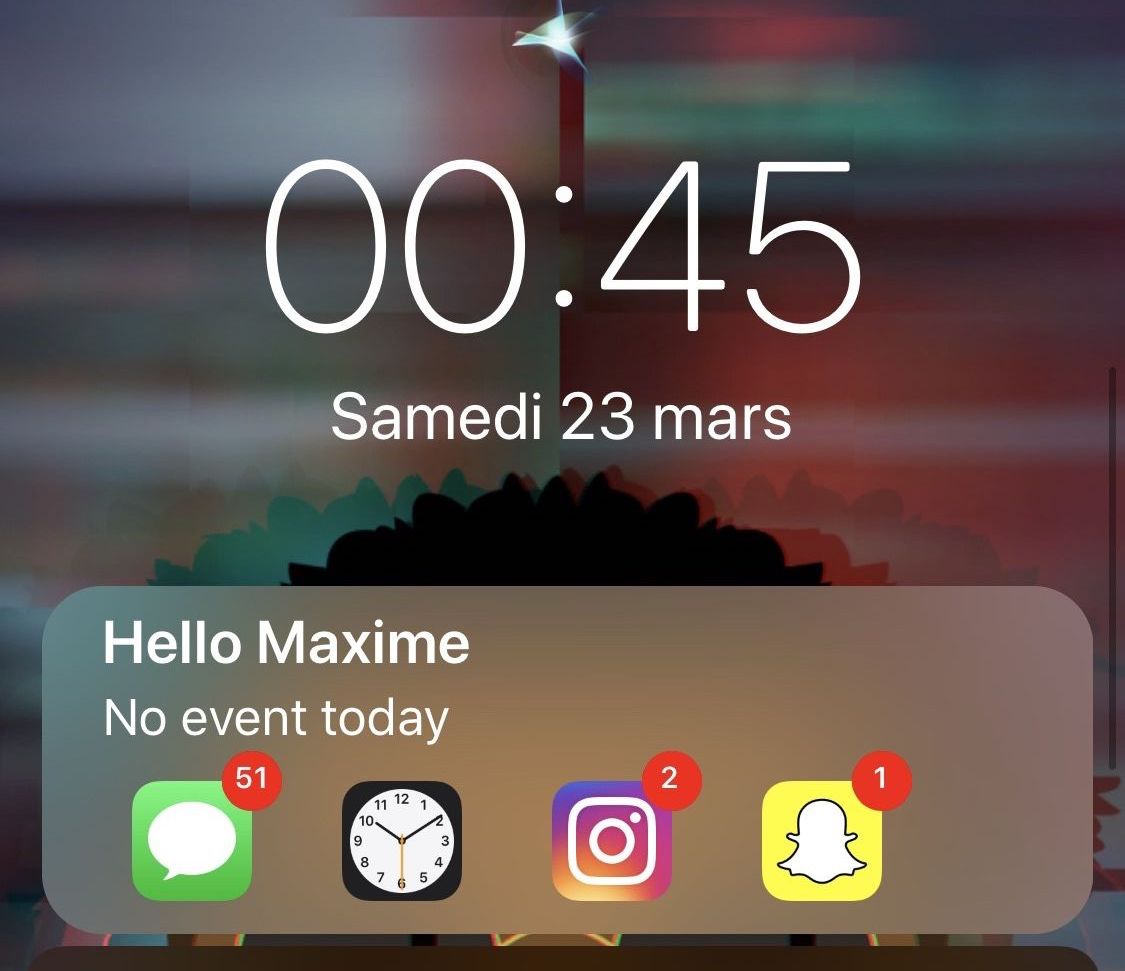
Centurion: A Lock screen widget that displays notifications and events at a glance

The iPhone’s stock Lock screen is as barebones as can be, and while some people love the minimalistic look, others with Apple would make better use of the available screen real estate. Those in the latter boat, much like myself, will come to appreciate a new jailbreak tweak called Centurion by iOS developer maximehip.

Centurion is essentially a new widget that appears just below the date and time on the Lock screen with an informative view regarding current/upcoming events and the number of missed notifications for some of your favorite apps.
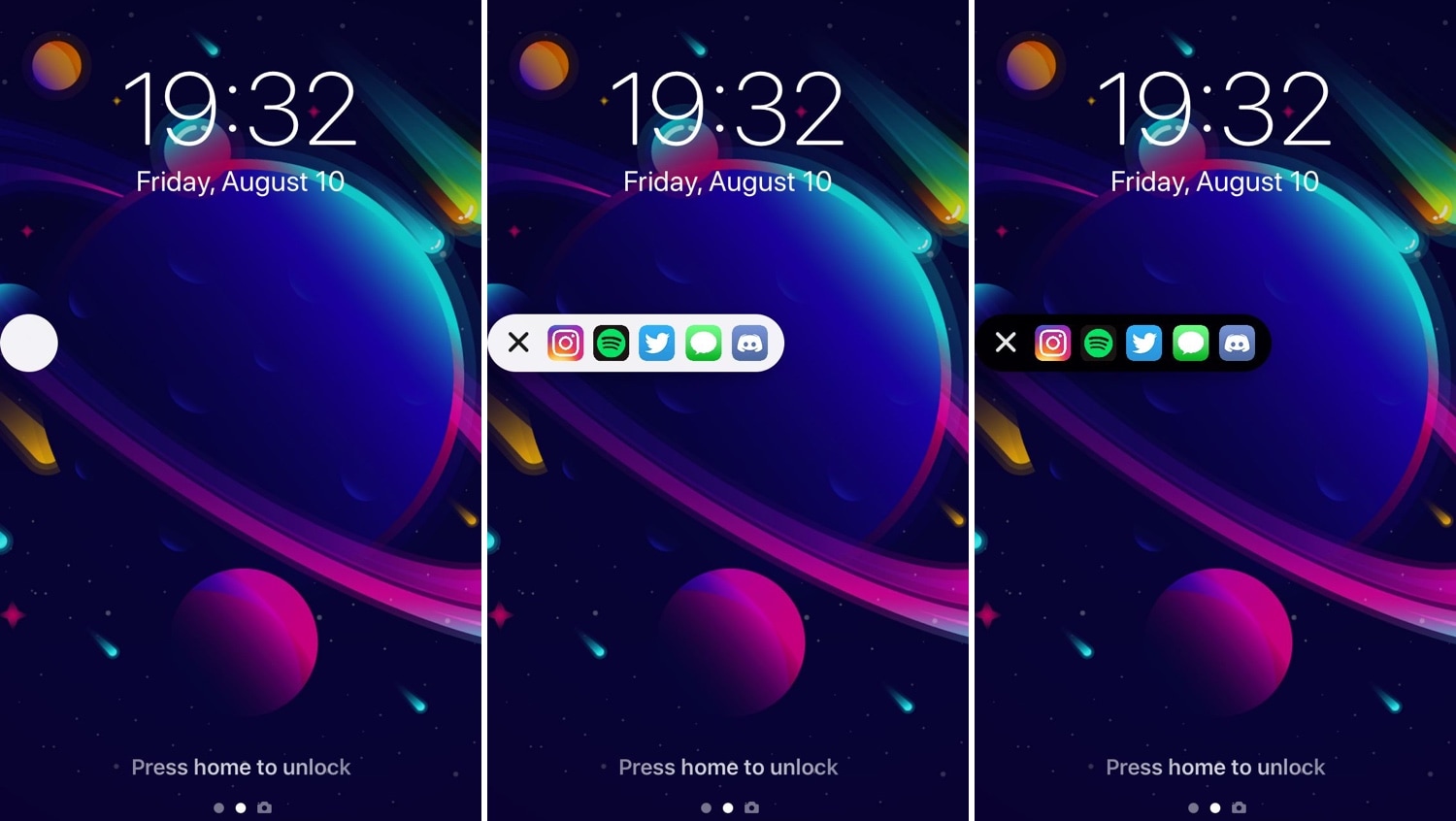
Access your favorite apps faster with AppShortcut

I’ve always been a fan of application shortcut-centric jailbreak tweaks, and that’s one of the reasons why I’m excited to show you a new release called AppShortcut by iOS developer donbytyqi.

AppShortcut is a customizable system-wide application shortcut interface that provides you with quick access to your favorite apps whether you’re on the Lock screen, Home screen, or in the middle of an app already.

Customize your iPhone’s locking sound with CustomSounds

Those sporting jailbroken devices are always looking for fun and quirky ways to customize the iOS experience, and we’re right there with you. That’s why we’re excited to show you a new free jailbreak tweak called CustomLock by iOS developer TylerD3v.

Just as the name implies, CustomLock empowers users to change the locking sound of their jailbroken iPhone or iPad – effectively replacing the ‘lock’ sound that naturally transpires when using the sleep button to lock the device.

Jailbreak tweaks of the week: Meteoroid, Modulus, SmartRotate, and more

There has been no shortage of new jailbreak tweak releases since the unc0ver jailbreak picked up support for iOS 12, and with that in mind, we're excited to go over all the new releases with you.

This roundup encompasses all the new jailbreak tweaks released in Cydia from Monday, March 18th to Sunday, March 24th. As usual, we'll begin by discussing our favorites and then outline the rest afterward.

Modulus brings a slew of useful new modules to Control Center

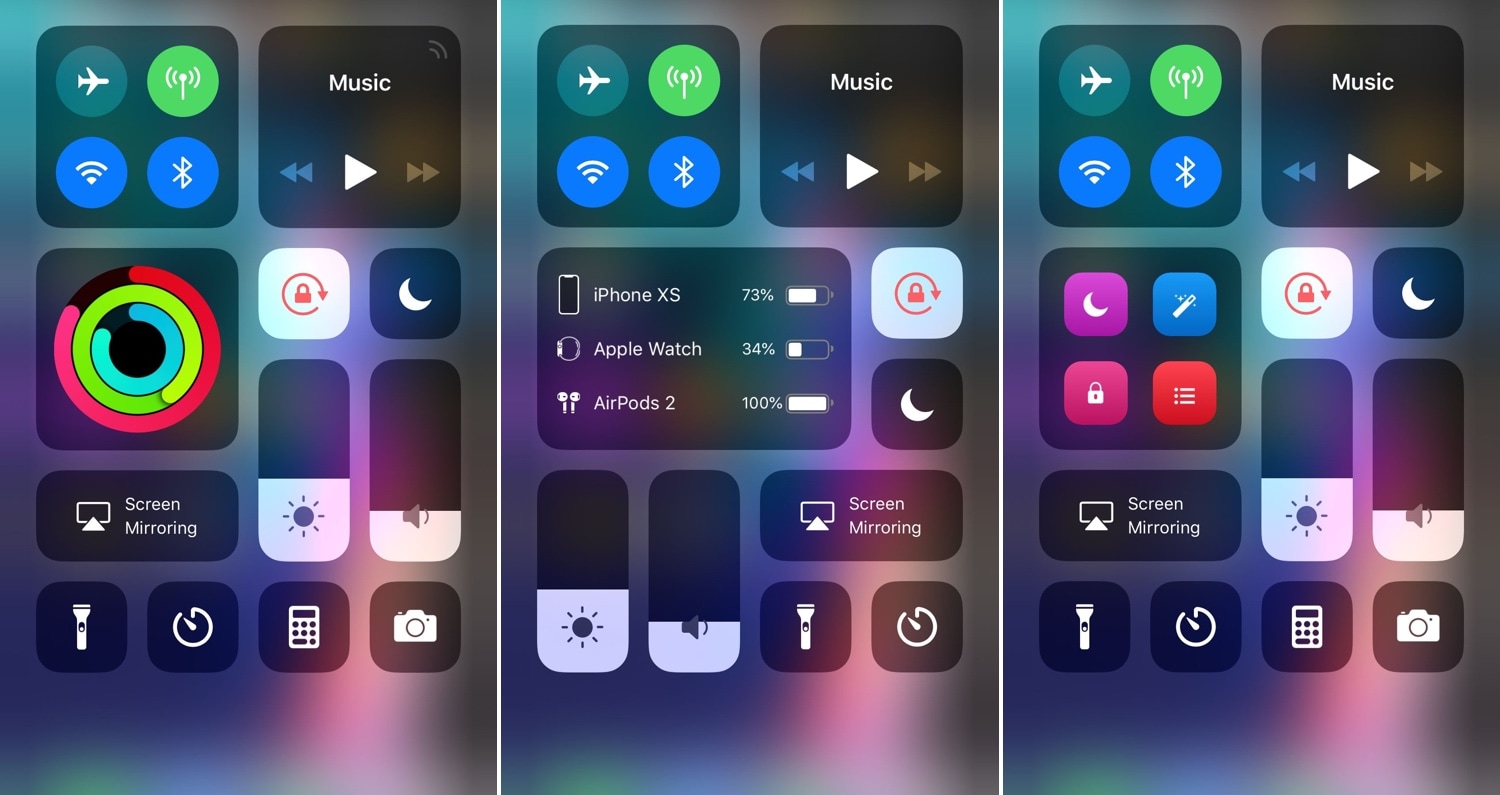
Making the Control Center interface modular was perhaps one of the greatest things Apple ever did to improve the iOS experience. On the other hand, Apple left a few things out of the interface from the start and hasn’t yet opened the platform to third-party developers for custom toggles and shortcuts. With that in mind, it certainly pays off to have a jailbreak.

A new jailbreak tweak called Modulus by iOS developer LaughingQuoll brings a slew of new third-party modules to the Control Center interface, and at first glance, each of the new modules seem to be rather impressive.

SnoozeX provides a more intuitive firing alarm interface for iOS

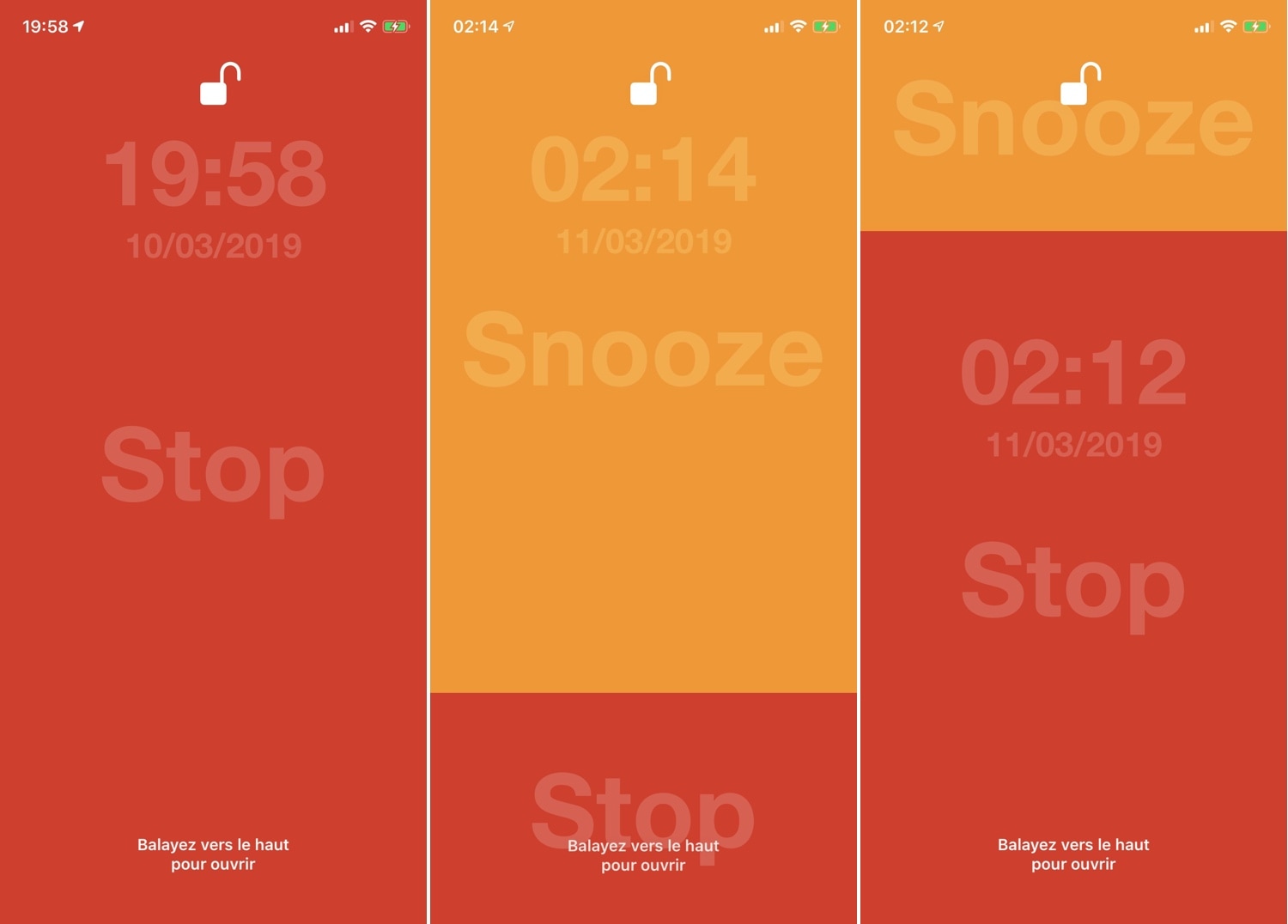
Whenever one of your iPhone’s alarm fires, you’re presented with an interface where you can either snooze or stop the alarm indefinitely. Many have expressed their dissatisfaction with iOS’ native alarm firing interface, and with that in mind, iOS developer VincentMDIM came out with a jailbreak tweak called SnoozeX to address that.

SnoozeX makes the iOS’ alarm firing interface more intuitive, especially for those who have trouble waking up early in the morning after their alarm goes off. As depicted by the screenshot examples above, SnoozeX makes the alarm firing interface easier to interact with, which will be appreciated by folks who are still half asleep when the alarm sounds.

LockDock lets you access your Dock from the Lock screen

When I first started jailbreaking many years ago, you were the cool kid on the block if you had access to application shortcuts on your iPhone’s Lock screen. For whatever reason, application shortcut add-ons have all but disappeared in recent memory, but a new jailbreak tweak called LockDock by iOS developer Blake Boxberger appears to revive this once popular concept.

LockDock takes advantage of an application launcher that already exists on the iOS platform – the Home screen’s application Dock – and makes it accessible from the Lock screen in addition to the Home screen, as shown above.

NCGrabberInfo: An actually useful Notification Center grabber for jailbroken devices

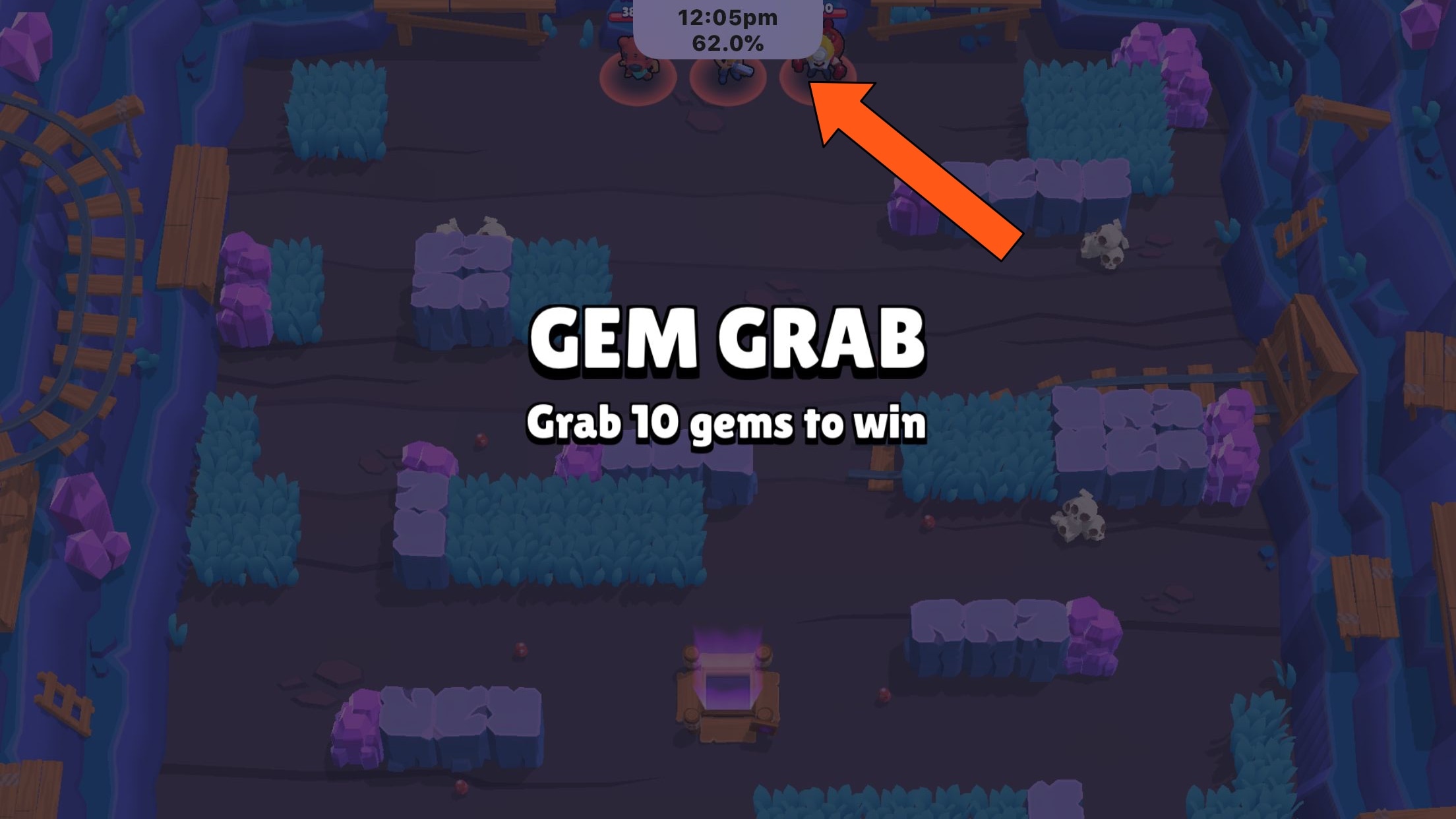
A lot of times when playing full-screen games on my iPhone, I wonder what time it is or how much battery life I have left. It’s inconvenient to pause my game to peek at Control Center or swipe out of the app to glance at the Status Bar, and so I was particularly excited when I saw a new free jailbreak tweak called NCGrabberInfo by iOS developer Antique.

With this tweak, you can grab a peek at both the time and your handset’s remaining battery life even when you’re enjoying a full-screen game; and the best part is, you don’t need to stop playing or leave the app to do it.

MessageColors lets you add color gradients to the Messages app

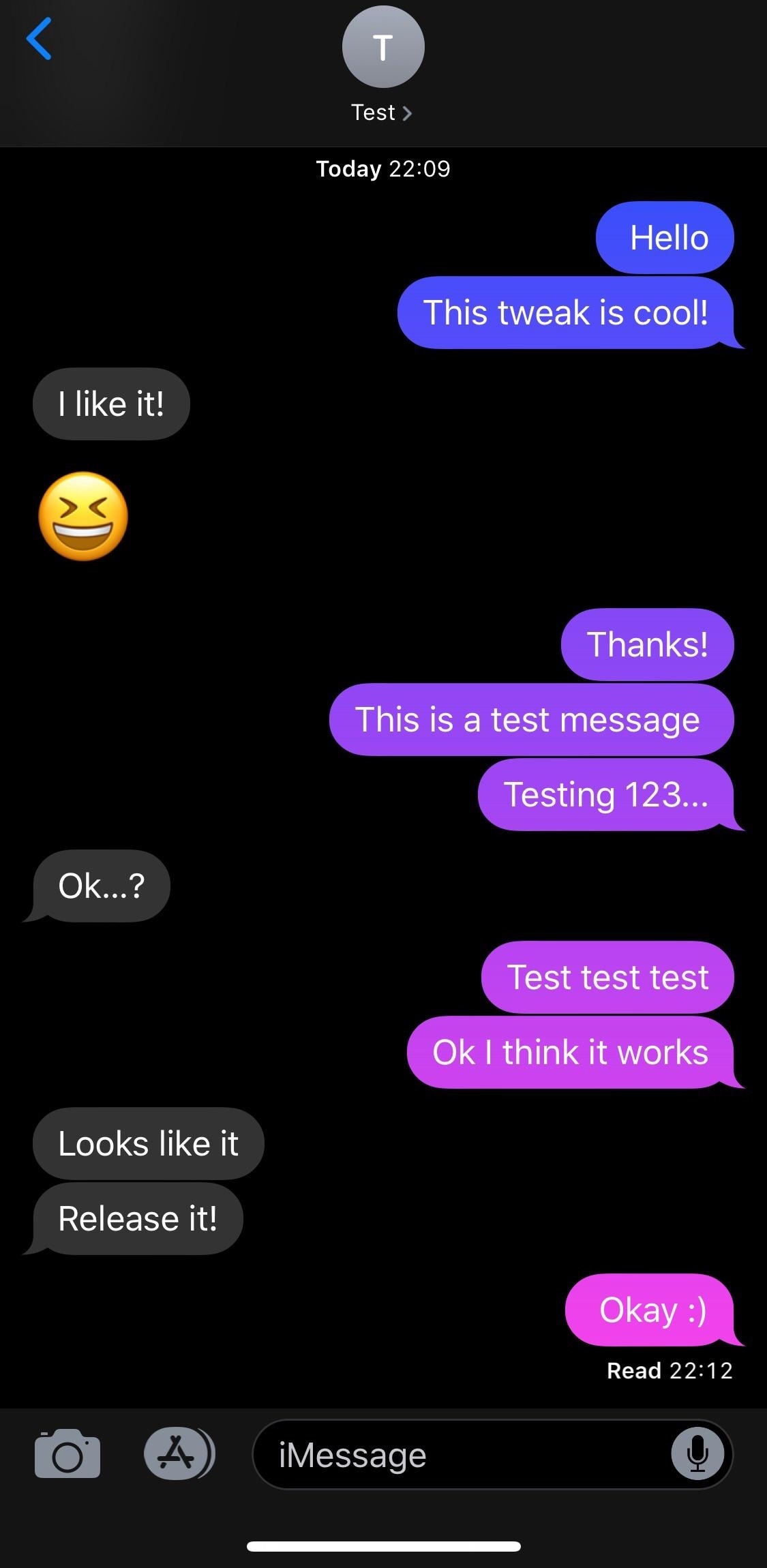
If you have an iPhone, then chances are you spend a lot of time in the Messages app text messaging other people. With that in mind, wouldn’t it be great if you could colorize the Messages app to match your individual personality?

If you like what you’re hearing so far, then you’ll probably enjoy a new free jailbreak tweak called MessageColors by iOS developer RestiveConch. This tweak lets you apply custom color gradients to your Messages app, making it possible to achieve the result you see in the screenshot example above.

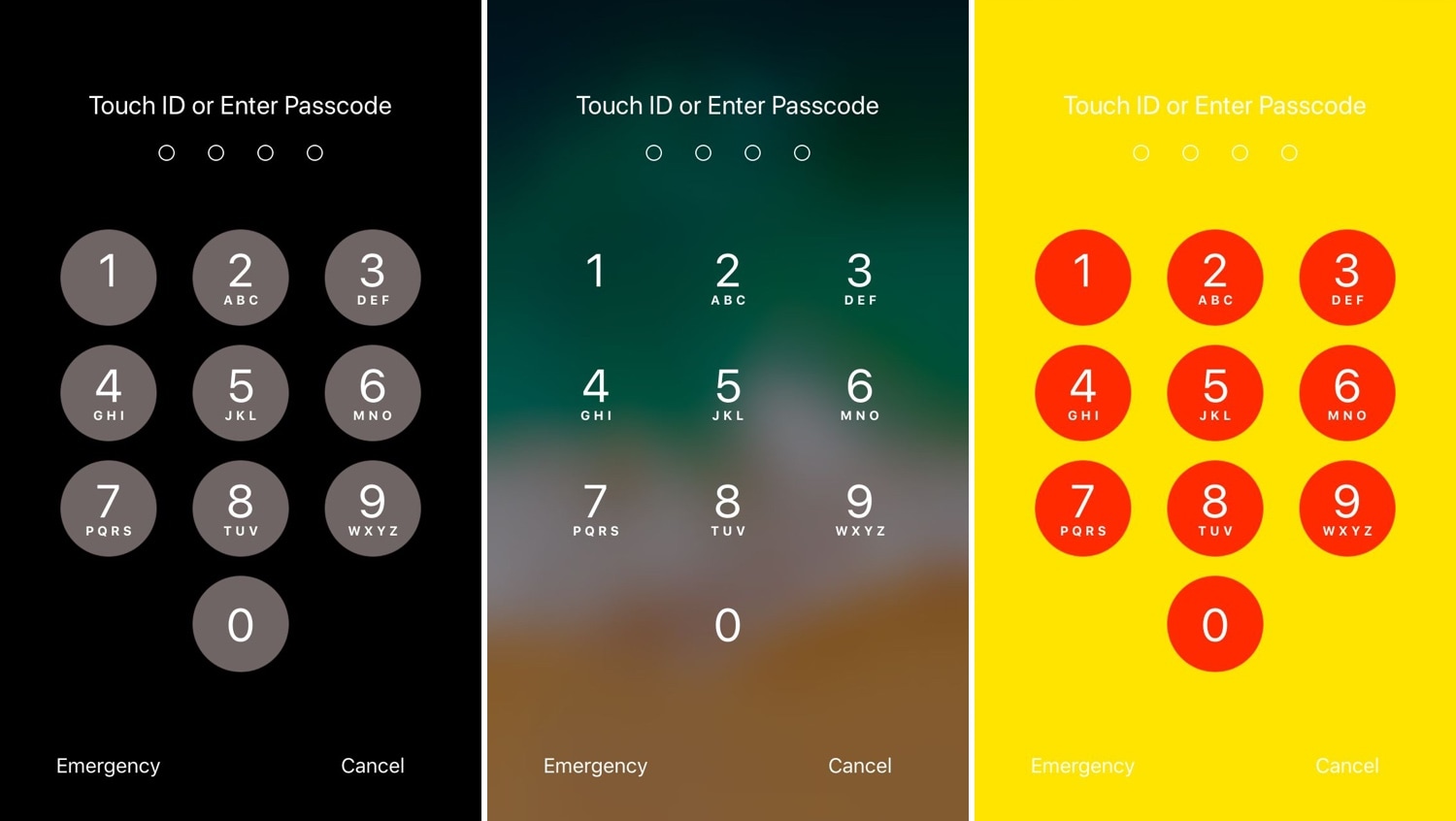
This tweak lets you add a splash of color to your iPhone’s passcode entry interface

One of the most exciting parts of owning a jailbroken iPhone or iPad is having the freedom to customize the handset’s look and feel outside the realm of Apple’s stock parameters and disturb the monotony exhibited by most iOS devices. If you agree, then you might take a liking to a new free jailbreak tweak called NudePassScreen by iOS developer Kiran Patil.

As you might have discerned from the screenshot examples above, NudePassScreen empowers the user to colorize their handset’s passcode entry interface with virtually any color scheme they want, helping them to stand out from the rest of the crowd.

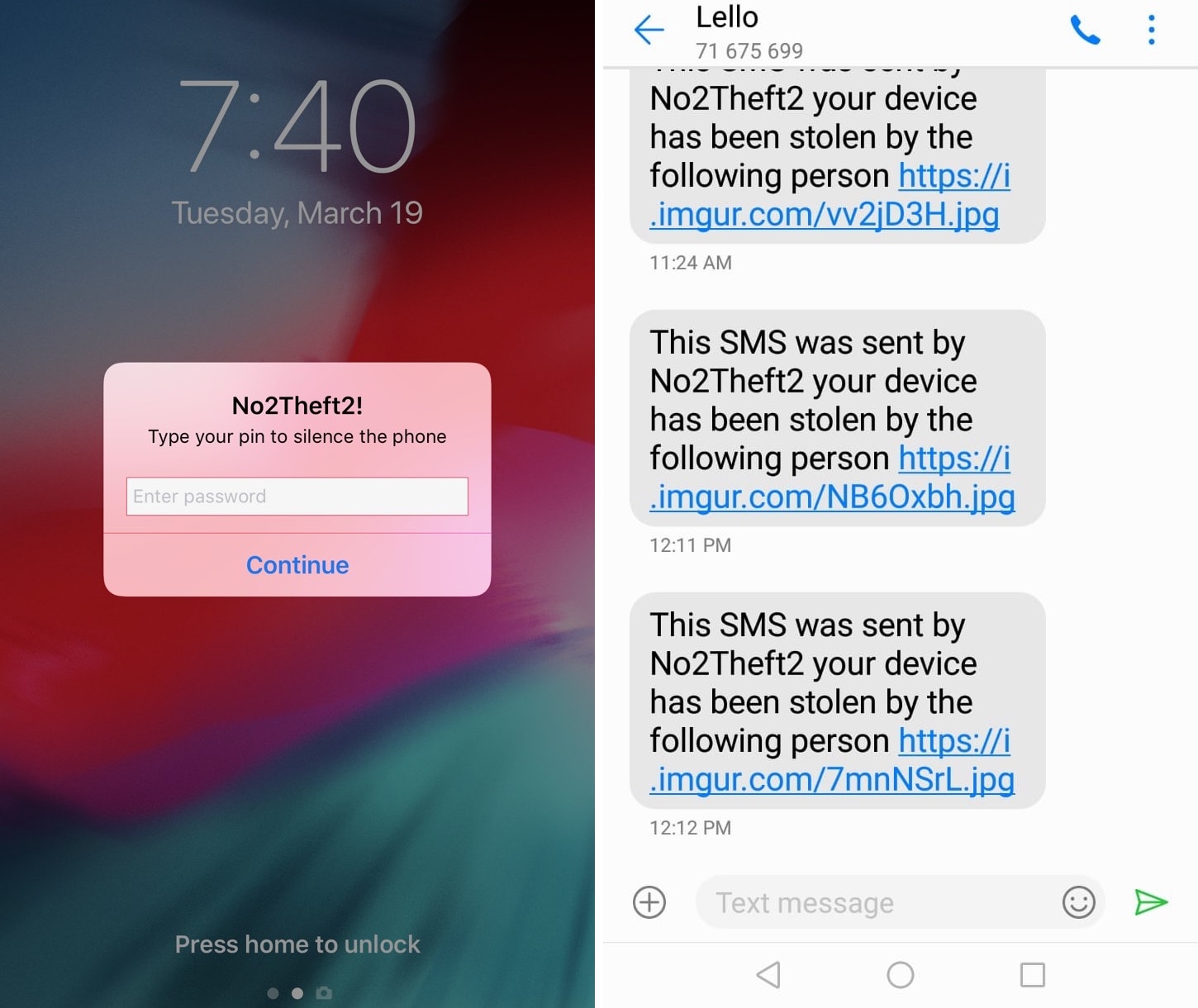
No2Theft2 protects your iPhone from thieves and pranksters

Whether you’re always paranoid about someone stealing your iPhone when you set it down on a table somewhere in public or you’ve just got lousy friends that like to play pranks on you, a jailbreak tweak called No2Theft2 by iOS developer Elias Sfeir promises to let you know whenever someone tries to be nefarious with your handset.

After you’ve installed and configured No2Theft2, you can rest assured that if someone’s doing something fishy with your iPhone behind your back, you’ll know about it. The tweak uses several methods to notify you whenever someone picks up your handset and enters the passcode incorrectly.

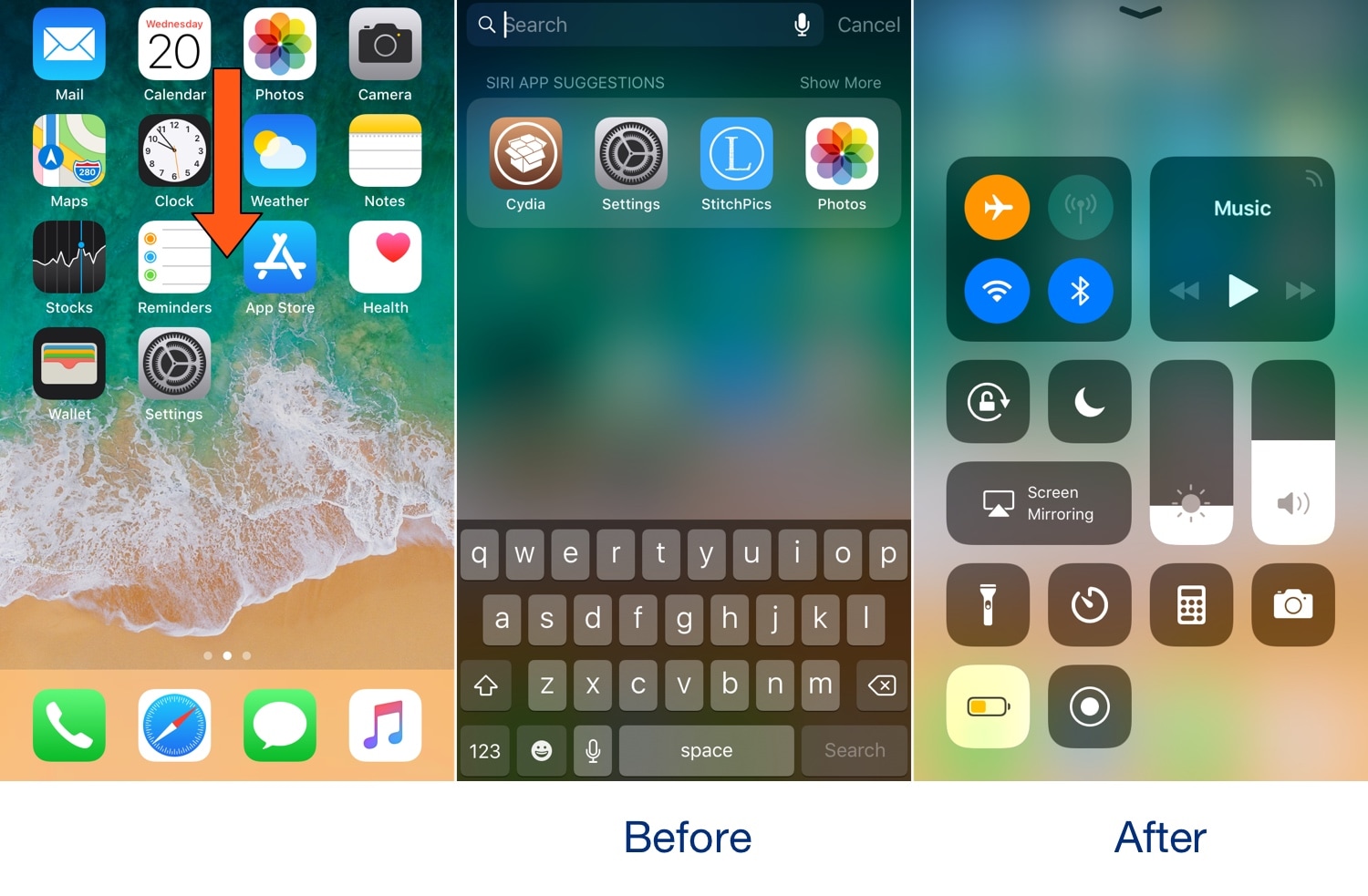
SpotCC launches Control Center instead of Spotlight when swiping down on the Home screen

Swiping down while on the Home screen of your iPhone usually presents you with the Spotlight search interface, but if you don’t use the Spotlight search feature that often, then you might take a liking to a new free jailbreak tweak called SpotCC by iOS developer Kiran Patil.

There isn’t much to say here concerning what the tweak does, but just as the name implies, SpotCC makes it so that swiping down on the Home screen summons Control Center rather than Spotlight search.