I guess some people who'd be ready to do anything to get themselves a free iPad.
[9 to 5 Mac]
I guess some people who'd be ready to do anything to get themselves a free iPad.
[9 to 5 Mac]
It seems as if someone at Sony feels threatened by the iPhone and its ability as a gaming device. I'm not sure why since it's quite obvious that the device isn't the first toy you think of when you hear about "serious gaming".
Nevertheless Sony has released a PSP commercial taking shots at what is obviously supposed to be an iPhone game. Kevin Butler (whose supposed iPhone has a game titled 'Lame Castle' on its screen) and young Marcus Rivers are featured in what is actually a pretty funny clip. Rivers tells Butler that his phone is for "texting your grandma and calling your girl" and that it can't handle "big boy games".
Engadget has the full video that informs us that the PSP has games as low as $9.99. It's an amusing little clip but why Sony feels the need to compare its PSP to the iPhone games is a bit bewildering.
I don't know about you but when I play a game on my iPhone, it is usually to just pass time here and there. Never have I considered it to be a gamer's device of choice. Is this just friendly banter from Sony or a bit of desperation? Give us your opinion in the comments right after you text your grandma.
It's that time of year again. The leaves are changing, minds are gathering, and the students are trying to plan out how to save as much money as possible for their weekend tirades. If your hoping to cut some of your costs in the textbook department perhaps eBay can help. The online auction site has launched an entry into the App Store from a company they bought 10 years ago to help you cut your rising costs this fall. Half.com is the name of both that company as well as the free application.
TechCrunch tell us this is the first eBay application to offer it's newest feature, barcode scanning which it bought from RedLaser not too long ago. Just a swipe of your iPhone should give you access to great deals on textbooks, DVD's, & games.
The best part is all items are discounted, sometimes in excess to 50% hence the name Half.com. With over 700,000 sellers and access to share through Facebook & Twitter, chances are you'll find someone to help you find that ancient edition classic literature text.
What do you think students and parents? Does this look appealing enough to partake in or will you just break down and buy from your bookstore, or stay with Amazon? Let us know in the education center known as the comment box.
Safari Download Manager, the extension that adds a powerful download manager to the iPhone's web browser, has been updated to work on iOS 4, bringing support for the iPhone 4 and the iPad.
Although a bit pricey, Safari Download Manager is a great application that really unleashes to power of the iPhone, allowing you to download and save on your device virtually any file out there.
You can download Safari Download Manager from Cydia for $5.
It was just over a week ago that it was announced that China would be getting a Wi-Fi capable iPhone 3GS to sell to its masses. Apparently things are moving fast because Apple Insider reports that the world's largest market is set to receive the new iPhone 4 "in the beginning part of September". It doesn't stop there as it's reported that the enormous country will also be getting its version of the iPad.
China Unicom will be unveiling the two products on separate dates following the removal of a ban of Wi-Fi devices. On the surface, it would seem like poor strategy to release the new iPhone so soon after its predecessor, however Apple has keened in on the buying power of the Chinese population. Two stores currently reside there while 25 new stores are planned for the country in which the phone is assembled in.
Is this smart business from Apple? Does the market potential call for both devices at once, or will the competition within itself cause less than expected revenue? Give us your two pennies in the comment section.
I just got tipped by an anonymous reader about a nice little trick that will convert iPhone app icons that haven't been optimized for the iPhone 4 Retina Display to high resolution icons. This will require a jailbroken iPhone and a couple applications.
Step 1: Download iFile from Cydia and Resize-Photo from the App Store.
Step 2: In iFile, navigate to the folder of the application of which you'd like to optimize the icon. The application folder is usually called appname.app.
Step 3: Save the app icon to your camera roll. The app icon size should be 512 x 512.
Step 4: Open Resize-Photo and change the application icon size from 512 x 512 to 114 x 114 and save it.
Step 5: In iFile, navigate to your photos folder and copy the new icon you just resized.
Step 6: Now go back to your app folder and look for the application icon and rename it to something like IconBackUp.png, just in case something goes wrong.
Step 7: Still in the application folder, paste the resized app icon and name it Icon.png, or whatever the app icon was called in the first place.
Step 8: Reboot your iPhone. You should now have a high resolution icon.
Apparently this doesn't work with every application icon but it should work with most of them.
Pretty nice trick, isn't it?
After being tipped off by my friend Sully, it seems The Sun Times of Chicago had an article that I found to be just as amusing as interesting. The story relates to criminal cases in which iPhones are seized in a search warrant. Apparently our beloved device has more data stored on it that other smartphones, which can be used by investigators to figure out whose telling the truth, but more importantly, who isn't.
Detective Josh Fazio is quoted saying, "When someone tells me they have an iPhone in a case, I say, 'Yeah!' I can do tons with an iPhone,". He's right, sort of. If an iPhone is already seized in a case that already has had a warrant issued, I would hope that there is more valuable evidence recovered that would actually demand said permission.
Well that didn't last long, did it? Just this week iDB reported that popular streaming agent Grooveshark had been added to the App Store for download. It was noted that the potential of the rights of music being violated existed, and it seems that very issue is the reason behind the short lived app.
Mac Life has the direct quote from the companies official blog, which states:
Earlier this afternoon, Apple sent us a letter notifying us that, due to a complaint they received from Universal Music Group UK, Grooveshark for iPhone has been, strangely, pulled from the App Store.
This comes as an absolute surprise to us, and we are not sleeping until we figure out exactly how to fix this—and get Grooveshark for iPhone back in the App Store. Above all, our biggest concern is damaging the service we provide to all of you guys—our loyal (awesome) users.
I have beaten this horse nearly to a corpse, however I feel another jab is in order. How the hell does Apple (again) validate an application without fully knowing if it is even legal? Did the responsible party just think that because Grooveshark's website runs without consequence, that all the necessary permission slips had been signed? If I were Universal, I would be drafting a threatening letter to not just Grooveshark, but to Apple alike. Maybe that happened, and maybe it didn't.
For those of us who managed to get the app downloaded promptly, Grooveshark tells us we should be able to continue to use it without incident. How come? Not that I'm complaining, but it would seem that if anything legit was violated then Apple should pull the plug, which is something they have the ability to do. Right?
Anyway, I think while the sort the legality of this out, they should figure out how they plan on charging $3 once the 30-day trial is up, without even providing background capabilities. Let's hope it doesn't take another year. Until then, enjoy Pandora!
The Telegraph posted an interview with Adobe CEO, Shantanu Narayen, which inevitably included talk of the Adobe vs. Apple dispute. Narayen stated the following, which basically means that the software company is "over it". Here's the word for word :
They've chosen to keep their system closed and we'd rather work with partners who are interested in working with us.
We believe in open systems. We believe in the power of the internet and in customers making choices and I think a lot of the controversy was about their decision at that point. They've made their choice. We've made ours and we've moved on.
It's a business decision. With the energy and innovation that our company has, we'd rather focus on people who want to deliver the best experience with Flash and there are so many of them.
I can't help but notice the undertones here, but the man has a point. Several capable smart-phones have adopted Flash in their devices. Heck, even a jailbroken iPhone will (kind of) give it to you.
Whether or not Adobe cares anymore is not what Steve Jobs, and Apple, should be worried about. The FCC denied Adobe's request of information regarding their claim against Apple, while the European Commissions recently joined the party. We at iDB will continue to provide you with the drama surrounding this story. Until then, we're gone in a flash. I Couldn't resist.
Want to give a vintage look to your iPad? Then you may want to try the BookBook case.
BookBook for iPad is a handmade one-of-a-kind, hardback leather case that doubles as a fully adjustable stand. Along with its vintage looks, the super cool case makes iPad feel as if you’re holding a real book, and in many ways you are holding a book. BookBook for iPad forms a safe cocoon around your prized iPad. The hardback cover and spine provide impact protection, while the hard protective inner frame offers crush protection. As a bonus, the unique design of this case disguises iPad for an extra level of stealthy security.
The BookBook case comes in classic black or vibrant red for $69.99 (free shipping).
[JAiB]
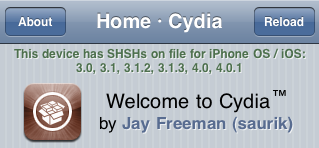
This step by step guide will show you how to downgrade your iPhone iOS 4.0.2 to iOS 4.0.1. These steps are pretty simple but there is one major requirement: you must have your SHSH files saved on Saurik's server. There is absolutely no way around it. If you don't have your SHSH, you won't be able to downgrade your iPhone.
In this tutorial, we will see how to downgrade the iPhone from 4.0.2 to 4.0.1 but the steps are the same if you want to downgrade to iOS 4 or even 3.1.3.
There are several methods used to downgrade the iPhone. We will learn the method that uses TinyUmbrella. No file editing will be necessary.
How to Downgrade from iOS 4.0.2 to 4.0.1Step 1: Let's download your SHSH blobs from Saurik's server to your computer. To do so, download TinyUmbrella and plug your iPhone in. Select the "Advanced Options" box. Also select the firmware version to which you wish to downgrade. Finally, select "Cydia" under "Request From". Then hit "Save My SHSH". This will grab your SHSH files from Saurik's servers and save them on your computer.
Step 2: Download the firmware to which you wish to downgrade to from our iPhone downloads section. Save it to your desktop.
Step 3: Put your iPhone in DFU Mode. To do so, launch iTunes and plug your iPhone in. Press and hold the Home and Power button together for 10 seconds. After 10 seconds, release the Power button while still holding the Home button until iTunes pops up and says it has found an iPhone in recovery Mode.
Step 4: Run TinyUmbrellaand click the "Display SHSHs" button to make sure your SHSH blobs were downloaded to your computer. Once done, click "Start TSS Server".
Step 5: Now we're going to restore to the firmware you want. To do so, launch iTunes and plug your iPhone in. Hold to SHIFT key (Windows only) or ALT/Option key (Mac only) while clicking on Restore. Make sure you hold the key while clicking Restore. A window will open. Simply select the firmware you downloaded in step 2.
Step 6: Your iPhone will start the restore process. You will most likely get several errors (error 1011, 1013, and 1015) but that's ok, don't worry about those.
Step 7: Finally, we need to get your iPhone out of recovery mode. To do so, simply click "Kick Device Out of Recovery" in TinyUmbrella.
Done!
You should now be back on a previous iOS, giving you the ability to jailbreak and unlock.
The Wall Street Journal is reporting that Apple's "revolutionary" advertising service iAd is off to a slow start due to Apple's demand for having creative control. This doesn't surprise this author since everything Apple does usually has to have their "unique" stamp of approval.
According to executives, advertisers aren't typically used to having the outsourcer having such a 'say-so' when it comes to the implementation and design of such ads. This process has left the building of the advertisements to take 8-10 weeks time, from brainstorming to completion. The delay is said to rest in Apple's hands, which partners say is taking 2 weeks longer than usual.