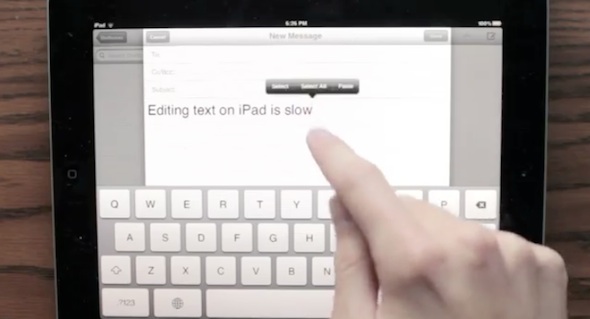
How text editing on the iPad should be

By , May 3, 2012

If you’ve ever spent any kind of time editing text on the iPad, you know that there has to be a better solution. Placing your cursor in a certain spot in a sentence or paragraph can be difficult. And between letters? Forget about it.

Luckily, YouTube user danielchasehooper has come up with the perfect way to fix this. In his new video entitled “iPad Keyboard Prototype,” he demonstrates how Apple could make cursor placement much more precise…

UPDATE: The jailbreak community was fast to respond by releasing SwipeSelection, a jailbreak tweak that works pretty much the same way as described in the video above. Make sure to check out our video demo of SwipeSelection in action.

The developer thinks the feature is good enough for Apple to use in iOS, and he posted the following instructions on how to tell them about it:

1. Go to bugreport.apple.com, sign in and click “New Problem”

2. Set the title to “Editing Text on iPad (duplicate of rdar://11365152)”

3. Set the product to “iPad,” version number to “N/A,” classification to “Feature (New)” and is it reproducible to “not applicable.”

4. Copy the following letter and paste it in the Problem Details section then click submit

“I just saw Daniel Hooper’s iPad keyboard demo and I want that for my iPad! (Check out the video here: http://www.youtube.com/watch?v=RGQTaHGQ04Q) Apple says the iPad is the future of the Post-PC world; if it’s going to be my primary keyboard, I want a better way to edit text!

Tapping directly on text to move the cursor works well for small portions of text, but we don’t just write short portions of text anymore! When performing lots of edits in larger documents the direct interaction metaphor falls apart for cursor control. Even short portions of text can be painful to edit when you need to move the cursor to a precise location. Would you ever want to write a document on your computer without using the arrow keys? This is the reality iPad users face because they do not have the equivalent of arrow keys.

There is a better way.

Take advantage of gestures by making a drag over the keyboard UI move the cursor. Move the cursor in word increments when dragging with two fingers. And finally, let the user select text while dragging when they hold down shift.”

We love the idea, and recommend that everyone follow the directions above to try and get Apple to implement this. Because hey, if they won’t, we’ll just get a jailbreak developer to do it for them.

What do you think of this concept for iPad text editing?

Thanks @iPadJailbroken

Update: Good news! A jailbreak developer has turned this concept into a reality. Check out the full details about SwipeSelection for more information.

  • Share:
  • Follow:
  • http://twitter.com/rcnino Ryan Canino

    Apple takes too long to get enhancements like this to the people. Jailbreak tweak, please!

  • http://twitter.com/DavidMai David of DavidHam

    Good idea and concept video. Very intuitive for people who already use their computer keyboard in this way have.

    More likely to get a jailbreak version than Apple implementing something like this in the near future.

  • Falk M.

    This also applies to iPhone and iPod, why not say iOS instead of iPad?
    It clearly is not a hardware issue.

    • http://twitter.com/BurntRoad Roey Marcus

      iPhone and iPod Touch don’t support multi-touch gestures. Stop being so butthurt about it.

      • Tiago Dias

        iPhone and iPod touch don’t support multi gestures because does not makes sense on a 3.5” screen.. it would be hard to use 5 ou 4 fingers in a screen so small.

        Of course they support multitouch, which is what is needed to use this feature.

      • Falk M.

        This.

        Also I think Roey should get off his high horse.

      • JAG Robles

        My iPod Touch 4 does support multi-touch gestures.

      • http://twitter.com/iKrill Antonio Santos

        All iOS devices support multi-touch. Only that the iPad is big enough for 4-5 fingers but 2 fingers is fine for iPhone.

  • http://twitter.com/GuyBey0ndC00L eDDie

    I love this idea. Problem is Apple loves a number of things before they even think about doing this.
    1. Patents – Everyone knows Apples love there patents, sigh….
    2. Can it be done on all iDevices or Mac Books even.
    3. Can they buy this idea off the creator without issue.

    • Anonymous

      #2 is already taken care of. There are multi-touch gestures on the iPad but not the iPhone or iPod touch.

      • Tiago Dias

        Why do you say that?

        iPhone and iPod Touch don’t have multigestures, however that does not mean they can’t support them.. In fact, the term we have to talk about is multitouch, and of course they support them.

        (multigestures are not in the iPhone and iPod Touch because doesn’t make sense on screens so small.. not easy to use four or 5 fingers at the same time on a 3.5” screen).

      • Anonymous

        That’s my point. It seemed that he was assuming that Apple wouldn’t implement it if it weren’t available on all devices. Maybe that’s not what he meant.

      • Tiago Dias

        @QuarterSwede

        Yes, sorry, I did not interpreted well your words the first time. You are right.

        However, despite that, this feature can be implemented in all iDevices (all they need is to support multitouch, and they all do!), so that is not an issue :)

        Ragards

  • Anonymous

    If we make this a jailbreak tweak, Apple won’t implent for sure.

    • Anonymous

      Yea because all the stuff they added in iOS 5 was completely original, none of it was a spinoff of a jailbreak tweak or anything.

      • Anonymous

        I mewn they won’t add the exact thing into iOS 6. Theyalways change it a bit.

      • Falk M.

        Yea, it’s called polishing.
        Never found an Apple copy of a jb tweak to be inferior in terms of design & function combined.

      • http://twitter.com/powerje James Power

        Which were spinoffs of Android tweaks. Which were essentially spinoffs of Desktop OSs.

        Also to Falk M the status notification area on iOS is inferior to both the JB version and Android’s.

    • http://twitter.com/xdracco Juan

      Really? You mean Apple hasn’t stolen any ideas from the jailbreak community? Ever?

      • Anonymous

        I mewn they won’t add the exact thing into iOS 6. Theyalways change it a bit.

  • http://www.facebook.com/shaz.shoghian Shahrouz Shoghian

    i wont it on my iphone..

  • http://twitter.com/zerocool5878 llǝuɥɔS lǝɐɥɔıW

    Jailbreak tweek would be the way to go. It will take apple ages to implement something like this for us. Idea is epic and would be great addition to the iPad though

  • Anonymous

    Interesting.

    I’m still waiting to get the added efficiency of a row of number and symbols above the keyboard?

    No reason the keyboard on the iPad can’t have an extra row on top.

  • ed mar

    did it

  • http://www.facebook.com/profile.php?id=1485505115 Josh Spankit

    This functionality is directly opposing both types of keyboard-hold-down actions, and is counter intuitive for older users.

    Apple’s design choices are not about making things faster for power users: That’s one of the many reasons to justify jailbreaking.

    I’d buy that for a dollar!

  • http://twitter.com/rud0lf77 Rudolf Lichtner

    I could try to make a Jailbreak Tweak for this on Sunday…

    • Anonymous

      Just submitted a bug report. However, @Rudolf Lichtner, I’d be all for a jailbreak tweak version. Lets make it happen.

      • http://twitter.com/kexik Mario Hros

        I am already working on a tweak which does something with keyboard, so I will include this functionality at least partly. It’s like 60% complete.

  • Sidney Affonso

    Fully agree and strongly recommend

  • http://twitter.com/Rirath Rirath

    The tweak KBShortcuts combined with iKiwi have sped up my editing considerably on iOS, but I would still take something along these lines.

    With KBShortcuts you can drag from space -> c to copy, space -> v to paste, space -> j/l to move the carat, i/j for lineup / down, p/q for start/end of line, and it all stretches the current selection to boot. (Author was kind enough to put this in after I sent a request via Twitter)

    It’s not perfect, but it’s faster than trying to use the magnifier. There’s also a swipe-to-move carat tweak I use, though that only moves one space at a time. Good for tweaking position quickly, but not for selection.

  • Anonymous

    Hehe, in two years, when iOS 8 releases, Apple will show off their “Great new, and original idea, about how editing text on a mobile device really should be.”

  • http://www.facebook.com/mattpet Matt Dowdy

    Submitted the report and got a reply stating that it’s a known issue and they’re working on it!

    • http://www.facebook.com/luisreyespr Luis

      gotta love automatic messages

  • http://www.sebastian-auer.com Sebastian

    Mhh, bug reporting down! System changes, errors, or just too many people submitting reports? LOL. I shall try later.

  • http://www.facebook.com/profile.php?id=100001564279191 David Morones

    “No matching components found”?

  • http://twitter.com/iDara09 iDara09

    I’ll request to apple, but first I’ll would like to request to JB community (cause they are fast both work and respond).

    But don’t forget iPhone. It needs this feature too. :(

  • Anonymous

    Very nice concept, though it might confuse some people. I’d love to see this implemented

  • Anonymous

    It would be interesting if you could patent this…

  • Anonymous

    So has this actually been implemented? If so, I could see a lightweight replacement for the Notes app that just uses this, and makes copying simple: then, you could just switch into that app, type, and paste back into any other app.

  • Anonymous

    This is exactly how editing worked on the TouchStream LP from Fingerworks, the company Apple bought while developing the iPhone. The right half of the keyboard responded to two and three-finger gestures that moved the mouse. The left half responded to two and three finger gestures for cursor movement. It was one of the most efficient things about the keyboard.

    They can improve on this even more, though, by allowing backward and forward swipe to delete and undo delete. Backpacking is still the most common editing action, and tap-tap-tapping backspace is inefficient. Dragging left from the backspace should bring the cursor left while deleting. Dragging to the right while performing this operation would restore the deleted text.

  • http://profile.yahoo.com/WWEALDHF4KW3UNTTJJ46FX4VAM redshot

    This is half assed proposal. Why isn’t copy and paste demonstrated with the new technique???

  • http://twitter.com/klau1001 KLau

    KBShortcut is also great idea/tweak
    Use space+s select, space+c copy and space+v paste
    it can also move cursor but no as comfortable as this idea

    great if make this two combined and add to iOS

  • http://greggman.com greggman

    What do I think?

    Neat idea but very U.S. centric. Try typing French, Spanish, German, Russian, Japanese, Chinese. There will be issues though maybe there are solutions

    • http://www.facebook.com/luisreyespr Luis

      solution would be for non us centrist to speak us centrist style?

  • http://twitter.com/The_Clarkster Chris Clark

    That’s very neat, someone should quickly build it for Android, make a proof of concept to see how well it works. Probably can make a bunch of cash selling it too in the Android Market.

  • Anonymous

    I don’t see how there can be issues with any European language. Oriental languages and perhaps Arabic may have issues.

  • http://twitter.com/yoshgoodman Josh Goodman

    +1, just submitted to Bug reported, so excited if they make it happen.

  • http://twitter.com/buxx Patrick Loonstra

    Nice idea, and done, put it trough to Apple =]

  • http://www.microsourcing.com/ MicroSourcing

    Editing text is difficult with any type of touch screen device. It’s great to see that talented Apple users care enough to share troubleshooting techniques like this one.

  • http://shibbyonline.co.uk/ Adam Chamberlin

    That is brilliant!

  • Anonymous

    Wow! Great concept!

    I can’t do the bugreport tho because it says I need to be a developer?

  • http://www.facebook.com/profile.php?id=633719247 Marc Mazzella

    Just realize that you have to sign up as a Develper before you’re allowed to submit a bug report.  This wasn’t part of the instructions in your article.  Great concept for text editing though.  Here’s hoping it makes it to iOS.

  • numpty

    Some neat ideas, but there’s got to be a better way than “hold Shift to select” — that’s an even less “post-PC” than what’s there now.

    Incidentally, directly bombarding Apple with requests to use a specific idea like this is probably a good way to make sure it never happens — apart from the annoyance factor, implementing an unsolicited, patentable feature that somebody outside of Apple has designed is something that has “future legal issues” written all over it. That’s why many musicians, authors, comedians etc. never look at unsolicited material that people send them — if they end up coincidentally doing something similar, their backside is legally covered if the person who sent it to them decides to sue.

  • Anonymous

    Why is it a Flash video! What year is this!? Don’t tell me to user Chrome or change my user agent. It’s 2012 for crying out loud!

  • http://www.facebook.com/luisreyespr Luis

    Well well well, given this amazing implementation of multitouch gesture over text editing, I would like to include to the list a feature inspired by this. Remake the undo-redo function! If instead of shaking to death your device to get undo/redo functions, you could change it to: slide 3 fingers to the left for ‘undo’, slide 3 fingers to the right to redo. It would feel more natural and intuitive than exorcizing your iDevice every time you make an error.

  • http://twitter.com/loucimj Javier Loucim

    Great feature! Its the most natural way to edit text!!

  • http://twitter.com/pgharavi Pouya Gharavi

    Done.

  • http://profile.yahoo.com/HJI5I2726DXSWDAF72OGT4LLXE Ryan

    a shorter feature request statement for an idea that sells itself:

    Daniel Hooper’s iPad keyboard demo offers a great way to speed up text editing, and I’d love to see something like this implemented. Check out the video: http://youtube.com/watch?v=RGQTaHGQ04Q.

    This is a fast and fluid alternative to tapping directly on text to move the cursor. Control the cursor with drag gestures over the keyboard UI, move in word increments when dragging with two fingers. Select text by holding shift while dragging.

  • http://twitter.com/chubert albert chu

    Great idea… just submitted!

  • Anonymous

    I love the irony of a site dedicated to iPad-iPhone-iOS that uses flash videos. I’m not sure how someone would think that is a good idea. I changed my user agent to iPad and it still shows missing plug-in. I’m too lazy to check on an actual iOS device to see if it is just brain dead browser detection.

    • http://twitter.com/xhuntter Hunter Freeman

      Just watched it on my iPhone. Seems to work fine, I’m not what people are talking about.
      On topic, this is great. And I love how many ideas are appearing in the comments. I’d love to be able to at least hold down backspace and drag left instead of repeatedly tapping the key to delete bits of text on my iPhone.

  • Paulo Pires

    I like the idea. Just have someone do it right now!!!

  • http://twitter.com/LucasHMaia Lucas H. Maia

    It shoula also be available at the iPhone

  • http://twitter.com/Adam_E_Official Adam Elkaim

    I got an email back from apple regarding this, it said:
    Hello Adam,
    This is a follow up to Bug ID# 11380062.  After further investigation it has been determined that this is a known issue, which is currently being investigated by engineering.  This issue has been filed in our bug database under the original Bug ID# 11365152. The original bug number being used to track this duplicate issue can be found in the State column, in this format:  Duplicate/OrigBug#.

    Thank you for submitting this bug report. We truly appreciate your assistance in helping us discover and isolate bugs.

    Best Regards,

    Apple Developer Connection 
    Worldwide Developer Relations

  • http://www.facebook.com/colby.kirchner Colby Kirchner

    Certainly an excellent idea!

  • http://www.facebook.com/profile.php?id=1425305135 Dapp Ollone

    Port this to Android!!

  • http://twitter.com/iPosTic Konstantine

    Give it a few years and apple will magically revolutionize text editing on iPad :) just like they did with Copy/Paste that took them a few years!…..ohh.. why do i like my iPhone so much…. and i keep following them and buying their staff….

  • Mathias Petermann

    I hope danielchasehooper has a patent on that, otherwise Apple might sue him, about having their idea, before they had it…

  • http://btwnworlds.tumblr.com/ Lou G

    If I weren’t scared of bricking my iPad 2, I’d jail break it and use it. For now, I’ll buy a blue tooth keyboard and a dock and be happy.

  • http://www.facebook.com/LuCiFeR.C0oL Nhân Ngáo

    Good idea……