How to Install Siri Proxy Tutorial [Video]

By , Dec 9, 2011

We’ve gone hands-on with Siri Proxy, and the things you can do with this handy tool are amazing.

But as you know, at iDB we don’t like to keep all the good stuff to ourselves. For that reason, we’ve created this comprehensive video tutorial and guide that shows you how to run Siri Proxy on your iPhone 4S.

We show you step-by-step what’s needed to try out Siri Proxy yourself…

Before we get too deep into the tutorial, we want to let you know about a few prerequisites.

1: You don’t have to use Ubuntu, but in order to follow these steps verbosely, you must have an Ubuntu machine, which is free. This install can be done on a Mac, Windows, or Linux machine. In my opinion it is much easier to do this on an Ubuntu installation than anything else, that’s why I selected it to install Siri Proxy. Your Ubuntu installation can be the real thing, or it can be a virtual machine like I have. In order to show you the full start to finish tutorial, I show you how to install Ubuntu using Parallels for Mac as a part of this tutorial. Parallels is a paid app for the Mac, but the good news is that you can download a free 14-day trial, and start using this today.

2: This only works with the iPhone 4S. We haven’t tested it on any other devices, because frankly, it probably wouldn’t work anyway, and it’s not exactly legal.

3: This will only work while connected to your local WiFi network. It’s true that you could get this working remotely with some VPN skills, but I tried to keep this as simple and straightforward as possible.

4: This tutorial only covers the initial install. Later, I’ll show you how to add various plugins to get more out of the experience, as seen here.

5: Anyone can do this. Yes, even you. So don’t be scared, give it a shot.

6: Lastly, we want to thank Pete “Plamoni” Lamonica for creating Siri Proxy, and providing the basis for this tutorial.

How to Install Siri Proxy

Preliminary Steps

Step 1: If you have Ubuntu already installed, great! If not, that’s okay, too. If you’re on a Windows box, you can install Ubuntu outright as if it was just another program. If you’re on a Mac, you can install Ubuntu as a virtual machine using software like Parallels 7 or VMWare Fusion. In this tutorial, I use Parallels.

Step 2: Install the latest Ubuntu updates if applicable. Please see 1:00 on the video tutorial.

Step 3: If you’re using Parallels, or any other virtual machine, you will need to set the Internet connection to bridged mode so that devices on your network can interface directly with the virtual machine. Please see 4:00 on the video tutorial for more info.

Step 4: Setup Dropbox. This is an optional step, but I found it easier than anything else. You must have some way to transfer the certificate that you generate to your iPhone. You can use email if you prefer, but I decided to use DropBox.

Command Line Steps

Each of these steps can be referenced in the video, and each has an accompanying timestamp for ease of reference. Simply copy and paste each of these commands in the Terminal app, and follow any additional instructions if so indicated. Each step has a timestamp that you can reference in the video tutorial to help gather your bearings.

Command 01: Time 5:44
sudo apt-get install dnsmasq ruby build-essential openssl libreadline6 libreadline6-dev curl git-core zlib1g zlib1g-dev libssl-dev libyaml-dev libsqlite3-0 libsqlite3-dev sqlite3 libxml2-dev libxslt-dev autoconf libc6-dev ncurses-dev automake libtool bison subversion
Select ‘y’ to continue.

Command 02: Time 6:13
sudo nano /etc/dnsmasq.conf
Find the following line on approximately line 62: #address=/double-click.net/127.0.0.1
Directly beneath that line type: address=/guzzoni.apple.com/(your_machine's_ip_address)
Replace (your_machine’s_ip_address) with the IP address of your machine as shown in the video.
Press control+o, and then return to save. Press control+x to exit back to main terminal prompt.

Command 03: Time 7:42
sudo /etc/init.d/dnsmasq restart
Command 04: Time 7:55
bash < <(curl -s https://raw.github.com/wayneeseguin/rvm/master/binscripts/rvm-installer)
Command 05: Time 8:20
[[ -s "$HOME/.rvm/scripts/rvm" ]] && . "$HOME/.rvm/scripts/rvm"
Command 06: Time 8:33
echo '[[ -s "$HOME/.rvm/scripts/rvm" ]] && . "$HOME/.rvm/scripts/rvm" # Load RVM function' >> ~/.bash_profile
Command 07: Time 8:47
rvm install 1.9.3
This command takes some time to execute. Be patient, especially on the compiling portion.

Command 08: Time 9:22
rvm use 1.9.3 --default
Command 09: Time 9:32
git clone git://github.com/plamoni/SiriProxy.git
Command 10: Time 9:49
cd SiriProxy
Select 'y' to continue.

Command 11: Time 10:06
rake install
Command 12: Time 10:21
mkdir ~/.siriproxy
Command 13: Time 10:31
cp ./config.example.yml ~/.siriproxy/config.yml
Command 14: Time 10:43
siriproxy gencerts
Command 15: Time 11:04
siriproxy bundle
Command 16: Time 11:23
rvmsudo siriproxy server
This command starts your Siri Proxy Server. It should say "Starting SiriProxy on port 443.."

Setting up the iPhone 4S

Step 1: First you need to grab the certificate we generated in Command 14 above, and install it on your iPhone 4S. You can use Dropbox or Email to transfer this to your iPhone 4S. See the video at 11:40 for more details on this.

The certificate is located at ~/.siriproxy/ca.pem so you will have to view hidden files in order to see this file. Once the certificate is on your iPhone, select install as shown at 12:44 in the video tutorial.

Step 2: In your iPhone 4S's WiFi Settings, select the blue arrow icon next to your active WiFi connection. Remember, you must be connected to the same local network as the Siri Proxy running on your computer. Tap on the DNS section, and edit the DNS entry to point to the IP address of your Siri Proxy server. See the video at 12:59 for more details.

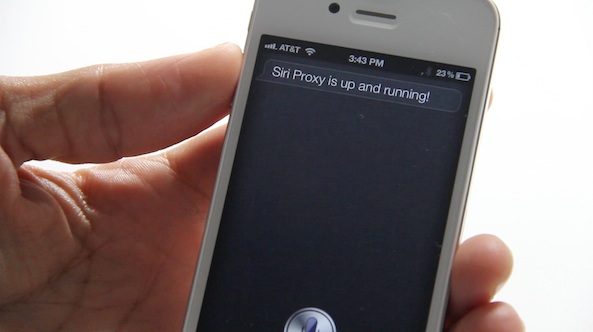
Step 3: Test Siri! Invoke Siri (hold home button on your iPhone 4S) and say "Test Siri Proxy". Siri should respond with: "Siri Proxy is up and running!" You'll also see the terminal window display all of your SpeechPackets from your conversation with Siri.

And that's a wrap folks. I know that seems like a lot of steps, but you can honestly have it running in less than an hour. This is just the beginning though. We now need to get Siri Proxy plugins installed so we can start to reap the benefits of this powerful tool. Stay tuned, we'll be back with tutorials on how to install Siri Proxy Plugins in the near future.

Were you able to get your Siri Proxy running? Let us know in the comments below.

UPDATE: If you're getting an error that says siriproxy: No such file or directory Make sure you are in the right directory. To change directories use the cd command. e.g. CD SiriProxy. If you restart Ubuntu, or go into another directory, you will not be in the same directory that contains SiriProxy.

  • Share:
  • Follow:
  • http://twitter.com/boobebeshi Abdullah Tarabishi

    Create server for iPhone connection
    start conn #<SiriProxy::Connection::Iphone:0x00000001682a30 @signature=3, @processed_headers=false, @output_buffer="", @input_buffer="", @unzipped_input="", @unzipped_output="", @unzip_stream=#, @zip_stream=#, @consumed_ace=false, @name=”iPhone”, @ssled=false>
    [Info - Plugin Manager] Plugins laoded: [#<SiriProxy::Plugin::Example:0x0000000164b648 @manager=#>]
    [Info - iPhone] Received Object: LoadAssistant
    [Info - iPhone] Received Object: SetAssistantData
    [Info - iPhone] Received Object: GetAnchors
    [Info - iPhone] Received Object: SetRestrictions
    [Info - iPhone] Received Object: ClearContext
    [Info - iPhone] Received Object: GetAnchors
    [Info - iPhone] Received Object: StartSpeechRequest
    [Info - iPhone] Received Object: SetRequestOrigin
    [Info - User Location] lat: , long:
    [Info - iPhone] Received Object: SpeechPacket
    [Info - iPhone] Received Object: SpeechPacket
    [Info - iPhone] Received Object: SpeechPacket
    [Info - iPhone] Received Object: SpeechPacket
    [Info - iPhone] Received Object: SpeechPacket
    [Info - iPhone] Received Object: SpeechPacket
    [Info - iPhone] Received Object: SpeechPacket
    [Info - iPhone] Received Object: SpeechPacket
    [Info - iPhone] Received Object: SpeechPacket
    [Info - iPhone] Received Object: SpeechPacket
    [Info - iPhone] Received Object: SpeechPacket
    [Info - iPhone] Received Object: SpeechPacket
    [Info - iPhone] Received Object: SpeechPacket
    [Info - iPhone] Received Object: SpeechPacket
    [Info - iPhone] Received Object: SpeechPacket
    [Info - iPhone] Received Object: SpeechPacket
    [Info - Guzzoni] Received Object: GetSessionCertificateResponse
    [Info - Guzzoni] Received Object: SessionValidationFailed
    [Info - Guzzoni] Received Object: CommandFailed
    [Info - Guzzoni] Received Object: CommandFailed
    [Info - Guzzoni] Received Object: CommandFailed
    [Info - Guzzoni] Received Object: CommandFailed
    [Info - Guzzoni] Received Object: CommandFailed
    [Info - Guzzoni] Received Object: CommandFailed
    [Info - Guzzoni] Received Object: CommandFailed
    [Info - Guzzoni] Received Object: CommandFailed
    [Info - Guzzoni] Received Object: CommandFailed
    [Info - Guzzoni] Received Object: CommandFailed
    [Info - Guzzoni] Received Object: CommandFailed
    [Info - Guzzoni] Received Object: CommandFailed
    [Info - Guzzoni] Received Object: CommandFailed
    [Info - Guzzoni] Received Object: CommandFailed
    [Info - Guzzoni] Received Object: CommandFailed
    [Info - Guzzoni] Received Object: CommandFailed
    [Info - Guzzoni] Received Object: CommandFailed
    [Info - Guzzoni] Received Object: CommandFailed
    [Info - Guzzoni] Received Object: CommandFailed
    [Info - Guzzoni] Received Object: CommandFailed
    [Info - Guzzoni] Received Object: CommandFailed
    [Info - iPhone] Received Object: SpeechPacket
    [Info - iPhone] Received Object: SpeechPacket
    [Info - Guzzoni] Received Object: CommandFailed
    [Info - iPhone] Received Object: SpeechPacket
    [Info - Guzzoni] Received Object: CommandFailed
    [Info - Guzzoni] Received Object: CommandFailed
    [Info - Guzzoni] Received Object: CommandFailed
    [Info - iPhone] Received Object: SpeechPacket
    [Info - iPhone] Received Object: LoadAssistant
    [Info - iPhone] Received Object: SetAssistantData
    [Info - iPhone] Received Object: GetAnchors
    [Info - iPhone] Received Object: SetRestrictions
    [Info - iPhone] Received Object: ClearContext
    [Info - Guzzoni] Received Object: CommandFailed
    [Info - Guzzoni] Received Object: CommandFailed
    [Info - Guzzoni] Received Object: GetSessionCertificateResponse
    [Info - Guzzoni] Received Object: SessionValidationFailed
    [Info - Guzzoni] Received Object: CommandFailed
    [Info - Guzzoni] Received Object: CommandFailed
    [Info - Guzzoni] Received Object: CommandFailed
    [Info - iPhone] Received Object: GetAnchors
    [Info - iPhone] Received Object: LoadAssistant
    [Info - iPhone] Received Object: SetAssistantData
    [Info - Guzzoni] Received Object: CommandFailed
    [Info - Guzzoni] Received Object: CommandFailed
    [Info - Guzzoni] Received Object: GetSessionCertificateResponse
    [Info - Guzzoni] Received Object: SessionValidationFailed
    [Info - iPhone] Received Object: GetAnchors
    [Info - iPhone] Received Object: SetRestrictions
    [Info - iPhone] Received Object: ClearContext
    [Info - iPhone] Received Object: GetAnchors
    [Info - iPhone] Received Object: LoadAssistant
    [Info - iPhone] Received Object: SetAssistantData
    [Info - iPhone] Received Object: GetAnchors
    [Info - iPhone] Received Object: SetRestrictions
    [Info - iPhone] Received Object: ClearContext
    [Info - Guzzoni] Received Object: CommandFailed
    [Info - Guzzoni] Received Object: CommandFailed
    [Info - Guzzoni] Received Object: CommandFailed
    [Info - Guzzoni] Received Object: CommandFailed
    [Info - Guzzoni] Received Object: CommandFailed
    [Info - Guzzoni] Received Object: GetSessionCertificateResponse
    [Info - Guzzoni] Received Object: SessionValidationFailed
    [Info - Guzzoni] Received Object: CommandFailed
    [Info - Guzzoni] Received Object: CommandFailed
    [Info - Guzzoni] Received Object: CommandFailed
    [Info - iPhone] Received Object: GetAnchors
    [Info - iPhone] Received Object: LoadAssistant
    [Info - iPhone] Received Object: SetAssistantData
    [Info - iPhone] Received Object: GetAnchors
    [Info - iPhone] Received Object: SetRestrictions
    [Info - iPhone] Received Object: ClearContext
    [Info - iPhone] Received Object: GetAnchors
    [Info - iPhone] Received Object: StartSpeechRequest
    [Info - iPhone] Received Object: SpeechPacket
    [Info - iPhone] Received Object: SpeechPacket
    [Info - iPhone] Received Object: SpeechPacket
    [Info - iPhone] Received Object: SpeechPacket
    [Info - iPhone] Received Object: SpeechPacket
    [Info - iPhone] Received Object: SpeechPacket
    [Info - iPhone] Received Object: SpeechPacket
    [Info - iPhone] Received Object: SpeechPacket
    [Info - iPhone] Received Object: SpeechPacket
    [Info - iPhone] Received Object: SpeechPacket
    [Info - Guzzoni] Received Object: CommandFailed
    [Info - Guzzoni] Received Object: CommandFailed
    [Info - Guzzoni] Received Object: GetSessionCertificateResponse
    [Info - Guzzoni] Received Object: SessionValidationFailed
    [Info - Guzzoni] Received Object: CommandFailed
    [Info - Guzzoni] Received Object: CommandFailed
    [Info - Guzzoni] Received Object: CommandFailed
    [Info - Guzzoni] Received Object: CommandFailed
    [Info - Guzzoni] Received Object: CommandFailed
    [Info - Guzzoni] Received Object: CommandFailed
    [Info - Guzzoni] Received Object: CommandFailed
    [Info - Guzzoni] Received Object: CommandFailed
    [Info - iPhone] Received Object: SpeechPacket
    [Info - iPhone] Received Object: SpeechPacket
    [Info - Guzzoni] Received Object: CommandFailed
    [Info - Guzzoni] Received Object: CommandFailed
    [Info - Guzzoni] Received Object: CommandFailed
    [Info - Guzzoni] Received Object: CommandFailed
    [Info - Guzzoni] Received Object: CommandFailed
    [Info - Guzzoni] Received Object: CommandFailed
    [Info - Guzzoni] Received Object: CommandFailed
    [Info - iPhone] Received Object: SpeechPacket
    [Info - iPhone] Received Object: LoadAssistant
    [Info - iPhone] Received Object: SetAssistantData
    [Info - iPhone] Received Object: GetAnchors
    [Info - iPhone] Received Object: SetRestrictions
    [Info - iPhone] Received Object: ClearContext
    [Info - Guzzoni] Received Object: CommandFailed
    [Info - Guzzoni] Received Object: CommandFailed
    [Info - Guzzoni] Received Object: CommandFailed
    [Info - Guzzoni] Received Object: CommandFailed
    [Info - Guzzoni] Received Object: GetSessionCertificateResponse
    [Info - Guzzoni] Received Object: SessionValidationFailed
    [Info - Guzzoni] Received Object: CommandFailed
    [Info - Guzzoni] Received Object: CommandFailed
    [Info - Guzzoni] Received Object: CommandFailed
    [Info - iPhone] Received Object: GetAnchors
    [Info - iPhone] Received Object: LoadAssistant
    [Info - iPhone] Received Object: SetAssistantData
    [Info - iPhone] Received Object: GetAnchors
    [Info - iPhone] Received Object: SetRestrictions
    [Info - iPhone] Received Object: ClearContext
    [Info - Guzzoni] Received Object: CommandFailed
    [Info - Guzzoni] Received Object: CommandFailed
    [Info - Guzzoni] Received Object: GetSessionCertificateResponse
    [Info - Guzzoni] Received Object: SessionValidationFailed
    [Info - Guzzoni] Received Object: CommandFailed
    [Info - Guzzoni] Received Object: CommandFailed
    [Info - Guzzoni] Received Object: CommandFailed
    [Info - iPhone] Received Object: GetAnchors
    [Info - iPhone] Received Object: LoadAssistant
    [Info - iPhone] Received Object: SetAssistantData
    [Info - iPhone] Received Object: GetAnchors
    [Info - iPhone] Received Object: SetRestrictions
    [Info - iPhone] Received Object: ClearContext
    [Info - Guzzoni] Received Object: CommandFailed
    [Info - Guzzoni] Received Object: CommandFailed
    [Info - Guzzoni] Received Object: GetSessionCertificateResponse
    [Info - Guzzoni] Received Object: SessionValidationFailed
    [Info - Guzzoni] Received Object: CommandFailed
    [Info - Guzzoni] Received Object: CommandFailed
    [Info - Guzzoni] Received Object: CommandFailed

    • http://twitter.com/boobebeshi Abdullah Tarabishi

      Help please :@

    • http://twitter.com/boobebeshi Abdullah Tarabishi

      [Info - Plugin Manager] Plugins laoded: [#<SiriProxy::Plugin::Example:0x000000022f2b58 @manager=#>]
      Create server for iPhone connection
      start conn #<SiriProxy::Connection::Iphone:0x000000022b6630 @signature=15, @processed_headers=false, @output_buffer="", @input_buffer="", @unzipped_input="", @unzipped_output="", @unzip_stream=#, @zip_stream=#, @consumed_ace=false, @name=”iPhone”, @ssled=false>
      [Info - Plugin Manager] Plugins laoded: [#<SiriProxy::Plugin::Example:0x0000000182a068 @manager=#>]
      Create server for iPhone connection
      start conn #<SiriProxy::Connection::Iphone:0x000000018290a0 @signature=16, @processed_headers=false, @output_buffer="", @input_buffer="", @unzipped_input="", @unzipped_output="", @unzip_stream=#, @zip_stream=#, @consumed_ace=false, @name=”iPhone”, @ssled=false>
      [Info - Plugin Manager] Plugins laoded: [#<SiriProxy::Plugin::Example:0x0000000183c8d0 @manager=#>]

  • http://twitter.com/boobebeshi Abdullah Tarabishi

    Why im getting too many errors in my terminal for Plugin things.. like this
    start conn #<SiriProxy::Connection::Iphone:0x00000001130a50 @signature=17, @processed_headers=false, @output_buffer="", @input_buffer="", @unzipped_input="", @unzipped_output="", @unzip_stream=#, @zip_stream=#, @consumed_ace=false, @auth_data=nil, @faux=false, @name=”iPhone”, @ssled=false>
    [Info - Plugin Manager] Plugins loaded: [#<SiriProxy::Plugin::Example:0x00000001136018 @manager=#>]

    • http://twitter.com/boobebeshi Abdullah Tarabishi

      Im trying this on ipad 2

      • http://www.facebook.com/chrislongden Chris Longden

        have you installed the certificate on the device?

      • http://twitter.com/boobebeshi Abdullah Tarabishi

        Yes I did.. But I found why I’m getting errors and shots :S because I don’t have an iPhone 4S and this won’t work without iPhone 4S ;)

  • michael caller

    after step 15 its asking me for my password [sudo] password for michaelcaller: but wont let me type it in

    any ideas

    • http://www.facebook.com/people/David-Diaz-Escandon/569033218 David Diaz Escandon

      Same issue

      • Anonymous

        password will not show on screen when you typing. but you can still enter your password press enter to process.

  • claudio peters

    UAAAUU MEN U,THE IPHONE AND SISTEM IS AN NICE BUT , GUYS LIKE U,MAKE THIS BE EEEXXITINNGG!!!!!!! A+ A+A+ FOR U AND TEAM ,TANKS.B CAUSE THIS WE KEEPING BUYNG AND BUYNG TEC

  • http://twitter.com/boobebeshi Abdullah Tarabishi

    Why no one from the staff of this site need to help us..?
    No comment..

  • http://www.facebook.com/jamie.rovetto Jamiee-Lee Rovetto

    Hi Jeff, great tutorial. I have an iPad 2 and a 4S. I want to get Siri on my iPad 2. Do I need to do this with my 4S to get Siri on my iPad 2? I’m a newbie so please bare with me. Thanks

  • http://profile.yahoo.com/YIAKM3CKCPMUA5I4SE7LNJ5F6M Björn Valgeir möller

    wifi does not work any idea why???

    • http://www.facebook.com/chrislongden Chris Longden

      make sure you put the ip address of the siriproxy server then a comma and then original DNS ip address…

      eg: 192.168.1.50, 192.168.1.254

      • http://twitter.com/boobebeshi Abdullah Tarabishi

        Chris, Please help me.. i have problem when i write the last commands and hold home button on my ipad 2 it start give plugin errors.. can you give me your email to contact you ? or anything else.. i really need your help
        Thanks :)

  • Anonymous

    when i use command no.14, its work. then i look to my home/avg2020/SiriProxy/
    there is no “ca.pem” file
    can someone help me?

    • http://www.facebook.com/chrislongden Chris Longden

      it will be in the hidden siriproxy folder you created /.siriproxy

      • Anonymous

        but, how i get into .siriproxy folder?

  • http://twitter.com/LoveJailbreak4S Max Resch

    when i restart Ubuntu who i start siri-proxy again??

  • http://twitter.com/lhl_alan Alan Lim Heng Loong

    beside Ubuntu, any other software can be used?

  • http://twitter.com/lhl_alan Alan Lim Heng Loong

    I don’t own an iphone 4S, how could I install and use Spire?

  • http://www.facebook.com/vincentlin.icloud 林晉辰

    I installed Spire on my iPhone 4s, when I want to uninstall it, I found that my siri is gone!!!!
    Can any one teach me how to uninstall Spire with out making sir disappear?

    • http://twitter.com/iAppleTech2  iAppleTech2 

      You can’t. Spire = Siri

      • http://www.facebook.com/vincentlin.icloud 林晉辰

        So just leave it alone?I can talk to siri by typing “guzzoni.apple”, is it connected to apple’s server or others?

  • http://www.facebook.com/vincentlin.icloud 林晉辰

    I installed Spire on my iPhone 4s, when I want to uninstall it, I found that my siri is gone!!!!
    Can any one teach me how to uninstall Spire with out making sir disappear?

  • Salem M. AL-Nomani

    When i enter command 3 it gives me a Fail message telling me that (failed to create listing socket for port 53: address already in use) how can i fix this?

  • http://www.facebook.com/michael.liauw21 Michael Liauw

    are we must have iphone 4s first to be able use siri for another device like ipad 2 ? thx

  • Louie Bellucci

    Since I’m on wifi and not connected to the internet using ethernet I’m not exactly sure what I’m supposed to do with the bridged connection on virtual box.

  • b bestman

    tried this thought I had messed it up deleted the siri folder so how do I start over tried step one said every thing was already newest version

  • Anonymous

    I had a problem when you have already your siri proxy installed, and you change the DNA on the wifi info, it stills saying that “SPIRE NOT CONFIGURED, OPEN SETTINGS TO CONFIGURE PROXY SERVER”
    Help me! What can i do?

  • http://www.facebook.com/profile.php?id=1735291791 Dirceu Augusto Ferri Medeiros

    I need to know the steps in case I turn off the terminal in Ubuntu, the commands I’ll have to input and other situation is, what if I’m using a dinamic ip and it turns to another adress, I need this steps too. Thank you!!

  • http://www.facebook.com/profile.php?id=1006525717 Ahmad M. Shurbaji

    There’s no Siri proxy for ipad 2 :/ ?! please help :) :D pleassseee i neeed it :D

  • hasan_gago_8

    I’m stuck at command 3. every time i try to hit control and X, it doesn’t do anything, please answer very soon !?

  • hasan_gago_8

    i’m stuck in command 11, what should i do??

  • http://www.facebook.com/profile.php?id=100000104920606 Roy Keidar

    hi jeff
    i try your toturial today and everything was work good but
    when i try siri she say:i`m really sorry about this but i can`t take any requests right now….
    what i need to do i really want siri on my ipod touch
    pleas help my !!!!!!:)

  • http://twitter.com/alexferreirag Alexis Ferreira

    I’ve done everything exactly as explained here, but I’d just like to know how to re-run the server once you close terminal?

  • http://twitter.com/alexferreirag Alexis Ferreira

    I’ve done everything exactly as explained here, but I’d just like to know how to re-run the server once you close terminal?

  • Abdulrahman Jami

    It’s not working & I don’t know why,!! when ever i open Siri, It’s directly tell mE to try again later without even wait to my question !!!!

  • http://twitter.com/sergiokoubayati sergio koubayati

    do i need to keep my computer running to use siri?

    • http://www.facebook.com/people/Guilherme-Moret-de-Barros/1793035676 Guilherme Moret de Barros

      yes

  • http://twitter.com/nasterlovin2010 Jerad McCarty

    Ok so once you have made the proxy and tested and it all works and then you close out and hit down how do you re open it up later and start it up again to use it, do you have to follow all these steps over again or what?

  • http://www.facebook.com/people/Evert-Potgieter/536644152 Evert Potgieter

    [Info - iPhone] Received Object: ClearContext
    [Info - iPhone] Received Object: CreateAssistant
    [Info - iPhone] Received Object: SetAssistantData
    [Info - iPhone] Received Object: SetRestrictions
    [Info - iPhone] Received Object: ClearContext
    [Info - iPhone] Received Object: StartSpeechRequest

    [Info - iPhone] Received Object: SpeechPacket
    [Info - Guzzoni] Received Object: CommandFailed
    [Info - Guzzoni] Received Object: CommandFailed
    [Info - Guzzoni] Received Object: GetSessionCertificateResponse
    [Info - Guzzoni] Received Object: SessionValidationFailed
    [Info - Guzzoni] Received Object: CommandFailed
    [Info - Guzzoni] Received Object: CommandFailed
    [Info - Guzzoni] Received Object: CommandFailed

    Help!!!!

  • http://www.facebook.com/zidane101 Zidane Zepeda

    How should i start again the server after i turned off my PC or the Virtual box or the Terminal… Do i have do it all over again?

  • http://twitter.com/Pl0xs Pl0xs

    When I do this, is this always running? I don’t really get it.

  • ngkiddle

    after the first command i got this ” Unable to Locate Package Subversion” how can i fix it thanks

  • http://www.facebook.com/leonardelove Leonard Love

    it keeps telling me that it cannot complete the request at this time

  • Anonymous

    Thanks for the video guys! This worked perfectly. I used VMware Player and a Ubuntu appliance I downloaded from VMWare’s their appliance site. I can now control my Vera 2 home automation controller with Siri!

  • http://twitter.com/Callaghn Callaghn

    Is there any way I can download an ISO or VM of a complete SiriProxy?

  • Teoh Soong En

    i just reliase that this only works for iphone4S.. my Question is.. why do i need to setup a Siri proxy for iphone4s? Naively, iphone4S Siri already work..pls correct me if i am wrong

    • http://www.facebook.com/people/Guilherme-Moret-de-Barros/1793035676 Guilherme Moret de Barros

      if you use a proxy, you can download cool addons to get your siri doing more actions. example: look for siri sports on cydia

  • http://profile.yahoo.com/BRZNA247GUUGDHD5DMIPDGRDVA SC

    How to disinstall and reinstall???

  • http://profile.yahoo.com/BRZNA247GUUGDHD5DMIPDGRDVA SC

    This is the problem:

    Create server for iPhone connection
    start conn #<SiriProxy::Connection::Iphone:0x0000000211e3e0 @signature=209, @processed_headers=false, @output_buffer="", @input_buffer="", @unzipped_input="", @unzipped_output="", @unzip_stream=#, @zip_stream=#, @consumed_ace=false, @auth_data=nil, @faux=false, @name=”iPhone”, @ssled=false>
    [Info - Plugin Manager] Plugins loaded: [#<SiriProxy::Plugin::Example:0x00000002122788 @manager=#>]

  • http://twitter.com/ah_m_osman Ahmed Osman

    hi, excellent guide, i have followed all the steps and everything is working great, except for the last step, step 2 in the iphone 4s setup. after i changed the DNS to the same one of my machine, iphone wifi stopped working? and of course i cannot proceed to the testing part because Siri cant find any internet connections. Any ideas?

  • http://www.facebook.com/bjames8462 Bryan James

    SIri pops up but doesnt say anything or respond to anything i say. The icon doesnt turn purple either.

  • deepak nanda

    The terminal windows on ubuntu doesnot depict speech packets being analyzed it is just stuck on starting siriproxy on port 443?

  • איתי ענבר

    hi jeff , im just having a problem that siri just doesnt work it says “im really sorry about this , but i cant take any requests right now , please try again in a lttle while” please help me !

  • Sanket Khanwani

    why doesnt siri work after closing the terminal or if it does then how do we get back the code..

  • Brendan Corsi

    i got this… Media change: please insert the disc labeled
    ‘Ubuntu 11.10 _Oneiric Ocelot_ – Release i386 (20111012)’
    in the drive ‘/media/cdrom/’ and press enter

    what does this mean

  • http://profile.yahoo.com/GX62USJE2QNBXPAQ7IWMPWBEOA spoon21

    I forgot my password so is there a way I can reset the password so I can install my certicate?

  • http://www.facebook.com/profile.php?id=710823480 Brandon De Beer

    how do i install this on windows 7?

    • http://www.facebook.com/people/Guilherme-Moret-de-Barros/1793035676 Guilherme Moret de Barros

      you need an Ubuntu for that

  • http://www.facebook.com/people/Guilherme-Moret-de-Barros/1793035676 Guilherme Moret de Barros

    when i putted the command number 14 “siriproxy gencerts” i get:”command not found”. i am copying and pasting everything correctly. what should i do?!?!?!
    i am trying to use siri on my ipod touch 4g, so can anyone send to my e-mail a tutorial for the ipod? e-mail: guilherme.mb1211@gmail.com

  • http://www.facebook.com/people/Guilherme-Moret-de-Barros/1793035676 Guilherme Moret de Barros

    i got these error too, but i ignored and passed trough

  • http://www.facebook.com/people/Seventhree-Clayday/100000199748746 Seventhree Clayday

    does this only work on 4s? trying on 4 and the 3gs

  • http://profile.yahoo.com/CG6XQLLXB4H4ETRNXI5KFPW6CU Aiyush

    Cool, but can you now post a tutorial on how to do this via VPN, so that I don’t have to be connected to the same wifi network. Or how about using one of the public Siri proxies? I know I know, it is not safe, but I just want to try it to see if it works. There are some safe ones out there.