How to Use iTunes Match: The Complete Walkthrough

By , Nov 14, 2011

After a little bit of a delay, iTunes Match was released to the public today. iTunes Match is a service that’s built into the latest version of iTunes. It lets you match, upload, and play music on a variety of different devices.

This is an extremely cool service that allows you to take your entire iTunes library with you on the go, even if you have a measly 8GB iPhone.

Unfortunately, we don’t think that Apple has done a very good job explaining the full benefits of iTunes Match. For that reason, we’ve created this ultimate iTunes Match tutorial, FAQ, and video walkthrough…

iTunes Match Ultimate Video Walkthrough

The above video highlights most of the major aspects of iTunes Match, along with some of the idiosyncrasies of the service. I highly recommend you watch it to get a good grasp of everything iTunes Match is capable of. It’s quite lengthy, but I didn’t want to spare any of the important details. This video shows you how to check iCloud status, download status, how to use iTunes Match on a separate Mac or PC, how to delete iTunes Match songs from your iOS device, and much, much more.

What is iTunes Match?

iTunes Match can be broken up into 3 separate entities:

Matching
iTunes scans all of the music contained in your iTunes library to see if there is already a version of that song available in the iCloud library. If so, the song is matched, and Apple will let you stream their high quality version on your iPhone, Mac or PC, iPad, iPod touch, or Apple TV. This eliminates the need to upload your music to iCloud, saving bandwidth and precious time. If you listen to a lot of popular music, most of your tunes should be able to be matched.

Uploading
If iTunes can’t find a version of your song on iCloud, it will upload the song to iCloud for you. That way you can play that song on any of your devices that have iTunes Match enabled. The downside of this is that it takes time to upload, and it uses bandwidth. If you listen to a lot of obscure music not found on the iTunes store, then prepare to wait a while to upload. You can compare this portion of iTunes Match to Google Music, which is strictly an upload service at the moment.

Playing
The final aspect of iTunes Match is the ability to play either your matched or uploaded music to any of your iTunes Match enabled devices. That includes Macs, PCs, and iOS devices. This makes it possible to take your entire music library with you on the go.

How Much Does iTunes Match Cost?

iTunes Match costs $24.99 a year. You must install iTunes 10.5.1 or higher to enable iTunes Match. Once iTunes is installed go to Store > Turn On iTunes Match to subscribe. You will be billed against the same account that is used for your Apple ID.

What Are the Requirements for iTunes Match?

You must have an iOS 5 capable device, a Mac or a PC with iTunes 10.5.1, or an Apple TV with the latest firmware. For iPhone’s and iPad 3G’s you can download music while on the go. For iPod Touch, you must have a Wi-Fi connection to download music. You can always download the music you want to hear to your device and listen to it while on the go, you just can’t download it while not connected to a Wi-Fi hotspot.

How Long Does it Take iTunes Match to Match and Upload My Entire Library?

That will depend on how big your library is, and whether or not iTunes can match your content. Matching doesn’t take particularly long, but uploading can be time consuming depending on the amount of songs that need to be uploaded and your upload speed. I have over 5,000 songs and it took at least 8 hours to complete, if not more. Larger libraries will take more time.

How Can I determine Which Songs have been Matched and Which Songs Have Been Uploaded?

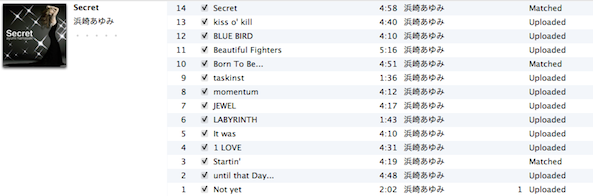
Our video walkthrough shows you in-depth how to check your iCloud Status using iTunes. In order to do so, right-click on the sort bar in iTunes, and select “iCloud Status” and “iCloud Download”.
What do the different iCloud Statuses mean, and is There a Limit to the Length or File Size of the uploads?

Here is a screenshot from the official support document from Apple regarding this:
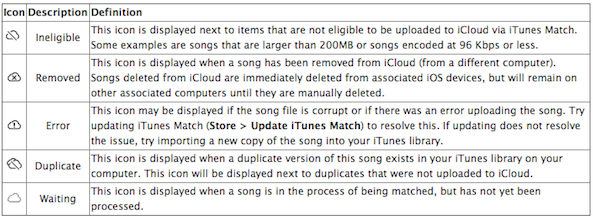
Thanks to The Loop for finding this document.

In addition to that, I’m pretty sure there’s a file length limit imposed as well, though we haven’t pinpointed exactly what that may be just yet.

My Music is Low Quality, How Will iTunes Match Handle That?

Any music that iTunes can match will be matched at 256Kbps AAC DRM-Free quality, even if the bit-rate is of a higher or lower quality.

How Much 3G Data Does iTunes Match Use

This will vary, depending on whether or not your song was uploaded or matched. Generally speaking, if your file meets the 256Kbps bit-rate standard, it will be the exact same size as stored on your local computer. Otherwise, size may vary heavily.

Is There a Limit to How Many Songs I Can Have?

iTunes Match is limited to 25,000 songs. 95% of all users will easily fit within that window.

Does iTunes Match Take Up Space on My iOS Device?

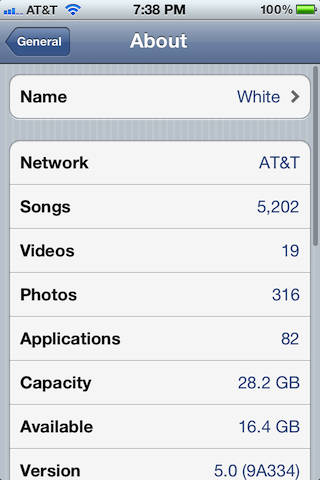
Yes and no. Yes if you decide to download the song by tapping the cloud icon. No if you have not downloaded the song. Just because your Music app shows a song or album doesn’t necessarily mean it’s stored locally on your device. Music isn’t stored locally until you play it and/or download it. See the video walkthrough for more details.
How Do I Delete iTunes Match Music From My iOS Device?

You can delete individual music tracks or delete entire albums by swiping from right to left on an album or individual song.
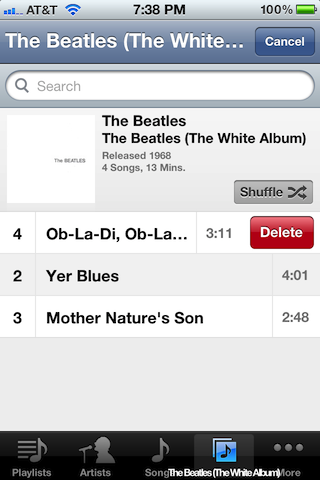
Why is the Song or Album I Deleted Still Being Displayed on My iOS Device?

By default, iTunes Match displays all of the songs available in your iCloud library, whether they exist on your local device or not. You can make it so it only shows content stored locally on your device by going to the Settings App > Music > and disabling “Show All Music”.

How Do I Play My iCloud Library on Another Mac or PC?

I recommend starting with a completely empty library on the second computer. That’s because iTunes Match will insist on using that computer’s library as a basis for iCloud matching and uploads. To cut down on any confusion, I suggests using an iTunes installation with an empty library. This way you can use your Mac or PC’s iTunes installation as if it were an iOS device.

Ensure iTunes 10.5.1 or higher is installed on the computer and go to Store > Turn On iTunes Match. Enter your Apple ID and Password, and you will receive a dialogue box that say “iTunes Match is matching a library from another computer.” Click “Match this computer”. iTunes Match only allows for one library to be matched at a time, that’s why I suggest starting with an empty library. You will then be able to access all of your iCloud Music library on the secondary computer. I recommend not adding any music to this computer, and using it strictly as a “jukebox” device. Please see the video walkthrough for more details.

How Many Devices Can Use a Particular iTunes Match Account?

Each account is limited to 10 devices.

Does iTunes Match Stream?

That’s still up for debate, but evidence suggests that Apple is streaming in some fashion, especially on a desktop computer. See our video walkthrough for more details.

How Does Shuffle Work With iTunes Match

Pretty awesomely. It will shuffle all music contained in your iTunes library, including music that hasn’t downloaded. iTunes Match gives you the ability to shuffle songs from your entire iTunes library while on the go as long as you have an Internet connection.

How do I Resync iTunes Match When I Add More Music to My Library?

Go to: Store > Update iTunes Match.

You Didn’t Answer My Question!

I’m sorry; feel free to ask your question below and if necessary we can add it to this FAQ. You can also read our follow-up post on more details concerning iTunes Match and iCloud.

  • Share:
  • Follow:
  • http://twitter.com/ScottInTheOC ScottInTheOC

    Somehow, my iTUnes Match has duplicated one of my playlists like 5028 times (literally). When iTunes Match is off, it only shows up once in my playlist. My iOS devices have no playlists, so its coming from iTunes Match. Anyone experience this? Is there a way to wipe an iTunes Match upload and start from scratch?

    • http://www.facebook.com/domtak Dom Murphy

      Likewise – I now have 26,000 blank playlists and I can’t get rid of them – trying to turn f=off iTunes Match gives me a beach ball. I’m stuck!

  • http://twitter.com/radbirdz Robin

    Jeff – if every song i play is downloaded to my phone, i will eventually run out of space as i only have a 16 gb phone. this is where the itunes match service loses me. am i missing something?

    • http://www.facebook.com/domtak Dom Murphy

      From what I gather from reading around any tracks you play temporarily download and are removed when space is needed. Until then they’re cached locally for instant play (and even without a connection)

  • Anonymous

    Does iTunes Match work for media other than music?

  • Dichotomous Key

    can you use it for tv shows and movies?

  • http://www.facebook.com/profile.php?id=100000082058451 Derek Bamonte

    Will iTunes match work with songs that don’t have the original file. I got the songs from an app on my android phone, transferred them to my computer, and then imported them into iTunes. Cannot transfer them to my iPod because i dont have the original file.

  • http://www.facebook.com/profile.php?id=100000627600056 Steven Wilson

    Is there a way to force the upload of a track that I have in iTunes instead of using the matched track? I have some audiophile versions of discs where I want that version uploaded instead of the match that iTunes has found.

  • http://twitter.com/meganwendell Megan Wendell

    Jeff,
    Thanks, this really helps – I have a question you might have answered already. If so, I’m sorry. Do I use data (if not on Wifi) everytime I download music from the Cloud? Is it a significant amount, if so? Also, can I still have playlists? Do I just make them on my iPhone using iTunes Match, rather than syncing them w/ my laptop?

  • http://twitter.com/ShlomoBoukai Shlomo Boukai

    It looks like iTunes is no longer syncing music directly to my iPhone. What will happen now if I buy music from Apple or add music to the iTunes library by ripping a CD?

  • Anonymous

    Okay… I hope you see this and I hope you have an answer for this. I download, on a very regular basis, single MP3′s that Apple will not have in iTunes. Think like 5 hour radio talk shows. They are typically under 200 meg in size and are typically 128kbps… So if I want to load these files onto my iPhone how do I go about doing it? Do I really have to spend the time to download this 195MB file, upload it to iTunes Match and then download it again?

    • http://www.facebook.com/people/David-Parker/552915271 David Parker

      I do a similar thing with my Howard Stern recordings. To make it easier to sync in iTunes highlight the recording, then hit Command-I and under Options change the media kind to Podcast. I also select the “remember playback positions” and “skip when shuffling” options. When they are changed to podcasts they are taken out of the music library so they don’t go through the Match thing. You can now sync them normally as long as you have Podcast sync enabled. Hope this makes sense!

  • http://www.facebook.com/charlie.robinson1 Charlie Robinson

    I’ve done some initial testing myself and I have discovered one thing is very clear, iTunes Match on iOS devices i.e. iPhone or iPad will not stream whether you have WiFi or 3g on. It will download any song you play. Which means you can never have more access to our library than what can physical fit on your device. On a Mac it does stream. I used an empty iTunes library on a second mac and it did not download one single song even though I play hundreds of songs, it all streamed. That to me seems sort of backwards, the devices I need to stream due to space limitations I can’t and the devices that I don’t have space limitations do stream. My reasoning for getting iTunes match was to listen to my library in my car with my iPhone. Switching between any playlist as the mood struck me. But now I have to manage what playlists go on my device each day. This is not simpler, but more complicated use of my library. I want to be able to play anything anytime from library without having to give any thought of the logistics of it. That is what I thought we were paying for.

    • http://www.facebook.com/people/David-Parker/552915271 David Parker

      Personally, I would have preferred to have kept the music I already had synced to my Touch and my iTunes Match music as separate entities. Would be great to be able to switch between them as needed.

  • Josh Cates

    This is very helpful. I signed up during the beta, but still learned a lot reading this guide, so thank you!

    Is it possible to limit what iCloud tracks can be seen/downloaded by device? Thinking parental controls here, prevent the kids from listening to all my Andrew Dice Clay stuff. :)

  • http://twitter.com/JEldenBailey James Bailey

    Great job in filling the void in information left by Apple. I bookmarked your video and watched it again after having some time to play with Match. Definitely helps fill in the gaps! Thanks.

  • http://twitter.com/asianmack asianmack

    FYI, If you listen to music on your iPhone and want to remove it all (after downloading from iCloud) go to:

    Settings > General > Usage > Music > Edit > then click the red icon to delete.

    Bam. a few clicks instead of a few hundred (removing manually each artist, album, song)

  • http://pulse.yahoo.com/_2E463CVWDDUH25CB6DOGMFCL74 Cris

    I have iTunes Match and successfully uploaded my whole library. I edited a playlist on my phone to add 3 songs. How do I get that playlist to sync on my desktop ITunes library? I tried “update iTunes match” but that didn’t help. I also physically connected my phone to my computer and that didn’t help either. What am I missing?

    • http://www.facebook.com/people/Steve-Murphy/659144975 Steve Murphy

      Great question, I’d love to know the answer to this. Syncing playlists from a device to iTunes is a necessity or what’s the point in letting me build / edit a playlist on my device?

  • http://twitter.com/JoeMiller Joe Miller

    I have yet to find an answer to this question: If I’ve ripped my vinyl album collection into MP3s currently sitting in my iTunes library not as individual songs/tracks but as “sides” of these albums, will Match try to parse the tracks out of the single “Side A” file? Or, will I need to manually split the files into tracks before Match can process them? If the former, great, I’m in for $25/yr — if the latter, I’m definitely not.

    • http://twitter.com/clarencejones Clarence E. Jones

      You’ll have to split the ‘sides’ into individual song files. Match is pretty smart but not quite that smart.

  • Roy Cassas

    with regard to “uploaded” vs. “matched”… how do i get iTunes Match to change the status, if the songs ARE available on iTunes? some are even within the same album… and it’s annoying…

  • http://www.facebook.com/flipslist Mitesh Gandhi

    Is there anyway to change the status of an Uploaded song to Matched? I tried by changing the Name, Artist and Album tags, deleting the song from the library and cloud, and adding it back to the library, but when I try to match it again, it still states ‘Uploaded’.

  • http://www.facebook.com/dias.leo Leonardo Dias

    Where the upgraded tracks I download from iTunes Match will be saved?
    I have a very large library (250Gb). My library is stored at my profile folder, but it points to media files stored on an external hard disk. If iTunes Match, downloads all 25.000 256kbps files to my Macbook’s internal disk, it’ll simply run out of space very quickly. So, the ideal world to me would be, having iTunes over-writing the files on their original location (external disk).
    Is this what happens?

  • http://www.facebook.com/profile.php?id=715434426 Lenny Donnarumma

    Jeff, Great job!! One thing and someone may have mentioned this; I learned the hard way. . . if you are working off a playlist you created and download it to your iOS device and later remove the songs from your device (leaving the songs in the cloud), you have to go to each individual song in your library and swipe – BIG pain in the a@@!!

    Me being new to it – ended up deleting my whole playlist – GONE! Now I have to recreate the playlist . . . just a word to us newbies. But great tutorial. Going to share with my friends & family. Lenny

  • http://www.facebook.com/people/David-Parker/552915271 David Parker

    I do a similar thing with my Howard Stern recordings. To make it easier to sync in iTunes highlight the recording, then hit Command-I and under Options change the media kind to Podcast. I also select the “remember playback positions” and “skip when shuffling” options. When they are changed to podcasts they are taken out of the music library so they don’t go through the Match thing. You can now sync them normally as long as you have Podcast sync enabled. Hope this makes sense!

  • http://www.facebook.com/people/Daniel-Schneider/547510790 Daniel Schneider

    Will itunes match upgrade the quality of all my songs to 256?
    I notice a lot of my songs have not been upgraded, can i do it manually?

  • Franz Elizondo

    I have many songs that show as “uploaded” on my itunes in my computer, but they are not in my ios device, not even grayed out! How do I “update” my ios device to get the more recently uploaded items?

  • http://www.facebook.com/people/Steve-Murphy/659144975 Steve Murphy

    My question is about managing my music on my iDevice. I got signed up for Match, got my devices connected, and I’m ready to go. I have limited space, as my iPhone cannot hold all my music at the same time. In using Match I see easy ways to add music to my device… but not so many easy ways to remove it.

    For instance: In iTunes I create a mix for a party, all different bands and albums. Once it’s ready I head over there, and on my way I open up my Music app, find that playlist, and click Download All as most of the songs were not on my device. Boom, I’m ready for the party.

    But then the party’s over… and I have this playlist. How do I get those songs off my device easily to clear valuable space for, say, a movie I want to add for a trip I’m taking? It seems deleting the files from the playlist only removes them from that list not from the device, so my only option is to open the playlist, look at the first song, then find that song elsewhere in the Music app (somewhere other than under Playlists, that is), then delete it, and repeat. For a 40 song mix, that’s tedious. For a mix like my Holiday mix, which has hundreds of songs and which I only need to have on me for a couple months a year… that’s torture. Then I have some mixes based on the season (Summer, Winter, etc) which have over a thousand songs, so clearing those song by song would be hell.

    That’s my big problem. Then I have two questions that come out of that:

    1. What if I don’t have space for that playlist when I go to download it in the first place? Does the iPhone make room intelligently somehow by removing some other music, or does it give me an error?

    2. When you play a playlist on shuffle, or your whole collection on shuffle, the iPhone will download any iTunes Match songs it shuffles to, downloading as it goes as long as you have an internet connection. So if I have limited space, and I have a playlist with a hundred songs on it but only 40 of them are local… then the iPhone is suddenly downloading 60 songs which of course eat up space. I know I can switch it so it only shows me songs on the local device and I assume will then not attempt to download and play shuffled songs which aren’t already on the device… but I’m still wondering about space management.

    I wish I could use old-school iTunes sync at home and iTunes Match while I’m not home, without having to choose, that would solve this problem. Or even better would be if I could delete playlists from the phone without deleting the actual playlist but simply removing the local copies of the songs from that device!

    Any thoughts?

  • http://twitter.com/mottley13 Dawn Mott

    I purchased i match and it wont play any of my music that i had on my iphone that I purchased from amazon. when I go to itunes on my computer it works fine. Any suggestions?

  • Nick Ayala

    Once everything is uploaded to the cloud through iTunes match. Can u delete it off your computer so that it isn’t taking up hard disk space?

    • Anonymous

      I think it was commented earlier that Apple does not recommend you do that at all.

  • Anonymous

    I have gotten through steps 1 and 2 during the itunes match scan process but when I get to step 3, match gets stuck and no album artwork gets “matched.” Does anyone else have this issue and is there a solution??

  • Joel Sanchez Berlingeri

    How can I download several songs uploaded at the iCloud in the second device (e.g. MacBook)

  • http://twitter.com/roRo_73 Mohammed Al-Rufeidy

    can i ask, when itunes matches my songs and download them do i get songs just in 256 bit-rate or songs at 256 with my account info in it just like purchased songs?

  • Anonymous

    Jeff, great video.

    One question. If I want to get the (in many cases) higher quality file downloaded to my “main” host computer, what do I do? I see how to do this on the iPhones, iPads and secondary Macs, but I have not seen how to do this with the main host computer.

    TIA,

  • Sterling Babcock

    Thank you very much for the guide!

    I have a bunch of tracks (1000s) which have not matched, but they are set to upload. I do not want these tracks uploaded, nor do I want to wait for them to be uploaded. Every time I run iCloud it is trying to upload these. How can I get these tracks tagged as Ineligible? I have heard something about GetInfo -> Other -> Type = Book. Would this work, or is there another way to make a song Ineligible so it does not upload?

  • Sterling Babcock

    Sorry duplicate post.

  • Charles Gaines

    Is there a way to download your entire Match library to an Ipod with one click?

  • http://pulse.yahoo.com/_RPB6WDONJSXB3AWAXCA67BDVFM Disco Stu

    In regard to the downloaded songs taking up iOS memory space, if I want to randomly listen to all songs in my library and go into songs, I see shuffle at the top above the list of songs starting with A. If I select shuffle, will this randomly pull songs down from the cloud onto my device and take all my memory? How do I clear all of the songs from my devise after listening to not affect the memory?

  • Anonymous

    REALLY helpful – VERY Well done!!!! ThaNX!

  • http://pulse.yahoo.com/_63ZZD6VOJCZ3RFTIJLJ5TYQ7AU Ben

    thank you for this amazing guide, it has talked me off the edge of beating my iPhone int oblivion. This is exactly what apple needed to have supplied with the iCloud and iMatch release.

  • dylan pearson

    i have about one thousand mp3/m4a music files that are untitled and free of artist name track name and all other info if i import these to itunes could itunes match still read and match these if i pay for itunes match

  • Anonymous

    My music collection is so large that it will not fit on any modern Apple portable device because the storage capacities are so woefully low. I have about 85GB of music in my Library. (I can fit 2/3 of it on an old classic 60Gb iPod which is solely dedicated to Audio playback, but the applications, OS, and storage on my 64GB 4GS does not provide sufficient space for the same. So the only way to get my music onto a portable iPod is to sample it all down to 128kHz, which takes iTunes on an I7 quad core about 26 hours of codec crunching which is done on the fly for each device.

    (I have an old classic 60GB, a 32GB 4G as a dedicated iPod, a 62 GB 4GS, and 64GB iPad 1 and an iPad II; so it takes about 1week to go through this enormously painful process every time iTunes screws up and fails an upgrade process as it did with iOS 5 recently!)

    So my hope was that I could use iMatch to gain improved audio quality out of a portable device when the network was available, due to streaming capabilities. And, I hoped I could do so without sacrificing the portability of having my music on my device, albeit at reduced quality. My thinking was that if Apple was smart they’d allow the iPod user to assign a portion of the storage as a cache for streamed music, leave the original library intact, and if streaming was not available just play the selection from the local store. I could set my cache to a size to store some high fidelity music, while balancing the storage for a local low fidelity library, apps, & other data. In that fashion Apple could allow the user to select a mode such as ‘Stream only when I’m on WIFI’ to avoid the cost of wireless access since the carriers in the US still haven’t figured out that people want to actually use bandwidth of their devices and most limit monthly access.

    I could imagine it not too difficult to switch in realtime to the local low fidelity copy in the “rare chance” that my AT&T network dropped out before my buffered stream was depleted, giving me a continuous, uninterrupted flow of music with a slight quality fluctuation.

    (At least that’s how I would design such a system.)

    However, as soon as I turned on iShare my entire music library was erased by iTunes and reports are that Apple doesn’t support streaming.

    Once again the genius people at Apple, who KNOW what we want and need better that we do, blew an opportunity to build a useful system. At least if they supported streaming someone could build an iMatch app to provide a stream as an alternative source of high fidelity music without forcing the user to choose between music portability or not. Of course, I guess they just knew what we are now finding out, that even with all it’s Billions of $ in the bank Apple can’t build a sustainable infrastructure to support it’s customers; which is probably why they didn’t support streamable media formats. How many of you had to wait for days, like I did, to get the recent iOS 5 upgrade installed (only to have iTunes fail to upgrade — due to bugs Apple still won’t admit — forcing me to scratch install all my devices and go through the 1 week synch process for all my devices.) Now it appears I have to resynch the two devices I enabled iMatch on before realizing they deleted your library.

  • Anonymous

    BTW: I do think iMatch is still a bargain at $25 / year for my iTunes on my desktop PC. I now get access to high fidelity music without having to spend 3 months re-ripping all the parts of my collection that were ripped at lower quality levels or sending my discs off to a ripping service at significantly more cost. I’m hoping my home listening becomes more enjoyable and consistent.

    I just wish Apple would have not rolled it out for portables or explained how it worked. At least they made it easy to erase my 32GB music library in 4 seconds with the click of a single button, true to apple style.

    I guess usability is in the eye of the beholder. You may not like what it does or wish any of the ill side-effects but it sure is easy to get hammered with a single click.

  • http://www.facebook.com/people/Mary-Russell/100000548906823 Mary Russell

    What happens to your iCloud music if, after one year, you do not renew the subscription?

    • http://twitter.com/clarencejones Clarence E. Jones

      The music you bought through iTunes is still available; the music you matched is no longer available.

  • http://www.facebook.com/profile.php?id=1356730302 Joseph Robinson III

    I subscribed to iTunes Match… and it completely destroyed my iTunes library. 1: The music on my iPhone is not the same as the music in my library. 2: I play a song on my Mac and not only is the album artwork wrong but the song it plays is wrong… hm… $24.99 well spent. I have been on the phone with apple for more than 30 minutes… irritation level on a scale of 1 to 10… 15.

  • Anonymous

    I think it’s kinda dumb for my device to download the song from them if I’m just wanting to listen to it… I was loving the idea that I’d be able to play my songs from their servers… but I guess it’s not a streaming service…. so it’s still going to end up filling my phone with music while I listen to songs randomly… that’s really not what I wanted from this service….. :(

  • http://www.facebook.com/carlosespinofb Carlos Espino

    How do I have iTunes reattempt to match my song that has been uploaded? I would prefer to have a matched song over a uploaded song… I’ve attempted to change my metadata to match the iTunes store with no success… Help!

  • http://twitter.com/RyanGaudet Ryan Gaudet

    Awesome tutorial. ITunes match jsut became available in Canada today and this guide was just perfect. Not dumbed down, not too technical. Just right. Great work

  • http://www.facebook.com/marvin.scharle Marvin Scharle

    What happens if I change e.g. the cover art of an album on my mac? Will changes be reflected on all devices?

  • http://twitter.com/DeclicVideo_EN Declic Video FX (EN)

    Hello,

    I would need to obtain the cover of albums I have (from CD which are ripped). Does iTunes match useful for that ? If iTunes can not, currently, find the cover, will iTunes Match do a better work ?

    Thanks,
    DV FX

  • http://twitter.com/simonjharrison Simon

    Superb – thanks from a new UK user!

  • Anonymous

    Great overview. Two days in and still working on uploading all my ripped vinyl! Now following you on Twitter.

  • http://www.facebook.com/people/Andrew-Monserrate/1201133674 Andrew Monserrate

    Great Video… Thanks. After reading all the comments here I don’t think people understand how cool this really is. First off… Why don’t people have their music installed on an external hard drive? Anyways… it’s pretty cool that all my music is up in the cloud and I can download a play list or album on my devices when I want… and then delete it when I’m done…Perhaps streaming is the inevitable here, but it’s great to be able to get tunes on devices I had no intention playing music on to begin with. Solves some minor problems I’ve had with carrying both my iPod-iPhone.

  • http://www.facebook.com/jchumbley Jon Chumbley

    You can go and find all the songs that matched. I used a smart playlist for this. Then, select all the songs and delete them. DO NOT delete from iTunes Match! Then, you can download the songs back to your computer. This can take a LONG time to download all your matched media…

  • http://www.facebook.com/profile.php?id=1369061789 Tony Tompkins

    Once I have downloaded a higher bit rate of my songs can I unsubscribe from the service and keep the higher quality files on my computer?