Everything You Need to Know About iMessage

By , Oct 12, 2011


Apple seeded the public version of iOS 5 earlier today, adding over 200 new features to its mobile OS. The Cupertino company gave a preview of the software back in June, and now it has given everyone the chance to check it out.

Among the several additions to iOS, one of the most prominent is the new iMessaging system. The cross-device messaging client can be used by any product running iOS 5. So how does it work? Hit the jump for a full breakdown…

Overview

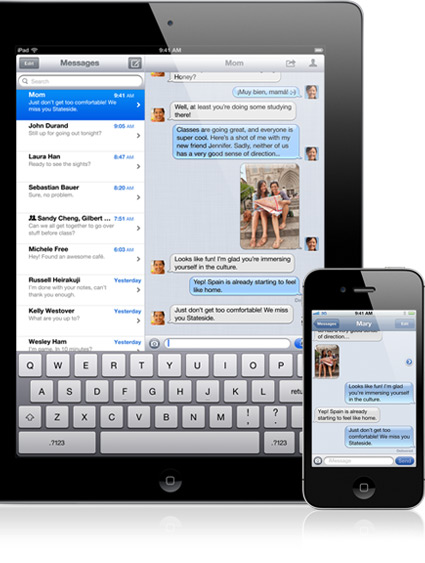
iMessage is a messaging client built into iOS 5. It works on the iPad, iPod touch, and of course the iPhone, as long as there is an active internet connection available. The entire platform is based on your Apple ID, so you must know your contact’s associated email address to send them messages. The system works a lot like standard text messaging, so you can send pictures, videos, and obviously text. It’s also comparable to other proprietary messaging clients like BlackBerry Messenger, as it can notify you when a contact has read your message or when they’re typing.

How Do I Get Started?

As aforementioned, you’ll need to have iOS 5 installed. iMessage is iOS-specific, so messages cannot be sent to non-Apple devices. Once you have iOS 5 installed, you need to make sure iMessage is setup. To do this, open up the Settings application and tap on Messages. This is where you can enable/disable iMessages, and tweak other settings. Switch on Read Receipts if you want others to be notified when you’ve read their messages. You can also change your Receiving Email Address, and turn the subject field off and on.
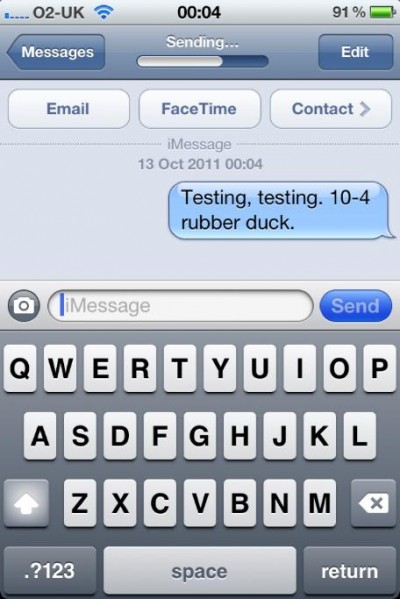
Now that you are all set up, you need to obtain your contacts’ Apple IDs. With over 200 million active users, it’s not surprising that Apple chose this method for validating iMessage contacts, but it’s still kind of odd. Their Apple ID is likely the email address associated with their Apple account, and once you have it you are all set. Enter it into the New Message field in iMessage, and start typing. If the Send button doesn’t appear accessible, that means that it doesn’t recognize the email address you entered. This is because it’s either wrong, or because the contact has not setup iMessage yet.
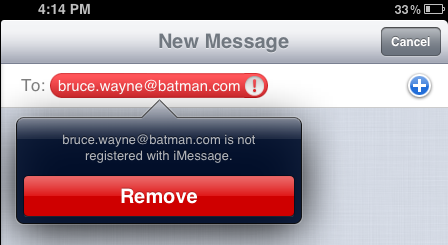
If the system recognizes the address, the send button will turn blue to show it’s enabled. Sending media isn’t difficult to figure out, simply tap the camera icon to the left of the message field and pick out your content.

Will This Replace Text Messaging?

iMessage is different on the iPhone than it is on the iPad or iPod touch. On the iPhone, you have the option to send an SMS message if a contact is not iMessage-capable. This can be enabled by visiting the Settings application, tapping iMessage, and making sure that the Send As SMS feature is turned on.
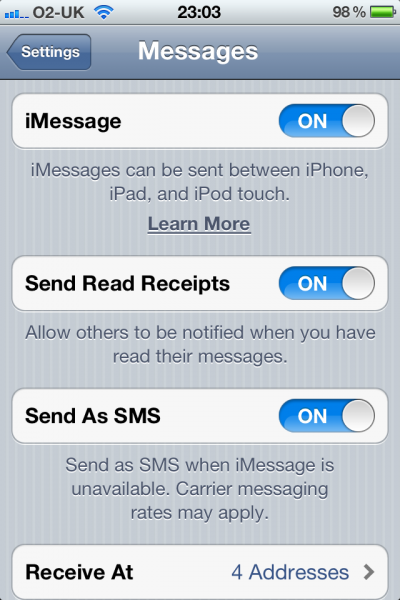
Keep in mind that this will send an SMS anytime a contact is not recognized by iMessage, so it can get expensive. Standard carrier text messaging rates apply. So the bottom line is no, this most likely won’t replace text messaging. It may, however, reduce the amount of SMS messages you send on a monthly basis, allowing you to dial down your texting package a bit. You’ll have a better idea in a month or so, once the dust has settled, of how many of your contacts are using iMessage.

Conclusion

I’ve been using iMessage since it debuted in Beta form back in June. The good news is that the service has come a long way in the last few months. Sending and receiving messages happen very quickly, and pictures and videos go through without a hitch. Of course, that could all change in a month or so. There’s not a lot of people using iMessage right now, because there aren’t a lot of iOS 5 users just yet (compared to the entire iOS user base). This has to be the messaging client’s biggest downfall. Not everyone owns an Apple device, and the ones that do may not be able to upgrade to iOS 5. This is pretty crippling for a system that looks to replace other messaging clients, which are generally cross-platform.  The true test for iMessage will come in the next few months, as more and more next-generation Apple devices with iOS 5 pre-installed are activated. But for now, if you know people that are using iMessage, I can’t think of a more convient way to chat.

Any Questions?

Update: This update is an attempt to answer some FAQ from Twitter and the comment section below.

One of the most popular questions we have been getting is “can you use someone’s phone number to send them an iMessage?” The answer depends on what device the person you are trying to contact is using. If they are using an iPhone with iOS 5, you should be able to send them an iMessage via their phone number. With an iPad or iPod touch however, you must have their Apple ID or associated email.

Some folks have been asking if you have to give out your Apple ID to others to use iMessage, and the answer is no. If you don’t want to give up your Apple ID, you can attach other emails to your iMessage account. Just go to your Settings app – Messages – Receive At – Add Another Email. Once you add an email address, Apple will verify it by sending you an authorization link. Once it shows as verified in the Settings app, you can start receiving messages at the new address. Just make sure you do this on all of your devices that you wish to receive iMessages on.

That should answer another big question we’ve been seeing. For the people who share an Apple account with other users, you can each individually attach your personal emails to iMessage on your respective devices. This way someone can send you an iMessage at johndoe@mail.com on your iPad, and your wife wouldn’t get that message at janedoe@mail.com on her iPhone. Just use the steps above to add a personal email.

And for the people having trouble figuring this out, iMessages and text messages are one in the same. iMessages is integrated into your old Messages application. If you have an iPhone, and are sending both SMS and iMessages, you might have trouble telling the two apart. Just remember that green bubbles are text messages, and blue bubbles are iMessages. If you want to send a text message, just do so as normal. If the contact is recognized as an iMessage user, the send button will appear blue, and the message will be sent via iMessage.

  • Share:
  • Follow:
  • Luke

    I have a (1) stuck in the badge of the messages app.. is there a fix for this?

  • Diyab

    Does iMessages depend on the GSM network provider? Like I live in the middle east where they have blocked facetime and hotspot features because of the agreement between apple and the network providers. Is it the same case with iMessages?

  • Rafik Sandford

    Can i see the conversation string on both my iPhone and IPad ? Ie if i start a conversation on my phone but need to move it to my iPad, while that work if I use the same called id

    • mas

      Yes, you can view message thread on all your devices running iOS 5. You can start on your iPad & pick up messaging on your iPhone or vice versa.

      • John

        Do you need to activate this on settings? It doesnt seem to work between my iphone and my ipad. If i send a message on the ipad and a separate message on the iphone, the receiver gets two different conversations.
        Thanks

  • OmGzzers

    Omgz, I used iMessage last night and forgot that my AppleID was also on my iPad2, and my wife read my steamy interchange with my mistress :/ she didnt know I had one

    • Francesco

      Why would effin post this, dontvu knw this is a friendly blog son and wtf :) did u get caught

    • MrDealHD

      wwwwwwooooooooowwwwwwwwwww…lmfao
      sucks to be you

    • arrvind

      ha ha:) face it:) wrath of technology dude:)

    • tanesha

      sorry im not sorry it sucks to suck.

  • jg

    You don’t need to know the recipient’s AppleID e-mail.

  • Masters

    Anyone having email lagging issues? Mines not being pushed. Yes I have it all turned on

  • TOrni

    Please is possible iMessages with iPod Touch 2g ???

    • MrDealHD

      only if you can get iOS 5 o it… :)

    • Francesco

      Can iPod 2G have ios 5 if so then yes if not then oviously no

    • TOrni

      any tweak ? or any possibility how get iOS 5 ??? I have iOS 4.2.1 with JB – the newest for this iPod…

    • iKnowitall

      Only iPod Touches of 3rd and 4th generations can have iOS 5 and iMessage, obviously.

  • Jay

    Off topic. Is it just me or the shortcut button for the camera is missing from the lock screen?

    • DWAYNE FERNANDES

      doble click the home button when on the lock screen

      • awallafashagba

        Ahaaa ! awesome ! cheers for that

  • JAFFAR

    Can I make groups for broadcasting messages in imessanger ? And how
    Thanks

  • JAFFAR Qambar

    Can I create groups in iMessage like whatsapp? And how

  • Shawn

    Groups in message??!!?!

    • austin

      yes you can. go to your message screen, they on the top right you click to start a new message and add the people you want in the group message.

  • Rob l

    Since this is data. I can send to other imessage users pics and vids using data correct? Also I’m doing this tonight. But I have an exchange server set up so iPhone requires password unlock. Thereore need quick reply. Wondering if bitesms will go through imessage? So that my pics and vids are sent over data. Thanks.

  • SAM

    MY WIFE’S iMESSAGE AND TEXTS FROM ME STAY IN ONE CONVERSATION. WHEN SHE iMESSAGES/TEXTS ME THEY GO INTO 2 SPEPERATE CONVERSATIONS. HOW DO I MERGE THEM INTO ONE CONVERSATION WITH GREEN AND BLUE BUBBLES?

    • iKnowitall

      You cannot. Especially if you both have iPhones…

  • Sara Canova

    When I send messages out to others, they don’t see the account as my name in iMessage, they see it as my e-mail address. How do I change it to my name? I went into Settings but couldn’t find anything.

    • JAFFAR Qambar

      Go to setting>message>receive at>Caller>and select the mobile no

  • jamicheema

    i have updated to ios 5 my imessage setting stuck on waiting for activation any fix?

  • Ashleigh

    How come numbers are showing as the name in iMessage even though I have the contacts saved in my phone?

    • http://dereksoundguy.com Derek

      I’m having the same problem, anyone have an answer to this?

    • http://dereksoundguy.com Derek

      I found an answer .. double tap the home button and close down the messages app, then restart it. At least it worked for me.

      • Ashleigh

        Worked for me! Thanks!

  • Stephanie

    I definitely have a question. I’m from the Philippines and I just updated to iOS5 on my ipod touch. It seems that when I send a message to a friend in the US running on iOS 5, the SEND button is grayed out. Do you know why that is? Is there any restrictions on the country of origin? maybe Philippines is not included, or did I miss anything on my settings. Thank you very much!

    • Ren

      Stephanie, did you have any luck sending iMessage?

      If the send button is grayed out, it means that either your friend isn’t running iOS 5 or his iMessage is turned off, or he didn’t give you the right apple ID he’s using. I’m from the Philippines, too; my problem is that all iMessages I try to send are not delivered. I’ve tried maybe a hundred times but not a single message got through. Frustrating. I was able to receive an iMessage from a friend in Bangkok, though. He said that maybe mobile carriers here in the PH have blocked the iMessage service. I don’t know if they’ve done it that fast, but it’s possible since there have been news about that in the US.

      • Stephanie

        Hello Ren, oh mine is working already. Just checked this thread. At first it was grayed out but when I asked my friend in the US to send me an SMS using my appleID, I got his message and started replying. So no, it’s not restricted in the Philippines.

        Before this, I also made sure that I disable my restrictions because before I had my restrictions enabled.

        Did you solve yours already? I’m enjoying iMessage now and I am very happy about it!

      • Stephanie

        Ren i haven’t solved yours just give me your AppleID and I will trying sending an iMessage ok! I love iMessage really, making my text message to the US easier and cheaper hehe:)

  • Sandy

    When I create a new message, the keyboard I get just has the option of letters or numbers. I am not able to type an email address. That’s why Cong send iMessage to iPad. Please advise

    • john

      I have the same issue! I’ve been trying the whole day how to get the “email keyboard” to show up but to no luck.

      I too have an issue on the Imessage app. Whenever I save a friend’s email address with Imessage enabled on his device, and try to imessage him, when I tap on the + sign on the To: field, it will say that the contact has no phone number. It basically does not see that the contact I saved has imessaging enabled.

      • karan

        hey!!
        even i have the same issue!
        got any solution to it? do let me know guys!!!
        its driving me nuts dont know what to do now!

  • Laura

    Everything on my phone has been upsated since the newest edition as of to date. My iMessage however is the only thing not working, i have literally tried everything from switching everything on to off to on to restarting my phone to plugging it back in and updating again to resyncing and everything in between. Am i the ONLY one with this issue? Ive seen it on my friends iPhone and hers works perfectly.

  • http://Gnomesoft.com Rodney

    How can you change the default email account used with iMessage? It seems to use the last one you register. What is odd is if someone sends you an iMessage to acct1@me.com and you reply to the message it doesn’t reply as acct1@me.com but acct3@me.com which was the last of three accounts registered with iMessage. The big issue here is that when you reply the other person gets it as that account and it starts a separate conversation. If it grouped all the accounts into one convo fine but it doesn’t and what’s even worse is if the person who contacted you only had the first acct they will now have the 3rd one you may not want them to have this is very bad. iMessage should always reply on the account the message was sent to and if it won’t then it seems worthless to setup multiple emails with it.

  • Stephanie

    hi Laura i had the same problem earlier. But mine is fixed. I just asked my friend in the US to send me an iMessage using my AppleID or ur number if an iphone, when i got his message i was able to reply.

  • Sheshan

    Yeh but u can’t sort them into groups in contacts ergo bbm is bettr

  • Lisa

    I’m trying to text an American phone number from a Canadian phone using iMessage to avoid carrier charges, but the Message app sporadically switches over to text messaging although I’ve disabled SMS if iMessage isn’t availabe. Any idea why this happens and how to resolve it?

  • Annie

    I have a twin call set up: two numbers linked to the same mobile phone line. Some people have my original number while others have the new one (with the micro sim in the iphhone). Is there any way of adding both numbers as “receive as” numbers in imessanger? I see that there is an option of listing multiple emails but not multiple numbers. Those with my old (non iPhone number) can’t send me an iMessage. It comes thru as an SMS but on the same device. Thanks

  • Alayna

    This might be a dumb question, but how do I change my avatar for iMessage? It automatically picked a random picture of my husband in my iPad and I can’t find the setting to change it.

    • BRamos

      how did you change it, i am having the same problem

    • Bramos

      Never mind, I figured it out.

      • Dan

        Please share how u did that, I can’t figure it out

      • Bramos

        Go to setting, under setting click on mail,contact,calendar, under contact make sure where it says “My info” it says your name. To add your name, add it under contacts. Hope this helps

  • Alayna

    Nevermind! I got it figured out.

    • dani Cooney

      how did you do it? i can’t change mine…

  • http://shigga.com shigga

    I turned my iOS 5 iMessage off since it started not working for me.

  • sheryl

    And if you’re sharing an appleid, here’s how to handle it: http://lifehacker.com/5849916/the-ins-and-outs-of-using-imessage-on-multiple-devices …basically just change the receive at email address in the settings and remove the apple id in the messages tab of settings.

  • Victor

    I can’t push the blue send button in imessage with my ipod touch???, and my contacts are registrated!

  • Matt

    I have tried to register my wife’s e-mail address in iMessage to separate our already shared accounts but it is telling me that the account is already being used and not letting me enter the address. Is anyone having a similar issue?

  • Chuck

    How do you get the picture to show up next to the text.

  • Chloe

    My problem is that when i go to setting>messages on my iphone4 then go to turn the imessage on, it just switches back to off. How can i make it stay as on?

  • Kim

    my iphone will not let me send an imessage to another iphone. Both phones are ios 5 and have been verified. sending via e-mail address works. but when i click on phone number it comes up with unregistered user. please help, why is my e-mail addressed registered but my phone number not?

  • Kendra

    im so confused, why does when i use iMessages in the actually texting field it shows the other iPhones number instead of the name in the phone. is there a way to change that because it really makes me mad!!!!

    • http://www.idownloadblog.com Sebastien

      Add the phone number to one of your contacts. It will then show the name of that contact.

  • kendra

    i tried that, it didnt work :/

    • RaRa

      I’m having exact same issues….tried playing with the number, adding in an email….addint to existing contact and nothing!!!

  • Joe

    Forget it for iPad. Not worth the hassle. I’ll use it on iPhone because I can use SMS. Again Apple faces out the rest of the world.

  • Jojo

    Hi,

    Just wondering if anyone can help me. Just updated to ios5 and trying to figure out how to work the imessages. Now do all my contacts required to have ios5 in order for it work? Everything is turned on and imessage has been activated. Have my “received at” as my email that I use with my Apple ID. Every message I send out, goes out as a SMS.

  • karan

    hey i was just wondering if anyone can help me out. Today i’ve installed ios 5 on my iphone 4 using gevey sim. the problem is that im not able to use imessage on my iphone, even thou it is enabled & very much active in my message settings. my friend tried sending me message but it wont go. and the keybaord is lil different im not able to find the “@” sign on it when im in messaging program.
    i dont know what the issue is? please help me out.
    thanks!

    • Harsh

      I am having the same problem. WTH x(

    • Harsh

      I am having the same problem. WTH

  • karan

    yea buddy! i’ve no clue….
    i need help!! have tried the whole day finding it out….. but no success
    do let me know if you get anything

    • Harsh

      Actually, just right now I figured that I can send iMessage to my friend by adding his email id to his contact and then go to his contact, tap on on send message and select his id. If this doesn’t work for you, your friend probably doesn’t have iMessage activated or you have entered the wrong apple id.

      • Karan

        Hey harsh U got any luck?
        I checked it in my friends phone over there he has this option of mms in iMessage , whereas in my I don’t have it..

  • Colin

    Im pretty sure if it’s an sMS the send button turns blue and of its an iMessage it turns green.

  • Karan

    Hey, it’s still not working fr me! I tried that but it opens up normal messaging service and some error shows up stating I don’t have mms activated on my iPhone! Where as I’m able to use Internet!

    • Harsh

      Try it on your WiFi network. Also, we need to figure out the ‘@’ sign issue. Reply here if you get to know something

      • karan

        hey man! i tried but still no luck on wifi either…
        showing me the same error…..
        your problem solved??

  • gemnilocs

    how can we merge conversations with the same person between imessage and regular text messaging. i have a friend that has the updated ios5 on her ipad but not her phone…she doesn’t carry the ipad to work so when i send a message from our current imessage conversation i get delivered but it only goes to her ipad which she doesn’t have near her…so i wanna send a text to the same person but i don’t want to have multiple conversations. is there a way to merge? thanks other than that i love imessage…but not everyone has ios5 on every idevice.

  • souheil

    HY, i cannot find KUWAIT country in the setting of Imessage??

  • xiaoyap

    my imessage is activated, sent iMessage to friends, after he replied me, i cant replied back with imessage, what problem is this~

  • Tgaine

    gemnilocs
    Basicaly you cant, as they are 2 different conversations. Its the same with BBM you cant semerge BBM messages into sms messages…….. Before people start saying BBM can do this BBM can do that BBM can also cook my tea etc etc etc

  • Tgaine

    I have the iphone 4 with ios 5 and the ipad1 with ios 5 and once i found out how the imessage worked on the iphone it has been a dream, and yes i can share “flit” between the 2 and keep the conversation going.
    I have not had any problems with the update on either device and i have no real concerns yet.
    Cheers Apple :)
    TG

  • Tommy

    Can Someone PLEASE PLEASE HELP ME!?!?….i really don’t want to lose all my previous messages to friends and I have just update my iphone through itunes and everytime I now go to send a txt message to anyone I am losing all the previous messages…I have intentially left these old messages so I know what people have said to me!! Please help as I don’t want to lose every single message on my iphone.

    • Tgaine

      do a back up first via itunes its simple

  • Tripp

    For some reason in iMessage, it is showing a picture when I sent a message. I am assuming the pic is supposed to be mine but it isn’t. Any idea how to change it.

  • erika1823

    can anyone tell me why my iMessage only uses my email address and not my cell number???

  • KongKong

    I lost my iPhone… Bought a new 4 with a new sim then got my old number back… Brilliant … Backed up a few weeks ago so I have my contacts, my diary, my life!! Woohoo
    But… iMessenger still has my interim sim number locked as its primary ID so all my mates are getting texts from a random number ….. Can’t find a solution but there must be other people having similar problems… Any ideas? There is an option to change or add email address but not to change or delete sim numbers :( waaaaaaaaah