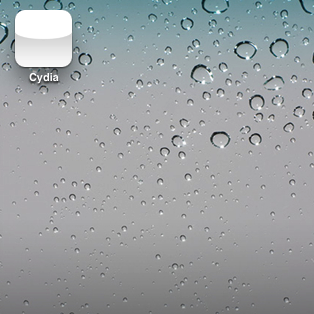
How to Fix That Pesky White Cydia Icon After Jailbreaking With RedSn0w

By , Apr 20, 2011

Now that a viable jailbreak solution has been released for the latest version of Apple’s firmware, all is well again in the world of jailbreaking.

That is of course, unless you’re facing the dreaded white Cydia icon of doom after jailbreaking with RedSn0w.

If you’ve rebooted, re-jailbroken, and the white icon continues to haunt you in your sleep, what should you do?

Fret not; all of your options have not been exhausted; there’s one more thing you can try, and it’s easy as pie…

I’ve personally faced the white icon a few times in my jailbreaking history, and I just about tore my hair out trying to figure out how to fix it. Meanwhile the fix was sitting right under my nose.

The White Cydia Icon Fix

Step 1: Open up RedSn0w.
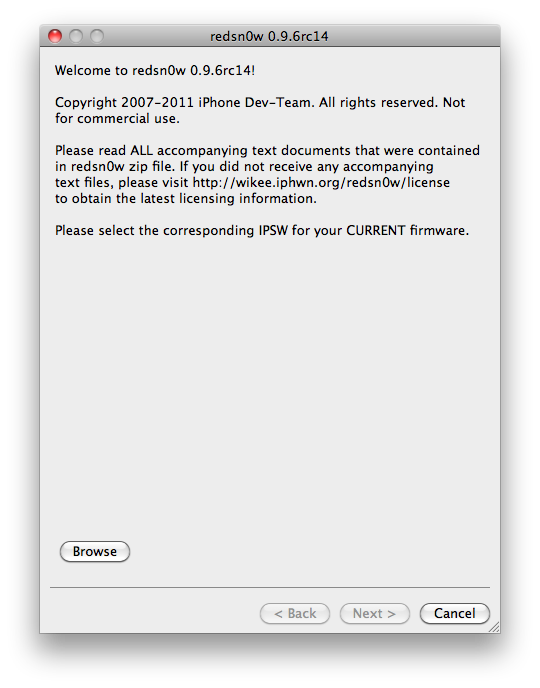

Step 2: Select browse and load the same firmware you used when jailbreaking.
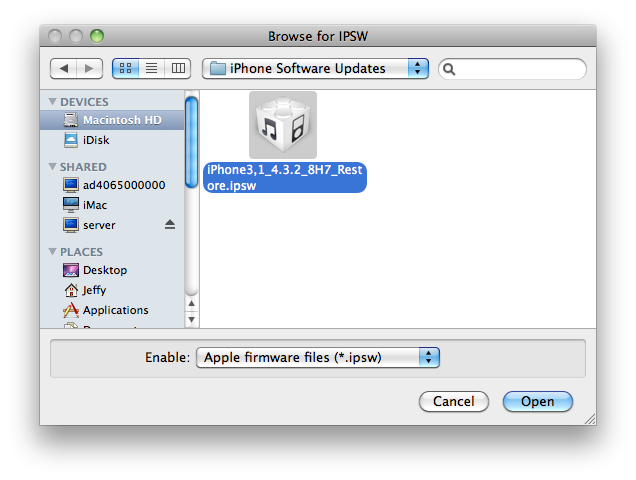

Step 3: Once the IPSW is successfully identified, click next.
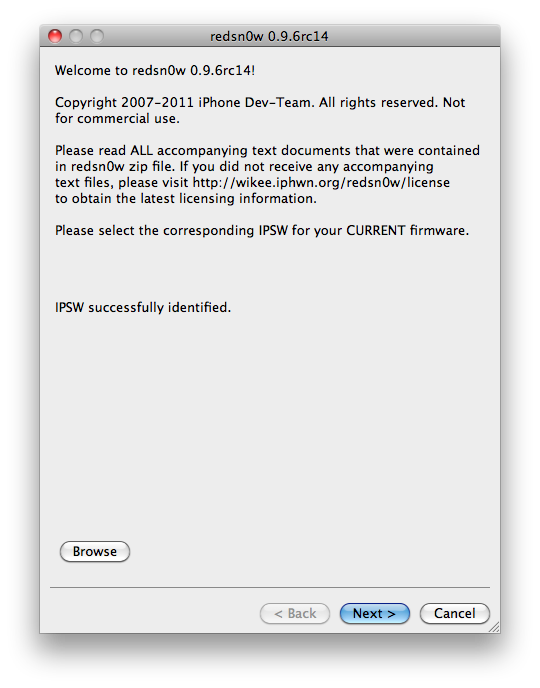

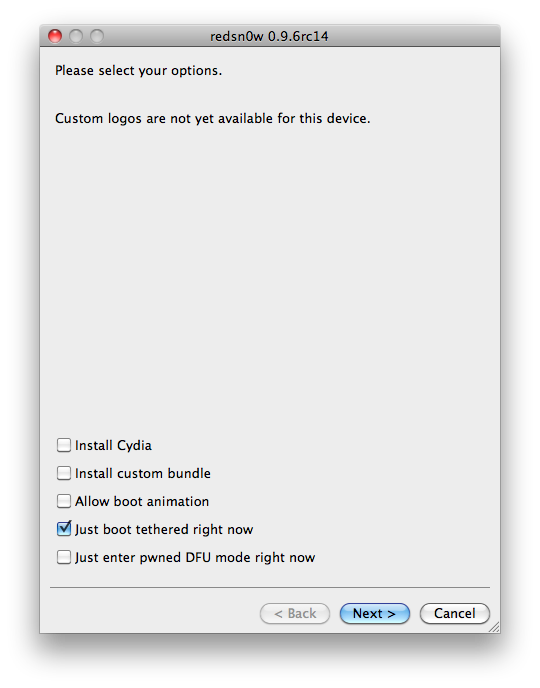
Step 4: Uncheck “Install Cydia” and select “Just boot tethered right now” and click next.
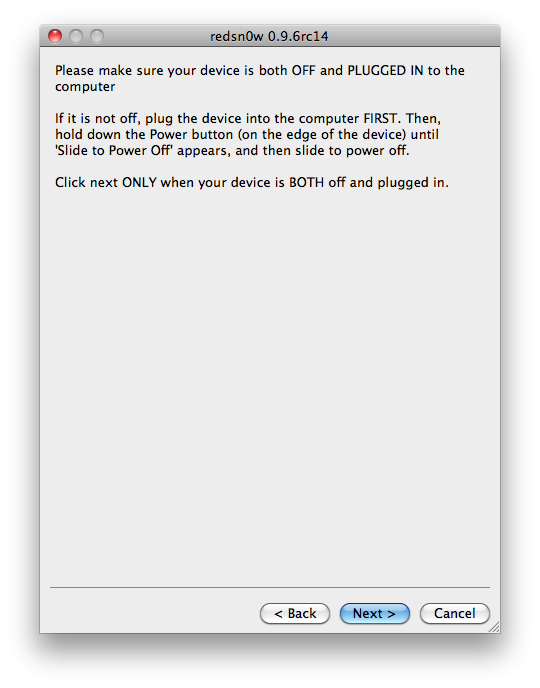
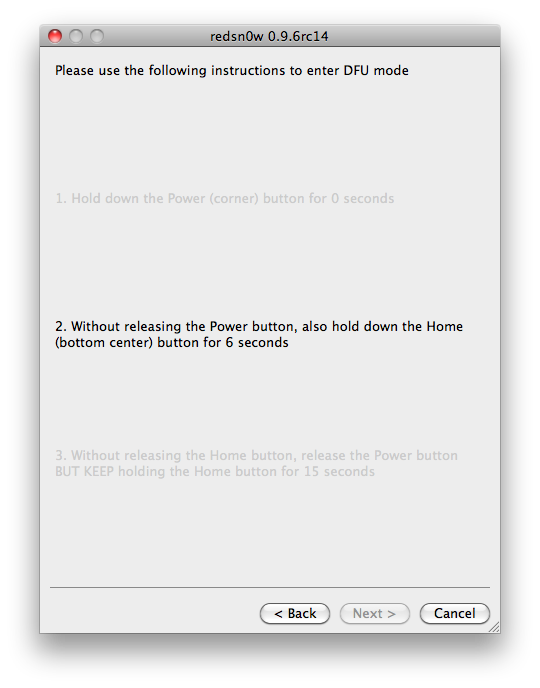
Step 5: Here, I recommend that you go ahead and be proactive by putting your iPhone into DFU mode prior to clicking next.
Step 6: Once you click next, the iPhone will go through the tethered boot process once. When you return to your home screen, Cydia should be back to normal.
While I can’t absolutely guarantee that this will work for you, it has worked for me, and I know quite a few people who it has worked for as well.

You should only have to do this once in order to restore your Cydia icon to working order, and this should not impact your untethered status at all.

Has it worked for you? Let me know.

  • Share:
  • Follow:
  • Burge

    Never had White Cydia icon…just ones from pkgbackup and a respring sorts that …but thanks for letting me know if I ever get it on how to get it sorted

  • beautb

    Happened to me yesterday on my iPhone 4- I tried the teather boot thing trying to fix another issue (no animated boot logo), and that fixed the cydia icon! still no animated boot logo though… Any ideas for me??

  • msxy

    @jeff

    then your iphone goes tethered :p mean every time u must boot tethered for the cydia to work and of course for your phone to boot. this hapened already with me !

    • beautb

      Once you are untethered jailbroken – you can choose to do a tethered boot. It does not affect future reboots. This solution does not put your phone into tethered mode. It sounds like that’s what you are thinking here

  • Pam

    I had the white icon yesterday. It fixed itself once I reinstalled My3G and SBSettings. First time I’ve ever had the icon be white.

  • msxy

    @jeff

    but i will choose to keep my iphone without jailbreak than choosing this solution.
    thx anyway (this hapened when i was on ios 4.2.1 )

  • ddr

    I had the white icon after jailbreaking my iPod 4g on 4.3.2, but I didn’t really care about it. As soon as I installed SBSettings and Activator and restarted the device, the icon was back to normal. I dunno if downloading/installing programs from Cydia and restarting has anything to do with it, but it might be worth a try if you don’t wanna go through booting tethered.

    • Pam

      Yep, same exact thing here(posted above) for my iPhone 4

    • Diego

      how do you install sbsetting and activator without cydia?
      my cydia is there but its white and dont open.
      i can’t open this

  • A.J.

    @msxy

    This DOES NOT mean you stay tethered. Just that it booted ONE time tethered. I have used this method before and your iPhone will stay untethered.

    • http://www.iphonedownloadblog.com Jeff

      Right on the money.

    • msxy

      don’t think so on ios 4.2.1 it wasn’t like that it depend’s on jb thx for ur reply anyway

  • ben

    My experience on both ipad1 and iphone4:
    1) after JB, click the white cydia icon
    2) it says it is rebuilding something
    3) afterwards, it will reboot
    4) after reboot, still white icon
    5) click it anyway, it will load as usual
    6) install something you always need after JB, like the installous and app sync
    7) exit and the icon is back!!!
    Both my ipad1 and iphone4 work exactly the same

  • Guidoncio

    For me didn’t work :( When I updated to 4.3.1 the Cydia icon was white too, but Cydua loaded, updated and everything was fine. Now for 4.3.2, the Cydia turns white again, but Cydia don’t even run :(

    • Diego

      same to me, cydia don’t opon, just crashed
      someone know something about this?
      i try everything and nothing seems to work

      • Bruno

        Same to me. 4.3.1 with white icon, but working. Now with 4.3.2, white icon and also not loading… :(

      • Guidoncio

        I made a fresh restore (restore at iTunes in DFU mode), ran Redsn0w for JB, and Cydia is just fine!

  • Nicos

    same for me. white cydia icon and not working

  • Lisa

    My Cydia icon won’t open either!!! HELP!!!

  • Diego

    To fix the with and not running cydia, I saw that we need to restore the iPhone from factory, and than install the 4.3.2 again and use the redsn0w, but I dont wanna do that because will need install all apps again, damm you iPhone 3GS ;(
    Waiting some answer

  • Diego

    To fix the with and not running cydia, I saw that we need to restore the iPhone from factory, and than install the 4.3.2 again and use the redsn0w, but I dont wanna do that because will need install all apps again, damm you iPhone 3GS ;(
    Waiting some answer.

  • ipox 4

    i usually just download a product from cydia such as installous or bitesms.. the icon restores once it finished installing those and would respring or reboot.

  • Tencents

    it works for me after D/l installous and winterboard.

    • 8chdeetwo

      Works!!

    • sahillion

      This worked for me too (ipod touch 3g ios 4.3.3) just download something form cydia

  • Scarface

    My Cydia also won’t load up after I jailbreaked to 4.3.2 from 4.3.1…. -.-
    I also have an 3GS – something went wrong there?
    Did a “restore from backup” – don’t wont to do a “factory restore” .
    Maybe we will have to wait for the next RC of redsn0w

    • Diego

      Yeah, maybe we need to wait the next rc, ;( i need my cydia apps, cant liverpool without them

  • Ampiscool

    i have a ipod touch 4g and the firmware is 4.3.2 i tried this because my cydia icon was white and it didnt even jailbreak my ipod at all all it did was just restore it? anybody know whats going on

  • Ampiscool

    i have a ipod touch 4g and the firmware is 4.3.2…… i tried this process because my cydia icon was white and i was going to try to fix it and it didnt even jailbreak my ipod at all and cydia didnt show up at all; all it did was just restore it? anybody know whats going on

    scratch the first comment it was messed up

  • dealdoug

    Me tooo, tried everything no luck with 3gs 4.3.2 and rc14 Cydia will not run no matter what I try

  • stephanus

    My cydia icon still white, and i cannot access cydia after Jailbreaking it with Redsnow. How to Fix it?

  • Lisa

    Since I had nothing of pertinent value on my iPad, I chose to use the method that Diego suggested in a previous post using a factory restore. Worked like a charm on the first try! However, if you have valuable apps and such, I would suggest waiting a couple of more days for the next rc release to hit the air :) Good luck everyone!!!

    • Diego

      Good to know that its works for you, I dont do that because I dont wanna install all apps again. Good luck to you too.

  • Creeps

    Can Anyone help me ?

    I’m in 4.3, i did the untethered jailbreak, everything went fine with redsnow.

    But Cydia’s icon was white and won’t load, so i re-launch redsnow using tethered mode.

    Now Cydia Work, cool but, i can’t reboot my iphone, it stays stuck on the apple logo.

    If i want to launch it, i have to use redsnow and mode tethered everytime..

    I try to rejailbreak, but nothing change..

    Does anyone have some ideas ?

    Thanks

    • Diego

      You use the redan0w rc14 ?? it shuld be work the untethered with the rc14, here works to reboot but just the cydia dont open

  • johnny

    BAM! worked like a champ for me! thanks for this post!

  • Dave

    iPod 4G 32Gb on 4.3 (8F190) here. I had the white Cydia icon issue after jailbreaking with redsn0w 0.9.6rc14. The Cydia icon was white, and Cydia would not open, it would just crash back to springboard immediately.

    Followed this tutorial, didn’t help. I then tried running redsn0w again with only “Install Cydia” ticked, hoping that it would reinstall Cydia. Still didn’t work.

    As an act of desperation I followed this tutorial again, and suddenly the Cydia icon showed, and it’s now working 100%. Not sure why it didn’t work the first time, maybe it’s just a little hit and miss.

    Either way, for those of you who have followed this tutorial (“just boot tethered right now”) and still get the white Cydia icon and immediate crash, I recommend trying it again a couple more times just to be sure. Better than doing a full restore.

    For those of you with a white Cydia icon but Cydia still works, installing a package that requires you to reboot your phone seemed to work for me on an iPhone 3GS 32Gb on 4.2.1.

  • Diego

    Im done with this, restore to factory and install 4.3.2 again and did the jailbreak with rc14, and its os works, the cydia works normally, and i male the restore backup and install all apps, now os everything doing fine,

  • Diego

    Im done with this, restore to factory and install 4.3.2 again and did the jailbreak with rc14, and its os works, the cydia works normally, and i male the restore backup and install all apps, now os everything doing fine.

  • Amanda

    I did what you said and when I rebooted my phone its stuck on the apple logo =\

  • Hisham

    When I did it, the logo of Cydia worked! But it still closes when I press it…

  • D.C.

    Thanks it has worked for me and I finally jailbroke my ipod after so many tries and get the white icon

  • http://www.epicxboxreviews.com Alex

    Worked.

  • http://www.hackers.com ameer

    thank man..its work..

  • L

    Worked for me! That you so much…have been looking for a fix for quite a few frustrating hours. THANKS!

  • c c

    easiest way is .. restore to factory and re-jailbreak .. then restore from backup

  • Steve T

    Thank you. It worked!

  • idham

    Hahaha oo ee oo aa aa it worked like a charm for me, thanks !

  • Ahm

    ThanQ

  • Jaja

    Thanks! It worked like a charm!

  • Gordon Newell

    “That is of course, unless you’re facing the dreaded white Cydia icon of doom after jailbreaking with RedSn0w.”

    Could you explain what this is please. How would one know?

  • matan

    works just fine to me!

  • ianelli

    it works for me!! thanks man!!

  • ashlee

    this worked right away thank you so much!

  • Westonism

    Worked like a charm! Thank you.
    iPT 4 32Gig/ Win 7

  • Steve

    Make sure your iphone date and time is correct… mine is april 09 2000 lol
    trust me it work perfect.

  • OnLy4FuN

    tyvm man! worked perfectly! i just dontknow if affectedmy unthetered status….yet
    how can i check that (no interrogation mark =( )

    thx

    OnLy4FuN

  • http://muhamadaminapple.blogspot.com MrApple

    after i tethered…cydia can open..but after reboot..cydia can’t open..why??

  • geoiphone

    it’s work thank you very much

  • tasha

    What do you do when you’ve successfully JB w/redsnow, cydia opens, you download an app, click “reboot cydia”, and the WHITE APPLE STAYS ON THE SCREEN?!?!?! It keeps dimming & never returns to the “phone”. Please help.

  • vik

    Hi.. thanks for this. unfortunately reboot didnt work for me.. my phone got stuck on the pineapple screen, donno whats wrong..

    ur suggestion – of booting tethered now, and unselecting the cydia box, that doesnt work on the newer redsn0ws 0.9.9b6.. so i clicked extras->select ipsw. but once u select the ipsw file, and click boot tethered now, thrs no option to load cydia or not.. plz help..

  • hyacinth

    it did.. now is for unlocking …. thanks….

  • cenker

    same problem and problem solved. thank you so much.