How to Enable Emoji on iPhone iOS 4

Sebastien, Jun 30, 2010

Emoji icons disappeared for a while with the release of iOS 4. But they’re back! This simple trick, compliments of Simon, will show you how to enable Emoji icons on your iPhone iOS 4.
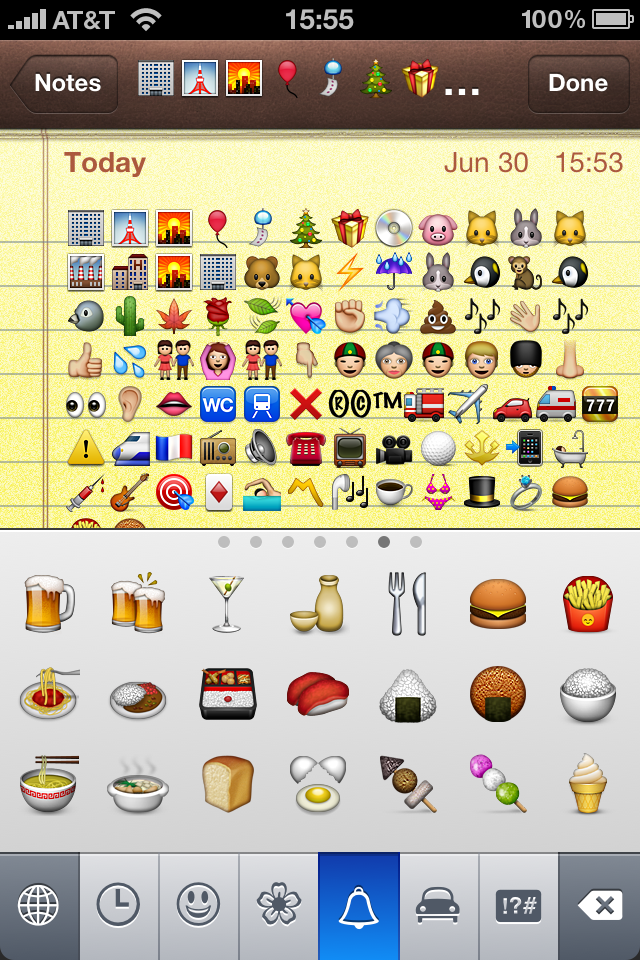
Emoji Icons on iPhone iOS 4

Step 1: Download this free app from the App Store.

Step 2: Launch the app and tap “ok, let’s do this”.

Step 3: Go to Settings > General > Keyboard > International Keyboard > Add New Keyboard > Emoji.

Step 4: Reboot your iPhone.

You can now get emoji icons on your iPhone. To bring up the emoji keyboard, launch your Notes.app and tap the little “globe” icon next to the space key.

If you send an email containing emoji icons, the person you send the email to must have emoji enabled too. For some reason, I wasn’t able to use emoji icons in the Email.app. It worked great for notes though.

How is it working for you?

 
  • Nicole Segear

    I have downloaded emjoi several times on my iPhone 4, both the free app and well as buying the app off iTunes. The keyboard shows up under the general settings and the globe and icons are available on my mms keyboard but the recipients only receive coded or encrypted versions of the icons. However the icons show up perfectly fine on my phone when I send the message.

    • Jeff

      Same thing for me. They look good on my side but recipients see a code instead of a picture. I have Verizon. Is anyone with ATT having the same problem?

      • Terri Lockwood

        Please refund my account as this feature is not what I am looking for. Plus the “Emoji ” option is not listed on my phone.
        Thanks

    • Adam

      Thats because Emoji is not a unicode character. Only a unicode character that can be read (on any devices) without installing another app. check here for an example of unicode : http://mrgan.com/gb/

      Sorry for my bad english. Cheers

  • James

    Yes, the same thing is happening on mine. Any advise?

    • Dani

      Mine too is it a verizon thing?? WTF I want emoji

  • Manj

    The icons can only be seen on other iPhones.

  • Myakciv

    No one answers if emoji works on fb statuses. Mine works on notes, emails and messages only. I have iphone4. 

    • Ada

      How????????? I followed the instructions but it didn’t work!

      • http://0877144965 Nisa

                            
                             EmojiFree
        check out this free app!

  • marcy schwartz

    I also have Verizon. My friends with AT&T do not have this problem.

  • paloma

    AT&T iPhone can send emoji to Verizon iPhone, but not the other way around

    • Smash key

      I have verizon and my friends have at&t it works fine

  • DevAust

    absolutely rubbish. I downloaded both the ‘free’ and 59p apps and neither worked. I restarted my iphone 4. nothing. I’ve not had this problem with any other app I’ve bought.

  • Todd

    My girlfriend has an android, and she can see all the little pics, so it must work for amdroids and iphones im guessin 

  • Hollywood62

    I’m having the same problem on my new iPhone 4 with verizon I can see the smiley faces on my phone but my friends cant see them on they’re end can’t some one please tell me whats going on??????

  • Hollywood62

    I’m having the same problem on my new iPhone 4 with verizon I can see the smiley faces on my phone but my friends cant see them on they’re end can’t some one please tell me whats going on?

  • whiteNoseHair

    Emoji for Verizon iPhone4 only works with other Verizon iPhones. AT&T iPhones cannot see the smileys if sent from a Verizon iPhone. But Verizon iPhones can see the Emoji from AT&T iPhones.

  • Hollywood6410

    It works for me now and I have verizon and I can text my emoij to AT&T iPhones now

    • Liz

      How did you get this to work??

    • Dreamin

      It says on the app that they can only be seen from other iPhones

  • zi

    I cant download the freaking app i have done it like 3 times and I dont see it in my options for my keyboard

  • Caddgirl

    Same here, it doesn’t show up in the text message keyboard. It says the keyboard is loaded and shows up in the notes, but I never intended to use it in the notes app, just the text meeages. ;-P

  • Caddgirl

    I take it back, it IS working. After rebooting phone, you have to tap on the text bar and then the keyboard option will pop up for the emoji. ;-D

  • marcy schwartz

    I think I’ve figured it out. It’s now working on my Verizon Iphone. I reinstalled it after deleting it from my iphone. When it reinstalled, there was a folder called Char Map, go into that and go into Settings. Go to Show Unicode and turn it off.

  • androidUser

    If the user is on a different carrier, you must convert the message to MMS before sending. SMS will not work when sending to another carrier.

  • Lou

    It worked for me- but only after I paid! The free one just wasn’t behaving at all.

  • john

    Am looking for emoticons and smileys for my iMAC to use with Apple Mail. Will emoji work or something else?

  • diane

    I have Verizon and the emoji opttion is not available under the international keyboard option, hence no emoji, bummer! What’s the problem? I get emoji’s from incoming text, so is it a verizon problem?

  • non

    For others reading, it works just fine when sending from a Verizon iPhone to an ATT iPhone. Can’t say about sending to a non-iPhone though.

  • http://yahoomail.com me

    i have tmobile and im on an unlocked att iphone it shows up on my phone but when i send it , other iphones say it shows up as stars. how can i fix this? email me at help please

  • Remy

    it worked for me on 4.3.1 ATT. I had to reboot as indicated. Thanks

  • Remy

    BTW guys, Emoji is an iphone thingy only. Not other phones can see it… Now, if Android sees it, then they just enabled it on their phones because a year ago that was not the case.

  • Priscilla

    Option for emoji does not appear under settings/keyboard/etc…..

  • Britny

    I don’t have the globe I have no idea how to work this. I want it!! Verizon iphone4

  • Morganic

    Dude I can’t even get this to work it won’t show up under keyboards can anyone help?

  • Gope1o

    RESTART YOUR iPhones AFTER INSTALL THE EMOJI!!!!!!!
    IT WORKS 100% SURE ;)
    Good Luck!!!

    • http://yahoo Me

      Thank u soooo much,It worked

  • Anthony

    When I initially installed Emoji, it didn’t work for me either… But then again, I didnt follow all the instructions. I dont believe you have the option to select the Emoji Keyboard in your settings until you install the paid version, and follow the instructions!!!!

    Here they are right from the app description and install directions.

    1. Buy and launch the app, it’s called “CharMap” on your iPhone

    2. IMPORTANT: In the app, press the “More…” button (on the lower right corner) 5-6 times consecutively, a message box will popup saying “You just unlocked the Emoji page…” and you eill be brought to the Emoji page.

    3. On the Emoji page, press the “Enable Emoji” button on the top right corner to enable Emoji keboard.

    4. After enabling Emoji, quit the app
    For iOS 4 users:
    Goto Settings > International > Keyboards > Add New Keyboard then select “Emoji”
    For iOS 3.x and 2.x users:
    Goto Settings > General > Keyboards > International Keyboards > Japanese and turn on Emoji switch.

    5. Reboot your iPhone

    Note: After the emoji keyboard is enabled, you can safely uninstall this app.

    To use the Emoji keyboard on Mail, Messages, Notes or any other app, tap the Globe key next to the space bar to bring up the Emoji keyboard.

    **Mine is now accessible on my iPhone but cannot be viewed by anyone I’ve sent messages to. It was not specified that only iPhone owners can view these emoticons. If this is the reality, then I do not believe this was marketed properly.

    • ISABEL

      yes it works !!! really ! thanks so much !!!

  • susan

    you don’t need the paid version! just restart your iphone and you’ll find emoji under keyboards!

  • Jeff

    Do what anthony says May 7th and it will work! EMOJI!!!!!

  • Sharon

    I did what anthony may 7th says and still can’t get it to come up under the keyboard AT ALL.

    Have tried uninstalling and reinstalling numerous times. Even tried different types and can’t get any of them to work.

    Could it be the 4.3.3 version of the iPhone software. Just updated a few days ago.

  • Dr. Mala Mehra

    I don’t see the emoji icon anywhere. I installed the app. Then did the keyboard thingy but didnt find any emoji written anywhere. But when I tap on the home screen at the emoji icon I get a page with a apace saying type emoji icon here. When I do that it says to put icon instead of typing text. Basically the keyboard is there I just don’t know wAt to do so the globe comes n I can SMS. Somebody help

  • Felix

    On my jailbroken phone i had to disable mobilesubtsrat (sbsettings – reboot – Safe Mode) then Start the enabler Programm only then the emoji Keyboard apeared unter settings… After that you can end the Safe Mode again

  • http://itune marion

    why hell pay for it , as dose not work , money back

  • Lionel Chan

    Hey all

    It does work with my brand new iPhone4 (bought it yesterday).
    What you need to do is:-

    1. Download Emoji from App Store (Free version will do)
    2. Start the app, “Ok Let’s do it”
    3. Once installation finished, restart your phone
    4. Go to Keyboard settings, and add international keyboard, and you should able to see the Emoji listed there
    5. And then you will be able to access it through the “globe” in the keyboard

    It get me nerves just now, but it works perfectly fine now :)

  • Marzinoo

    mine just doesnt come up on the add new keyboard option! i rebooted many times!

    • anna

      Marzinoo I had the same problem. You have to download this app from your iphone. Do not forget to switch it off and restart your phone.

  • rainz

    it works! thanks

  • Tina

    I looked for an hour trying to figure out this stupid emoji thing and this was the only site that told me to do something that actually worked!!!

  • DeejayJ

    So installing is Not a Problem.
    Bilut how can I completely remove the Free emoji Keyboard to be able to install the Pay-versions of the App?
    After removing the Free App there is still the Keyboard in the List!!

  • DeejayJ

    How can I completely remove the Free emoji Keyboard to be able to install the Pay-versions of the App?
    After removing the Free App there is still the Keyboard in the List!!

  • Rob

    Question; why does it work in notes but not texts? How do I enable the globe button for texts? Please help

  • Alipine

    Did all of the above many times…still will not work on my iphone purchased Sept 11
    Soo frustrating. turned the unicode to off …rebooted several times ..chose both Japanese Keyboards, rebooted and rebooted.. no emoji keyboard… Right now Im carrying around a piece of paper with the emotion icons on it to translate what BB users have for free and easy!!!.
    grrrrr

  • MM

    followed your instructions, worked great for me !!! Thank you

  • Alipine

    Works fine. The reboot is the answer. However I want an app that’s compatible w BBM.

  • Alipine

    The reboot is the answer. However I want an app that’s compatible w BBM.

  • http://www.facebook.com/people/Amanda-Inglis/693995478 Amanda Inglis

    when i go into settings-general-keyboard the screen is blank there is nothing in there as well as international and power management

  • http://www.facebook.com/profile.php?id=760525413 Cathy Taylor

    As I have installed Emoji on my iphone 3gs, I updated the software and since then Emoji isn’t on the list of International Keyboard. It’s simply not an option there, so I cannot add it. :(

  • http://www.facebook.com/hawaiki Hawaiki Tamati

    My iphone keeps telling me to reboot it before I can set the keyboard, I’ve rebooted it three times now and tried to set and find the keyboard but its not working. What do I do?

  • http://www.facebook.com/hawaiki Hawaiki Tamati

    My iphone keeps telling me to reboot it before I can set the keyboard, I’ve rebooted it three times now and tried to set and find the keyboard but its not working. What do I do?