How to Save Your iPhone ECID SHSH

Sebastien, Apr 2, 2010

Every time a new iPhone firmware comes out, many of us accidentally update their device to the latest OS, making it impossible to jailbreak/unlock, or even downgrade to an earlier version.

In order to have a shot at downgrading your iPhone, you must have your ECID SHSH on file on Saurik’s server, just in case Apple stops signing the older firmware version, just like it did a few weeks ago with 3.1.2.

How to Save Your ECID SHSH

Note that this is only valid for iPhone 3GS and iPod Touch 2G/3G. iPhone 3G owners are not concerned as they can downgrade the firmware (not the baseband).

The Easy Way
ECID SHSH

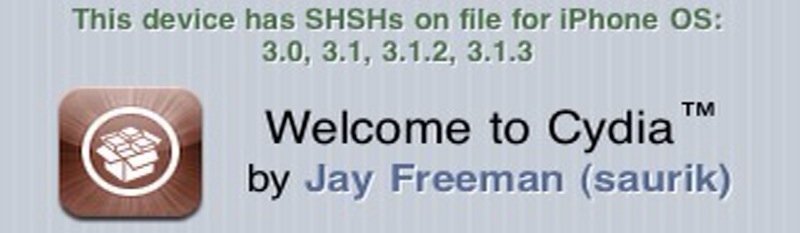
If like me you are lucky and you launch Cydia and see that “this device has SHSHs on file for iPhone OS: 3.0, 3.1, 3.1.2, 3.1.3″, then you don’t have anything to do. I have these 4 SHSHs on file but  it’s ok if you only have the latest SHSH on file. At the time I am writing this, the latest firmware is 3.1.3 so to date, you should make sure you have at least the SHSH for 3.1.3.

The Other Easy Way
make my life easier

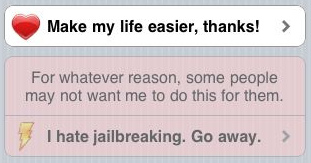
If you don’t see this message then don’t worry, just scroll down a bit on Cydia’s homepage and look for the “make my life easier” button. Simply tap on it and your ECID SHSH will be automatically saved on Saurik’s server. Close Cydia and launch it again. You should now have a message at the top saying your SHSH is on file.

You’re good to go now! But remember that anytime a new firmware is available, do not update right away. Just wait until a new jailbreak is available.

 
  • Aleksander

    Okey, i did this but cannot downgrade anyways… I did some resourche on Google but Could not find a solution…
    I have a iPhone 3Gs (mc) with shsh on file in Cydia for 3.1.2…
    How can I downgrade back to 3.1.2 from 3.1.3 with the shsh on file?
    PS: I am running windows, with the ip adress in the host file…

  • http://ottodestruct.com Otto

    If you have the SHSH on file, then you need to use saurik’s signature server to downgrade.

    Edit your hosts file, and add this line:

    74.208.10.249 gs.apple.com

    Your hosts file is C:\Windows\System32\drivers\etc\hosts on Windows and /etc/hosts on Mac’s.

    Next: Put the phone into DFU mode.
    * Connect your iPhone to your computer.
    * Turn iPhone off.
    * Hold power and home together for 10 seconds (exactly).
    * Release power but keep holding home until the computers beeps (observed on a PC) as a USB device is recognized.
    * A few seconds later iTunes should detect your iPhone.
    * If the Restore Logo is present on the screen, you are in Recovery Mode, not DFU.

    Now you can use iTunes to install the IPSW for the old firmware you want to install and it’ll work.

  • Aleksander

    Thanks I’ll try it out! :)

  • iStupid

    Ok, seriously upgrading to the newest firmware and loosing ur unlock and Jailbreak is not done accidently…!
    When you plug in your phone iTunes with promt you about the update. Then it downloads the firmware, so at that time if you realized SH$T, that’s not whY I wanted to do, you can cancel it.
    So STOP calling it an accident, it should be called StUPIDITY, on ur behalf…!
    Give it a break!!!!!

  • Puyan101

    I’ve been downgrading my friends ipod’s seeing as they dont know how to do it themselves, so I’m pretty knowledgeable about jailbreaking/downgrading.

    HOWEVER, because i’ve never upgraded myself before the jailbreak is out, I don’t know if i have my SHSH on file. It doesnt say the message at the top of cydia, and i can’t remember if i pressed ‘help me out’ or ‘go away’. Is there any way i can check or revert back to choosing if i wanna save the SHSH or not?

  • Aleksander

    Well it was an axident! Couse my iPhone woldnt boot up becouse I did somthing in sbsettings (disabled all extra functions) so I had to restore… But I put it in recovery mode not dfu that’s why I didn’t get sauriks method to work so back off! It was an accident that was neccesery becouse I didn’t know how else to get my phone on, and I need my iPhone! So NO not all people do this becose they are stupid, fuck you all haters! And greate job everyone else! :)

  • Puyan101

    *great

    :)

  • Aleksander

    Otto… I still cant get this to work :(
    I am 100% shure that i have my shsh with saurik and my iPhone is in DFU mode (Not recovery).
    The error message i get:
    This Device isnt eligible for the requested build.

    Am i doing somthing wrong?
    Please help me otto, or somone else…
    (PS: Fuck all haters, dont bother answering!)

  • Aleksander

    Okey please let me describe where i am now…

    Device: iPhone 3Gs
    Model: MC
    OS Version: 3.1.3
    Saved SHSH (Saurik’s server): 3.1.3

    I get error message when trying to do a restore to 3.1.2:
    This Device isnt eligible for the requested build.

    I have tryd this in:
    DFU Mode.
    Recovery Mode.
    And Normal Mode.

    More than this i dont know to say…
    So please anyone help me? Really need to downgrade, the iPhone allmost isnt anything without a jailbreak :(

  • Puyan101

    Aleksander i think it’s because you only have SHSH for 3.1.3…you might need them for 3.1.2 as well

  • Paresh Patel

    Hey Sabastian,

    I have IPhone 3G with 3.1.2 firmware n 5.11 baseband . Do i need to SHSH with saurik’s server? You did mention in your blog about this, but just to reassure myself n having some peace of mind.

    Thanks in anticipation,
    Paresh Patel

  • Paresh Patel

    Hi Sabastian,

    I’ve IPhone 3G with 3.1.2 firmware n 5.11 baseband. Do i need to Save ECID SHSH file on Saurik Server?

    You did mention about this in your blog, though just would like to reassure my self n have peace of mind.

    Thanks in anticipation
    Paresh Patel

  • http://www.iphonedownloadblog.com Sebastien

    @Paresh Did you read the article? Take a minute to read it an you’ll find the answer to your question.

  • Aleksander

    Sorry that was a spelling mistake…

    Saved on saurik”s server: 3.1.2
    any idias? Please?

  • Chris1982

    I hit, i hate jailbrakeing go away on accdent how do i get it to come back?

  • slowhand

    Hey Sebastien,
    hey fellow jailbreakers!

    I’m very pleased that you commmented on this topic!
    As a matter of fact, I was going to suggest that you do because I just have been stuck in a situation where I had to format my iPhone and was not able to install 3.1.2 back onto it – iTunes was essentially forcing me to upgrade to 3.1.3 after having formatted my iPhone.

    LUCKILY, I had backed up my ECID SHSHs via Cydia (thank you so much – saurik!!!) so I was able to downgrade to 3.1.2 and re-jailbreak my device!

    I CAN NOT STRESS ENOUGH HOW IMPORTANT IT IS FOR JAILBREAKERS TO BACK UP THEIR ECID SHSHs!!

    If you haven’t done it yet! DO IT!
    Do it NOW!

    It is unlikely – but you might get stuck in a situation like mine and you may have to format your device, hence forcing you to lose your jailbreak…
    AND forcing you to wait until the 3.1.3 jailbreak is released (yeah, the rumors are out there but who knows when a decent release candidate is going to be available…).

    So… For the sake of all that is holy to you – heed the advice!!!

  • sona

    hi i have a 3gs iphone model mb715LL with 3.1.3 and baseband 05.12.1 how can i jailbreak and unlock it please if anyone know please let me know with all steps that i have to do
    thanks

  • Aleksander

    Thats easy…

    1) download redsn0w 0.9.4 here:

    Windows:
    http://xs1.iphwn.org/redsn0...

    Mac:
    http://xs1.iphwn.org/redsn0...

    2) download your iphones ipsw 3.1.2 here:

    http://www.felixbruns.de/iPod/firmware/

    3) Do what redsn0w tells you…

    4) Your done!

    NOTE: if it dosnt work try three more times, if you still have a problem please comment me back with your exatckt moves.

  • sona

    hi thnaks for reply but i tried this many times before it just stuck in device boot thats it nothing is happening if u knoe anything else please let me knoe
    thakns again

  • slowhand

    why doesn’t it let me post anymore?

  • slowhand

    @Aleksander:

    For some reason I can’t post what I wanted to here, I keep hitting “Submit Comment” but my comment never showed up…

    Anyway,
    since this didn’t work I posted a possible fix to your problem in the forum of this site!
    The topic is located in the “Troublshooting”-section and it’s called “trying to downgrade to 3.1.2 but no success” originally posted by “lpoolft9″

  • Aleksander

    Can you please give me a link to this forum or email me at: aleksanderazizi@hotmail.com thanks!

  • Dan

    I have the same problem of not being able to by pass Apple signature servers. I am almost sure I saved my SHSH on Cydia, but for some reason cant downgrade and still getting device isn’t eligible for build error. Is it possible that I haven’t saved my SHSH and Cydia server reroutes me back to Apple?

  • slowhand

    @Dan:

    It is possible that you made a mistake editing that host-file of your system.
    Doublecheck that!
    And, if you’re on a Windows machine, restart youlr PC after editing the file for the change to take effec – that worked for me!

    Check out the instructions I posted in the forum (http://www.iphonedownloadblog.com/forum/viewtopic.php?f=4&t=1750)
    for details and step by step walkthrough!

  • Aleksander

    I have done it all!
    I have ecid shsh on saurik.
    I have my iphone in dfu (not recovery)
    I have my host file edited.
    I have rebooted my computer.

    But the first time (and som random other times) i did get the error msg 30** somthing.

    All the other times: bla bla not eligleble…

    I have an iPhone 3Gs, a computer with xp/7 (both host files edited).

    I dont get what i am doing wrong!

    (And yes i am a 100% shure that i have it with saurik.)

    please help. Thanks!

  • slowhand

    Mm…

    I’m kinda beat at the moment…
    And I don’t know about that 30** error message…

    I’ll get back to you when I think of something else – but right now, I’m out of ideas… Sorry…

  • Aleksander

    It is not 30** but 3003 or somthing, and other times it is 1303 or somthing like that…

  • Dan

    @slowhand:

    I double checked the hosts file, restarted my computer, did “ipconfig /releasedns”,ping gs.apple.com to verify and repeated it many times. Unfortunately I still cant get past apple signature server. I would be very happy at this point to get either of the errors including the 3002, but not “the device isn’t eligible for build”.
    Maybe it what happens when Cydia doesn’t have your SHSH.

  • salensaturn

    I have a brand new Iphone 3gs FACTORY UNLOCKED (MC131ZP from HK) version 3.1.3 (7E18) modem firmware 05.12.01, model A1303, can I JAILBREAK IT?

    another question: been that my phone is new i do not have shsh on cydia, how can I save the shsh on saurik’s server? the comments (instructions above) is for previously jailbroken iphones.. what about people who wants to jailbreak for the first time or at least want to save shsh to have the chance to jailbreak on the future when 3.1.3 MC model jailbreak be available

    Thanks

  • Aleksander

    This is for:

    iPod 2g mb 3.1.3

    redsn0w 0.9.4

    select iPod2 3.1.2

    if error:

    restore to 3.1.3 (without syncing after restore)

    do this from the top.

  • Aleksander

    Well… Your fucked.
    I have an iPhone 3Gs 3.1.3 mc with sauriks shsh on file.
    But i still cant get the downgrade to work.
    So… Im fucked, your fucked, so its all FUCKED!
    You gotta wait 3 month then MAYBE there will be some new hacks. (Greenp0isen, Spirit, Blackra1n rc4, Meybe redsn0w 1.0)

  • Chris1982

    I had hit, i hate jailbreakeing go away on accdeint how do i get it to come back?

  • hilla8

    hi and what can we do if we have : “this device has a pending TSS request” or jusr wait

  • hilla8

    I have problems with my iphone 3gs, I can’t make calls but I receive, and sometimes the wifi dont work, until i restore . I’m in firmwear 3.1 and I can’t pass at 3.1.2 Due to message at the top.Please help me

  • Dylan

    okay look, the damn button isn’t on Cydia for me. Plus IT IS AN ACCIDENT. iTunes AUTOMATICALLY UPGRADES 3Gs to 3.1.3. its happened in front of me lyk 25 times. IT IS AN ACCIDENT

  • Dylan

    what do i do if button isnt there? cydia is of the newest software

  • davisj

    Hi I have a iphone 3Gs 3.0.1, I want to update my jailbreak. I tried to check cydia lke you mention to verify I have saved my ECID but the app won’ launch, it just says “loading” clicks off. I don’t want to jailbreak until I know. I even tried to resave it but purperaln isn’t there anymore. And blackraln has errors. Please help me!!!!!!

  • Aleksander

    This is an easy one Davisj.
    Simply update your iPhone to 3.1.3 (Click the update button in iTunes) and go here to download the new 3.1.3 jailbreak:
    http://www.spiritjb.com

    Then you MAY be able to save it in cydia (It has been overloaded the last few days so…)

  • Davisj

    Well how is that “easy” if I don’t for sure my ecid has been saved? I do what you say I’m I’m blocked from jailbreaking again? The word out there was “don’t update directly from apple”. But that’s what you are suggesting I do. I don’t understand

  • Aleksander

    You Sony need to sage Your old ecid becouse there is a jailbreak for the newest…
    Sage it When you jailbreak the newest.
    Simply uppdate…

  • Davisj

    Ok, if my phone doesn’t work on jailbreak any more……..

  • Davisj

    You said save the old one? Again how do I save it? I can’t access Cydia or blackraln

  • Aleksander

    Okey, You dont need the old shsh on file… (Unless your iPhone is without a sim-plan).
    SO DO THIS! NO MORE QUESTIONS!
    Upgrade normally with iTunes and go to http://www.spiritjb.com and run the file.

    (If you must know, you can use redsn0w to get icy in your phone… (I DO NOT RECOMEND IT!))
    (So if you reeaaaallyy need the old version shsh on file then:
    Download a compatible version of redsn0w,
    click on add icy when jailbreak options is shown in redsn0w.
    And then remove “cydia installer” from icy then rejailbreak with redsn0w and select add cydia…
    )

    (PS: I THINK the shsh server is down, so dont get your hopes up even if you get cydia back…)

  • davisj

    Jailbreak worked!! Thank you!! Cydia is slow and freezes. Again another Freaking Question: So whats wrong with installing ICY?
    But again thanks for your help.

  • Aleksander

    Nothing wrong with icy, but i do not recomend having the old 3.0.1 or whatewer you have.
    You should allways have the newest firmware for securety reasons…

  • Jonathan

    Ok, so if i hit “I hate Jailbreak” and actually wanted to press “Make life Easier”. How do i get the message back?? Thanka

  • / Mike

    Hello !
    Problem : 3GS FW 3.1.2
    Jailbreaked it With Spirit .
    Prevously saved the SHSH Files With Umbrella at Cydia.

    My Mistake was That i didnt click on advanced Options. so. Umbrella saved The 3.1.2 SHSH as 3.1.3 !!

    I need to change that so i can Downgrade back to 3.1.2 if i ever need that.

    My Question:

    Can i modify the ECID SHSH files on The Ydia server and how to?
    i used then umbrella hoping i can edit it there. but it says sth to “not eglidable device”.

    SO IF EVER i need TO DOWNGRADE Cydia may think i was on 3.1.2
    HELP pls

  • Ariah

    HELP ME! if i do the steps above to save my ECID SHSH on cydia will it reset my phone? or wil it just take it back to the home screen?? this is an emergency please HELP

    background:
    my little cousin accidentally put in a passcode and i don’t know it. But luckily I found out before she locked it. so when i tried to go in the setting and turn the passcode off it asked me for the passcode (the one my cousin set). so to make sure my phone didn’t lock on auto lock i set the auto lock option to never. now i need to get rid of the passcode. i know the only way is to restore. but if i restore it, it will automatically update it to 3.1.3. (I have a 16gb 3Gs on 3.1.2 and firmware 5.11.07) and that has no unlock or jailbreak yet. So if anyone knows how to please please please help me!!!

  • Dylan

    Ariah, you canm upgrade to 3.1.3 now, there is an upgrade. just download the spirit jailbreak from this blog, or spiritjb.com

  • dajojo

    Hi There,
    I’m on 3.1.2 with my 3GS and i want to save my shsh. But I only get the shsh of 3.1.3? What should i do in order to save the shsh of that firmware i am running right now?
    thanks