How to Transfer Music From iPhone to Computer

By , Oct 22, 2009

Lately, I have been working on getting my iPhone ready for our long trip beginning in about a week. I started a few weeks ago by moving my contacts and calendars to the cloud with Google Sync. The next step was to move some of my music from my computer to my netbook.

I could just sync my iPhone before leaving and load it up with music but if something wrong happened (ie if I had to restore), I would lose all my music, which is why I think it is wise to move the music I want to my netbook.

There are many iPhone to PC softwares out there. My favorite is Lenogo (for Mac and PC). I use it on my everyday computer to copy music from iPhone to computer. Tansee is another solution but I like the UI of Lenogo better.

All these softwares cost money though and I didn’t want to have to buy another license for my netbook so I had to go the good old way about transferring my music to my computer.
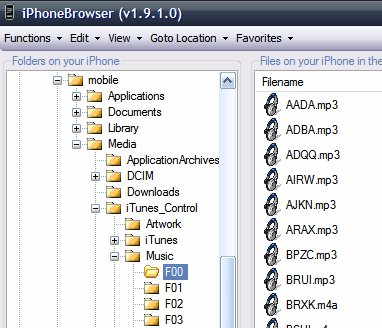
You can manually copy your music to your computer but it’s not as straightforward as using Lenogo and it will require you either SSH into your iPhone or use a free tool such as iPhoneBrowser.

From the computer where you want to move your music to, navigate to private/var/mobile/Media/iTunes_Control/Music and you should see a bunch of files name F00, F01, F02, etc…

All your music and movies are located in these folders. If you open F00 for example, you will see some mp3 files with names that don’t make any sense (see image above). It’s fine though.

Now move the “Music” folder to your computer. Depending on the amount of music you have in there, it could take a while. Moving 20 GB of music took me hours… Painful!

Once you’ve backed up your music to your computer, simply open iTunes and drag/drop the folders into there. iTunes will automatically recognize the files’ information such as titles, artists, etc…

There is a few downsides to this method though:

  • it doesn’t save playlists: if your songs were sorted into playlists, you will still copy the songs but they will be attributed to no playlist
  • it doesn’t transfer ratings
  • it doesn’t transfer play count

In my case, these were minor downsides and I can deal with it but it might be an issue for others.

  • Share:
  • Follow:
  • Tom

    I love iPhone but it’s simple stuff like this – which should be as easy as plugging in the phone and dragging stuff to a folder – that makes me hate this thing some times.

    • http://www.facebook.com/bill.austin3 Bill Austin

      This is why my next phone will be an Android! I bought a new computer pc of course and now if I sync my I phone with my computer it will delete all my songs. I moved all my music to a external hard drive but the pain it will be to associate it with iTunes is ridicules

      • http://twitter.com/JellyBeanJones1 JellyBeanJones

        bill, you dont know how to use an iphone

  • http://www.iphonedownloadblog.com Sebastien

    I completely agree with you. All these little details make a huge difference in the end.

    • Michael

      I downloaded Lenogo iphone to pc software on your advice but it doesn’t work at all and there is no support page at Legano

    • Alex

      I also bought the Lenogo software and am having problems. It doesn’t recognize my iPhone at all. I checked the Lenogo website and their “Support” page is non-existent. If I click the “Help” button the when I open the software itself, and then click “Troubleshooting”, nothing happens. Nothing opens. What’s the deal, Lucille?

  • Juan

    Not only does iPhoneBrowswer give you access to your music but your entire root partition. How rad is that?

  • Tom

    Sebastien,

    Does iPhoneBrowser require you to have iTunes loaded on your machine? I ask because I can’t load ITunes on my work laptop and I would like to have a way to transfer to my iPhone.

    I’m thinking of loading up USB Drive from apt.dmytro.me repo so I can mount as a USB drive without any additional software. Played with that at all?

    Great blog! Keep up the good work bro.

  • http://www.iphonedownloadblog.com Sebastien

    Hey Tom,

    Thanks for the comment :)

    iPhoneBrowser doesn’t need iTunes. As I explain in the article, it is fairly easy to copy the music from your iPhone to your computer, but I don’t think you can go the other way around (computer to iPhone). If you want to do that, I think you’ll need Lenogo (mentioned in the article).

    Sebastien

  • T-Will

    Another program I just discovered (haven’t tried it yet) is i-FunBox. Has anyone tried that program?

    http://www.i-funbox.com/

  • Josh

    I-funbox is the fastest for transferring files to and from the iPhone. Try it.

  • Irha

    > I could just sync my iPhone before leaving and load it up with music but if something wrong happened (ie if I had to restore), I would lose all my music, which is why I think it is wise to move the music I want to my netbook.

    Can you clarify the above? Why would you loose your music if you have to restore when it is there on your netbook?

  • http://www.iphonedownloadblog.com Sebastien

    Irha,

    Because at that point, the music wasn’t on my netbook yet. The music was on my iPhone and on my everyday computer. I had to move it to the netbook to in case something bad happens.

    Sebastien

  • http://Mmplas.com Adesh

    Hey , I use double twist , I find it works well , any one else ?

  • DKLA

    For those of you on a Mac, iFuntastic will do the job too. :)

  • Varun

    Hey Sebastien,

    Thanks for writing such informative articles about the iPhone. I have bought one 2 weeks ago and am just exploring it and your articles are really helping me out. Keep writing.

    Varun

  • Archhead

    Thanks, did not knew about lenogo. Will Give it a try.

  • ksp672

    just downloaded and installed and program will not work, I am presently running Vista.

  • Joe

    thanks

  • ben

    it doesnt let me copy the music files to my computer…how do you do that?

  • Danny

    I am using Windows7 and cannot get Lenogo to work. Not impressed with their dead link “support page” either. Hoping Paypal can get my money back.

  • The Man

    SharePod does the job and it’s free

    • Danny

      Very much appreciate the tip! Sharepod works, LeNOGO doesn’t…

    • lonnie

      thank you soo much man

    • John Rockwell

      Sharepod free trial will only transfer 10 files at a time now…

      • http://twitter.com/JellyBeanJones1 JellyBeanJones

        sharepod isn’t for the iphone…geniuses. the iphone is the topic of discussion…not ipod

      • http://www.facebook.com/HadenTheGreatest Haden Odom

        whaaaat? It used to be completely free! I hate when developers do this stupid “free trial” stuff with vital apps, where it’s pointless to transfer just ten songs. It makes me want to make my own alternative to sharepod, and make it open-source.

  • Danny

    Paypal didn’t issue a refund– money down the drain. Lenogo will readily take your money, but will ignore you entirely when their stuff doesn’t work. Next stop- FTC complaint. I would have much rather bought a working product than go through the hassle… If you’re considering their product, consider yourself warned.

  • hellaxile

    Umm how do you move the music file to the computer?

    • Jason

      I figured out how to do it, it takes a long time, but all you have to do is right click on the “music” folder and “backup files”. depending on the amount you have it will take a long time. once they are backed up you just pull the folder over to your itunes.
      Because it was taking so long I backed up one folder at a time. That way I was able to unplug my phone and come back to it later.
      Hope that helps. But it does work great.
      Cheers

  • Jason

    having the same problem, cannot move “music” file to computer.

  • Jason

    What about my apps? How can i transfer them?

  • Kristy

    Hey,
    I have recently had everything wiped off my computer, I have all my music on my iPhone and want it back on the computer, if I plug my phone in will it wipe all my music when it auto sync’s?
    Sorry if ur blog already states this…
    Help!!!

  • Danny

    Forget Lame-no-go. Sharepod is free and it works. I wish I had known about it sooner. While Apple does allow a reload of iTunes store puchases, there are no provisions from Apple to load back stuff you may have gathered from other sources. Sharepod saves the entire content of your device to a separate music folder on your computer’s hard drive, outside of iTunes– after which you can then load back into iTunes just by clicking on each selection. Just be sure to shut down iTunes and run Sharepod by itself–you do not want iTunes running while you are backing up your iphone/ipod.

  • Jessica

    I dont want to jail break my iphone. and i really need to transfer a song to my laptop please help!!!

  • Ash

    Hi

    I just downloaded itunes browser (THANK YOUUU) and I can view all the files but it won’t let me drag my music to my computer??

  • JY

    Hi hi

    Can you share how to navigate to private/var/mobile/Media/iTunes_Control/Music

  • g

    Lenogo software DOES NOT work AND neither does their support email address or the web-link.

  • Liz R

    I am about to try Sharepod so wish me good luck, im so comp illiterate its scarey…
    Ill do anything to save the music i havent already lost!!!
    Anyone feel like giving me step by step instructions for dummies using sharepod .. pls do!

    • Liz R

      Sharepod is the bomb!!!!

    • http://www.facebook.com/HadenTheGreatest Haden Odom

      sharepod is pretty easy to use, but it only works on Windows :(

  • F@!k u2

    This software is a piece of shit…careful it is a SCAM……….

  • mrm

    Wow, after three days of searching forums, help sites and multiple useless downloads Sharepod came through for me. Simply can’t understand why Apple thinks they are the exclusive keepers of music, and my files, making it f’ing impossible to get this done. I used to think they represented the opposite of Microsoft’s proprietary mindset but those days must be long gone. Thanks to the makers of Sharepod.

  • Hugh

    Lenogo must have worked at ONE time or else Sebastien wouldn’t have recommended it(notice article is three years old).

    Thing is, the ONLY thing which currently “works” at Lenogo is their billing department, who will be more than happy to charge you for non-functioning software.

    Sharepod works NOW, with current iTunes and phone firmware. Just be sure to download the latest rev…

    This article needs a rewrite, Sebastien

    • Alex

      I’ve done some research. “Sebastian” has spammed the hell out of people in forums and blogs (asking about the iPhone exporting issue) all over the place with Lenogo product links, some pretty recently. I, unfortunately, found that out the hard way. I found a free software trial that allowed me to do exactly what I needed. This, on the other hand, is all a scam. Awesome. Hopefully PayPal can get my money back.

      • Hugh

        Good luck on the Paypal refund. I was also scammed by Lenogo and Paypal didnt get my money back. I guess as long as Lenogo sent a data stream purporting to be a working program they are exempt from any warranty of suitability of their product. This one should go to the FTC.

  • Khumb6

    sharepod i have found works for me it’s free and very user friendly for people like me who arent wizz’s with technology

  • http://www.howandreview.com Tommy

    Is working just with iTunes. Go to Music folder, select songs, right click and copy/paste to hdd.

  • Liv

    If I use sharepod it won’t jailbreak or do anything to my phone will it? Im doing it so I can take it back to the apple store yet have music on my computer that I lost, don’t want apple to refuse because ive done something to my phone.

    • Hugh

      Sharepod does not require (or have anything to do with) a jailbreak. It is a program you load on your PC.

  • Charles

    I’ve been trying all night to set some music and vids up on my wifes iphone. After this experience, I just love my HTC Desire HD Android even more!

    • Jeff

      Charles, Put down that Android for a second and read the above comments concerning Sharepod.
      It will make your life simpler and your wife happier.
      Sharepod will enable loading to and from your wife’s iPhone without using iTunes. This is good as then both of you will be able to share from the same music and video libraries on your computer’s harddrive. .

      I hope this helps. I’m just glad I was able to post this reply without using the words “android fanboy troll”.

      Oops. Well I ALMOST made it.

  • http://wiki-alexis.blogspot.com Alexis

    I have successfully extracted from my iphone to computer. The files was shown in m4a and m4v.
    It still able to be played in Windows Media Player as well… Glad that I saw this blog.

    Thanks for sharing.

  • SeanSJ

    use iSpirit and navigate the Music file :)

  • Becca

    CopyTrans is really good.

  • http://none Vonny

    hey.. i know you wrote this a looong time ago, but today i’m in need of doing this procedure, everything worked okay, but the thing is, my itunes doesn’t put the names of the songs like you said it would. When i transfered the music with weird names, the weird names still appear in my itunes… any way you know for it to change?

    • http://www.iphonedownloadblog.com Sebastien

      Yeah like you said, this was written a long time ago. It doesn’t work anymore, and I unfortunately don’t have a solution for you except downloading one of those transfer softwares.

  • Courtney Macfarlane

    Hey guys, sorry to be a pain. I have read through this whole thread and am abit confused! I synced my songs onto my iphone4 with my uncles laptop (which is what i have been using for 2/3 months since i got my phone) Anyway, I have around 730 songs which i have on my phone but last night someone spilt beer on the laptop and the screen is screwed! Im abs gutted as all y music was on there along with my tvshows/films and pictures.

    Now the funny thing is, is that Im getting a laptop tomorrow and was going to transfer the songs from his laptop to mine…

    Well, thats out of the question now! I buy 9/10 of my songs from iTunes and have done for a good while now, What software should I download that will let me put the music from my phone onto the computer with the names of the files; not just AFGB. haha

    Or am i out of luck? :( Cheers guys, hopefully theres something I can do!

  • VideoDave

    I’m stoked! The original guy who recommended SharePod, much Mahalo!
    This program solved my problem of transferring 900+ music files from my iPhone to computer to iTunes.
    I’ve been stressing over this for months not wanting to loose all of the music files that I loaded from my old CD’s when I had to reinstall iTunes.
    It’s simple and easy to transfer from iPhone to computer, unlike Apple’s iTunes inability to transfer in this direction requiring you to reload all of your CD’s over again.
    Apple wake up to the fact that you’re over doing your copyright protection by not allowing your iPhone customers to recover their files when we have a problem like mine where I had to reinstall windows due to those nasty spyware jerks out there.
    Big thank you to SharePod!!!!

  • Jake Esser

    Can this be done in reverse? i.e. placing songs on your Iphone this way, I ask because mine is Jailbroken and syncing software no longer recognizes my firmware, Email me a response if you know at SuicidalSk1LLz@gmail.com

    • Anonymous

      yes please I’d like to transfer songs FROM my pc TO my iPhone

  • Jake Esser

    Can this be done in reverse? i.e. placing songs on your Iphone this way, I ask because mine is Jailbroken and syncing software no longer recognizes my firmware, Email me a response if you know at SuicidalSk1LLz@gmail.com

  • Jake Esser

    Can this be done in reverse? i.e. placing songs on your Iphone this way, I ask because mine is Jailbroken and syncing software no longer recognizes my firmware, Email me a response if you know at SuicidalSk1LLz@gmail.com

  • http://www.facebook.com/people/Augusto-De-Angelis/1602394106 Augusto De Angelis

    Thanks for this! I had a 64GB Iphone 4S full of music and I needed to save them to PC to clean it up and now is empty and all music has been saved!! I used ‘iExplorer’ to find the music folders as mentioned from Sebastian and saved the folders in the Hard Drive. After I tried to put them back and it works. Names shows up and even the album pictures. The only thing is the music inside each single folder is not saved by artist but is all random! So you cannot just choose to put in Itunes the ones you really want but you need to put them all back in and choose after from itunes.

    Thanks again I nearly canceled them all.

  • http://www.techx64.com/ Tushar Agarwal

    The iPhoneBrowser is very useful but it is freezing every few minutes, still have bugs i guess.

  • Avi

    I didn’t have a folder in my iPhone containing music. All I can see from opening my phone’s folder on the computer is Internal Storage, then DCIM, then 800AAAAAA, and all it has in that folder is pictures. So… your blog didn’t help at all. But thanks for trying.

  • rareki11a455

    well definitely don’t try PhoneStick from Softorino…

  • CB

    AWESOME. Worked Great. Was a little sketchy downloading a random program but it ended up working great and was safe, my antivirus picked up nothing.