[digg-me]This guide will show you how to use QuickPwn 2.2 to jailbreak your iPhone. This tutorial is for PC users but I assume the steps are the same on a Mac.
UPDATE: THIS WILL ONLY WORK WITH FIRMWARE 2.2. IT WILL NOT WORK WITH 2.2.1 AS THERE IS NO JAILBREAK FOR IT YET. IF YOU ARE ON 2.2 THEN FOLLOW THESE INSTRUCTIONS. IF YOU ARE ON 2.2.1, THEN COME BACK TO THIS SITE IN A FEW DAYS WHEN WE FIND A SOLUTION TO JAILBREAKING IT.
UPDATE 2: I updated this guide for the newer firmware 2.2.1. Please go here for a QuickPWN 2.2.1 guide.
UPDATE 3: The comments are closed. If you have any question about jailbreaking, please ask it in the forum.
IMPORTANT: READ EVERY SINGLE WORD OF THIS POST BEFORE ATTEMPTING TO JAILBREAK YOUR IPHONE

If you like this post, please feel free to digg it, or subscribe to our RSS feed, or follow me on Twitter, or all of the above 😉
This QuickPwn 2.2 tutorial will be short as I have already posted a QuickPwn guide before. This guide only shows you how to jailbreak. If you want to learn how to unlock your iPhone 2.2 firmware, please read my iPhone 2.2 QuickPwn unlock tutorial.
The following is not applicable anymore since you can unlock your iPhone safely with this method.
IMPORTANT NOTE FROM THE DEV TEAM:
If you are using your iPhone with one carrier and have no interest in the possibility of an iPhone 3G unlock in the near future then just restore or upgrade to 2.2 using iTunes and use QuickPwn to Jailbreak and add Cydia and Installer.
Before doing anything, I suggest you read this important message from the Dev Team.
What does that mean? It means that you can only use this method if you don’t care about unlocking your iPhone in the future. If you’re a “legit” AT&T iPhone user and you have no interest in unlocking your iPhone in the future, then this is for you.
On the other hand, if you’re not a “legit” user or if you do want to be able to unlock your iPhone in the future, then this is NOT for you. If that’s the case, you will have to jailbreak your iPhone using PwnageTool, which will preserve your baseband.
Note that you are pwning your iPhone at your own risk… Success is not guaranteed!
- Create a folder called “QuickPwn” on your desktop. Download a copy of your iPhone 2.2 firmware from here. Also download QuickPwn 2.2 from here. Place all these files in the newly created QuickPwn folder on your desktop.
- Unzip QuickPwn.
- Make sure you have downloaded the latest version of iTunes. If you have to update to the latest version of iTunes, I highly recommend you restart your computer after the update. Not restarting my computer after updating iTunes caused me trouble in the past…
- Plug your iPhone and make sure iTunes has detected it. If you’re iPhone is already jailbroken, you may want to remove all the apps that you have downloaded from Cydia. Certain applications such as Winterboard, Categories and more cause trouble. You will be able to reinstall them later. As an alternative solution, you may want to read by post about upgrading a jailbroken iPhone without using AptBackup, which saves your Cydia apps settings. Update or restore your iPhone to firmware 2.2 using iTunes. Restore is preferred as it won’t create any wasted space on your iPhone.
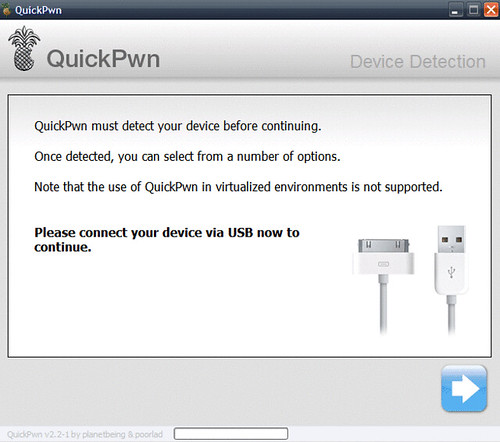
- Right after restoring your iPhone, launch QuickPwn. It should recognize your device automatically.
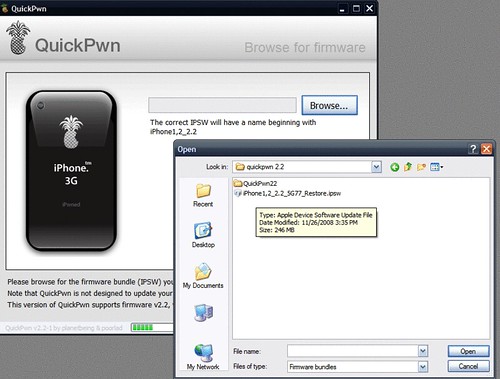
- You will be asked to select your iPhone firmware. Select the firmware you downloaded in Step 1.
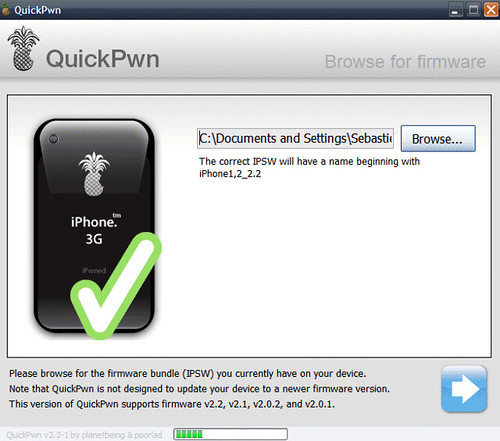
- If the firmware you selected is valid, QuickPwn will show a green checkmark. Click Continue.
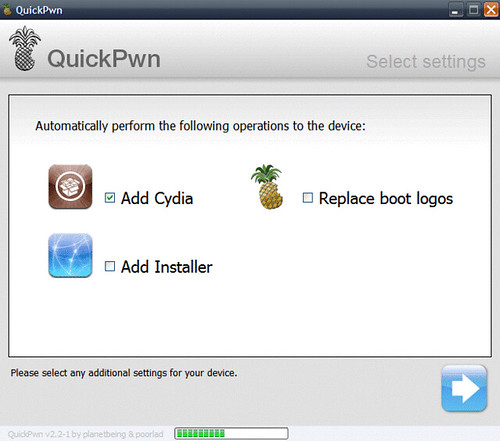
- You will then have the opportunity to select Cydia,Installer, and custom boot logos. You have to at least select Cydia. You may also choose to install Installer .and check to BootLogos box if you want to replace your boot logo. Click Next.
- QuickPwn will now ask you to confirm that your iPhone is connected. Click the blue arrow to continue.
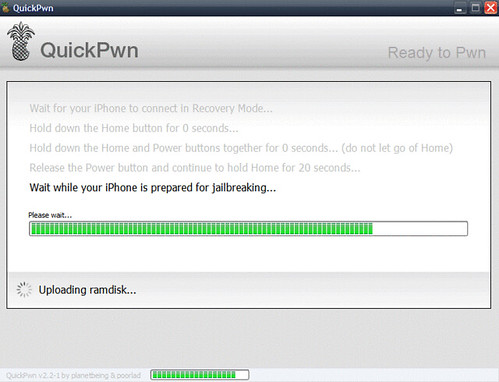
- QuickPwn will now automatically put your iPhone into recovery mode. Once its in recovery mode you will be prompted to: Hold the Home button for 5 seconds, Hold the Home and Power buttons for 10 seconds, then release the Power button and continuing holding the Home button until your iPhone is in DFU mode. Watch the prompts carefully and follow along.
- Once QuickPwn detects your iPhone in DFU mode, it will start the jailbreak process.
- Finally, QuickPwn will let you know that pwnage process was completed successfully.
- Done!



Share your jailbreak experience with us in the comments…
what about the mobileinstall for iphone firmware 2.2
from my understanding it is not possible to use the 2.1 mobileinstall
Will this method preserve my apps and settings from my jailbroken 2.1?
I used my new Macbook to update the software and my Vista machine to jailbreak with the process described above. Worked perfectly!!!
Tom:
App store apps and music are preserved. You do, of course, lose 3rd party apps.
Anybody know if the mac version unlocks 2G iphones?? As far I am aware the quickpwn1.1 on mac (for 2.1) did not.
Anybody know if the mac version unlocks 2G iphones?? As far I am aware the quickpwn1.1 on mac (for 2.1) did not.
sorry for double post…
yea, anyone hear anything about mobileinstallation 2.2?
Yes… I would love to see a nice step by step tutorial for a 2G phone that has not been jailbroken before. It would be of Greaattt help to noobs like me. Thanks
It took me five minutes to jailbreak my phone, its much faster than 2.1 version, it was a smooth hassle free process,Kudos to the dev team , they are our saviours, THANK YOu
Good stuff guys, that was quick and painless. Can’t tell you how annoyed i was when i stupidly upgraded to 2.2. Thanks!
Do the cracked apps still work after updating to 2.2 with a custom fw??
Just ran through the process and everything went just like you said except for the power off and press enter part. Mine just said to hold home for 5 seconds, hold home and power for 10 seconds, then release power and continue to hold home for 30 seconds. I am using a 3G iPhone. I am assuming that you tested on a 2G. You might want to point out that minor difference.
Thanks!
Worth the update IMO!!!
ther is no real risk doing this? i mean if something goes wrong i just restore it in itunes?
it worked OMG i love you!!
So I have a 2nd gen iPhone running 2.1 and Jailbroken using quickpwn on AT&T (but I don’t have an iPhone plan so I can’t activate using iTunes). I uninstalled all Winterboard plugins/themes, uninstalled the 5 icon dock, synced and allowed it to do a backup, then D/L the firmware and did a shift click to restore to the new 2.2 firmware in iTunes. It restored to the new 2.2 and iTunes wanted me to activate in iTunes, I didn’t go through that and just opened up quickpwn and followed the procedures above to get it up and running. Then restored from my backup in iTunes and I’m G2G!!!
alright i know this was already posted but is there any way possible to update to 2.2 while now erasing the jailbroken apps
and if u dont hav a 3g will updating through itunes have any advantage threw saving it on ur computer??
thanks
Hey everyone,
I updated the MobileInstallation page of the blog.
Click here to download the MobileInstallation 2.2 patch.
Sebastien
Krock,
it will not break your iPhone or ipod touch.
Worst case scenario is that you will have to restore in iTunes.
I’m running a 2.2 iPhone (1st generation) and it has been jailbroken fine.
i will most likely restore it later on to update to the newest firmware but until then i love it.
Jake
Used above combined with your other post: http://www.iphonedownloadblog.com/2008/09/19/upgrade-a-jailbroken-iphone/.
No issues at all accept I had to run AptBackup restore from the command line (cd /Applications/AptBackup/restore).
I assumed the ipsw file was supposed to preserve the jailbroken apps on the phone. i guess not. i know the first jailbreak i did with Firmware 2.1 did not require that I d/load the 2.1 firmware seperately. Why this time? Is there no way to update a jailbroken phone with the new Firmware without losing all the 3rd party apps? What about AptBackup? anyone used it with success? What is the process? Thanks.
Categories fu*cked up my phone. I had the settings app in a settings folder and I uninstalled categories before 2.2. Now I have no settings app at all and I cannot install this piece of sh*t categories app because of some bs cydia error
John:
If cydia is not working:
1: Restore phone from iTunes.
2: Jailbreak your phone.
3: Install boss prefs from Cydia, and unhide the wanted icons. 🙂
Categories are nice, but watch out. Once you re-jailbreak it, I think you have to do the steps above to recover the “lost” icons that were in your old categories.
Correct me if I’m wrong.
..and by the way. I have successfully jbroken my phone both on 2.1 and now on 2.2 using vista x64.
Works like a charm! Thank you guys!
john – see if this info helps – http://sleepers.net/2008/09/14/how-to-restore-your-21-backup/
worked like a charm dude it took me less then 10 minutes to do everything the only thing that takes time is deleting all the cydia apps and downloading itunes 8.0 if you dont have it already. 😀
yes, I too jumped the gun and installed 2.2 w/o uninstalling categories. I’m assuming that’s why it f**cked my phone up. I’m restoring it after a few hours of trying to fix the problem and lots of cussing and frustration. I”m crossing my fingers
Can I use the above method to upagrade an already jailbroken (1st generation iphone) with 2.0 firmware directly to 2.2.
Thank you very much! Works fine. Just done it on my 3G iphone, first attempt and only took around 8 minutes to complete. Very easy instructions, much appreciated, thank you again.
Fellas,
Why does quickpwn not work? It says wait for iphone to connect in recovery mode but still no sign… it’s been half’n hour…
Does anybody have a suggestion?
my 3G iPhone is jailbreaked and I use Turbo SIM, I updated it to 2.1 firmware with no problems, but I mistakenly updated it to firmware 2.2!! the Turbo SIM is not working after doing the above process????
Why do I need to download the MobileInstallation patch for 2.2? It isn’t mentioned anywhere in your step-by-step guide.
I have an iPhone 3G running jailbroken 2.1 and I’m with AT&T. To jailbreak the first time all I did was update my phone to 2.1 then ran QuickPwn 2.1
Why do I have to download the firmware separately? Since I don’t care about unlocking the phone, only re-jailbreaking it, couldn’t I just update the phone through iTunes and then use QuickPwn 2.2 to jailbreak it? There seems to be a large communications gap here.
i have updated to 2.2…patched the mobileinstallation then sync with iTunes,the apps got installed but they can’t be opened….every single app says “application can’t be opened.Anyone who can help pls???
i’ve been trying to jailbreak 2.1, and now 2.2 with quickpwn or pwnagetool, and neither are working. The whole process seems like it works, but when it restarts, there’s no cydia or installer. I’ve tried this a million times, i’ve restored fresh and tried it again many times too and the same thing happens. i’ve tried it on both my mac and my pc….
Works perfectly with vista.
I was actually already on 2.1 and just needed to install the installer. Does this mean if I used quickpwn to following your method on the 2.1 jailbreak guide? I won’t be able to perform a soft unlock in the future? Yes I’m asking about 2.1 not 2.2. I only saw this warning on the 2.2 firmware upgrade.
Worked Like a Piece Of cake…………
Am amazed at the speed at which it does it job…
Good Job Dev Team…
We all owe you guys a lot..
Thanks..
Worked Like a Piece Of cake…………
Am amazed at the speed at which it does it job…
Good Job Dev Team…
We all owe you guys a lot..
Thanks..
Chris-The mobileinstallation patch allows you to sync cracked apps in iTunes. If you’re only using Cydia apps with your jailbroken iPhone, you probably won’t need it.
garron-did you have your cydia icon hidden before the upgrade?
ViRuSi-just a hunch, but you may need to chmod your mobileinstallation patch. check out this post for more info – http://www.iphonedownloadblog.com/2008/08/04/how-to-add-ipa-apps-to-your-iphone/
I finally pulled the trigger. I had an iPhone 3G, jailbroken, 2.1 with AT&T. What I did is download 2.2 through iTunes then Restore the phone to 2.2 after backing up all my important stuff. After the phone was running 2.2 I proceeded to jailbreak it with Quickpwn 2.2 and everything worked perfectly. I hope someone finds this helpful.
ok maybe its just me but i know the steps were there and it said to choose to add a custom logo when using quickpwn for my 2g iphone but how do i actually do it. After jailbraking the phone it never prompted me to actually add the logo
I’ve run this several times, but the iphone still wants me to activate via itunes if I use a different sim than the one that came with the iphone.
I got the 1st gen iphone second hand & I am trying to use my AT&T sim, but when it’s intsalled I can still only make emergency calls.
Suggestions?
I finally pulled the trigger. I had an iPhone 3G, jailbroken, 2.1 with AT&T. What I did is download 2.2 through iTunes then Restore the phone to 2.2 after backing up all my important stuff. After the phone was running 2.2 I proceeded to jailbreak it with Quickpwn 2.2 and everything worked perfectly. I hope someone finds this helpful.
Currently have 2.1 jailbroken on ATT, how do you backup cydia third party apps (categories, 5 icon dock, themes and other custom modifications)? If I have my cracked apps in itunes are those backed up like the paid for apps from the app store? Can i upgrade to 2.2 without losing all these apps/themse/customizations?
THANKYOU THANKYOU
Try aptBackup and Chronus. You can find them on Cydia. You’ll have to back everything up and restore it after the update.
Hi I have an apple unlocked 3g iphone from italy and I want to jailbreak 2.2 using Quickpwn but I am unsure what might happen as it seems to
browse to a firmware and I am unsure if it will do a restore or just jailbreak.
Anyone else jailbroke an unlocked 3g and selected the firmware from the gui? I noticed too that the one from apple I downloaded today is
named iPhone1,1_2.2_5G77_Restore but this doesnt match what is on my iphone (downloaded last fri and installed ok)
according to QuickPwn. (iPhone1,2_2.2_5G77_Restore)
I downloaded the matching version which Quickpwn is happy with but still not sure I want a restore done
I have a 1st gen phone jailbroken with 2.0.1. QuickPwn 2.2 says my firmware is not supported by the tool. Do I need to use older version of QuickPwn to install intermediate firmware versions?
I’m using a mac and I wanted to try Pwnage, but the link to the torrent is broken. Any other place I could get it?
thanks.
is this site a scam??
http://www.iphoneunlockuk.com/whatphones1.
they claim to be able to unlock 3g with firmware 2.2.
Jailbroken fairly easily. Thanks for the guide!
Here a Dutch guy who tried the jailbreak. I have T-Mobile as provider and applied the jailbreak the first day I got the iPhone.. I was confident enough to do it and it worked perfectly. First the Quickpwn Tool shutdown when i started it, but the second time it worked fine! Under 8 minutes the process was done!
Happy gaming.. Cheers
Seems to have worked just fine. v2.2
One tip, do not use the apple dock when jailbreaking. It might be tough to hold the home button.
Thanks for the tutorial.
Had errors with iTunes firmware restore before uninstalling all Cydia apps. Removed the apps from Cydia and restore process went fine.
QuickPwn’d all good.
Cheers 🙂
Used Pwnage instead of QuickPwn to upgrade from 2.0.1 to to 2.1 and then from 2.1 to 2.2 (need new version of Pwnage tool each time). Happy 2.2 user now.
Hello all, I had Cydia hidden under SBSettings before I restored. Now it’s not showing up after the jailbreak 2.2.
Any ideas on what I should do? Thanks in advance!
i’m using the Turbo-SIM on an iphone 3G. I had jailbroken firmware 2.2 and datas are restored, apps are working just fine.
However my Turbo-SIM can no longer find the signal mobile network. Anyone can help me with this?
E-mail me thx.
Ivan
ilovemegaman@hotmail.com
awesome!! you guys rock …
Worked just perfect for me, thank you guys!
Had no problems using this guide and it worked quite fast!
Just quckpwn’d my old 2G iPhone. Everything works great with a T-Mobile sim except there is no wifi. I tried connected to our wireless router, it see the signal, allows me to enter the password, accepts it, shows the wifi signal icon in full strength, but says it cannot open the page as its not connected to the internet. Tired rebooting, re-quickpwn’ing but still nothing.
Even if there is a fix on Cydia or installer….! cant connect. any suggestions. Thanks in advance.
@dgreekman – did you restore from backup?? Or did you set up as a new phone?? I always advise NOT restoring from backup as it might create some unwanted issues (ie. the one you’re having).
I might be wrong though…
Did a clean restore from a new restore file.
i followed all the steps and it completed successfully, now the problem is when my phone goes to reboot it just stays on the pineapple.what should i do?
disregard my previous post it’s working now.thanks for the software guys 🙂
Quickpwned my 2G after the 2.2 firmware update and everything seemed to work fine except I have NO SIGNAL…HELP…anyone have any ideas?
Using an international SIM in Armenia :-/
I used Ziphone to unlock my phone to 1.14. Do I only have to restore my ipod to follow the steps here?
so i have quickpwn do i upgrade with itunes first or do i just use quickpwn?
i have a jb 3g on 2.1 i have quickpwn 2.2 but do i update on itunes first or just use the quickpwn 2.2? need help please i bought my iphone already jb so im confused
this stupid thing does not let me install applications downloaded from appulos.us
what can i do plz help me i am rly desprate
Unfortunately, my primary net connection IS my phone. I was able to acquire the ipsw for 2.2 described here, and upgraded my. 2.1 AT&T 3g, but had to take it back to the local store for re-actvation, as it was prompting to reconnect through iTunes after the upgrade.
Can anyone shed light on what I could expect after jailbreaking? Would I need to reactivate again? If so, I guess I’ll have to wait til I have another net connection to try this, as I don’t expect the store will be very helpful if they see what I was doing.
Any tips would be appreciated.
Hello, it didn’t work for my iPhone 3G, Fw 2.2, T-Mobile.
The Phone stopped booting after the “successfull” jailbreaking operation. I restored my original 2.2 firmware. Maybe i’ll try it again… 🙁
this worked perfectly.. thanks a bunch
I unlocked and jailbroke my iphone but now it stays stick in the reboot stage with the apple. what can i do/
i try to jail broke my iphone 3g but still it stacks in reboot stage. help should i do? need help thanks..
I am able to do a few things on computer as far as messing around and tweaking..but I was scared to death to Jailbreak my 3g iphone..but I wanted the vid recorder and the ability to customize my iphone…well I wasnt worried about the unlock thing because I knew I had two years with provider so I just wanted jailbreak..it was so easy..I have already installed winterboard and sbs? and the video recorder..and customized everything..I love it!!!!!!!!!!!!!! Thank you so much!!! I didnt have to use the mobile patch though…should I? I was version 2.2 Itunes 8.0 and I couldnt really figure that part out..but everything else works :0)
I’m using Turbo-SIM on my iphone 3G. I have jailbroke the 2.2 firmware, it was unlocked. however there was no service after that..it seems that the Turbo-SIM is no longer working…
PLEASE HELPPPPPPPPPPPPPPPPPPPP
So I just unlocked the iPhone 2G using this, and everything went by ok, only when I plug in my T-Mobile chip, it tells me that the Sim is different? I tried doing the whole thing over again with my T-Mobil chip already inside…still not working? What the heck do I do?
hey i saw another tutorial here on this website called (how to add ipa files to your iphone) so if i want to add ipa files i have to do the 2 tutorials right!? and also is mobile installation needed for the second tutorial or for this too??because i cant see why do we need to install it in this tutorial?
Do I need to do a fresh restore before running Quickpwn?
What I mean is, if I have all my songs, apps, etc. on there right now, can I just run Quickpwn and it will all stay or do I have to start with a clean slate?
a very good tutorial on jailbreaking…. the dev team has done a really good job of it… but the question of unlocking still remains in doubt…. hopefully we’ll have a 2.2 unlocking quickpwn or pwnage device to complete the quest… the only jailbreaking backdrops remain the synchronous movements between the home buton and the power button during the jail break process…. the rest rocks… cant wait to experiment with my jail broken iphone…
cheers guys!!!! Happy New Year!
Thanks a lot
it’s works for me
but what function of mobile installation??
thanks..
Thanks alot
I have Iphone 3g 16 gb 2.1 using givey sim for unlock.
Perfectly works for me
Well, thanks a lot for the guide. I am a complete noob, but I got my 1st gen Itouch jailbroken using this… But I still don’t know what I have to do to install apps. I mean… I have some ipa files downloaded. What do I do now?
Hey,
I’m trying to jailbreak my itouch which is running 2.0.1 and it says waitin to go into recovery mode and then it stops there is no indication that it has entered reovery mode and also the hold home for 5sec command does not highlight. Any Suggestions plz help?!
Thanks a lot for the guide. I just jailbroke my iphone 3g 2.2 and its working perfectly.
wow very easy..just jailbroke my iphone 3g v. 2.2 couldnt be happier
Hey, thanks man!
Worked perfectly at first time and it was so easy! 🙂
Thank you, again! 🙂
Ran the jailbreak, everything seem to go fine, but it freezes on reboot. Can’t sync to itunes to restore. Any suggestions?
Hi
I am trying, unsuccessfully, to unlock my 2G iphone. It has version 2.2 firmware and my laptop runs Vista.
Like K I do not get beyond the stage using Quickpwn where the screen says “Wait for your iPhone to connect in Recovery Mode …”
The phone shows an image of a USB connector and an arrow pointing to iTunes globe. I think this means it is in recovery mode.
Helpppppp
Yea I’m having the same problem as Eric.
I’m using Vista and after all the steps, it freezes on the reboot stage…
Any suggestions or thoughts?
Anything would be helpful =D
Plz help i did all the tutorial say but there is no signal plzz help
from where can i get the bootneuter
Jailbreak iphone 2 using quickpwn 2.2 fails because QuickPWN doesn’t detect the right firmware on the iphone.
So – how did I get into this situation
1. I have an iphone 2G with 1.1.4 on it
2. Using itunes I upgrade the phone to 2.2 with firmware downloaded from
http://www.iphonedownloadblog.com/iphone-downloads/
(the summary page of itunes confirms that I have 2.2 running)
3. Starting QuickPWN 2.2, it notifies:
This version of QuickPwn can only jailbreak devices with versions >= 2.0
Any clues ?
Smooth guide, worked perfectly, thanks a lot 🙂
thanks dev team, i have successfully jailbroke my iphone 2g, now i need to unlock its sim lock to be able to use it in my country and my service provider, HOW DO I DO THAT? thanks in advance
Hi, i have made the update 2.2 of my iphone using itune and now it’s lock, i try to use Quickpwn but when i run it nothing appned i can’t continue quickpwn stay on the first windows and don’t found the iphone or i don’t know please i need help.
I tried the the procedure for jailbreaking iphone 3g with the 2.2 firmware. On the first try, it just stayed on the apple logo of death. I restored it back to factory settings and back to the firmware 2.2. On the second try at quickpwn, I have the same problem with Carlos. It just stays on the third screen before the pressing the home key and the iphone stays in DFU mode (recovery mode) and quickpwn cannot see the phone anymore. I have to restore it again using itunes 8 to get it back to factory settings and install the applications.
How do I fix this DFU recovery mode problem? Any help is greatly appreciated.
Same problem as a few here – iPhone 3g, after quickpwn it hangs on the apple logo at bootup – it vibrates a couple of times periodically to piss you off and think it’s actually doing something, but it never gets to the home screen.
Have restored and tried again – same thing…
fuck you
PLEASE HELP!!!
I have a black iPhone 3G 8GB running v2.2.
I tried to jailbreak the phone and followed all of the instructions. Everything seemed to go fine, I saw the statusbar and a running pinapple logo on my iPhone and it also confirmed it had completed on my WinXP computer.
However it said it would reboot but it will not go past the black loading screen with the Apple logo! Every once in awhile the screen will flash white and/or the phone will vibrate in bursts of two every once in awhile.
I tried to connect it to my iTunes, but it will not recognize the iPhone at all, so I can not do a factory restore on it.
I am freaking out. Any help would be greatly appreciated. Please email me any suggestions at markamccray@gmail.com.
Thank you everyone!!!
Ok for those people who are stuck at the black apple logo screen(the rebooting screen)
I found a way to solve it(well it worked for me at least):
Restore the phone with itunes first before trying to jailbreak it.
Don’t sync anything yet till you have jailbroken the phone.
Run the QuickPwn prog to jailbreak it.
The apps seem to conflict with the rebooting and jailbreaking, so give that a try for people who want to.
DId the quickpwn jailbreak again without syncing but on the second run of quickpwn, the iphone gets stuck in the DFU mode (recovery mode). And quickpwn cannot see the phone anymore.
Had to restore using Itunes instead to get past the DFU mode.
Works perfect!!! Thanx alot!
Thanks a lot for the great tutorial! Worked perfectly for me… (but you really have to be exact with pressing the buttons! ; ))
Can’t wait to install all the apps!
Just finished pwning owning etc. few seconds ago…it looks like everything is working 🙂 I wonder if that AptBackup will backup now my applications or not…not big loss videos was more important 😀
Great tutorial it will lead to more freed iPhones 🙂
I was a big chickensh*t about doing this because it is my phone that I use for personal and work. After reading your tutorial and spending a few hours researching the success rate I decided to go for it. Great tutorial, BTW!
jailbreak works a treat, 1 problem loading some apps!! some will load perfectly, others on 2nd attempt after receiving message “MD5Sum mismatch” others continually get this message and wont load at all.
Any help or advice greatly appreciated.
Worked like a dream
Awesome stufff man!!!!!!!! Iphone unlocked atlast!!!!!!!!!! better than gevey or turbosim 😀
Works perfect!!! Thanx alot!
every thing was fine i unlock my Iphone 3G but it does not work .
i dont have any service . my friend did the same but his iphone works well
wts the prblem ?
GREAT TOOL!
Worked perfectly, now finetuning using Cydia
Thanks guys,
Cheers to y’all
Serge
ok so if jailbreak my fone not unlocking it for another company but if i follow the steps what happens when i plug my iphone and the itunes runs it will like to put music n photos on it cuz i heard AT&T may brick my fone?? can sumone tell me wats up?
Flawless. Took way longer to download the requisite files than to follow the guide. All jailbroken and downloading apps in Cydia now ! Thanks !!!
i have a mac and everytime i try to jailbreak my iphone 2G it gets all the way to the part where QuickPwn says that everything was succesful and then nothing happens to my phone…then i have to restore it and everything gets deleted
so i cant figure out how to do it on a mac..HELP
Just (finally) decided to do this, worked perfectly. I didn’t restore beforehand though, I don’t see the point.
MobileInstallation part is made unclear, but I found the correct use for it on another guide.
Thanks for this guide. Well written.
Wow…. I was so sweating it going through this process, but it was totally worth it, Everything went through without a hitch. I made sure to follow every single step exactly to the word.
For those wondering like I was, I have a iPhone 3G that I had updated to 2.2 with itunes. I just restored it, and everything works fine.
Wow…. I can breath easily now, I’m so glad that it worked!
i’m using an Orange Sim on an iphone 3G. I had jailbroken firmware 2.2 and datas are restored, apps are working just fine.
However my Orange Sim can no longer find the signal mobile network. Anyone can help me with this?
please email me
monsta_maguire@yahoo.com.au
Please help, I followed all the instructions to the letter to jailbreak my phone, but now it won’t reboot, it’s stuck on the pineapple logo screen. What do I do?
Please email me at kimlydee@aol.com
bonsoir, jai jailbreaker mon iphone, tous c bien passer mais le tel ne reconnait plus ma carte sim ( sfr)
HELP !!!!!!!!!!!!!!!!!!!!!!!!!!!!!!!!!!!!!!!!!
U r too gud thanks
does this activate the iphone as well? cuz i wanna use it for wifi only…
Help!!! just bought a new iphone… came new with the update 2.2.1 and firm 02.30.03. want to jailbreak, what can I do? quickpwn22 gives me an error when I open the program on all my pcs. any thoughts?
@Curt
You can’t jailbreak 2.2.1 yet. I am sure the dev team is working on something so come back to the blog to check soon.
Sebastien
Hi, i just tried to jail break. The process went along fine. All the processes completed successfully. iphone re-started and i inserted my new sim card and it gave me an error of new sim inserted, connect to itunes. Itunes obviously did not recognize the sim. I am using 2.2 firmware on my 1st generation iphone. Any help to fix my problem will be greatly appreciated. thanks!!
I am interested in jailbreaking solely to install PDANet on my iPhone (I used it with my old Treo and it saved my butt many, many times). If I jailbreak and install Cydia, can I install PDANet, then UNINSTALL Cydia and be OK? I have no interest in having the phone permanently jailbroken and want to return to “factory condition” once that app is installed.
I had my iphone 1st Gen. at 2.2 firmware level. I used quickpwn tool for jail breaking and unlockling. The tool said the process was successful…and after rebooting it is still at the Apple boot screen with Apple logo displaying.
It seems it tries to reboot again after sometime with 2 buzz.
My computer recognises the iphone but itunes does not recognise my iphone (1st Gen)
Dont know what to do…….
I was told that if I do below..I can recover using itunes
Press HOME+SLEEP button..it reboots and then I leave SLEEP button ..still holding HOME…. till I see itunes screen….
…Yes I did that and I got a itunes screen(on Iphone)
BUT still itunes(on Computer) does not recognise my iphone
Any help ???
I read somewhere uninstall itunes and do what I did above (Home+Sleep…till itunes comes on iphone)…
I used another computer where I had another itunes….I did above and itunes could detect my phone (after couple of min).
I tried restoring it……it wanted a firmware download…Itunes started downloading…But even before itunes completed downloading….my iphone rebooted (maybe like screen saver)…and lo and behold my Iphone started working again……!!
What a relief !!!
First of all Thank you so much to the Iphone Dev Team. I managed to restore my 1st generation Iphone to firmware 2.2 from fw.1.1.4.
Using Quickpawn was easy. I restored my Iphone fw using Itune 8.0.2. Then used quickpawn to jailbreak the Iphone.
By the way I am using my Iphone in Malaysia, so no problem found so far.
Thanks again to the quickpawn dev team. 🙂
Just like a few more people here have posted; I follow the instructions until I get to the point where QuickPwn ask “Wait till your phone goes into recovery mode…” I follow the steps and get the phone into DFU mode and nothing… Just hangs there.
Anyone have any ideas?
Just a little more info, I used iTunes 8.0.2 with recovery file:
iPhone1,1_2.0.2_5C1_Restore.ipsw
Using windows XP
The iPhone is 8Gig 2G phone.
you guys are amazing…. worked like a charm
THANK YOU!
but now what?
i quickpwned my iphone.. so now what?
i put my sim in it?
NO!
i put my sim in and at the top left is says t mobile and it just has the “emergency calls only” thing up and when i slide that, if i type in any number it will call it. (not just 911) it just wont let me access the phone.
and its telling me to connect to i tunes.
how the **** am i supposed to do that if my sim card is T **** mobile!
wow.
this is getting very annoying..
Same as “HELP ME!!”. All went well no crashes, no data loss.
However with new SIM in only offered emergency calls. Albeit i can dial out using this facility and can receive calls, with SIM card in i cannot access anything else whatsoever.
Does anyone ever replay to these posts?
i dont get it. quickpwn 2.2 worked on my 3g iphone but now there is no service. I have at&t i just want it JB’s not unlocked….wtf??
Just restored my touch from 1.1.1 to 2.2 (which I found through a torrent site) and then quickpwn’ed. All worked perfectly.
1º- Press Windows+R and enter services.msc
2º Activate terminal, fast user change and remote procedure calls, i think it was all that i switched on. (to activate, right click, iniciate and then go the propreties and set the type of start to “automatic”)
3º Restart if you wish, i didn’t needed to.
3º Jailbreak it.
PS: If need to, Write down all those services that were desactivated, then activate all, jailbreak and then turn those again off.
I hope it solves that! You won’t find the name like i mencioned, i’m on the portuguese language and to translate it’s kinda hard!
good luck
All I can say its the best way I have ever used.Don change teh Boot Logs and you will be fine.Just use the Check options.All The best and Thanks Indeed….
I get a pop up when i am running the Quickpwn that says i need to fix my JIT (just-in-time) debugging program… i dont know what to do from here and i dont know how to do it ??? Please help me !!!!
As a lot of people, i jail broke my iphone and it was stuck on re-boot.
I had half an hour of shitting my pants but, then it just turned on and I was then able to experience my new jail broken iphone.
Be patient, and it should eventually turn on.
It must just need that time to sort itself out.
Good Luck
I stupidly forgot to hold SHIFT when I pressed RESTORE on my Iphone 2G (jailbroken) and not the SIM is locked? Can anyone pls help me?
I tried to jailbreak my iPhone when it had the 2.2 firmware but experienced a common problem when it would freeze on the apple/pineapple logo. So i restored and was forced to upgrade to 2.2.1. But then i followed this same procedure designed for 2.2.1 and it worked.
iTunes would not recognise my phone so i couldnt restore that way.
What i did was hold the power and home button until it switched off. Then hold the power button to turn it back on. Open iTunes and you should see a message saying that the iPhone is ready to be restored. Then you can try all over again if u want. But remember that when u restored it, it gets upgraded to 2.2.1. So follow the procedure for that firmware or just downgrade to original firmware.
hi…i hav an iphone 2.0.2….bt i dnt hav a wi-fi at home …so dnt knw how 2 install applets….i hav a pc at home…with itunes…n internet….n aftr dis i dunno how to install applets to my iphone…..plz help me ….mail me…d needfull
OMG HELP ME ITS NOT WORKING. I read ev erything Hold Down Home and Power Button but ive been stuck on the appel
for ages
Hi Sebastien or anybody,
please help to solve this issue, I try 1st step to restore but itunes asked me to restore the backup from previous sync and doing sync. Once finish, I run the QuickPwn for some step but always stuck on “Wait for your iPhone to connect in Recovery Mode…” .. it stays there forever…..
Any tips to solve this issue???
Thanks in advance…
Jailbreaked my iPhone using quickpwn and this guide. Worked great! Just one major problem, all my calls are dropping after 1 second!!! Please can anyone advise what the problem is, I was quite enjoying sb settings and icon poof and winterboard so don’t want to go back to standard iPhone.
I am closing the comments for this post. If you have any question about jailbreaking your iPhone, please ask in the forum.