Downgrade iPhone Firmware 2.2 to 2.1

By , Nov 22, 2008

Firmware update 2.2 surprised a few people who accidentally updated their iPhone. If that happened to you, you now have 2 choices: either stay and 2.2 and wait for the Dev Team to come up with a jailbreak method for 2.2, or you can try to downgrade from 2.2 to 2.1.

I personally don’t have this issue. I haven’t updated to 2.2 but I figured that some of you guys may have, so I started looking for a solution to post here. The problem is there doesn’t seem to be a solution that works for one main reason: 2.2 updates your baseband and once your baseband is updated, you can’t downgrade it to 2.1 (not as yet anyway).

From what I read, only 2-3 people were actually able to get their iPhone back to 2.1 without issues but it is very unclear what they did exactly… Now let’s have a look at these different methods that supposedly show you how to downgrade from iPhone firmware 2.2 to 2.1.

Note that I haven’t tried this and I do not approve it. If you choose to try any of these methods, understand that you’re doing it at your own risks. If I were you, I would just wait for a new jailbreak method by the Dev Team.

I found the first method on MegaLeecher.net and here is how it goes:

For downgrading iPhone Firmware 2.2 to an earlier version you will need to downgrade the baseband and firmware, for this following software are needed:

  1. ZiPhone patched by kIREmK (Pls. read this comment).
  2. QuickPwn v 2.1.
  3. Apple iTunes.
  4. Firmware IPSW file : 2.1 firmware 3G or 2.1 firmware 2G.

Once you have got all the above softwares, follow the process below:

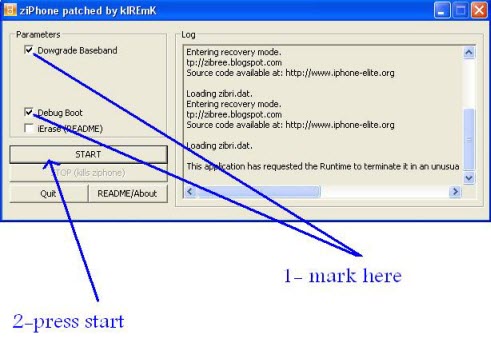
  1. Use Ziphone to downgrade the baseband using the settings as shown below.
  2. Downgrade iPhone Firmware
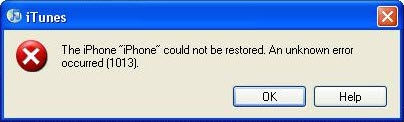
  3. Now restore the firmware to an earlier version using the IPSW file via iTunes, if you receive errors during this procedure simply ignore and proceed further.
  4. iPhone Update Error 1013
  5. Now, use Quickpwn to unlock and jailbreak using the same firmware flash file used to restore in previous step.
  6. Your iPhone should be jailborken and unlocked now.
Please read the comments on MegaLeecher and you’ll see for yourself that it is not a really safe way to downgrade…

Now the second method that I found on iPhoneHacks.com.

First you need to download iPhone firmware 2.1 (for 1st iPhone, use this download link and for iPhone 3G, use this download link).

You can then follow these steps to downgrade from iPhone firmware 2.2 to firmware 2.1:

  • Connect your iPhone to your Mac or PC select your iPhone from the list of devices in iTunes. If things had gone horribly wrong while hacking your iPhone and iTunes does not detect your iPhone then you will need to put it in DFU (Device Firmware Upgrade) mode.
    • You can follow these steps to put your iPhone in DFU mode (this is required only if iTunes does not recognize your iPhone):
      • Connect your iPhone to your computer.
      • Turn iPhone off.
      • Hold power and home together for 10 seconds (exactly).
      • Release power but keep holding home until the computers beeps (observed on a PC) as a USB device is recognized.
      • A few seconds later iTunes should detect your iPhone.
  • In the Summary Tab, Hold down Option and press the “Restore” button. If you are using Windows hold down Shift and press the Restore button. (This is an important step as just pressing the “Restore” button will result in restoring your iPhone with the latest firmware which is firmware 2.2 currently, by holding down Option in case of Mac or Shift in case of Windows, allows you choose the firmware file that you want to downgrade to.)
  • Restore or Revirginize iPhone

  • You should be able to see all the older iPhone firmware files you had downloaded so far, select iPhone firmware 2.1 file (iPhone1,1_2.1_5F136_Restore.ipsw) to restore your iPhone or browse to the folder where you have downloaded it and select it.
  • You might get the any of the following errors: 1011, 1013, 1015, you can ignore them. However, if you get errors such as: 1601, 1602, 1600 or anything else then try putting the iPhone into DFU mode and try again.
  • Your iPhone should now be restored to iPhone firmware 2.1 (Settings -> General -> About). You can then jailbreak and unlock your 1st gen iPhone or jailbreak iPhone 3G.

Again, I highly suggest that you read the comments about this method…

If you have successfully downgraded your iPhone from 2.2 to 2.1, please let us know how you did that.

  • Share:
  • Follow:
  • roberto

    someone knows about any efforts that someone everywhere is doing do crack the 2.2 basband ??????????????????????????????

  • luna

    Did any1 manage to downgrade the baseband after upgrading to 2.2 then downgrading to 2.1 ??? please help!!

  • roberto

    at a moment , the only way to get service on your phone is to buy a new turbosim { 45$ } that support 2.2 fw } ,

    dont you even try to resolve the problem in other ways , there aren’t !! belive me, i checked all the web for solution !!!!!!!!!!

    italked with the experts , yhe answer is , buy the sim or wait for the dev team.

    all i’m saying refer to 3g iphone , in the 2g there is no problem .

  • johndoc240

    Hey everyone,

    http://www.metacafe.com/watch/2084105/downgrade_iphone_firmware_2_2_to_2_1

    This is so simple but worked for me on the 3G

  • roberto

    what about downgrading the baseband in unlocked phones ????

    your video shows downgrading an unlocked or simfree phone .

    and its not the issue .

    but thanks anywhere

  • http://www.unlockedphone.blogspot.com Kam

    Does anyone know how to downgrade the baseband? I have downgraded the firmware from 2.2 to 2.1. Now i need help downgrading the basband as well. the Ziphone program does not work!!!

  • aman

    @kam, someone mentioned about bootneuter 2.1. should work, will b trying tonite, as i too accidentally did the upgrade

  • Matheen

    Excellent, Well done.. it perfectly works. so let me tell the instructions again.
    1.Per the Blog instructions, click zip phone and enter recovery mode and then restore iphone to 2.1 and it will restore automatically to 2.1 but after your boots up automatically it will show you your service name but it will be in DFU mode. So all i did was, i went to quickpwn2.1 and jailbreaked it again selecting unlocking option,addcydia and installer and then also i selected baseband of 2.1 which you will get an option and i followed instructions as per the quickpwn app. Now my iphone works perfectly it was earlier.

    **this is for iphone 2G
    **After this whole process your phone will be back to new that means if you have backedup your when it was 2.2 then you cannot retrieve your contacts. Unfortunately i lost my notes but luckily i had made a bakup with 2.1 so i retrieved all my contacts.

    Hope this helps,
    mohdmatheen@gmail.com

  • roberto

    again !!! the problem is only !!!! with 3g iphones , there is no solution till now .

  • P
  • Matheen

    hello again…
    well , One more problem luckily got solved because of this downgrade. i dont exactly know how it happened as i didnt do much research with my iphone. the problem was “this accessory is not made to work with this iphone” this thing was going crazy on my iphone and draining my battery almost 6hrs down… So after this downgrade it has been stopped popping back and also battery stands long..let me know if anyone finds how this happened..

  • Jon

    Does this downgrade the 2.2 baseband update back to the 2.1 baseband so i can use my turbo sim again?

  • Dominique

    hello all,

    i have the iphone 2G version. i was using it unlocked and jailbroke with T-Mobile. i was using the 2.0.2 firmware and decided to upgrade to 2.2 to use some of the new apps coming out. turns out QuickPwn 2.2 dint work with my Vista system, so i used QuickPwn 2.1 and it worked great. After upgrading to 2.2, these were my steps to downgrade and re-unlock and jailbreak.

    1) connect iphone let itunes detect it, if not enter DFU mode like described above.

    2) once detected hold shift and click restore and it should open ur explorer to find the 2.1 firmware that u SHOULD have already downloaded. i put mine on my desktop. i filed it in a document folder after i completed using it.

    3) itunes will restore and ur phone should look like factory default on the home screen.

    4) after that disconnect ur phone then open quickpwn 2.1. once its opened it will ask you to connect it again, do so, and the blue arrow on the bottom right should become clickable. click it.

    5) i dont kno them by heart but just follow the directions and the process should finish and ur phone should be unlocked and jailbroken. note that u must have downloaded the 3.9/4.6 bootloaders and ur firmware (2.1) before using quickpwn because during the process it will ask u to select these files, so u need the ready, downloaded and on hand.

    6) quickpwn should say it appears to have completed successfully. then all u do is insert any sim, give it a minute to register and ur set. on the phone go to settings->mail, contact, calendar then scroll to the bottom. ull see an “import SIM contacts” button. push that to get all ur number onto the phone.

    7) fin :)

  • roberto

    good news !!!!!!

    hebdev israeli team will relese in 48 hours a jailbreak & unlock for 2.2 fw

    http://www.hebdev.com/

  • roberto

    and for you Dominique ,

    please try to folow the posts , you will see that there is no problem with 2.2 fw and 2g iphones !!!!! only 3g .

  • jay

    geesh

    WILL SOME OF YOU FRIGGIN READ LOL.

    on the 2g iphone its is easy as friggin cleaning your a$$ lol. just shift + restore while the phone is on. after its done your phone will show itunes logo with the slide to unlock. next step go to jailbreak using quickpwn. finish the steps done deal. or you can also follow the method posted by some else.

    NO PLEASE STOP ASKING ABOUT 3G……………….. WHAT PART OF THE MODEM FIRMWARE DONT YOU UNDERSTAND.

    if its 2.28 you have a $500 ipod until dev team figures that one out. sorry to be so blunt, but its painful to read the same stuff over and over when it clearly tells you NO YOU CANT DOWNGRADE THE BASEBAND OF 2.28…….. watch someone is going ask again lol

  • Pingback: old at&t blue mmode settings on iphone - Page 5

  • ronen

    roberto –
    are you from israel?
    even if the hebdev will publish a package for the 2.2
    you still cant use the phone options ( at least untill you buy new turbosim) or im wrong ?

  • roberto

    אהלן רונן ,

    לצערי הרב אתה צודק , ואני מחפש כזה טורבוסים .

  • Masrocha

    Hey guys, looks like everyone is having the same problem with this downgrade thing. I found a video that shows you how to downgrade from 2.2 to 2.1, but I’m not sure if resolves the problem with the baseband issue.
    Go to this link to see the video.
    http://www.metacafe.com/watch/208410/downgrade_iphone_firmware_2_2_to_2_1/
    If I find more stuff about how to fix the baseband issue I’ll come back and post here. Good luck to all of you. Marco Aurelio

  • Masrocha

    Here is the solution to understand the Hebrew website (hebdev.com). Follow the link:
    http://translate.google.com/translate?u=http%3A%2F%2Fwww.hebdev.com%2Fhowto.html&hl=en&ie=UTF-8&sl=iw&tl=en

    I hope this will help.
    Marco Aurelio

  • http://iphone.cazisoft.com Mojtaba Cazi

    Thank you sebastian

  • Michael Knisley

    So far nothing is working, I finally order the turbo sime for $16.00 on ebay and this is working great. Thanks got I can use my Iphone again. Take my advice and pay $16.00 for your stupidity ( not searching before upgrading)

  • Gio

    My father and I we have two iPhone first generation, the 2 phones had iPhone 2.1 created with Pwng and wen we did the update to 2.2 iPhone we found out that the phone was still working with no issue, we are in Costa Rica, no ATT here. Now the two phones have the Apple logo at start up too.

  • davidkingdc

    This works, Thank God ….. I dislike my iphone if I dont have it jailbreak!
    Thanks again, this worked great for me, I used the 2nd method.

  • Jon

    hey all. how many people got their iPhone 3 g baseband downgraded from 2.2 to 2.1? do either of these methods really work so that I will be able to use my old sim card once again?

  • roberto

    TO davidkingdc -

    WHAT METHOD DID YOU USED ?

    IS YOUR 3G IPHONE BASEBASE DOWNGRADED ?

    DO YOU GET SERVICE AFTER UPGRADING 2.2

    & DOWNGRADING TO 2.1 ?

  • MOJO

    i was able to downgrade from iphone 2.2 to 2.1 but the modem firmware stays the same.

    any remarks

  • roberto

    iphone 3g ?????

  • Dragan

    I have 3G 2.1 with “universal” or “turbo” sim , but I tried to use Ibrickr (i did not knew that it will not work with new firmware) and now my iPhone is in recovery mode!
    In iTunes I get:
    “iTunes has detected an iPhone in recovery mode.You must restore this iPhone before it can be used with iTunes.”
    But if I do that, it will be updated to 2.2 firmware and probably baseband will be upgraded too and it will be “no service”!
    I am new in all this, and I dont know what to do?
    Can anybody help me?
    P.S. Sorry if my english is bad!

  • roberto

    dragan .

    go to hebdev

    http://www.hebdev.com/howto.html

    download – HebPwn -

    and follow the insruction .

  • marko

    I downgrade my 3G from 2.2 to 2.1 and now still have same modem firmware 02.28.00? is that normal ? I lost signal and network. I am using rebel simcard for unlocking

  • Dragan

    Thank you Roberto!
    I dont understand the language, but I manage to fix my iPhone!

  • Jon

    What does hebdev.com do to the iphone? just install hebrew?

  • roberto

    to jon ,

    the app hebpwn was made for jb activate & hebrew installing you can use all but the hebrew .

  • roberto

    to marco ,

    you need to buy a new turbo sim that support 2.2 fw and that after you have uograded your fw 2.2 , when downgrading, the baseband {the modem } remain in the 2.2 fw .

  • Joe

    Anyone knows where to get the new turbo sim for firmware 2.2 for iphone 3G ? As so far, no solution for iphone 3g to get back signal after upgrade.

  • roberto

    hi joe , where do you live ?

  • Chirag

    Turo sim for 3G i-phone 2.2. is here..

    Guyz i have programmed a turbo sim for firmware 2.2..
    I am using it in India on airtel n it’s working perfectly fine…
    If anyone wants tat contace me at +919212582064 or cmanaktala@yahoo.com

  • Chirag

    Downgrading is impossible…
    DO NOT USE ziphone .. Mite destroy the bootloader for 3G i-phone…
    The best solution is to use 2.2 turbo sim..

  • Sam

    I have got IPHONE 3G and i upgraded it to 2.2 and pf course no service but then i bought this new V3 card from any network but it is still the same. No signal. Does anyone know what kind of sim should i buy to make it work?

  • Joe

    To Roberto

    I live in Malaysia

  • friend

    i m also using iphone 3g with firm ware 2.2.and it said no service.so i bought rebel proxy sim card and its working fine with firmware 2.2.check their website http://rebelsimcard.com/virtu/
    they have explained everything their.check it

  • Chirag
  • mamsong

    I just downgrade my 2G iphone from 2.2 to 2.1. Thanks God every thing back to normal.
    On my PC I used Pwnage 2.1 and iphone 2.1 firmware and it works ;-)

    I had tried ziphone but not work for me.

  • Joe

    To Friend.

    How much u bought it ?
    tq

  • jojo

    Everything work fine with in 5 min. Thank you Sir

  • c0ach

    Hi mamsong, can you tell us detail how to downgrade it?? Did you manage to update the baseband down to 2.1 as well?

  • vannfanell
  • willb

    I can do for downgrade baseband from 2.28 in my 3G IPHONE?

    DO ANYONE KNOW?