Create an iTunes account without a credit card

Sebastien, Oct 18, 2008

[digg-me]So you have a spanking new iPhone or iPod Touch and you can’t wait to download all these applications from iTunes until you realize you need a Credit Card to have an iTunes account. Or, maybe you do have a Credit Card but the app you want is not available in your country? Don’t panic, there is an easy solution to this problem, and best of all, it’s totally legit and should take you about 2 minutes to set up.

This tutorial will teach you how to create an iTunes account in any country whether you have a credit card or not. All you need is 2 minutes, an Internet connection and have iTunes already running on your computer.

1. Select country
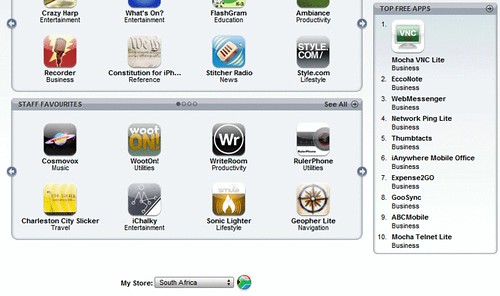
First things first. Go to iTunes homepage, and select your contry, at the very bottom of the page. For the purpose of this tutorial, I chose South Africa, although I live in the US.

2. Click on a free app

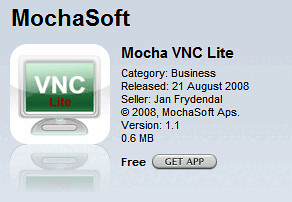
Once you have selected your country, you want to click on a free app in the “top free apps” section (see image above). For this tutorial, I clicked on Mocha VNC Lite. After clicking on the app, it will open the app description page. From there, click on “Get App”.
3. Create a new account

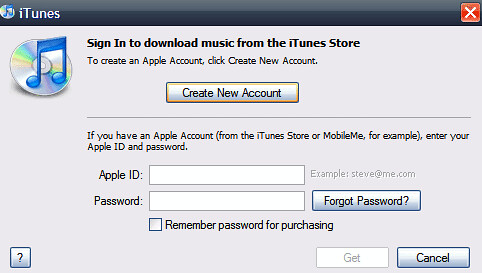
After clicking on “get app”, a window like the one below will pop up. Simply click on”Create New Account”.
4. iTunes welcome message

You will see this welcome message. Click “Continue”.

5. Terms Of Service

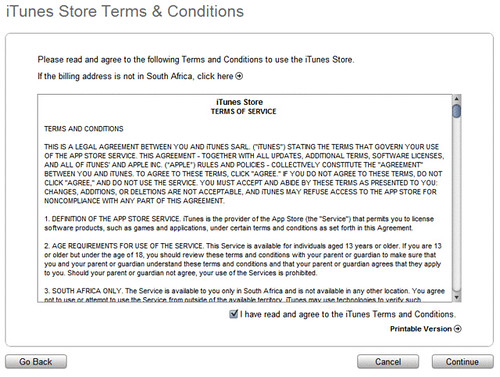
You will now see the usual Terms Of Service. Check the box saying that you agree and click “Continue”.
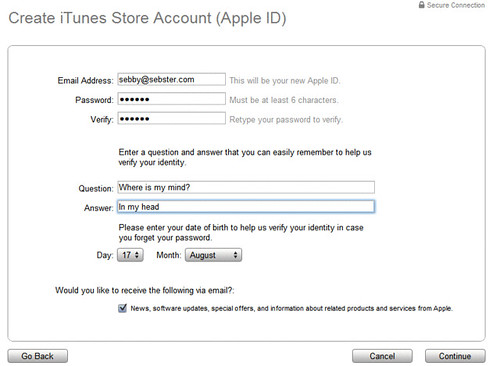
6. Create your iTunes account

Enter the information required to create your iTunes account. DO NOT lie about your email address as it would be pointless. You have to provide a real email address to activate your iTunes account. After creating your account info, click “Continue”.
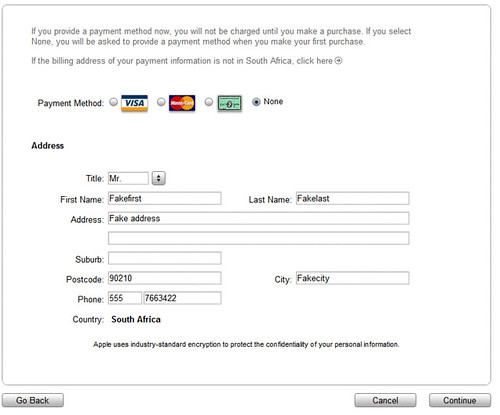
7. Payment method

Now, where you would normally be supposed to enter your credit card information, you have another option showing up: “Payment method: None”. Select “None”, enter your personal information and click “Continue”.
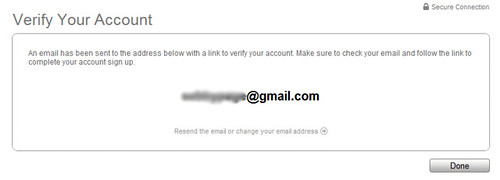
8. Verify your account

You now get a message saying that a confirmation email has been sent to the address you provided.
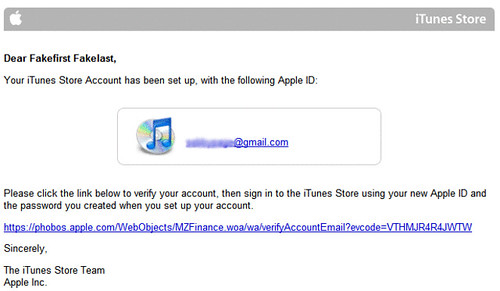
9. Check your emails to activate

Go check your emails. You should have received the email below from Apple. If it’s not here, make sure to check your spam folder. Click the link in the email to activate your new iTunes account.
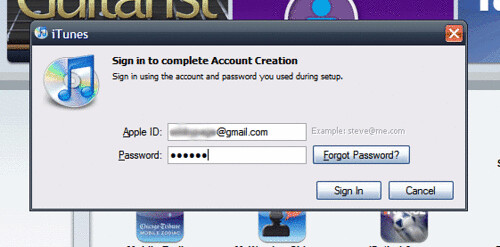
10. Sign in your new iTunes account

Now you should be prompted to sign in. Enter your email and password.
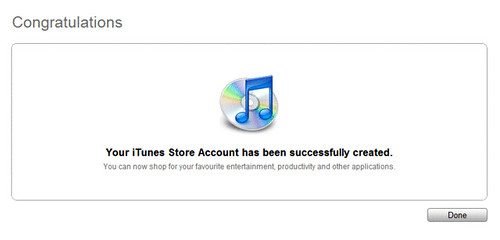
11. Congratulations

Done! You now have an iTunes account that you created without giving your credit card information.
You may wonder why you had to go through these steps instead of just creating an account straight from the login box when you try to purchase music on iTunes. I don’t know why but if you did this, you wouldn’t be able to see the “payment: none” option that we saw in step 7. So make sure to follow this step by step if you want it to work.

I hope this post will be helpful to some of you. If you liked it, please DIGG IT (button at the top of the post).

 
  • patrick

    for this to work u hav to fill in fake address of the country u have selected..for me it worked when i chose south africa n filled in fake address n fake phone no.

  • http://yahoo.com Jorge

    I whant a new account

    • http://yahoo Philbert franklyn

      Sign on

    • http://yahoo Philbert franklyn

      Sign in I think. I have my accound

  • http://facebook skylar gann

    heyyyyyyyyyyyyyyyyyyyyyyyyyyyyyyyy

  • glory

    wow,amazing tis helped me thanks…

    • Taylor

      It does give me instructions

    • mahmud

      Please replay (from ethiopya)

  • conrado bonifacio

    thnks i have my account

    • Conrado

      In any country u can use

  • Cassy

    when i went to select none, it wasnt there? what do i do

  • http://www.robert2011.com Robert McKinley

    I would to have a tunes account download to my computer

  • Umair

    hey thanks buddy…..i created one….tnk u..

  • saad

    and here I was wasting all that time trying to find redeem coupons just so that I can create an account without a credit card while creating a free account is this simple.

    thx you made my day

    btw its not a new shiny iphone but a 2nd hand shinny iphone but iphone just the same :)

  • Bex

    I follow all these steps but there is no option to select ‘none’ for payment type.. what to do?? pleeaasee help (:

  • http://www.empowerbpo.com Jason

    Wow its working man i like this

  • Ally

    none isnt showing up help!!!

  • Robbie

    Thanks, it helped me.

  • Krishna

    Great guide yar.
    helped me after a huge pile of search.
    Once again a splendid service from you guys.

  • Christ

    Please help me.
    No options “none” on the payment information
    here’s my email palomaresian@yahoo.com … pls send me ur help

  • Christ

    hey never mind my comment coz i got THE BEST>>THANK YOU

  • Yaniepots

    thank U so much!!!!! this worked for me after 3 hours of browsing! Godbless!!!

  • Kumuyi

    This is simply fantastic. I have been trying to get registered for days without any success

  • Petros

    Thank You it helped. I was wondering How could I get any app. because in my country there is no credit card system. Thank You

  • akshay

    none option is not comming this is fake

  • janine auty

    hi there isnt a none option please help

  • http://donthaveone! Raju Gurusamy

    Excellent. Worked. Just a note, it doesnt work if you are re-activating your account. Works only for fresh accounts.

  • ismael

    thanks for the info! it really helps!

  • http://apple.com Noname

    I don’t see the itunes Homepage. I don’t see anywhere to choose the countries. Could you please paste the link to the home page of itunes?

    Thanks!

  • biju

    no their is NONE button

  • Shahid

    no their none button????

  • tunonay

    just follow the step analyzed it or chat me in yahoo messenger tunonay@yahoo.com

  • Lana

    I follow all these steps but there is no option to select ‘none’ for payment type.. what to do?? pleeaasee help (:

  • Wind4953

    same with me here Lana.. there’s no “none” payment method for the new iTunes ver. 10

  • noynoy

    i follow the steps carefully and still no option “none” for me..

  • Niila

    itunes used to have the ‘none’ button before like probabally back in 2008/09, but they have cancelled it now. its just that this page was made back in 2008. :)
    and i dont think you can make an account without credit card, apple has blocked that… :/

  • AAA

    it still has, and you can create a free account.
    you are not following the steps carefully.

    first search for a free app, in the app store, then click to download/install it, it will ask you to sign in, or create account, then follow the steps from there and you will find None.

    I post a comment on March 2009 too regarding this ;-)

  • AAA

    Oopss it was Jan 2009 :D
    Follow this:

    AAA says: January 28, 2009 at 11:26 pm
    Hey Guys

    I got the new account and the reason some of you can’t find “none” tab
    is you go directly to create a new account

    but solution is first search for a free application for example “Remote”, then click on Get It, so iTunes will ask you to enter your user name/password, here you should choose “Create a new account” click on that and fill every questions asked, then click on next and you will surely find “None” there to choose and then you can have an account easily without credit card or any payment

    with this account you can only purchase free applications or other things which are free, and not everything

    any one still has problem to get a free account?

  • YEAH

    Very good, i think i got my account but the first 2 steps was kinda hard to understand :p

  • John

    Sweet, this actually worked :D thanks..

  • brian

    Please help me.
    No options “none” on the payment information
    here’s my email brianmullins222@yahoo.ie plz anser bak

  • MANO

    GUYS
    YOU CAN MAKE IT IN AN EASIER WAY.

    CREATE A GMAIL ID WITH SOUTH AFRICA LOCATION
    CHOOSE SA AS YOUR LOCATION IN I TUNES STORES
    WHILE DOWNLOADING A FREE APP, GIVE CREATE NEW ID
    CHANGE THE REGION TO YOURS
    THEN ‘NONE’ WILL BE APPEARING IN THE TRANSACTION PAGE..
    ENJOY

  • Tito

    Nothing is working for me…. i can’t get the “none” option.

    i tried to follow all steps (first choose something and then log-in)
    i made several accounts because i was afraid they were contaminated
    and i even tried the South Africa account’s solution with no success.

    Please Help !!!

  • Kencha

    I just create my own Apple ID, simply:
    > go to itunes
    >try to download free apps
    > Then will prompt if you will create a new account
    > that’s it follow the above steps
    > Read Read Read…. :)

  • maria

    hi i wanna do this but @ the date of birth it require s year i was born!any year i put it says i am 2 young i even put 1976 and it did that!how old shoud put?

  • Pam

    It works!!! Thanks for the article!

  • Paul

    This was written in October 2008 and certainly needs updating, although by using the method, I managed to set up a Canadian account, although none of the screenshots were the same.
    The question is if you already have an iTunes account on your computer in your home country, can you safely create another one onthesame machine without affecting your original. It would be very useful to be able to shop in other countries stores where they may have special offers and cheaper price, but then you probably couldn’t get any of those purchases on to your iPad. I chickened out and set up my second account on a laptop that was clean and had no previous iTunes. After downloading the latest version it was just a question of selecting a country, and creating the account after ‘buying’ free app. I had an address and a telephone number that could be genuine, so I an
    M notsure what would happen if you used one with a fake post code.
    This was just an exercise to see if it could be done, as I can’t use it.

  • majid

    thnxx alottt…!!! it worked gr88..!!!

  • sean

    well apprieciated works kool in uk

  • http://www.facebook.com/ahma.jamal ahmad jamal

    i tried but it doesn’t work can any one help me

  • Help me

    I DONT SEE THE NONE! :/

  • Wind4953

    The reason i tried this before was because i have an iPod nano 6th gen and i was curious to see what i can get through the ‘store’ feature. I guess none of it works for nano though..

    So, NOW i don’t use iTunes anymore as it is known that Apple made a bigggg effort to get as much money they can get from you. I recommend FooBar2000 for you to manage your Apple products. it is an open source and very trustworthy. Just google it. i don’t want to sound like a reseller posting links and you guys accuse me of trying to get money from you by clicking those links too.

    Cheers!

  • peace

    after all these steps will i be able to download apps that have a price?

  • harry

    i know thiis post is old and has been written many times update itunes and go to app store select a free app and then continue to create an account but you should get payment none

  • http://www.hotmail.cim Kathy

    Well for me this didnt work at all can some one help me
    Out